

一 类微信界面
Android Studio 类微信界面的制作
目录
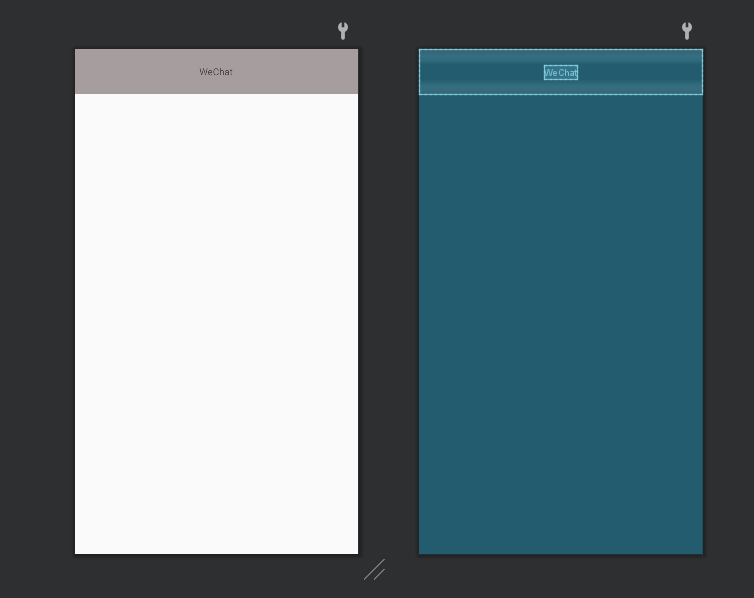
一、编写微信头部
<?xml version="1.0" encoding="utf-8"?>
<LinearLayout xmlns:android="http://schemas.android.com/apk/res/android"
    android:layout_width="match_parent"
    android:layout_height="65dp"
    android:background="#A69E9E"
    android:gravity="center"
    android:orientation="vertical">


    <TextView
        android:id="@+id/TextView"
        android:layout_width="wrap_content"
        android:layout_height="wrap_content"
        android:text="WeChat" />

</LinearLayout>
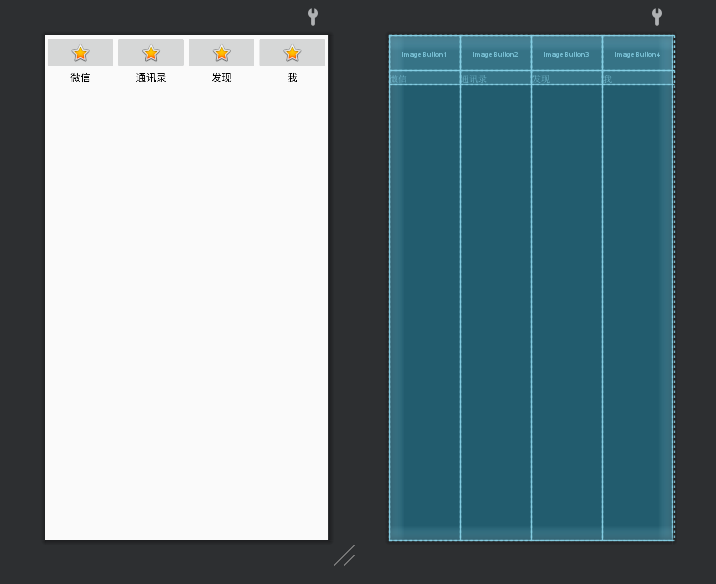
二、编写微信底部
<LinearLayout
    android:id="@+id/linearlayout1"
    android:layout_width="match_parent"
    android:layout_height="match_parent"
    android:layout_weight="1"
    android:orientation="vertical">


    <ImageButton
        android:id="@+id/imageButton1"
        android:layout_width="match_parent"
        android:layout_height="wrap_content"
        app:srcCompat="@android:drawable/btn_star_big_on"
        tools:ignore="SpeakableTextPresentCheck" />

    <TextView
        android:id="@+id/textView1"
        android:layout_width="match_parent"
        android:layout_height="wrap_content"
        android:layout_gravity="center"
        android:gravity="center"
        android:saveEnabled="false"
        android:text="微信"
        android:textColor="#000000"
        android:textSize="15sp" />
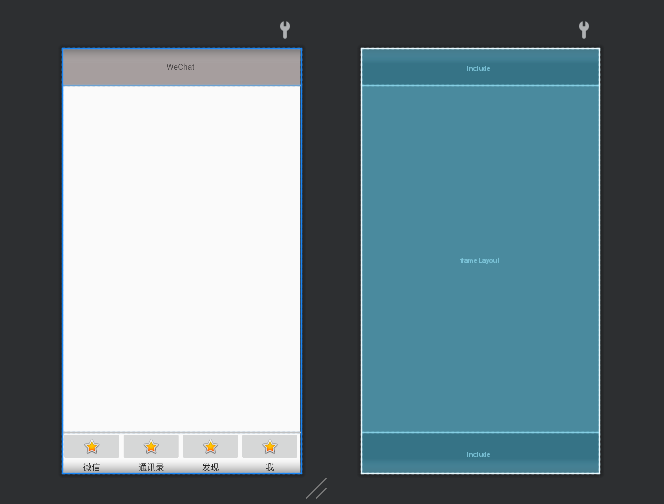
三、合并
<?xml version="1.0" encoding="utf-8"?>
<LinearLayout xmlns:android="http://schemas.android.com/apk/res/android"
    android:layout_width="match_parent"
    android:layout_height="match_parent"
    android:orientation="vertical">

    <include
        layout="@layout/top"
        android:layout_width="match_parent"
        android:layout_height="64dp"
        android:layout_weight="1" />

    <FrameLayout
        android:id="@+id/frameLayout"
        android:layout_width="match_parent"
        android:layout_height="591dp"
        android:layout_weight="100">

    </FrameLayout>

    <include
        layout="@layout/bottom"
        android:layout_width="match_parent"
        android:layout_height="wrap_content"
        android:layout_weight="1" />
</LinearLayout>
四、编写mainactivity和activity_main.xml文件
package com.example.myapplication;

import androidx.appcompat.app.AppCompatActivity;
import androidx.fragment.app.FragmentManager;
import androidx.fragment.app.Fragment;
import androidx.fragment.app.FragmentTransaction;
import android.view.View;

import android.os.Bundle;

import android.widget.LinearLayout;

public class MainActivity extends AppCompatActivity implements View.OnClickListener {
    private Fragment fragment1,fragment2,fragment3,fragment4;
    private LinearLayout linearlayout1,linearlayout2,linearlayout3,linearlayout4;
    private FragmentTransaction transaction;
    private FragmentManager manager;

    @Override
    protected void onCreate(Bundle savedInstanceState) {
        super.onCreate(savedInstanceState);
        setContentView(R.layout.activity_main);
        fragment1=new Fragment1();
        fragment2=new Fragment2();
        fragment3=new Fragment3();
        fragment4=new Fragment4();
        manager=getSupportFragmentManager();
        initial();

        hidden();

        linearlayout1=findViewById(R.id.linearlayout1);
        linearlayout2=findViewById(R.id.linearlayout2);
        linearlayout3=findViewById(R.id.linearlayout3);
        linearlayout4=findViewById(R.id.linearlayout4);
        linearlayout1.setOnClickListener(this);
        linearlayout2.setOnClickListener(this);
        linearlayout3.setOnClickListener(this);
        linearlayout4.setOnClickListener(this);
    }

    private void initial() {

        FragmentTransaction transaction=manager.beginTransaction()

                .add(R.id.frameLayout,fragment1)

                .add(R.id.frameLayout,fragment2)

                .add(R.id.frameLayout,fragment3)

                .add(R.id.frameLayout,fragment4);

        transaction.commit();

    }

    private void select(int i) {

        hidden();

        switch (i){

            case 1:showfragment(fragment1);

                break;

            case 2:showfragment(fragment2);;

                break;

            case 3:showfragment(fragment3);;

                break;

            case 4:showfragment(fragment4);;

                break;

        }

    }

    private void showfragment(Fragment fragment) {

        transaction.show(fragment);

    }

    private void hidden() {

        transaction=manager.beginTransaction()

                .hide(fragment1)

                .hide(fragment2)

                .hide(fragment3)

                .hide(fragment4);

        transaction.commit();

    }

    @Override
    public void onClick(View view) {
        switch (view.getId()){
            case R.id.linearlayout1:
                select(1);
                break;
            case R.id.linearlayout2:
                select(2);
                break;
            case R.id.linearlayout3:
                select(3);
                break;
            case R.id.linearlayout4:
                select(4);
                break;

        }

    }

}


代码仓库:https://gitee.com/lyr666/android1

 浙公网安备 33010602011771号