
Vue+Mockjs+Axios模拟数据小实例
Mock.js 前端模拟数据
-
搭建好Vue环境
vue init webpack -
npm安装axios mock
npm i axios vue-axios -S npm i mockjs -S -
main.js配置
import Vue from 'vue' import App from './App' //导入第三方插件 import axios from 'axios' import VueAxios from 'vue-axios' //mock 自动读取index.js import mock from './mock' //使用第三方插件 Vue.use(VueAxios,axios) //全局化axios Vue.prototype.$axios = axios Vue.config.productionTip = false /* eslint-disable no-new */ new Vue({ el: '#app', components: { App }, //配置mock mock, template: '<App/>' }) -
mock
mock目录结构
- src
- mock
- index.js
- mock
index.js
var Mock = require('mockjs'); //无参写法 Mock.mock('http://tdy.com/getList','get',{ arr:{ "name":"谭达源", "age":20 } }); //有参写法 Mock.mock('http://tdy.com/postList','post',req=>{ var age= JSON.parse(req.body).age if (age < 18) { var info = '年龄不达标' }else{ var info = '恭喜你年龄达标' } return{ info } }); - src
-
实战模拟
目标:通过mockjs模拟后端获取姓名和年龄,并且检验年龄是否达标!
App.vue
<template>
  <div id="app">
    姓名:{{text.name}} <br>
    年龄:{{text.age}} <br>
    <button @click="readData()">读取数据</button>
    <br>
    <button @click="testAge(text.age)">测试年龄是否达标</button>
  </div>
</template>

<script>

export default {
  name: 'App',
  data(){
    return{
      text:{
        name:'无',
        age:'无'
      }
    }
  },
  methods:{
    //获取年龄数据
    readData(){
      this.$axios.get('http://tdy.com/getList').then(res=>{
         this.text = res.data.arr;
      });
    },
    //测试年龄
    testAge(val){
      this.$axios.post('http://tdy.com/postList',{age:val}).then(res=>{
         alert(res.data.info);
      });
    }
  }
}
</script>

<style>
#app {
  font-family: 'Avenir', Helvetica, Arial, sans-serif;
  -webkit-font-smoothing: antialiased;
  -moz-osx-font-smoothing: grayscale;
  text-align: center;
  color: #2c3e50;
  margin-top: 60px;
}
</style>
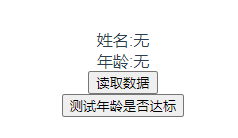
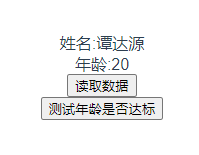
读取数据:
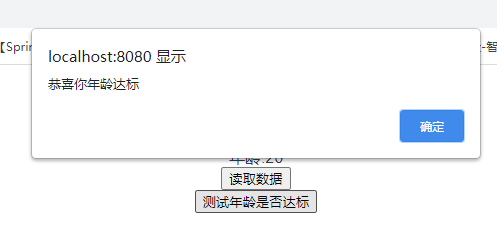
测试年龄是否达标:

 浙公网安备 33010602011771号