
华三交换机升级版本步骤
命令行升级
组网图
交换机作为FTP客户端
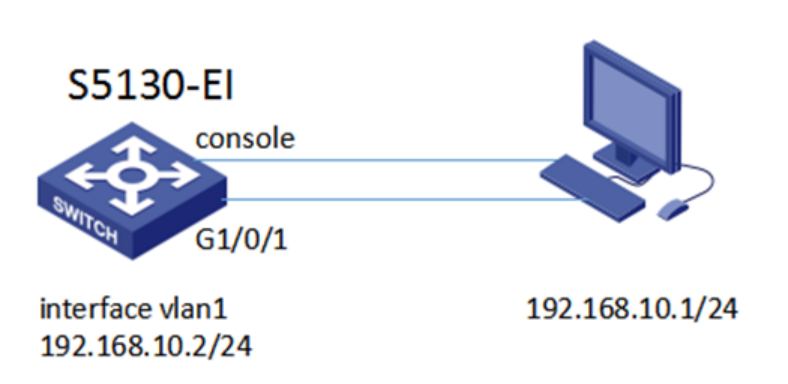
配置交换机
interface vlan-interface 1 //进入VLAN1视图下
ip address 192.168.10.2 255.255.255.0 //设置VLAN1的IP地址
测试连通性
ping 192.168.10.1 (交换机192.168.10.2 PING 192.168.10.1)
PING 192.168.1.1: 56
data bytes, press CTRL_C to break
Reply from 192.168.1.1: bytes=56 Sequence=1 ttl=128 time=6 ms
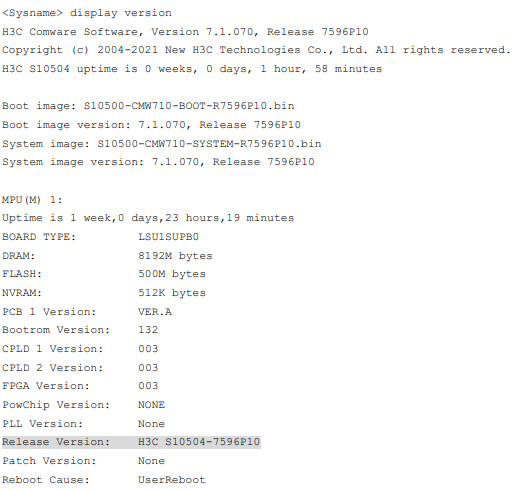
查看当前系统软件版本
display version //查看当前系统软件版本
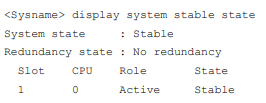
dislpay system stable state //查看设备运行状态
FTP到服务器上下载版本
在交换机上FTP
ftp 192.168.10.1
Trying 192.168.10.1...
Press CTRL+K to abort
User(192.168.10.1):admin
enter password:admin@123
get S6520EI-CMW710-R2432P05.ipe
将IPE文件指定启动软件
boot-loader file flash:/S6520EI-CMW710-R2432P05.ipe all main //指定系统软件
Verifying the file flash:/s6520ei-cmw710-r2432p05.ipe on slot 1..........Done.
H3C S6520-42QF-EI images in IPE:
s6520ei-cmw710-boot-r2432p05.bin
s6520ei-cmw710-system-r2432p05.bin
This command will set the main startup software images. Continue? [Y/N]:y //确定
Add images to slot 1.
Decompressing file s6520ei-cmw710-boot-r2432p05.bin to flash:/s6520ei-cmw710-boot-r2432p05.bin.........................Done.
Decompressing file s6520ei-cmw710-system-r2432p05.bin to flash:/s6520ei-cmw710-system-r2432p05.bin.........................................................................................................................................................Done.
Verifying the file flash:/s6520ei-cmw710-boot-r2432p05.bin on slot 1...Done.
Verifying the file flash:/s6520ei-cmw710-system-r2432p05.bin on slot 1.........Done.
The images that have passed all examinations will be used as the main startup software images at the next reboot on slot 1.
Decompression completed.
Do you want to delete flash:/s6520ei-cmw710-r2432p05.ipe now? [Y/N]:n //是否删除软件,释放空间。
保存配置
save //保存
The current configuration will be written to the device. Are you sure? [Y/N]:y
Please input the file name(*.cfg)[flash:/startup.cfg]
(To leave the existing filename unchanged, press the enter key):
flash:/startup.cfg exists, overwrite? [Y/N]:y
Validating file. Please wait...
Saved the current configuration to mainboard device successfully.
重启
reboot //重启设备
Start to check configuration with next startup configuration file, please wait.........DONE!
This command will reboot the device. Continue? [Y/N]:y
Now rebooting, please wait...
%Jan 1 00:41:35:007 2011 H3C DEV/5/SYSTEM_REBOOT: System is rebooting now.
Starting......
Press Ctrl+D to access BASIC BOOT MENU
重启之后查看版本
display version //升级后检查软件版本
3C Comware Software, Version 7.1.045, Release 2432P05
Copyright (c) 2004-2017 New H3C Technologies Co., Ltd. All rights reserved.
H3C S6520-42QF-EI uptime is 0 weeks, 0 days, 0 hours, 1 minute
Last reboot reason : USER reboot
Boot image: flash:/s6520ei-cmw710-boot-r2432p05.bin
Boot image version: 7.1.045, Release 2432P05
Compiled Aug 31 2017 16:00:00
System image: flash:/s6520ei-cmw710-system-r2432p05.bin
System image version: 7.1.045, Release 2432P05
Compiled Aug 31 2017 16:00:00
确认设备启动软件的存储介质
display boot-loader //查看设备启动软件的存储介质
Software images on slot 1:
Current software images:
flash:/S6520EI-CMW710-R2432P05.bin
flash:/S6520EI-CMW710-R2432P05.bin
Main startup software images:
flash:/S6520EI-CMW710-R2432P05.bin
flash:/S6520EI-CMW710-R2432P05.bin
Backup startup software images:
flash:/S6520EI-CMW710-R2432P05.bin
flash:/S6520EI-CMW710-R2432P05.bin
安装补丁
上传补丁跟上传版本是一样的操作
install activate patch flash:/patch1.bin all //安装补丁包
install commit //设置设备重启后补丁继续生效
display install active //显示处于active状态补丁包的信息
bootware菜单升级软件版本方法
#断电重启交换机,当出现Press Ctrl-B to enter Extended Boot menu...3时,迅速按Ctrl+B(也可以开机启动的时候一直按着ctrl+B),进入bootware菜单后,提示输入密码。密码默认为空,直接回车即可,然后显示如下界面:

#输入1。回车
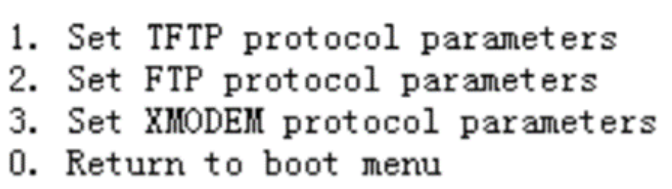
#输入2。回车
Load File Name :S5130EI_E-CMW710-R3208P10.ipe
Server IP Address :192.168.10.1
Local IP Address :192.168.10.2
Subnet Mask :255.255.255.0
Gateway IP Address :0.0.0.0
#打开3CDaemon,可以看到数据正在传输,当显示如下界面时,数据传输完毕

#当命令行界面出现Please input the file attribute (Main/Backup/None)时,输入main,回车
#输入0,重启交换机。查看结果,升级完毕


 浙公网安备 33010602011771号