LaTeX语法介绍
1 LaTeX介绍
LATEX (读作LAY-tek 或 LAH-tek)是一个用于创建看起来更专业的文档的工具。它是基于所见即所得(的思想,意思是你只需要关注文档的内容,计算机就会处理格式。LATEX 在世界各地被用于科学文档、图书以及许多其他形式的出版。它不仅可以创建漂亮的排版文档,而且允许用户非常快速地处理排版中更复杂的部分,如输入数学、创建目录、引用和创建书目,以及在所有部分有一个一致的布局。1
2 语法介绍
\documentclass{article}

\begin{document}
First document. This is a simple example, with no
extra parameters or packages included.
\end{document}
以上为一个简单的LaTex例子。
2.1 序言部分
\documentclass[12pt, letterpaper]{article}
\usepackage[utf8]{inputenc}
- 第一句定义了文档的类型如
article,其中中括号里的内容为可选的属性,各个属性之间必须以,分隔开。例子中规定了字体大小(12pt,默认是10pt)和纸张的尺寸(letterpaper) - 第二句定义了文档的编码
\usepackage{ctex}使用宏包(为了能够显示汉字)
2.2 标题、作者和日期
该部分写在序言部分
\title{First document}
\author{Hubert Farnsworth
\thanks{funded by the Overleaf team}}
\date{February 2017}
- title表示文章的标题
- author表示文章的作者,可以在名字右上角用
*备注 - date表示日期,
\today调用系统当前时间 - 用
%注释 \maketitle这一行一定要在\begin{document}的下面,否则LaTeX会判定为语法错误
2.3 字体加粗、下划线、斜体
Some of the \textbf{greatest}
discoveries in \underline{science}
were made by \textbf{\textit{accident}}.
- 加粗:
\textbf {内容} - 斜体:
\textit {内容} - 下划线:
\underline {内容}
2.4 添加图片
\documentclass{article}
\usepackage{graphicx}
\graphicspath{ {images/} }

\begin{document}
The universe is immense and it seems to be homogeneous,
in a large scale, everywhere we look at.

\includegraphics{universe}

There's a picture of a galaxy above
\end{document}
- 要添加图片需要借助包
graphicx \graphicspath{ {images/} }表示了图片路径,即当前文件夹下的images下\includegraphics{universe}表示了要添加进来的图片,universe是图片的名字
2.5 标题、标签和引用
\begin{figure}[h]
 \centering
 \includegraphics[width=0.25\textwidth]{mesh}
 \caption{a nice plot}
 \label{fig:mesh1}
\end{figure}
As you can see in the figure \ref{fig:mesh1},
the function grows near 0. Also, in the
page \pageref{fig:mesh1} is the same example.
- \centering 表示了图片位置居中
- \caption 表示图片的标题
\label{fig:mesh1}该命令会给图片计数(如图2),如果想在段落里引用图片就可以使用\ref{fig:mesh1}
2.6 列表
无序列表
\begin{itemize}
  \item The individual entries are indicated with a black dot, a so-called bullet.
  \item The text in the entries may be of any length.
\end{itemize}
有序列表
\begin{enumerate}
  \item This is the first entry in our list
  \item The list numbers increase with each entry we add
\end{enumerate}
2.7 数学表达式
行内模式:即在段落里添加数学公式,使用
\( ... \)如\(e=mc^2\)$ ... $如$e=mc^2$\begin{math} ... \end{math}
显示模式,即单独的占用一行显示
-
不计数方式(即公式末尾无数字):
\[ E=mc^2 \] -
计数方式:
\begin{equation} E=m \end{equation}
2.8 摘要、章节、块和段落
摘要
\begin{document}

\begin{abstract}
This is a simple paragraph at the beginning of the
document. A brief introduction about the main subject.
\end{abstract}
\end{document}
段落:要输入新的段落需要空两行
\begin{document}

\begin{abstract}
This is a simple paragraph at the beginning of the
document. A brief introduction about the main subject.
\end{abstract}

Now that we have written our abstract, we can begin writing our first paragraph.

This line will start a second Paragraph.
\end{document}
章节
\chapter{First Chapter}

\section{Introduction}

This is the first section.

Lorem  ipsum  dolor  sit  amet,  consectetuer  adipiscing
elit.   Etiam  lobortisfacilisis sem.  Nullam nec mi et
neque pharetra sollicitudin.  Praesent imperdietmi nec ante.
Donec ullamcorper, felis non sodales...

\section{Second Section}

Lorem ipsum dolor sit amet, consectetuer adipiscing elit.
Etiam lobortis facilisissem.  Nullam nec mi et neque pharetra
sollicitudin.  Praesent imperdiet mi necante...

\subsection{First Subsection}
Praesent imperdietmi nec ante. Donec ullamcorper, felis non sodales...

\section*{Unnumbered Section}
Lorem ipsum dolor sit amet, consectetuer adipiscing elit.
Etiam lobortis facilisissem
2.9 创建表格
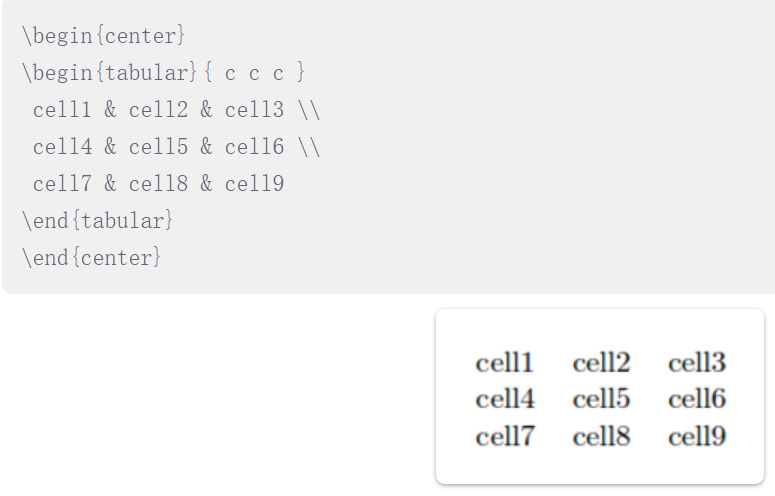
三行三列无边框
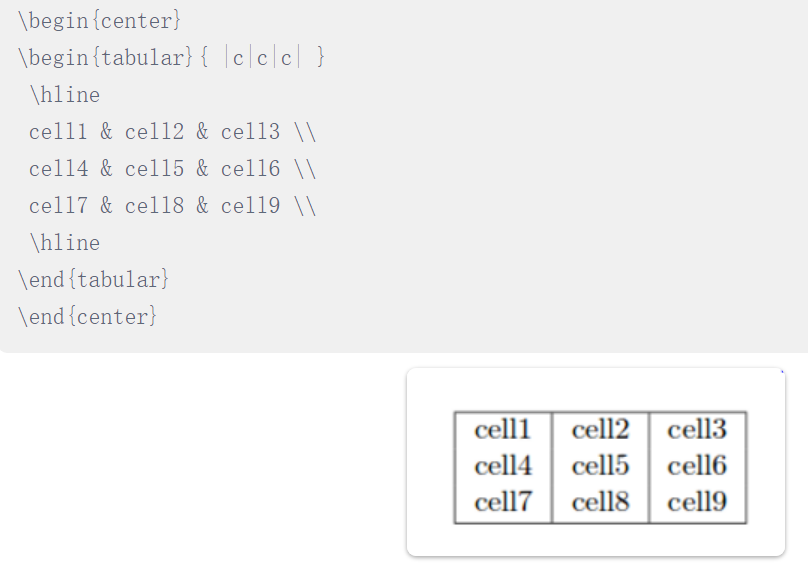
有边框

 浙公网安备 33010602011771号