

Socket基础编程
本节介绍如何使用基础Socket实现TCP通信。
(1)Socket详细介绍:
Socket的英文原义是“孔”或“插座”。通常称作"套接字",用于描述IP地址和端口,是一个通信链的句柄。在Internet上的主机一般运行了多个服务软件,同时提供几种服务。每种服务都打开一个Socket,并绑定到一个端口上,不同的端口对应于不同的服务。Socket正如其英文原意那样,象一个多孔插座。
Socket的发展:
七十年代中,美国国防部高研署(DARPA)将TCP/IP的软件提供给加利福尼亚大学Berkeley分校后,TCP/IP很快被集成到Unix中,同时出现了许多成熟的TCP/IP应用程序接口(API)。这个API称为Socket接口。 今天,SOCKET接口是TCP/IP网络最为 通用的API,也是在INTERNET上进行应用开发最为通用的API。
九十年代初,由Microsoft联合了其他几家公司共同制定了一套 WINDOWS下的网络编程接口,即Windows Sockets规范(简称WinSock)。它是Berkeley Sockets的重要扩充,主要是增加了一些异步函数,并增加了符合 Windows 消息驱动特性的网络事件异步选择机制。
WinSock:
Windows Sockets规范是一套开放的、支持多种协议的 Windows下的网络编程接口。 Windows Socket规范1.1版,只支持TCP/IP协议。 Windows Socket规范2.0版,支持多种协议。
(2)套接字分类:
根据不同的应用协议的需要,套接字分为字节流套接字(stream Socket),数据报套接字(datagram Socket),原始套接字(raw Socket):

1.字节流套接字(stream Socket)
流套接字用于提供面向连接、可靠的数据传输服务。
该服务将保证数据能够实现无差错、无重复发送,并按顺序接收。
流套接字之所以能够实现可靠的数据服务,原因在于其使用了传输控制协议,即TCP(The Transmission Control Protocol)协议。
2.数据报套接字(datagram Socket)
数据报套接字提供了一种无连接的服务。
该服务并不能保证数据传输的可靠性,数据有可能在传输过程中丢失或出现数据重复,且无法保证顺序地接收到数据。
数据报套接字使用UDP(User Datagram Protocol)协议进行数据的传输。
由于数据报套接字不能保证数据传输的可靠性,对于有可能出现的数据丢失情况,需要在程序中做相应的处理。
3.原始套接字(raw Socket)
原始套接字与标准套接字(标准套接字指的是前面介绍的流套接字和数据报套接字)的区别在于:
原始套接字可以读写内核没有处理的IP数据包,而流套接字只能读取TCP协议的数据,数据报套接字只能读取UDP协议的数据。
因此,如果要访问其他协议发送数据必须使用原始套接字。
原始套接字允许对底层协议如IP或ICMP进行直接访问,功能强大但使用较为不便,主要用于一些协议的开发。
根据套接字的不同,套接字编程又分为:面向连接,无连接,原始套接字编程。
套接字的TCP通信流程:
TCP是面向连接的,程序运行后,服务器有一个Socket一直处于侦听状态,客户端Socket与服务器通信之前必须首先发起连接请求,服务器上负责侦听的Socket接受请求并另外创建一个Socket与客户端通信息,自己则继续侦听新的请求。
(3)Socket编程实例:
1)面向连接-基于TCP:
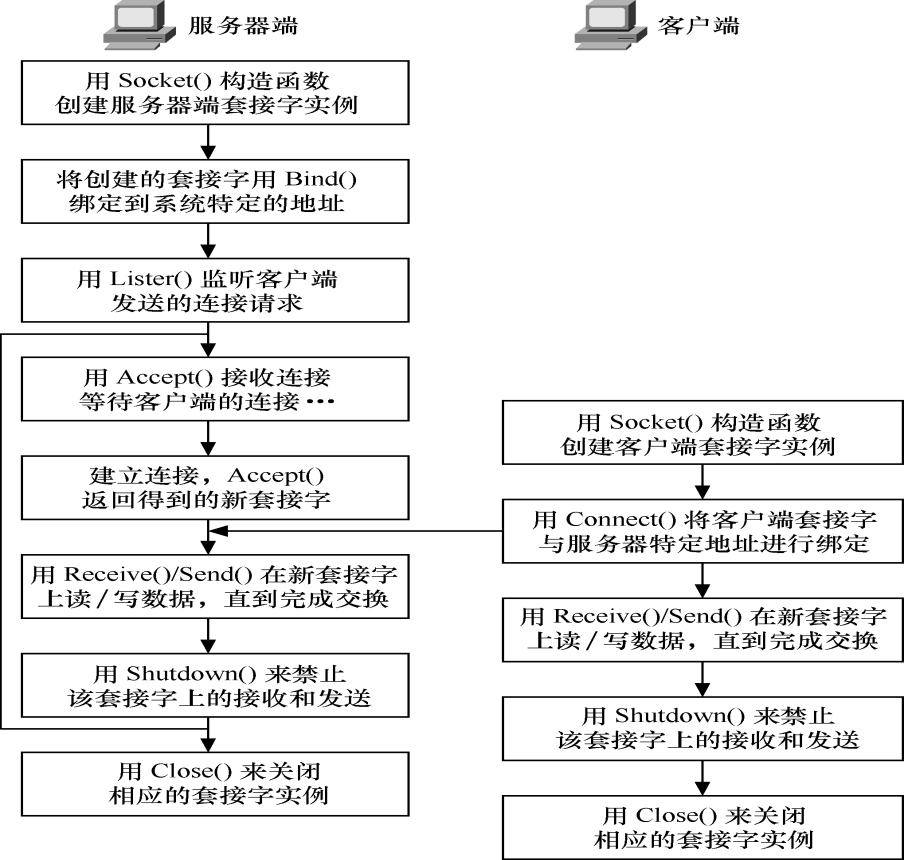
服务器端(带窗体):
using System;
using System.Collections.Generic;
using System.ComponentModel;
using System.Data;
using System.Drawing;
using System.Linq;
using System.Text;
using System.Threading.Tasks;
using System.Windows.Forms;

//添加的引用
using System.Net;
using System.Net.Sockets;
using System.Threading;

namespace TCPServer
{
    public partial class SocketTcpServerForm : Form
    {
        private int port;
        Socket tcpSocket=null;
        List<Socket> clientSockets;
        public SocketTcpServerForm()
        {
            InitializeComponent();
            CheckForIllegalCrossThreadCalls = false;
            port = 10000;//默认使用端口号10000
            portTextBox.Text = port.ToString();
            clientSockets= new List<Socket>();
        }

        private void Form1_Load(object sender, EventArgs e)
        {

        }

        private void portTextBox_TextChanged(object sender, EventArgs e)
        {

        }

        private void listenButton_Click(object sender, EventArgs e)
        {
            string portString = portTextBox.Text;
            port = int.Parse(portString);
            IPEndPoint ipep = new IPEndPoint(IPAddress.Any,port);
            tcpSocket = new Socket(AddressFamily.InterNetwork,SocketType.Stream,ProtocolType.Tcp);
            tcpSocket.Bind(ipep);
            tcpSocket.Listen(10);
            showDataListBox.Items.Add("1.开始监听端口" + port.ToString() + "......");
            showDataListBox.Items.Add("2.等待客户端连接......");
            Thread listenThread = new Thread(ListenConnect);
            listenThread.Start(tcpSocket);
        }

        private void ListenConnect(object obj)
        {
            Socket tcpSocket = (Socket)obj;
            while (true)
            {
                Socket client = tcpSocket.Accept();
                clientSockets.Add(client);
                Thread sonProcess = new Thread(acceptClient);
                sonProcess.Start(client);
            }
        }
        private void acceptClient(object client)
        {
            Socket socketClient = (Socket)client;
            IPEndPoint remoteIP = (IPEndPoint)socketClient.RemoteEndPoint;
            socketClient.Send(Encoding.UTF8.GetBytes("已连接到服务端在端口:"+port.ToString()),SocketFlags.None);
            showDataListBox.Items.Add("客户端连接:"+remoteIP.Address+"("+remoteIP.Port+")");
            while (true)
            {
                //一直接收客户端发来的信息
                try
                {
                    byte[] receiveData = new byte[64];
                    int longth = socketClient.Receive(receiveData);
                    string s = Encoding.UTF8.GetString(receiveData);
                    showDataListBox.Items.Add(s + "(" + socketClient.ToString() + ")");
                    if (s == "exit")
                    {
                        showDataListBox.Items.Add("客户端断开连接" + "(" + socketClient.ToString() + ")");
                        clientSockets.Remove(socketClient);
                        socketClient.Close();
                        break;
                    }
                }catch(Exception e){
                    Console.WriteLine("出现错误");
                }
            }
        }

        private void sendDataButton_Click(object sender, EventArgs e)
        {
            string sendData = sendDataBox.Text;
            foreach (Socket s in clientSockets)
            {
                s.Send(Encoding.UTF8.GetBytes(sendData));
            }
        }
    }
}
客户端(控制台):
using System;
using System.Collections.Generic;
using System.Linq;
using System.Text;
using System.Threading.Tasks;

using System.Net;
using System.Net.Sockets;
using System.Threading;
namespace TCPClient
{
    class Program
    {
        private static bool flag = true;
        static void Main(string[] args)
        {
            Socket newclient = new Socket(AddressFamily.InterNetwork, SocketType.Stream, ProtocolType.Tcp);
            Console.Write("请输入要连接的IP:");
            string ipadd = Console.ReadLine();
            Console.Write("请输入要连接的端口:");
            int port = Convert.ToInt32(Console.ReadLine());
            IPEndPoint ie = new IPEndPoint(IPAddress.Parse(ipadd), port);//服务器的IP和端口
            try
            {
                newclient.Connect(ie);
            }
            catch (SocketException e)
            {
                Console.WriteLine("连接服务器失败");
                Console.WriteLine(e.ToString());
                return;
            }
            //在第一次连接到客户端时,服务端会返回一个字符串,客户端接收并显示在控制台上
            byte[] data = new byte[1024];
            int recv = newclient.Receive(data);
            string stringdata = Encoding.UTF8.GetString(data, 0, recv);
            Console.WriteLine(stringdata);
            //启动一个子线程专门用来接收服务器发送的数据
            Thread receiveThread = new Thread(receiveData);
            receiveThread.Start(newclient);
            while (true)
            {
                string input = Console.ReadLine();
                newclient.Send(Encoding.UTF8.GetBytes(input), SocketFlags.None);
                if (input == "exit"){
                    flag=false;
                    break;
                }

            }
            Console.WriteLine("与服务端断开连接");
            newclient.Shutdown(SocketShutdown.Both);
            newclient.Close();
            Console.ReadKey();
        }
        private static void receiveData(object obj)
        {
            Socket newclient = (Socket)obj;
            byte[] data=new byte[64];
            while(flag==true)
            {
                try
                {
                    int length = newclient.Receive(data);
                    string s = Encoding.UTF8.GetString(data, 0, length);
                    Console.WriteLine("服务端传来数据:" + s);
                }
                catch(Exception e)
                {
                    break;
                }
            }
        }
    }
}
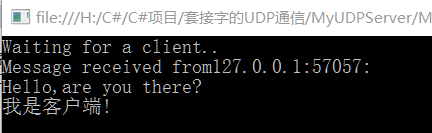
显示效果:
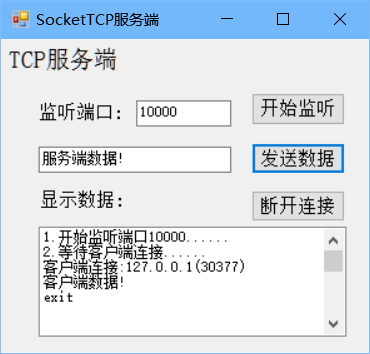
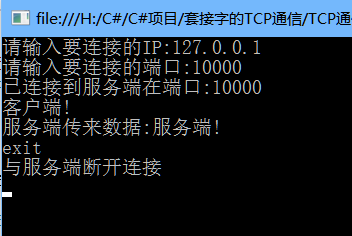
2)无连接-基于UDP
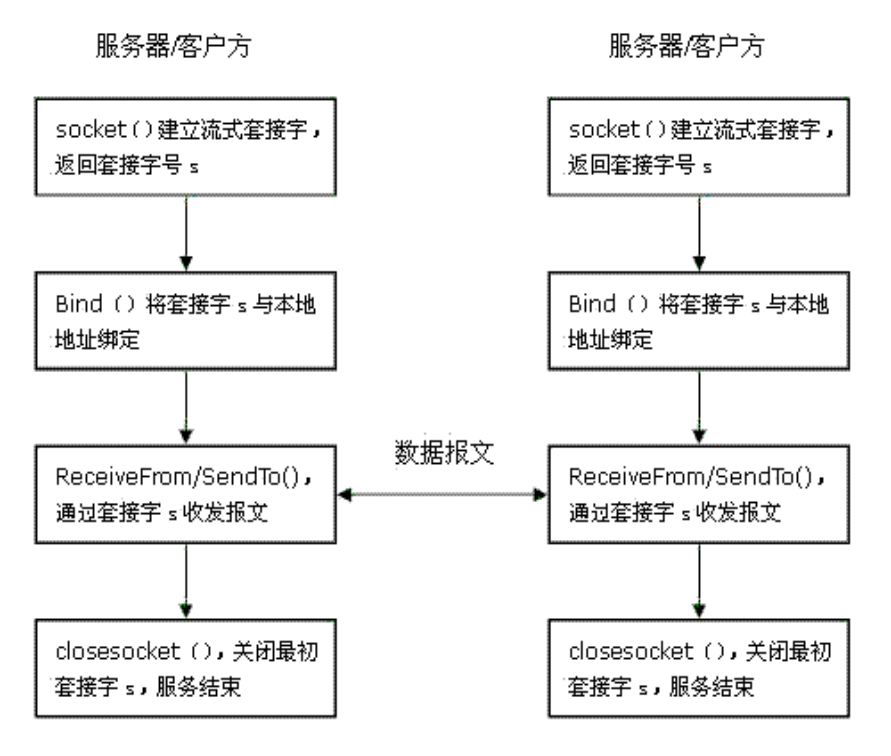
服务端:
using System;
using System.Collections.Generic;
using System.Linq;
using System.Text;

using System.Net;
using System.Net.Sockets;
namespace MyUDPServer
{
    class Program
    {
        static void Main(string[] args)
        {
            int recv;
            byte[] data = new byte[1024];
            IPEndPoint ipep = new IPEndPoint(IPAddress.Any, 9050);//定义一网络端点
            Socket newsock = new Socket(AddressFamily.InterNetwork, SocketType.Dgram, ProtocolType.Udp);//定义一个Socket
            newsock.Bind(ipep);//Socket与本地的一个终结点相关联
            Console.WriteLine("Waiting for a client..");
            IPEndPoint sender = new IPEndPoint(IPAddress.Any, 0);//定义要发送的计算机的地址
            EndPoint Remote = (EndPoint)(sender);//
            recv = newsock.ReceiveFrom(data, ref Remote);//接受数据
            Console.WriteLine("Message received from{0}:", Remote.ToString());
            string stringdata = Encoding.ASCII.GetString(data, 0, recv);
            Console.WriteLine(stringdata);
            string welcome = "Welcome to my test server!";
            data = Encoding.UTF8.GetBytes(welcome);
            newsock.SendTo(data, data.Length, SocketFlags.None, Remote);
            while (true)
            {
                data = new byte[1024];
                recv = newsock.ReceiveFrom(data, ref Remote);
                Console.WriteLine(Encoding.UTF8.GetString(data, 0, recv));
                newsock.SendTo(data, recv, SocketFlags.None, Remote);
            }
        }
    }
}
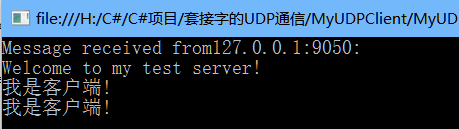
客户端:
using System;
using System.Collections.Generic;
using System.Linq;
using System.Text;

using System.Net;
using System.Net.Sockets;

namespace MyUDPClient
{
    class Program
    {
        static void Main(string[] args)
        {
            byte[] data = new byte[1024];//定义一个数组用来做数据的缓冲区
            string input, stringData;
            IPEndPoint server_ipep = new IPEndPoint(IPAddress.Parse("127.0.0.1"), 9050);
            Socket client = new Socket(AddressFamily.InterNetwork, SocketType.Dgram, ProtocolType.Udp);
            string welcome = "Hello,are you there?";
            data = Encoding.UTF8.GetBytes(welcome);
            client.SendTo(data, data.Length, SocketFlags.None, server_ipep);//将数据发送到指定的终结点
            IPEndPoint sender = new IPEndPoint(IPAddress.Any,0);
            EndPoint Remote = (EndPoint)sender;
            data = new byte[1024];
            int recv = client.ReceiveFrom(data, ref Remote);//接受来自服务器的数据
            Console.WriteLine("Message received from{0}:", Remote.ToString());
            Console.WriteLine(Encoding.UTF8.GetString(data, 0, recv));
            while (true)//读取数据
            {
                input = Console.ReadLine();//从键盘读取数据
                if (input == "exit")//结束标记
                {
                    break;
                }
                client.SendTo(Encoding.UTF8.GetBytes(input), Remote);//将数据发送到指定的终结点Remote
                data = new byte[1024];
                recv = client.ReceiveFrom(data, ref Remote);//从Remote接受数据
                stringData = Encoding.UTF8.GetString(data, 0, recv);
                Console.WriteLine(stringData);
            }
            Console.WriteLine("Stopping client");
            client.Close();
        }
    }
}
显示效果:
3)原始套接字:
原始套接字编程流程:
1.创建原始套接字
2.定义数据包头部数据结构
3.发送报文
4.接收报文
IP报文首部:
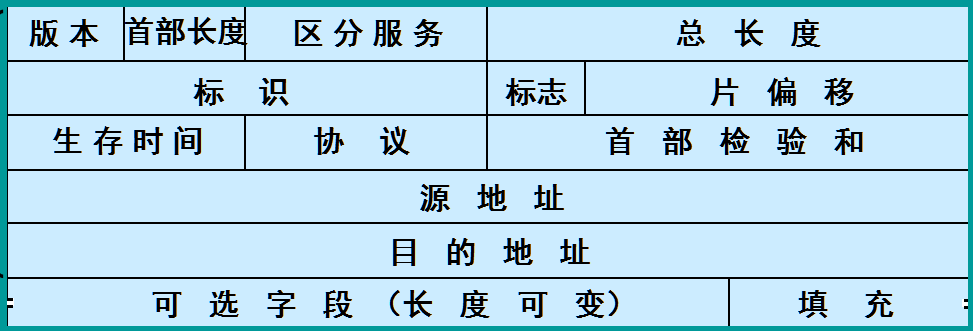
IP报文:

ICMP报文:(IP报文承载)

Ping程序的实现:
功能:PING命令是用于测试两个端系统之间的网络连通性。如果连通:输出源主机到目的主机的往返时延(时间),目的主机的操作系统(TTL)。如果不连通:输出可能原因。
原理:向网络上的另一个主机系统发送ICMP回送请求报文,如果指定系统得到了报文,它将把报文一模一样地传回给发送者。 ICMP echo & ICMP echo reply (rfc792)
TTL(Time To Live)生存期
指定数据报被路由器丢弃之前允许通过的网段数量。 TTL 是由发送主机设置的。
Windows 9x/Me      TTL=32
LINUX              TTL=64
Windows 200x/XP    TTL=128
Unix               TTL=255
PING程序的基本框架
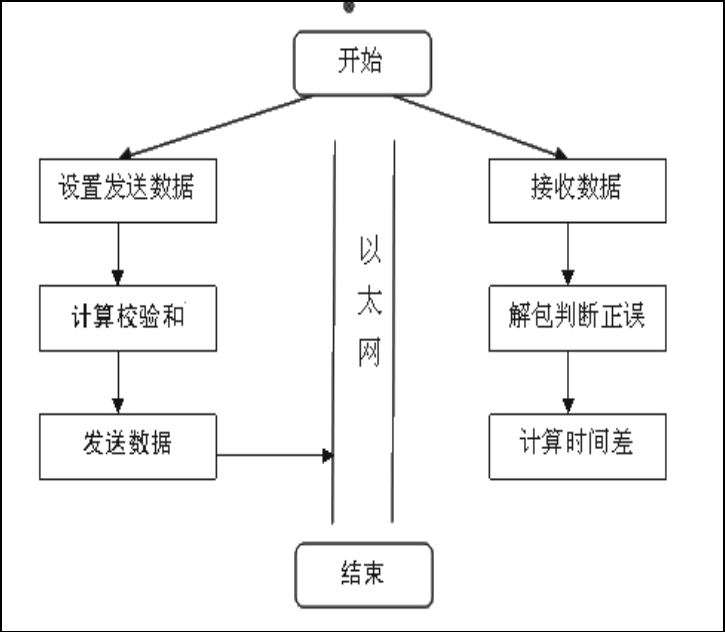
设置发送数据就是封装ICMP数据报的过程。需要两级封装:首先添加ICMP报头形成ICMP报文,再添加IP头形成IP数据报。注意:IP头不需要我们实现,由内核协议栈自动添加,我们只需要实现ICMP报文。
using System;
using System.Collections.Generic;
using System.ComponentModel;
using System.Data;
using System.Drawing;
using System.Linq;
using System.Text;
using System.Windows.Forms;
using System.Net;
using System.Net.Sockets;
using System.Net.NetworkInformation;

namespace Csharp_PING
{
    class MyPing
    {
        const int SOCKET_ERROR = -1;
        const int ICMP_ECHO = 8;
        public string PingHost(string host,ref int spentTime)
        {
            IPHostEntry serverHE, fromHE;
            int nBytes = 0;
            int dwStart = 0, dwStop = 0;

            Socket socket =
             new Socket(AddressFamily.InterNetwork, SocketType.Raw, ProtocolType.Icmp);
            socket.SetSocketOption(SocketOptionLevel.Socket, SocketOptionName.SendTimeout, 1000);
            socket.SetSocketOption(SocketOptionLevel.Socket, SocketOptionName.ReceiveTimeout, 1000);
            // Get the server endpoint
            try
            {
                serverHE = Dns.GetHostEntry(host);
            }
            catch (Exception)
            {
                return "Host not found"; //解释主机名失败
            }

            // Convert the server IP_EndPoint to an EndPoint
            //用IP地址和端口号构造IPEndPoint对象
            IPEndPoint ipepServer = new IPEndPoint(serverHE.AddressList[1], 0);
            EndPoint epServer = (ipepServer);


            //获得本地计算机的EndPoint
            fromHE = Dns.GetHostEntry(Dns.GetHostName());//Dns.GetHostName()获取本地计算机的主机名
            IPEndPoint ipEndPointFrom = new IPEndPoint(fromHE.AddressList[0], 80);
            EndPoint EndPointFrom = (ipEndPointFrom);

            int PacketSize = 0;
            IcmpPacket packet = new IcmpPacket();
            // 构建ICMP数据包
            //构建数据报、报头字节、数据设计为字节
            packet.Type = ICMP_ECHO; //值为8,1个字节
            packet.SubCode = 0;  //1个字节
            packet.CheckSum = UInt16.Parse("0");  //2个字节
            packet.Identifier = UInt16.Parse("45");  //2个字节
            packet.SequenceNumber = UInt16.Parse("0"); //2个字节
            int PingData = 32; // sizeof(IcmpPacket) - 8;
            packet.Data = new Byte[PingData];
            //初始化ICMP包的数据部分,即Packet.Data
            for (int i = 0; i < PingData; i++)
            {
                packet.Data[i] = (byte)'a';
            }
            //保存数据报的长度
            PacketSize = PingData + 8;//ICMP数据包大小
            Byte[] icmp_pkt_buffer = new Byte[PacketSize];
            Int32 Index = 0;
            //调用Serialize方法
            //报文总共的字节数
            //序列化数据包,验证数据包大小
            Index = Serialize(
             packet,
             icmp_pkt_buffer,
             PacketSize,
             PingData);
            if (Index == -1)
            {
                return "Error Creating Packet";
            }

            //将ICMP数据包转换成 UInt16数组
            //获取转换后的数组长度
            Double double_length = Convert.ToDouble(Index);
            Double dtemp = Math.Ceiling(double_length / 2);//向上取整;
            int cksum_buffer_length = Convert.ToInt32(dtemp);
            //生成一个字节数组
            UInt16[] cksum_buffer = new UInt16[cksum_buffer_length];
            //初始化Uint16类型数组
            int icmp_header_buffer_index = 0;
            for (int i = 0; i < cksum_buffer_length; i++)
            {
                cksum_buffer[i] =
                 BitConverter.ToUInt16(icmp_pkt_buffer, icmp_header_buffer_index);
                icmp_header_buffer_index += 2;
            }
            //获取ICMP数据包的校验码
            // 调用checksum,返回检查和
            UInt16 u_cksum = checksum(cksum_buffer, cksum_buffer_length);
            //保存校验码
            packet.CheckSum = u_cksum;

            // 再次序列化数据包
            //再次检查报的大小
            Byte[] sendbuf = new Byte[PacketSize];
            Index = Serialize(
             packet,
             sendbuf,
             PacketSize,
             PingData);
            //如果有错误,给出提示
            if (Index == -1)
            {
                return "Error Creating Packet";
            }

            dwStart = System.Environment.TickCount; // 开始时间用socket发送数据报
            //通过socket发送数据包
            if ((nBytes = socket.SendTo(sendbuf, PacketSize, 0, epServer)) == SOCKET_ERROR)
            {
                return "Socket Error: cannot send Packet";
            }
            // 初始化缓冲区, 接收缓冲区
            //大小为ICMP报头+IP报头的大小(20字节),共32+8+20=60字节.
            Byte[] ReceiveBuffer = new Byte[60];
            nBytes = 0;
            //接收字节流
            bool recd = false;
            int timeout = 0;
            //循环检查目标主机响应时间
            while (!recd)
            {
                try
                {
                    nBytes = socket.ReceiveFrom(ReceiveBuffer, 60, SocketFlags.None, ref EndPointFrom);
                    if (nBytes == SOCKET_ERROR)//如果超过时间限制,则提示
                    {
                        return "Host not Responding";
                    }
                    else if (nBytes > 0)
                    {
                        dwStop = System.Environment.TickCount - dwStart;// 停止计时
                        spentTime = dwStop;
                        return "Reply from " + epServer.ToString() + " in "
                         + dwStop + "ms.  Received: " + nBytes + " Bytes."
                         +" TTL="+PingTTl(host);
                    }
                }
                catch (SocketException e)
                {
                    return "Time Out";
                }
            }

            socket.Close();
            return "";
        }

        //序列化数据包(计算数据包的大小并将数据转换成字节数组)
        public static Int32 Serialize(IcmpPacket packet, Byte[] Buffer,
         Int32 PacketSize, Int32 PingData)
        {
            //取得报文内容,转化为字节数组,然后计算报文的长度
            Int32 cbReturn = 0;
            //数据报结构转化为数组
            int Index = 0;

            Byte[] b_type = new Byte[1];
            b_type[0] = (packet.Type);

            Byte[] b_code = new Byte[1];
            b_code[0] = (packet.SubCode);

            Byte[] b_cksum = BitConverter.GetBytes(packet.CheckSum);
            Byte[] b_id = BitConverter.GetBytes(packet.Identifier);
            Byte[] b_seq = BitConverter.GetBytes(packet.SequenceNumber);

            Array.Copy(b_type, 0, Buffer, Index, b_type.Length);
            Index += b_type.Length;

            Array.Copy(b_code, 0, Buffer, Index, b_code.Length);
            Index += b_code.Length;

            Array.Copy(b_cksum, 0, Buffer, Index, b_cksum.Length);
            Index += b_cksum.Length;

            Array.Copy(b_id, 0, Buffer, Index, b_id.Length);
            Index += b_id.Length;

            Array.Copy(b_seq, 0, Buffer, Index, b_seq.Length);
            Index += b_seq.Length;
            //复制数据
            Array.Copy(packet.Data, 0, Buffer, Index, PingData);
            Index += PingData;
            if (Index != PacketSize/*如果不等于数据包长度,则返回出错信息*/)
            {
                cbReturn = -1;
                return cbReturn;
            }

            cbReturn = Index;
            return cbReturn;
        }

        //计算数据包的校验码
        public static UInt16 checksum(UInt16[] buffer, int size)
        {
            Int32 cksum = 0;
            int counter = 0;
            //把ICMP报头的二进制数据以字节为单位累加起来。
            while (size > 0)
            {
                UInt16 val = buffer[counter];
                cksum += Convert.ToInt32(buffer[counter]);
                counter += 1;
                size -= 1;
            }
            /*弱ICMP报头为奇数个字节,就会剩下最后1个字节。把最后一个字节是为1个
             *2个字节数据的高字节,这个字节数据的低字节继续累加*/
            cksum = (cksum >> 16) + (cksum & 0xffff);
            cksum += (cksum >> 16);
            return (UInt16)(~cksum);
        }


        public int PingTTl(string host)
        {
            Ping pingSender = new Ping();
            PingOptions options = new PingOptions();

            // Use the default Ttl value which is 128,
            // but change the fragmentation behavior.
            options.DontFragment = true;

            // Create a buffer of 32 bytes of data to be transmitted.
            string data = "aaaaaaaaaaaaaaaaaaaaaaaaaaaaaaaa";
            byte[] buffer = Encoding.ASCII.GetBytes(data);
            int timeout = 1000;
            PingReply reply = pingSender.Send(host, timeout, buffer, options);
            if (reply.Status == IPStatus.Success)
            {
                return reply.Options.Ttl;
            }
            return -1;
        }
    }

    //ICMP数据报类
    public class IcmpPacket
    {
        public Byte Type;    // 类型:回显请求(8),应答(0)
        public Byte SubCode;    // 编码
        public UInt16 CheckSum;   // 校验码
        public UInt16 Identifier;      // 标识符
        public UInt16 SequenceNumber;     // 序列号
        public Byte[] Data;

    }
}
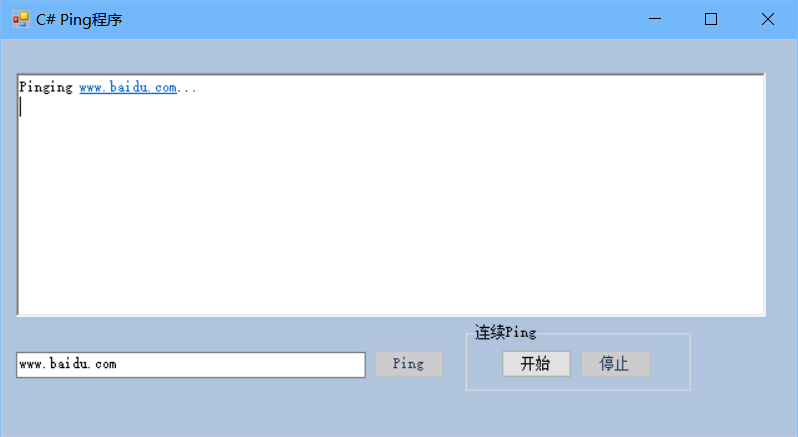
出现错误:
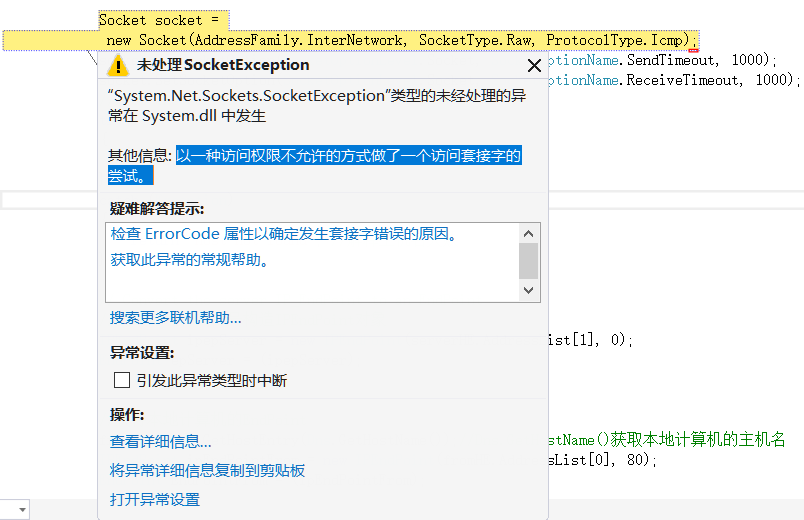
程序的基本实现是这样,但会出现访问权限不足的问题,以后再解决。
实验文档:https://files.cnblogs.com/files/MenAngel/Socket.zip

 浙公网安备 33010602011771号