
xiaoymin swagger
1.pom引入依赖
         <!-- swagger start-->
        <dependency>
            <groupId>com.github.xiaoymin</groupId>
            <artifactId>knife4j-micro-spring-boot-starter</artifactId>
            <version>2.0.8</version>
        </dependency>
        <dependency>
            <groupId>com.github.xiaoymin</groupId>
            <artifactId>knife4j-spring-boot-starter</artifactId>
            <version>2.0.8</version>
        </dependency>
        <!--统一Guava版本防止冲突   可以不用添加-->
        <dependency>
            <groupId>com.google.guava</groupId>
            <artifactId>guava</artifactId>
            <version>23.0</version>
        </dependency>
        <!--swagger end-->
2.创建swagger配置类
import org.springframework.context.annotation.Bean;
import org.springframework.context.annotation.Configuration;
import springfox.documentation.builders.ApiInfoBuilder;
import springfox.documentation.builders.PathSelectors;
import springfox.documentation.builders.RequestHandlerSelectors;
import springfox.documentation.service.ApiInfo;
import springfox.documentation.spi.DocumentationType;
import springfox.documentation.spring.web.plugins.Docket;
import springfox.documentation.swagger2.annotations.EnableSwagger2WebMvc;

import java.util.Arrays;
import java.util.HashSet;
import java.util.Set;

/**
 * Created by hyp on 2019/4/11
 * desc:Swagger配置
 */
@Configuration
@EnableSwagger2WebMvc
public class SwaggerConfig {

    public static final String DEVELOPER_NAME = "接口文档"; // 名称
    public static final String SWAGGER_SCAN_DEVELOPER_PACKAGE = "扫描的包路径";
    public static final String DEVELOPER_VERSION = "1.0.0"; // 版本

    //配置content type
    private static final Set<String> DEFAULT_PRODUCES_AND_CONSUMES =
            new HashSet<>(Arrays.asList("application/json", "charset=UTF-8"));

    @Bean
    public Docket createDeveloperApi() {
        return new Docket(DocumentationType.SWAGGER_2)
                .apiInfo(apiDeveloperInfo())
                .consumes(DEFAULT_PRODUCES_AND_CONSUMES)
                .produces(DEFAULT_PRODUCES_AND_CONSUMES)
                .select()
                .apis(RequestHandlerSelectors.basePackage(SWAGGER_SCAN_DEVELOPER_PACKAGE))
                .paths(PathSelectors.any())
                .build();
    }

    private ApiInfo apiDeveloperInfo() {
        return new ApiInfoBuilder()
                .title("接口文档")
                .description("端接口rest风格接口文档")
                .termsOfServiceUrl("https://www.XXX.com/")
                .version(DEVELOPER_VERSION)
                .build();
    }
}
import org.springframework.beans.factory.InitializingBean;
import org.springframework.beans.factory.annotation.Autowired;
import org.springframework.beans.factory.annotation.Value;
import org.springframework.context.annotation.Bean;
import org.springframework.context.annotation.Configuration;
import org.springframework.core.env.Environment;
import org.springframework.core.io.ClassPathResource;
import org.springframework.http.ResponseEntity;
import org.springframework.stereotype.Controller;
import org.springframework.web.bind.annotation.RequestMapping;
import org.springframework.web.bind.annotation.RequestMethod;
import org.springframework.web.bind.annotation.RequestParam;
import org.springframework.web.bind.annotation.ResponseBody;
import org.springframework.web.servlet.handler.SimpleUrlHandlerMapping;
import org.springframework.web.servlet.resource.PathResourceResolver;
import org.springframework.web.servlet.resource.ResourceHttpRequestHandler;
import org.springframework.web.util.UrlPathHelper;
import springfox.documentation.annotations.ApiIgnore;
import springfox.documentation.spring.web.DocumentationCache;
import springfox.documentation.spring.web.json.Json;
import springfox.documentation.spring.web.json.JsonSerializer;
import springfox.documentation.swagger.web.ApiResourceController;
import springfox.documentation.swagger.web.SecurityConfiguration;
import springfox.documentation.swagger.web.SwaggerResource;
import springfox.documentation.swagger.web.UiConfiguration;
import springfox.documentation.swagger2.annotations.EnableSwagger2WebMvc;
import springfox.documentation.swagger2.mappers.ServiceModelToSwagger2Mapper;
import springfox.documentation.swagger2.web.Swagger2ControllerWebMvc;

import javax.servlet.ServletContext;
import javax.servlet.http.HttpServletRequest;
import java.util.Arrays;
import java.util.HashMap;
import java.util.List;
import java.util.Map;

/**
 * Created by huangli on 2020/12/18
 * desc:Swagger路径配置
 */
@Configuration
@EnableSwagger2WebMvc
public class SwaggerPathConfig {

    private static final String DEFAULT_PATH = "/insurance"; // 请求的前缀方便将多个微服务文档通过网关转发


    /**
     * SwaggerUI资源访问
     *
     * @param servletContext
     * @param order
     * @return
     * @throws Exception
     */
    @Bean
    public SimpleUrlHandlerMapping swaggerUrlHandlerMapping(ServletContext servletContext,
                                                            @Value("${swagger.mapping.order:10}") int order) throws Exception {
        SimpleUrlHandlerMapping urlHandlerMapping = new SimpleUrlHandlerMapping();
        Map<String, ResourceHttpRequestHandler> urlMap = new HashMap<>();
        {
            PathResourceResolver pathResourceResolver = new PathResourceResolver();
            pathResourceResolver.setAllowedLocations(new ClassPathResource("META-INF/resources/webjars/"));
            pathResourceResolver.setUrlPathHelper(new UrlPathHelper());

            ResourceHttpRequestHandler resourceHttpRequestHandler = new ResourceHttpRequestHandler();
            resourceHttpRequestHandler.setLocations(Arrays.asList(new ClassPathResource("META-INF/resources/webjars/")));
            resourceHttpRequestHandler.setResourceResolvers(Arrays.asList(pathResourceResolver));
            resourceHttpRequestHandler.setServletContext(servletContext);
            resourceHttpRequestHandler.afterPropertiesSet();
            //设置新的路径
            urlMap.put(DEFAULT_PATH + "/webjars/**", resourceHttpRequestHandler);
        }
        {
            PathResourceResolver pathResourceResolver = new PathResourceResolver();
            pathResourceResolver.setAllowedLocations(new ClassPathResource("META-INF/resources/"));
            pathResourceResolver.setUrlPathHelper(new UrlPathHelper());

            ResourceHttpRequestHandler resourceHttpRequestHandler = new ResourceHttpRequestHandler();
            resourceHttpRequestHandler.setLocations(Arrays.asList(new ClassPathResource("META-INF/resources/")));
            resourceHttpRequestHandler.setResourceResolvers(Arrays.asList(pathResourceResolver));
            resourceHttpRequestHandler.setServletContext(servletContext);
            resourceHttpRequestHandler.afterPropertiesSet();
            //设置新的路径
            urlMap.put(DEFAULT_PATH + "/**", resourceHttpRequestHandler);
        }
        urlHandlerMapping.setUrlMap(urlMap);
        //调整DispatcherServlet关于SimpleUrlHandlerMapping的排序
        urlHandlerMapping.setOrder(order);
        return urlHandlerMapping;
    }

    /**
     * SwaggerUI接口访问
     */
    @Controller
    @ApiIgnore
    @RequestMapping(DEFAULT_PATH)
    public static class SwaggerResourceController implements InitializingBean {

        @Autowired
        private ApiResourceController apiResourceController;

        @Autowired
        private Environment environment;

        @Autowired
        private DocumentationCache documentationCache;

        @Autowired
        private ServiceModelToSwagger2Mapper mapper;

        @Autowired
        private JsonSerializer jsonSerializer;

        private Swagger2ControllerWebMvc swagger2Controller;

        @Override
        public void afterPropertiesSet() {
            swagger2Controller = new Swagger2ControllerWebMvc(environment, documentationCache, mapper, jsonSerializer);
        }

        /**
         * 首页
         *
         * @return
         */
//        @RequestMapping
//        public ModelAndView index() {
//            ModelAndView modelAndView = new ModelAndView("redirect:" + DEFAULT_PATH + "/swagger-ui.html");
//            return modelAndView;
//        }
        @RequestMapping("/swagger-resources/configuration/security")
        @ResponseBody
        public ResponseEntity<SecurityConfiguration> securityConfiguration() {
            return apiResourceController.securityConfiguration();
        }

        @RequestMapping("/swagger-resources/configuration/ui")
        @ResponseBody
        public ResponseEntity<UiConfiguration> uiConfiguration() {
            return apiResourceController.uiConfiguration();
        }

        @RequestMapping("/swagger-resources")
        @ResponseBody
        public ResponseEntity<List<SwaggerResource>> swaggerResources() {
            return apiResourceController.swaggerResources();
        }

        @RequestMapping(value = "/v2/api-docs", method = RequestMethod.GET, produces = {"application/json", "application/hal+json"})
        @ResponseBody
        public ResponseEntity<Json> getDocumentation(
                @RequestParam(value = "group", required = false) String swaggerGroup,
                HttpServletRequest servletRequest) {
            return swagger2Controller.getDocumentation(swaggerGroup, servletRequest);
        }
    }

}
3.常用注释
@Api(tags = "XXX") 用在Controller上
@ApiOperation("测试") 用在方法上
@ApiOperationSupport(order = 1) 用来排序使用
@ApiModel("请求参数") 用在实体类上
@ApiModelProperty("ID") 用在字段上



4.运行项目查看结果
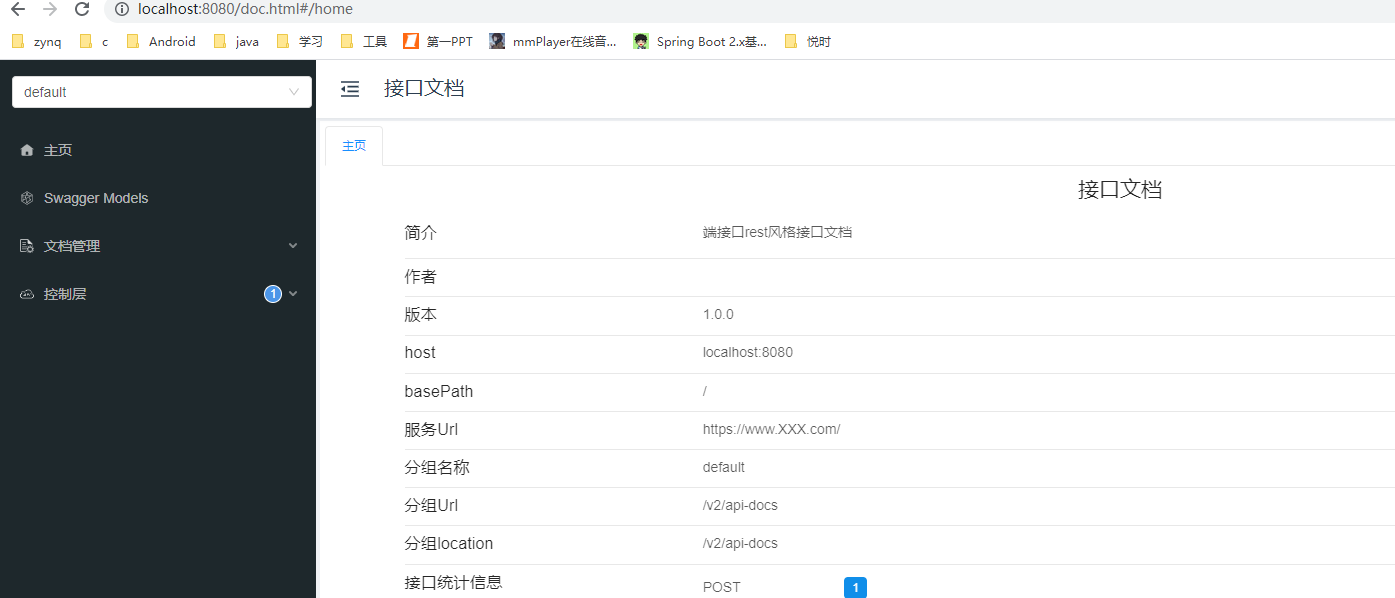
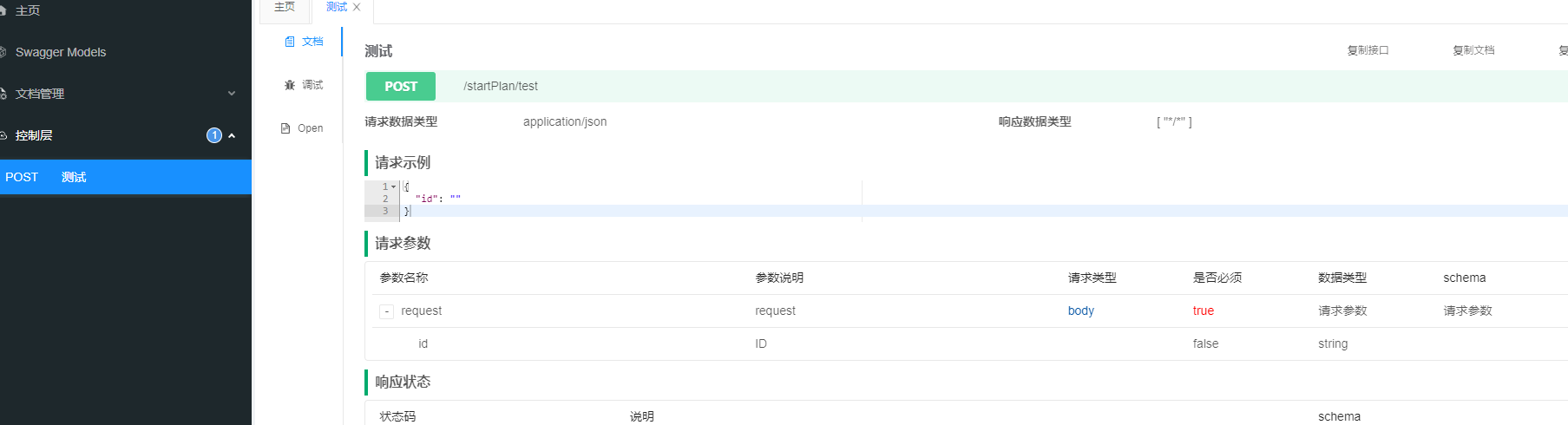
启动项目访问http://IP:端口/doc.html

 浙公网安备 33010602011771号