
linux 安装mysql
1 下载mysql
wget https://dev.mysql.com/get/Downloads/MySQL-5.7/mysql-5.7.41-linux-glibc2.12-x86_64.tar.gz
2
groupadd mysql  添加用户组
useradd -r -g mysql mysql 添加用户
mkdir -p  /usr/local/mysql/data/ 创建数据存储目录
chown mysql:mysql -R /usr/local/mysql/data/  授权数据存储目录
vim /etc/my.cnf  编辑
[mysqld]
user=mysql
basedir=/usr/local/mysql
datadir=basedir=/usr/local/mysql/data/
socket=/var/lib/mysql/mysql.sock
# Disabling symbolic-links is recommended to prevent assorted security risks
symbolic-links=0
# Settings user and group are ignored when systemd is used.
# If you need to run mysqld under a different user or group,
# customize your systemd unit file for mariadb according to the
# instructions in http://fedoraproject.org/wiki/Systemd

[mysqld_safe]
log-error=/var/log/mariadb/mariadb.log
pid-file=/var/run/mariadb/mariadb.pid

#
# include all files from the config directory
#
!includedir /etc/my.cnf.d

如果出现上述 初始化错误 需要删除data目录中原有数据

如果出现缺少依赖 需要下载
yum install -y libaio
查看密码
cat /data/mysql/mysql.err

直接删除mysql.cnf
重启服务mysql
修改mysql密码
use mysql
查看mysql使用plugin
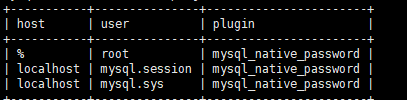
修改密码
ALTER USER 'root'@'%' IDENTIFIED WITH mysql_native_password BY 'xxxxxx.';
退出 重新连接

 浙公网安备 33010602011771号