Iteration
Start by picking a number, any number. Enter it into MATLAB by typing
x = 3
Next, enter this statement
x = sqrt(1 + x)
The up-arrow key allows you to recall earlier commands, including commands from previous sessions. Use the up-arrow key, followed by the Enter or Return key, to iterate, or repeatedly execute, this statement:
x = sqrt(1 + x)
Here is what you get when you start with x = 3:
x =
     3
x =
     2
x =
    1.7321
x =
    1.6529
x =
    1.6288
x =
    1.6213
x =
    1.6191
x =
    1.6184
x =
    1.6181
x =
    1.6181
After 10 steps, the value printed remains constant at 1.6181. Try several other starting values, you should find that no matter where you start, you will always reach 1.6181 in about 10 steps.(Maybe a few more will be required if you have a very large starting value.)
MATLAB is doing these computations to accuracy of about 16 decimal digits, but is displaying only 5. You can see more digits by entering
format long
and repeating experiment. About 30 steps starting with x = 3, the number remains constant at 1.618033988749895
x =
     3
x =
     2
x =
   1.732050807568877
	... ...
x =
   1.618033988749895
x =
   1.618033988749895
you have computed one of the most famous numbers in mathematics, \(\phi\), the Golden Ratio.
\(x = \sqrt{1+x}\) is an equation. A solution to such an equation is known as a fixed point. We can solve the equation using the quadratic formula. We obtained the quadratic equation:
The positive root of the quadratic equation is the Golden Ratio:
The Golden Ratio gets its name from the golden rectangle, shown in this figure
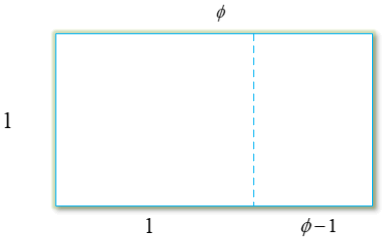
The golden rectangle has the property that removing a square leaves a smaller rectangle with the same shape. Equating the aspect ratios of the rectangles gives a defining equation for \(\phi\):
the same quadratic polynomial equation that we obtained from our fixed point iteration:

 浙公网安备 33010602011771号