
1 集合
1.1 为什么要使用集合框架?
传统的容器(数组)在进行增、删等破坏性操作时,需要移动元素,可能导致性能问题;同时添加、删除等算法和具体业务耦合在一起,增加了程序开发的复杂度。
Java集合框架提供了一套性能优良、使用方便的接口和类,位于java.util包中。
1.2 Collection
Collection是java集合框架(collection-frame)中的顶层接口。
Collection接口表示一个容器,容器中只能存储引用数据类型,建议存同一类型的引用类型,方便后续遍历等操作。
容器中的元素可以是有序的、可重复的,称为List接口。
也可能是无序的、唯一的,称为Set接口。
1.2.1 集合常用方法
|
public static void main(String[] args) {
/** * 增:add/addAll * 删:clear/remove/removeAll/retainAll * 改: * 查:contains/containsAll/isEmpty/size */
Collection c1 = new ArrayList();
// 追加 c1.add("apple"); // Object object = new String("apple"); // c1.add(1); // Object object = new Integer(1); c1.add("banana"); System.out.println(c1);
// 追加一个集合 Collection c2 = new ArrayList(); c2.add("java"); c2.add("c++"); c1.addAll(c2); System.out.println(c1);
// clear //c1.clear();
// c1.remove("apple"); // c1.removeAll(c2); //c1.retainAll(c2); //System.out.println(c1);
System.out.println(c1.contains("apple")); c2.add("js"); System.out.println(c1.containsAll(c2)); // c1.clear(); System.out.println(c1.isEmpty()); // 返回集合元素的个数 System.out.println(c1.size());
System.out.println(c1.equals(c2));
} |
1.2.2 集合的遍历
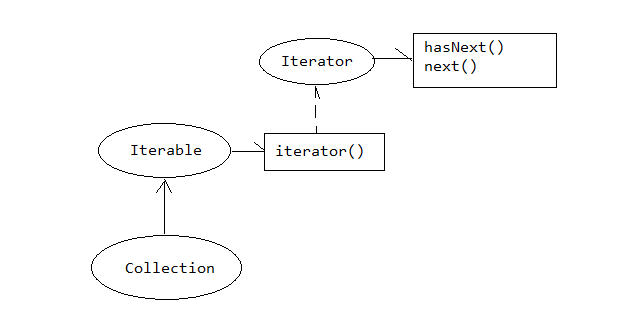
Iterable 可遍历的接口,集合接口继承于它,集合支持快速遍历。
|
// 快速遍历 // for-each // Object 表示元素类型 // item表示迭代变量 // c1表示集合 for (Object item : c1) { System.out.println(item.toString()); } |
快速遍历的本质:
Collection继承Iterable接口,表示集合支持快速遍历。Iterable接口定义了一个方法iterator()用于获取集合的迭代器,是一个Iterator接口类型,iterator()内部返回一个实现类实现Iterator接口。这个实现类一定具有hasNext和next方法用于判断是否有下一个元素和获取下一个元素。快速遍历就是基于迭代器工作的。
|
public static void main(String[] args) {
Collection c1 = new ArrayList(); c1.add("apple"); c1.add("banana"); c1.add("coco");
// 迭代器遍历(国内) Iterator it = c1.iterator(); while(it.hasNext()) { Object item = it.next(); System.out.println(item.toString()); }
// 国外 for(Iterator it2=c1.iterator();it2.hasNext();) { Object item = it2.next(); System.out.println(item.toString()); } } |
 |
1.3 List接口
List接口中的元素通过索引(index)来确定元素的顺序。可以对列表中每个元素的插入位置进行精确地控制。用户可以根据元素的整数索引(在列表中的位置)访问元素,并搜索列表中的元素。
1.3.1List常用方法
 1 public static void main(String[] args) {
 2
 3         /**
 4          * 增:add/addAll/add(index,el)/addAll(index,collection)
 5          * 删:clear/remove/removeAll/remove(index)
 6          * 改:set(index,el)
 7          * 查:get(index)/indexOf/lastIndexOf()
 8          * 其他:contains/containsAll/isEmpty/size
 9          */
10         List list1 = new ArrayList();
11         // 添加元素
12         list1.add("apple");
13         list1.add("banana");
14         // 在指定位置添加元素
15         list1.add(0, "coco");
16
17         System.out.println(list1);
18
19         List list2 = new ArrayList();
20         list2.add("java");
21         list2.add("c++");
22                 list1.addAll(1, list2);
23         System.out.println(list1);
24
25         // 删除
26         list1.remove(0);
27         System.out.println(list1);
28
29         // 修改
30         list1.set(0, "javax");
31         System.out.println(list1);
32
33         // 查
34         System.out.println(list1.get(0));
35         list1.add("apple");
36         list1.add("apple");
37         System.out.println(list1);
38         System.out.println(list1.indexOf("apple"));
39         System.out.println(list1.lastIndexOf("apple"));
40     }
1.3.2 List接口遍历
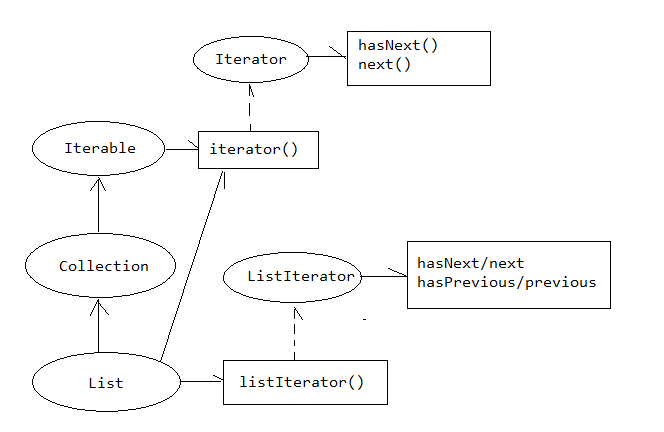
ListIterator 继承于Iterator,在Iterator的基础上提供了以正向遍历集合,也可以以逆序遍历集合。
hasNext/next 以正向遍历。
hasPrevious/previous 以逆序遍历。
 1 public static void main(String[] args) {
 2
 3
 4         List list1 = new ArrayList();
 5         list1.add("apple");
 6         list1.add("banana");
 7         list1.add("coco");
 8
 9         // 【1】快速遍历
10         System.out.println("--for each--");
11         for (Object item : list1) {
12             System.out.println(item.toString());
13         }
14
15         // 【2】普通for
16         System.out.println("--for--");
17         for(int i=0;i<list1.size();i++) {
18             System.out.println(list1.get(i));
19         }
20
21         // 【3】集合迭代器
22         System.out.println("--iterator--");
23         Iterator it = list1.iterator();
24         while(it.hasNext()) {
25             System.out.println(it.next());
26         }
27
28         System.out.println("--list iterator--");
29         // 正向遍历
30         ListIterator it2 = list1.listIterator();
31         while(it2.hasNext()) {
32             System.out.println(it2.next());
33         }
34
35         // 逆序遍历
36         while(it2.hasPrevious()) {
37             System.out.println(it2.previous());
38         }
39
40         System.out.println("--list iterator with index--");
41         ListIterator it3 = list1.listIterator(1);
42         while(it3.hasNext()) {
43             System.out.println(it3.next());
44         }
45     }
 |
1.4 数据结构(补充)
数据结构就是数据在内存中存储结构。根据存储的方式不同,分为线性表、二叉树、图、栈、队列等
1.4.1 线性表
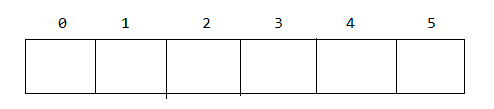
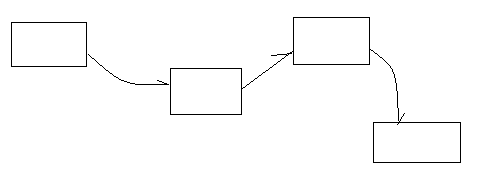
线性表数据按照一定的逻辑顺序存储在内存中。线性表是有序的。线性表根据内存的物理结构分为两种:数组和链表
数组是一种逻辑上有序的线性表,物理上也连续。
|
|
链表是一种逻辑上有序的线性表,但物理上不连续。
|
|
数组在查询时效率高,在添加、删除元素时效率低(涉及移动元素)
链表在查询时效率低(每次从头开始,不能跳跃访问),在添加、删除元素时效率高(不涉及移动元素)
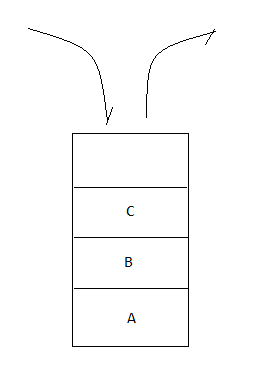
1.4.2 栈
特性:先进后出,后进先出
|
|
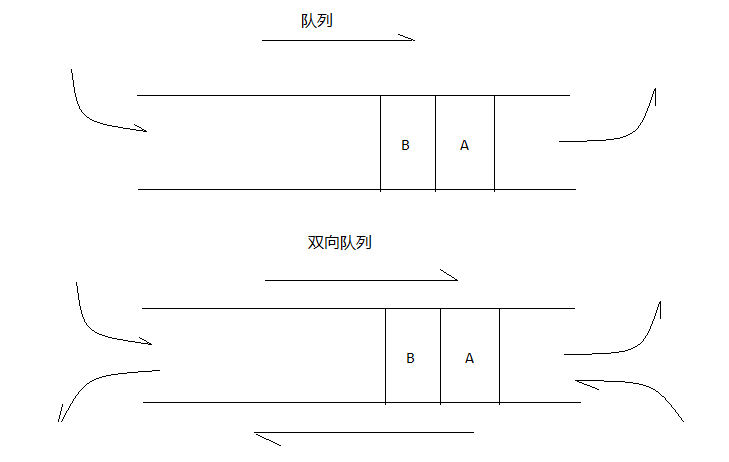
1.4.3 队列
特性:先进先出
 |
1.5 ArrayList/Vector
ArrayList 是List接口的实现类,底层数据结构是数组,实现大小可变的数组。
ArrayList 线程不安全,jdk1.2。
ArrayList 底层数据结构是数组,默认数组大小是10,如果添加的元素个数超过默认容量,ArrayList会自动拓容,拓容原则:newCapacity = oldCapacity + oldCapacity / 2;
如果未来确定序列的元素不在增加,通过调用trimToSize()调制容量至合适的空间。
ArrayList作为List接口的实现类,常用方法和遍历方法参考List接口。
Vector 是List接口的实现类,底层数据结构也是数组,也是大小可变的数组。
Vector是线程安全的,jdk1.0。
Vector底层数据结构是数组,默认数组大小是10,如果添加的元素个数超过默认容量,Vector会自动拓容,拓容原则:newCapacity = oldCapacity +capacityIncrement(增长因子);如果未来确定序列的元素不在增加,通过调用trimToSize()调制容量至合适的空间。
注意:Vector 在实现List接口的同时,同添加了自身特有的方法xxxElement,未来使用时为了程序的可拓展性,一定要按照接口来操作Vector。
1.6 LinkedList
LinkedList是List接口的实现类,底层数据结构是链表。
LinekList常用方法和遍历方法参照List接口。
LinkedList 线程不安全。
除了实现List接口, 还实现栈接口.
|
|

push入栈操作 / pop出栈操作
 1 public class Test01 {
 2     public static void main(String[] args) {
 3         LinkedList list = new LinkedList();
 4         list.push("apple");
 5         list.push("banana");
 6         list.push("coco");
 7
 8
 9         System.out.println(list.pop());
10         System.out.println(list.pop());
11         System.out.println(list.pop());
12
13         // java.util.NoSuchElementException
14         System.out.println(list.pop());
15     }
16 }
队列(Queue)接口
|
|
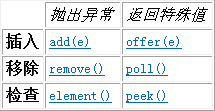
add/remove/element() 可能会出现NoSuchElementException异常
 1 public static void main(String[] args) {
 2
 3         LinkedList queue = new LinkedList();
 4         // 入队
 5         /**
 6          * 队列头                          队列尾
 7          *<-----          <-----
 8          * [apple, banana, coco]
 9          */
10         queue.add("apple");
11         queue.add("banana");
12         queue.add("coco");
13         System.out.println(queue);
14
15         // 出队
16         System.out.println(queue.remove());
17         System.out.println(queue.remove());
18         System.out.println(queue.remove());
19         System.out.println(queue);
20
21         // java.util.NoSuchElementException
22         System.out.println(queue.remove());
23
24
25         // 获取表头元素
26         System.out.println(queue.element());
27     }
1.7 Iterator和ListIterator
Iterator在迭代过程中不允许向集合中添加元素,:
当通过Iterator集合迭代器遍历集合过程中,不能再向集合汇总添加元素,否则出现ConcurrentModificationException 并发修改异常。
ListIterator允许程序员按任一方向遍历列表、迭代期间修改列表,并获得迭代器在列表中的当前位置。
1.8 泛型(generic)
1.8.1 泛型的概念
泛型允许开发者在强类型程序设计语言(java)编写代码时定义一些可变部分,这些部分在使用前必须作出指明。
泛型就是将类型参数化:
ArrayList<E> list表示声明了一个列表list,列表的元素是E类型。
ArrayList<String> list = new ArrayList<String>();
声明了一个列表list,列表的元素只能是String类型。
泛型在编译器起作用,运行时jvm察觉不到泛型的存在。
泛型在运行时已经被擦除了。
1.8.2 泛型的应用
1.8.2.1 泛型类
当一个类中属性的数据类型不确定时,具体是什么类型由使用者来确定时,使用泛型。泛型类的形式:
1 public class 类名<T> {
2
3 }
定义一个泛型类:
 1 public class FanClass<T> {
 2     private T t;
 3
 4     public T getT() {
 5         return t;
 6     }
 7
 8     public void setT(T t) {
 9         this.t = t;
10     }
11
12     public FanClass(T t) {
13         super();
14         this.t = t;
15     }
16
17     public FanClass() {
18         super();
19     }
20 }
1 public class Test01 {
2     public static void main(String[] args) {
3         FanClass<String> fan = new FanClass<String>();
4         fan.setT("apple");
5
6         FanClass<Integer> fan2 = new FanClass<Integer>();
7         fan2.setT(1);
8     }
9 }
1.8.2.2 泛型方法
当一个方法的参数类型不确定时,具体是什么类型由使用者来确定,可以考虑使用泛型方法。形式:
1 public class Student {
2
3      public <T> void showInfo(T a) {
4         System.out.println(a);
5     }
6 }
泛型方法在调用时确定(指明)类型。
泛型方法在一定程度上优化了方法重载。
泛型方法可以定义多个泛型类型:
1 public <A,B> void showInfo(A a,B b) {
2         System.out.println(a);
3         System.out.println(b);
4     }
多个泛型类型进一步优化了方法重载。
多个同类型的泛型:
1 public <A> void print(A...a) {
2         System.out.println(a);
3     }
A… a 表示方法可以接受多个参数。当调用方法传递多个参数时,多个参数被放到a数组中,a是什么类型的数组由开发者调用处传参决定。
print(A...a) 方法称为可变参数的泛型形式。
1.8.2.3 泛型接口(C)
如果接口中的方法的参数(形参、返回值)不确定时,可以考虑使用泛型接口。形式:
1 public interface FanInterface<T> {
2     public void showInfo(T t);
3 }
[1]实现类能确定泛型接口的类型:
1 public class ImplClass implements FanInterface<String>{
2
3     @Override
4     public void showInfo(String t) {
5         // TODO Auto-generated method stub
6
7     }
8 }
[2]实现类不能确定泛型接口的类型->继续泛:
1 public class ImplClass2<T> implements FanInterface<T>{
2
3     @Override
4     public void showInfo(T t) {
5
6     }
7 }
1.8.2.4 泛型的上限和下限 (C)
1 public static void print(ArrayList<? extends Pet> list) {
2         for (Pet pet : list) {
3             pet.showInfo();
4         }
5     }
泛型的上限ArrayList(? extends Pet) list 声明了一个容器,容器中的元素类型一定要继承于Pet,我们称这种形式叫做泛型的上限。
泛型的下限ArrayList(? super Pet) list 声明了一个容器,容器中的元素类型一定要是Pet的父类,我们称这个形式为泛型的下限。
1.9 Set接口
Set接口表示一个唯一、无序的容器(和添加顺序无关)。
1.9.1Set接口提供的方法
 1 public static void main(String[] args) {
 2         /**
 3          * 增:add/addAll
 4          * 删:clear/remove/removeAll/retainAll
 5          * 改:
 6          * 查:contains/containsAll
 7          * 遍历:iterator
 8          * 其他:size/isEmpty
 9          */
10
11         Set<Integer> set = new HashSet<Integer>();
12         // [1]添加
13         // 无序
14         set.add(10);
15         set.add(3);
16         set.add(20);
17         set.add(0);
18         // 不能添加重复元素
19         boolean r = set.add(1);
20         System.out.println(set);
21
22         // 【2】删除
23 //        set.remove(1);
24 //        set.clear();
25 //        System.out.println(set);
26
27         // 【3】查看是否包含
28         System.out.println(set.contains(1));
29
30         // 【4】其他
31         System.out.println(set.size());
32         System.out.println(set.isEmpty());
33     }
1.9.2Set接口的遍历
 1 public static void main(String[] args) {
 2
 3         Set<String> set = new HashSet<String>();
 4         set.add("banana");
 5         set.add("apple");
 6         set.add("coco");
 7
 8         // 快速遍历
 9         for (String item : set) {
10             System.out.println(item);
11         }
12
13         // 迭代器
14         Iterator<String> it = set.iterator();
15         while(it.hasNext()) {
16             String item = it.next();
17             System.out.println(item);
18         }
19     }
Set接口的实现类常见的有HashSet、LinkedHashSet、TreeSet。
Set接口的实现类常见的有HashSet、LinkedHashSet、TreeSet
1.10 HashSet
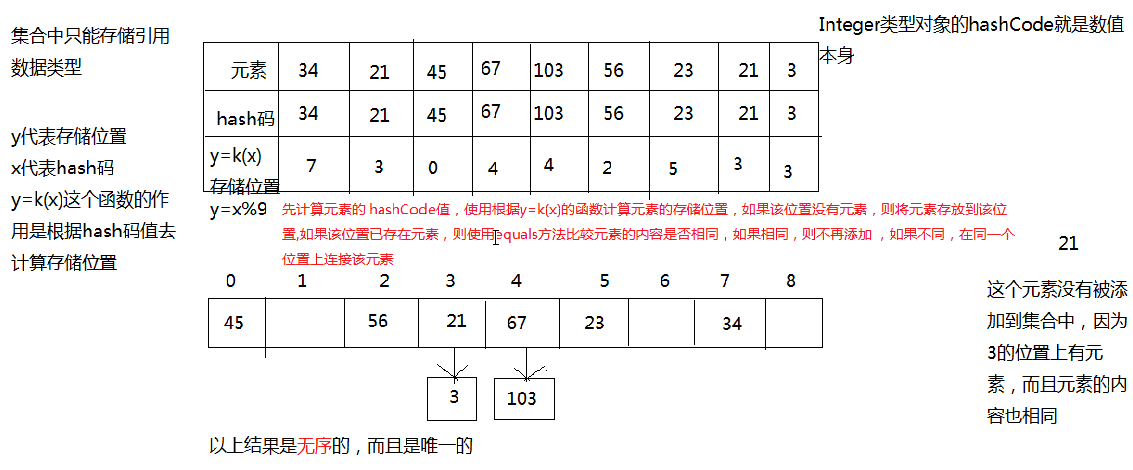
HashSet是Set接口的实现类,底层数据结构是哈希表。
HashSet是线程不安全的(不保证同步)。
1.10.1 哈希表工作原理
 |
1.10.2 添加自定义对象
根据哈希表的工作原理,请存储一个自定义对象到HashSet中。
 1 package cn.sxt03.hashset;
 2
 3 public class Student {
 4     private String id;
 5     private String name;
 6     private int age;
 7
 8     // …
 9
10
11     @Override
12     public int hashCode() {
13         final int prime = 31;
14         int result = 1;
15         result = prime * result + age;
16         result = prime * result + ((id == null) ? 0 : id.hashCode());
17         result = prime * result + ((name == null) ? 0 : name.hashCode());
18         return result;
19     }
20
21     @Override
22     public boolean equals(Object obj) {
23         if (this == obj)
24             return true;
25         if (obj == null)
26             return false;
27         if (getClass() != obj.getClass())
28             return false;
29         Student other = (Student) obj;
30         if (age != other.age)
31             return false;
32         if (id == null) {
33             if (other.id != null)
34                 return false;
35         } else if (!id.equals(other.id))
36             return false;
37         if (name == null) {
38             if (other.name != null)
39                 return false;
40         } else if (!name.equals(other.name))
41             return false;
42         return true;
43     }
44
45     @Override
46     public String toString() {
47         return "Student [id=" + id + ", name=" + name + ", age=" + age + "]";
48     }
49
50 }
总结
[1]如果向HashSet中存储元素时,元素一定要实现hashCode方法和equals方法。
[2] 优点:添加、删除、查询效率高;缺点:无序。
1.11 LinkedHashSet
LinkedHashSet是Set接口的实现类,底层数据结构哈希表+链表
哈希表用于散列元素;链表用于维持添加顺序。
如果要添加自定义对象元素,也需要重写hashCode和equals方法。
1.12 TreeSet
TreeSet 是Set接口的实现类,底层数据结构是二叉树。
TreeSet 存储的数据按照一定的规则存储。存储规则让数据表现出自然顺序。
1.12.1TreeSet工作原理
 |
添加一个新元素t的存储的步骤
[1] 如果集合无元素,t直接加入;如果集合有元素,t和根节点比较;
[2] 如果t小于根节点;把t放到根节点的左子树上;重复1-3步骤
[3] t大于根节点;把t放到根节点的右子树上;重复1-3步骤
输出时按照一定的规则:左子树->根节点->右子树
根据TreeSet的工作原理,向TreeSet添加自定义元素
向TreeSet中添加元素时,一定要提供比较策略,否则会出现ClassCastException。
比较策略分两种:内部比较器和外部比较器
1.1.1 内部比较器
当一个自定义对象实现Comparable并实现compareTo方法时,通过指定具体的比较策略,此时称为内部比较器。
 1 package cn.sxt05.treeset;
 2
 3 public class Student implements Comparable<Student>{
 4     private String id;
 5     private String name;
 6     private int age;
 7
 8     // 。。。
 9
10     @Override
11     public String toString() {
12         return "Student [id=" + id + ", name=" + name + ", age=" + age + "]";
13     }
14
15     @Override
16     public int compareTo(Student o) {
17         if(this.getAge()<o.getAge()) {
18             return -1;
19         }else if(this.getAge() == o.getAge()) {
20             return 0;
21         }else {
22             return 1;
23         }
24     }
25
26 }
比较策略的几种情况:
[1]比较策略一般当前对象写在前面,待比较对象也在后面,比较结果默认升序:
1 return this.getAge() - o.getAge() ;
如果想要降序,改变两个比较对象的位置即可。
[2] 多种比较因素:
 1 @Override
 2     public int compareTo(Student o) {
 3         /*if(this.getAge()<o.getAge()) {
 4             return -1;
 5         }else if(this.getAge() == o.getAge()) {
 6             return 0;
 7         }else {
 8             return 1;
 9         }*/
10
11         // return  this.getAge() - o.getAge() ;
12
13         if(this.getAge()<o.getAge()) {
14             return -1;
15         }else if(this.getAge() == o.getAge()) {
16             return this.getName().compareTo(o.getName());
17         }else {
18             return 1;
19         }
20     }
1.12.3 外部比较器
当实际开发过程中不知道添加元素的源代码、无权修改别人的代码,此时可以使用外部比较器。
Comparator 位于java.util包中,定义了compare(o1,o2) 用于提供外部比较策略。
TreeSet接受一个指定比较策略的构造方法,这些比较策略的实现类必须实现Comparator
接口。
需求:按照字符串的长度比较:
 1 public class Test01 {
 2     public static void main(String[] args) {
 3
 4         LenComparator lenComparator = new LenComparator();
 5         TreeSet<String> set2 = new TreeSet<String>(lenComparator);
 6
 7         set2.add("banana");
 8         set2.add("coco");
 9         set2.add("apple");
10
11         set2.add("apple");
12         System.out.println(set2);
13
14     }
15 }
16
17 class LenComparator implements Comparator<String>{
18
19     @Override
20     public int compare(String o1, String o2) {
21         return o1.length() - o2.length();
22     }
23 }
使用匿名内部类优化:
 1 public class Test02 {
 2     public static void main(String[] args) {
 3
 4         TreeSet<String> set2 = new TreeSet<String>(new Comparator<String>() {
 5
 6             @Override
 7             public int compare(String o1, String o2) {
 8                 return o1.length() - o2.length();
 9             }
10
11         });
12
13         set2.add("banana");
14         set2.add("coco");
15         set2.add("apple");
16
17         set2.add("apple");
18         System.out.println(set2);
19
20     }
21 }
1.13 Map接口
Map接口称为键值对集合或者映射集合,其中的元素(entry)是以键值对(key-value)的形式存在。
Map 容器接口中提供了增、删、改、查的方式对集合进行操作。
Map接口中都是通过key来操作键值对,一般key是已知。通过key获取value。
1.13.1 map常用方法
 1 public static void main(String[] args) {
 2
 3         /**
 4          * 增:put/putAll
 5          * 删:clear/remove
 6          * 改:put
 7          * 查:get/containsKey/containsValue
 8          * 其他:isEmpty/size
 9          */
10
11         Map<String, String> map = new HashMap<String,String>();
12
13         // 【1】put
14         map.put("A", "apple");
15         map.put("B", "banana");
16         map.put("C", "coco");
17
18         // 【2】删除
19         // map.clear();
20         // smap.remove("A");
21
22         // 【3】修改
23         //map.put("A", "apple x");
24
25         // 【4】查看
26         String val = map.get("A");
27         System.out.println(map.containsKey("D"));
28
29
30         System.out.println(map);
31     }
1.13.2 map接口的遍历
通过keySet() 返回map中键的set集合。
 1 public static void main(String[] args) {
 2
 3         Map<String, String> map = new HashMap<String,String>();
 4
 5         map.put("B", "banana");
 6         map.put("A", "apple");
 7         map.put("C", "coco");
 8         // map无序
 9         // 可以根据key的自然顺序 让map有序  => 一般用string作为key
10         System.out.println(map);
11
12
13         // 遍历
14         Set<String> keys = map.keySet();
15         for (String key : keys) {
16             System.out.println(key+"=>"+map.get(key));
17         }
18
19         Iterator<String> it = keys.iterator();
20         while(it.hasNext()) {
21             String key = it.next();
22             System.out.println(key+"=>"+map.get(key));
23         }
24     }
map中以键值对作为元素,键值对在map中称为entry,entrySet返回键值对的set集合:
 1 public static void main(String[] args) {
 2
 3         Map<String, String> map = new HashMap<String,String>();
 4
 5         map.put("B", "banana");
 6         map.put("A", "apple");
 7         map.put("C", "coco");
 8         // map无序
 9         // 可以根据key的自然顺序 让map有序  => 一般用string作为key
10         System.out.println(map);
11
12         // entrySet
13         Set<Entry<String, String>> entrySet = map.entrySet();
14         for (Entry<String, String> entry : entrySet) {
15             System.out.println(entry.getKey()+"=>"+entry.getValue());
16         }
17
18         Iterator<Entry<String, String>> it2 = entrySet.iterator();
19         while(it2.hasNext()) {
20             Entry<String, String> entry = it2.next();
21             System.out.println(entry.getKey()+"=>"+entry.getValue());
22         }
23     }
Map接口的实现类HashMap、LinkedHashMap、TreeMap.
1.14 HashMap
HashMap 是Map的实现类,key以HashSet存储。
 1 public static void main(String[] args) {
 2
 3         /*
 4         HashMap<String, Object> map = new HashMap<String,Object>();
 5
 6         ArrayList<String> list1 = new ArrayList<String>();
 7         list1.add("alex");
 8         list1.add("alice");
 9         list1.add("allen");
10         map.put("A", list1);
11
12
13         ArrayList<String> list2 = new ArrayList<String>();
14         list2.add("ben");
15         list2.add("bill");
16         map.put("B", list2);
17
18         System.out.println(map);
19         */
20
21
22         HashMap<Student, Object> map = new HashMap<Student,Object>();
23
24         ArrayList<String> list1 = new ArrayList<String>();
25         list1.add("alex");
26         list1.add("alice");
27         list1.add("allen");
28         Student s1 = new Student("001", "大狗", 20);
29         map.put(s1, list1);
30
31
32         ArrayList<String> list2 = new ArrayList<String>();
33         list2.add("ben");
34         list2.add("bill");
35         Student s2 = new Student("001", "大狗", 20);
36         // 修改
37         map.put(s2, list2);
38         System.out.println(map);
39
40     }
总结:
[1] 向HashMap中存储元素时,key一定要实现hashCode和equals。
[2] 一般建议使用String作为Map接口的key。
1.15 LinkedHashMap
LinkedHashMap是Map接口的实现类,key以LinkedHashSet存储。
哈希表散列key,链表维持key的添加顺序。
 1 public static void main(String[] args) {
 2
 3
 4         /*LinkedHashMap<String, Object> map = new LinkedHashMap<String,Object>();
 5
 6         ArrayList<String> list2 = new ArrayList<String>();
 7         list2.add("ben");
 8         list2.add("bill");
 9         map.put("B", list2);
10
11         ArrayList<String> list1 = new ArrayList<String>();
12         list1.add("alex");
13         list1.add("alice");
14         list1.add("allen");
15         map.put("A", list1);
16
17         System.out.println(map);*/
18
19
20
21         HashMap<Student, Object> map = new HashMap<Student,Object>();
22
23         ArrayList<String> list1 = new ArrayList<String>();
24         list1.add("alex");
25         list1.add("alice");
26         list1.add("allen");
27         Student s1 = new Student("001", "大狗", 20);
28         map.put(s1, list1);
29
30
31         ArrayList<String> list2 = new ArrayList<String>();
32         list2.add("ben");
33         list2.add("bill");
34         Student s2 = new Student("001", "大狗", 20);
35         // 修改
36         map.put(s2, list2);
37         System.out.println(map);
38
39     }
1.16 TreeMap
TreeMap是Map的实现类,key以TreeSet存储。
 1 public static void main(String[] args) {
 2
 3
 4         /*TreeMap<String, Object> map = new TreeMap<String,Object>(new Comparator<String>() {
 5
 6             @Override
 7             public int compare(String o1, String o2) {
 8                 return o1.length() - o2.length();
 9             }
10         });
11
12         ArrayList<String> list2 = new ArrayList<String>();
13         list2.add("ben");
14         list2.add("bill");
15         map.put("Aa", list2);
16
17         ArrayList<String> list1 = new ArrayList<String>();
18         list1.add("alex");
19         list1.add("alice");
20         list1.add("allen");
21         map.put("B", list1);
22
23         System.out.println(map);*/
24
25
26
27         TreeMap<Student, Object> map = new TreeMap<Student,Object>(new Comparator<Student>() {
28
29             @Override
30             public int compare(Student o1, Student o2) {
31                 return o1.getAge() - o2.getAge();
32             }
33         });
34
35         ArrayList<String> list1 = new ArrayList<String>();
36         list1.add("alex");
37         list1.add("alice");
38         list1.add("allen");
39         Student s1 = new Student("001", "大狗", 20);
40         map.put(s1, list1);
41
42
43         ArrayList<String> list2 = new ArrayList<String>();
44         list2.add("ben");
45         list2.add("bill");
46         Student s2 = new Student("001", "2狗", 20);
47         // 修改
48         map.put(s2, list2);
49         System.out.println(map);
50
51     }
1.17总结
 |

 浙公网安备 33010602011771号