

2018软件测试_Lab2
一、问题描述
编写Selenium Java WebDriver程序,测试input.xlsx表格中的学号和git地址的对应关系是否正确。
该问题主要是通过操纵浏览器,进入特定网页,通过对网页元素的操作,实现所需功能。通过java、selenium、chromedriver、junit、hamcrest可达成要求
二、程序设计
大致思路是读取Excel文件中的数据,然后通过webdriver操作浏览器,对网页元素进行操作,在特定位置输入学号及密码,提交后,获取跳转页面特定元素中的内容,即网页中显示的该同学的GitHub网址,将其与Excel中的比较,忽略不必要的差别,比如网址末尾的斜杠。若该同学没有GitHub网址,则跳过。通过循环的方式,将Excel中的数据遍历完。
首先是对Excel的读取操作,我使用了poi,并参考网络资源,封装了一个读取Excel的类,具体代码如下:
package Lab2;

import java.io.File;

import java.io.FileInputStream;
import java.io.IOException;
import java.io.InputStream;
import java.util.ArrayList;
import org.apache.poi.ss.usermodel.Cell;
import org.apache.poi.xssf.usermodel.XSSFCell;
import org.apache.poi.xssf.usermodel.XSSFRow;
import org.apache.poi.xssf.usermodel.XSSFSheet;
import org.apache.poi.xssf.usermodel.XSSFWorkbook;

public class Excel_reader {

    //*************xlsx文件读取函数************************
    //excel_name为文件名,arg为需要查询的列号
    //返回二维字符串数组
    @SuppressWarnings({ "resource", "unused" })
    public ArrayList<ArrayList<String>> xlsx_reader(String excel_url,int ... args) throws IOException {

        //读取xlsx文件
        XSSFWorkbook xssfWorkbook = null;
        //寻找目录读取文件
        File excelFile = new File(excel_url);
        InputStream is = new FileInputStream(excelFile);
        xssfWorkbook = new XSSFWorkbook(is);

        if(xssfWorkbook==null){
            System.out.println("未读取到内容,请检查路径!");
            return null;
        }

        ArrayList<ArrayList<String>> ans=new ArrayList<ArrayList<String>>();
        //遍历xlsx中的sheet
        for (int numSheet = 0; numSheet < xssfWorkbook.getNumberOfSheets(); numSheet++) {
            XSSFSheet xssfSheet = xssfWorkbook.getSheetAt(numSheet);
            if (xssfSheet == null) {
                continue;
            }
            // 对于每个sheet,读取其中的每一行
            for (int rowNum = 0; rowNum <= xssfSheet.getLastRowNum(); rowNum++) {
                XSSFRow xssfRow = xssfSheet.getRow(rowNum);
                if (xssfRow == null) continue;
                ArrayList<String> curarr=new ArrayList<String>();
                for(int columnNum = 0 ; columnNum<args.length ; columnNum++){
                    XSSFCell cell = xssfRow.getCell(args[columnNum]);

                    curarr.add( Trim_str( getValue(cell) ) );
                }
                ans.add(curarr);
            }
        }
        return ans;
    }

    //判断后缀为xlsx的excel文件的数据类
    @SuppressWarnings("deprecation")
    private static String getValue(XSSFCell xssfRow) {
        if(xssfRow==null){
            return "---";
        }
        if (xssfRow.getCellType() == Cell.CELL_TYPE_BOOLEAN) {
            return String.valueOf(xssfRow.getBooleanCellValue());
        } else if (xssfRow.getCellType() == Cell.CELL_TYPE_NUMERIC) {
            double cur=xssfRow.getNumericCellValue();
            long longVal = Math.round(cur);
            Object inputValue = null;
            if(Double.parseDouble(longVal + ".0") == cur)
                    inputValue = longVal;
            else
                    inputValue = cur;
            return String.valueOf(inputValue);
        } else if(xssfRow.getCellType() == Cell.CELL_TYPE_BLANK || xssfRow.getCellType() == Cell.CELL_TYPE_ERROR){
            return "---";
        }
        else {
            return String.valueOf(xssfRow.getStringCellValue());
        }
    }

    //判断后缀为xls的excel文件的数据类型
    /*
    @SuppressWarnings("deprecation")
    private static String getValue(HSSFCell hssfCell) {
        if(hssfCell==null){
            return "---";
        }
        if (hssfCell.getCellType() == Cell.CELL_TYPE_BOOLEAN) {
            return String.valueOf(hssfCell.getBooleanCellValue());
        } else if (hssfCell.getCellType() == Cell.CELL_TYPE_NUMERIC) {
            double cur=hssfCell.getNumericCellValue();
            long longVal = Math.round(cur);
            Object inputValue = null;
            if(Double.parseDouble(longVal + ".0") == cur)
                    inputValue = longVal;
            else
                    inputValue = cur;
            return String.valueOf(inputValue);
        } else if(hssfCell.getCellType() == Cell.CELL_TYPE_BLANK || hssfCell.getCellType() == Cell.CELL_TYPE_ERROR){
            return "---";
        }
        else {
            return String.valueOf(hssfCell.getStringCellValue());
        }
    }*/

  //字符串修剪  去除所有空白符号 , 问号 , 中文空格
    static private String Trim_str(String str){
        if(str==null)
            return null;
        return str.replaceAll("[\\s\\?]", "").replace(" ", "");
    }
}
然后引用Excel读取操作类,存储在二维String数组里,即一个同学的学号与网址存在一个数组中,这些数组存放在一个新数组中。网页元素通过xpath获取,循环比较即可。具体代码如下:
package Lab2;

import static org.junit.Assert.assertEquals;

import java.io.IOException;
import java.util.ArrayList;

import org.junit.Before;
import org.junit.Test;
import org.openqa.selenium.By;
import org.openqa.selenium.WebDriver;
import org.openqa.selenium.WebElement;
import org.openqa.selenium.chrome.ChromeDriver;

public class Lab2Test {
    Lab2Test test;
    WebDriver driver;

    public String webTest(String user,WebDriver driver){
        //输入用户名
        WebElement username = driver.findElement(By.xpath("//*[@id=\"username\"]"));
        username.clear();
        username.sendKeys(user);

        //获取密码
        String passWd=user.substring(4);

        //输入密码
        WebElement password = driver.findElement(By.xpath("//*[@id=\"password\"]"));
        password.clear();
        password.sendKeys(passWd);

        //提交
        driver.findElement(By.xpath("//*[@id=\"submitButton\"]")).click();

        //获取对应网址
        WebElement path = driver.findElement(By.xpath("/html/body/div[1]/div[2]/a/p"));

        return path.getText();
    }

    @Before
    public void setUp() throws Exception {
        System.setProperty("webdriver.chrome.driver", "webdriver\\chromedriver.exe");
        driver = new ChromeDriver();
        driver.get("https://psych.liebes.top/st");
        test=new Lab2Test();
    }

    @Test
    public void test() throws IOException{
        Excel_reader data= new Excel_reader();
        ArrayList<ArrayList<String>> arr=data.xlsx_reader("input.xlsx",0,1);  //后面的参数代表需要输出哪些列,参数个数可以任意
        for(int i=0;i<arr.size();i++){
            ArrayList<String> row=arr.get(i);

            String expected=row.get(1);

            //该同学没有填写网址,不进行判断
            if(row.get(1).equals("---"))
                continue;
            else {
                String result=" ";
                try {
                    result = test.webTest(row.get(0), driver);
                } catch (Exception e) {
                    // TODO Auto-generated catch block
                    e.printStackTrace();
                }
                if(expected.charAt(expected.length()-1)=='/') {
                    expected=expected.substring(0, expected.length()-1);
                }
                if(result.charAt(result.length()-1)=='/') {
                    result=result.substring(0, result.length()-1);
                }
                assertEquals(expected,result);
                driver.navigate().back();
            }
        }
        driver.close();
        System.out.println("全对");
    }
}
四、结果分析
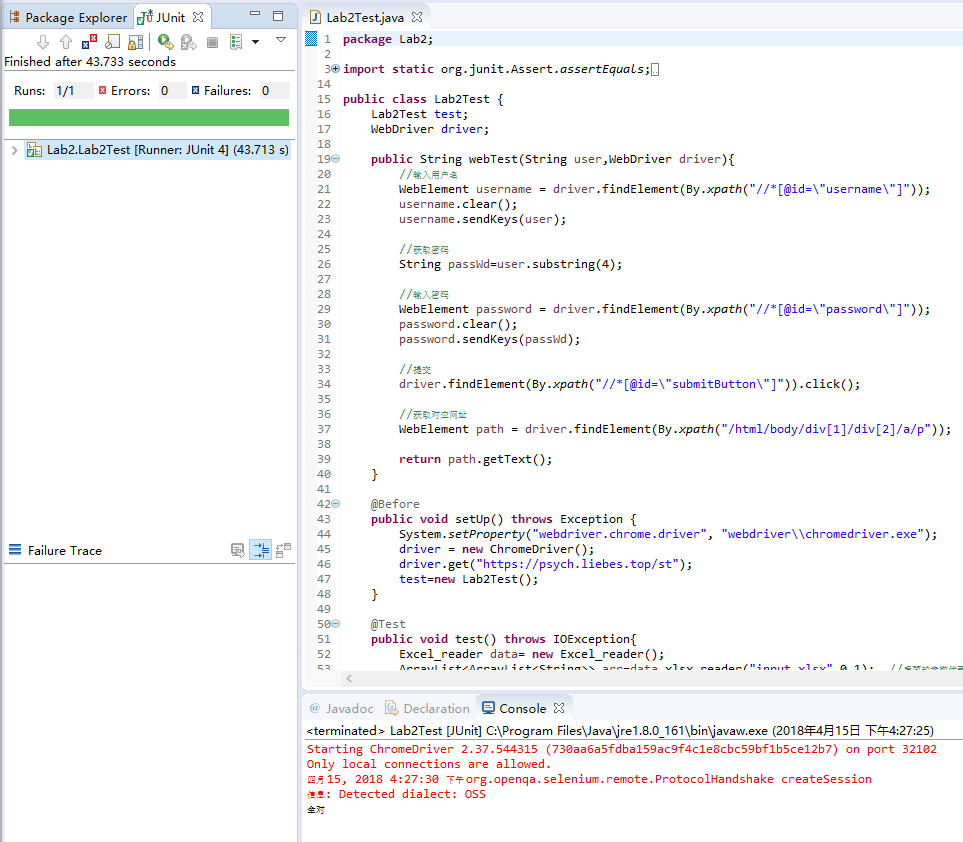
运行结果如图,没有错误,全都对应:
五、未来展望与思考
通过此次作业,我学会了使用selenium进行自动化网页测试,使我对软件测试有了进一步的了解,增加了我对软件测试的兴趣。通过也给了我一个自己测试自己网页的方法,以后我在做网站时,也可以通过这种方法进行测试,发现错误。
源码网址:https://github.com/jingranburangyongzhongwen/Lab2

 浙公网安备 33010602011771号