

C# RichTextBox 制作文本编辑器
本文利用一个简单的小例子【文本编辑器】,讲解RichTextBox的用法,仅供学习分享使用,如有不足之处,还请指正。
Windows窗体中的RichTextBox控件用于显示,输入和操作格式化的文本,RichTextBox除了拥有TextBox控件的所有功能外,还可以显示字体,颜色,链接,从文件中读取和加载图像,以及查找指定的字符。RichTextBox控件通常用于提供类似字体处理程序(如Microsoft Word)的文本操作和显示功能。RichTextBox控件可以显示滚动条,且默认根据需要进行显示。
涉及知识点:
- SelectionFont 获取或设置当前选定文本或插入点的字体。
- FontStyle 指定应用到文本的字形信息。
- SelectionAlignment 获取或设置应用到当前选定内容或插入点的对齐方式。
- SelectionIndent 获取或设置所选内容开始行的缩进距离(以像素为单位)。
- SelectionCharOffset 获取或设置控件中的文本是显示在基线上、作为上标还是作为基线下方的下标。
- SelectionColor 获取或设置当前选定文本或插入点的文本颜色。
- SelectionBackColor 获取或设置在 System.Windows.Forms.RichTextBox 控件中选中文本时文本的颜色。
- SelectionBullet 获取或设置一个值,通过该值指示项目符号样式是否应用到当前选定内容或插入点。
- Clipboard Paste 粘贴指定剪贴板格式的剪贴板内容【插入图片时使用】。
- Find 在对搜索应用特定选项的情况下,在 System.Windows.Forms.RichTextBox 控件的文本中搜索位于控件内特定位置的字符串。
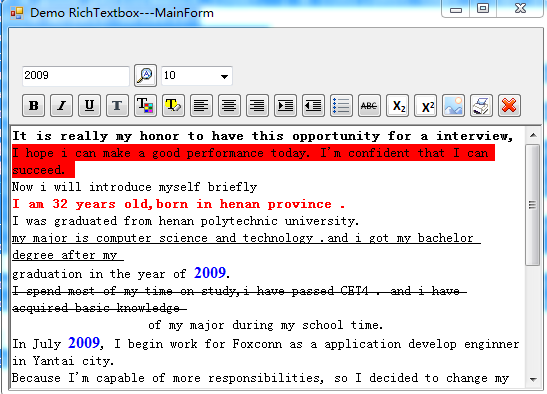
效果图
如下【以下设置文本对应的格式】:
![]()
核心代码
- 如下
-
using System;
using System.Collections.Generic;
using System.Drawing;
using System.Drawing.Printing;
using System.Linq;
using System.Text;
using System.Threading.Tasks;
using System.Windows.Forms;

namespace DemoRichText.Model
{
    public class DefaultRickFormat : BaseRichFormat
    {
        public override void SetFormat(RichTextBox rtbInfo)
        {

        }
    }

    /// <summary>
    /// 加粗格式
    /// </summary>
    public class BoldRichFormat : BaseRichFormat
    {
        public override void SetFormat(RichTextBox rtbInfo)
        {
            Font oldFont = rtbInfo.SelectionFont;
            Font newFont;
            if (oldFont.Bold)
            {
                newFont = new Font(oldFont, oldFont.Style & ~FontStyle.Bold);//支持位于运算
            }
            else
            {
                newFont = new Font(oldFont, oldFont.Style | FontStyle.Bold);
            }
            rtbInfo.SelectionFont = newFont;
        }
    }

    /// <summary>
    /// 斜体
    /// </summary>
    public class ItalicRichFormat : BaseRichFormat
    {
        public override void SetFormat(RichTextBox rtbInfo)
        {
            Font oldFont = rtbInfo.SelectionFont;
            Font newFont;
            if (oldFont.Italic)
            {
                newFont = new Font(oldFont, oldFont.Style & ~FontStyle.Italic);
            }
            else
            {
                newFont = new Font(oldFont, oldFont.Style | FontStyle.Italic);
            }
            rtbInfo.SelectionFont = newFont;
            rtbInfo.Focus();
        }
    }

    /// <summary>
    /// 下划线
    /// </summary>
    public class UnderLineRichFormat : BaseRichFormat
    {
        public override void SetFormat(RichTextBox rtbInfo)
        {
            Font oldFont = rtbInfo.SelectionFont;
            Font newFont;
            if (oldFont.Underline)
            {
                newFont = new Font(oldFont, oldFont.Style & ~FontStyle.Underline);
            }
            else
            {
                newFont = new Font(oldFont, oldFont.Style | FontStyle.Underline);
            }
            rtbInfo.SelectionFont = newFont;
            rtbInfo.Focus();
        }
    }

    /// <summary>
    /// 删除线
    /// </summary>
    public class StrikeLineRichFormat : BaseRichFormat
    {
        public override void SetFormat(RichTextBox rtbInfo)
        {
            Font oldFont = rtbInfo.SelectionFont;
            Font newFont;
            if (oldFont.Underline)
            {
                newFont = new Font(oldFont, oldFont.Style & ~FontStyle.Strikeout);
            }
            else
            {
                newFont = new Font(oldFont, oldFont.Style | FontStyle.Strikeout);
            }
            rtbInfo.SelectionFont = newFont;
            rtbInfo.Focus();
        }
    }

    /// <summary>
    /// 左对齐
    /// </summary>
    public class LeftRichFormat : BaseRichFormat
    {
        public override void SetFormat(RichTextBox rtbInfo)
        {
            rtbInfo.SelectionAlignment = HorizontalAlignment.Left;
            rtbInfo.Focus();
        }
    }

    /// <summary>
    /// 居中对齐
    /// </summary>
    public class CenterRichFormat : BaseRichFormat
    {
        public override void SetFormat(RichTextBox rtbInfo)
        {
            if (rtbInfo.SelectionAlignment == HorizontalAlignment.Center)
            {
                rtbInfo.SelectionAlignment = HorizontalAlignment.Left;
            }
            else
            {
                rtbInfo.SelectionAlignment = HorizontalAlignment.Center;
            }

            rtbInfo.Focus();
        }
    }

    /// <summary>
    /// 右对齐
    /// </summary>
    public class RightRichFormat : BaseRichFormat
    {
        public override void SetFormat(RichTextBox rtbInfo)
        {
            if (rtbInfo.SelectionAlignment == HorizontalAlignment.Right)
            {
                rtbInfo.SelectionAlignment = HorizontalAlignment.Left;
            }
            else
            {
                rtbInfo.SelectionAlignment = HorizontalAlignment.Right;
            }

            rtbInfo.Focus();
        }
    }

    /// <summary>
    /// 缩进对齐
    /// </summary>
    public class IndentRichFormat : BaseRichFormat
    {
        public override void SetFormat(RichTextBox rtbInfo)
        {
            //每次以10个像素进行缩进
            rtbInfo.SelectionIndent = rtbInfo.SelectionIndent + 10;
            rtbInfo.Focus();
        }
    }

    /// <summary>
    /// 缩进对齐
    /// </summary>
    public class OutIndentRichFormat : BaseRichFormat
    {
        public override void SetFormat(RichTextBox rtbInfo)
        {
            //每次以10个像素进行缩进
            rtbInfo.SelectionIndent = rtbInfo.SelectionIndent - 10;
            rtbInfo.Focus();
        }
    }

    /// <summary>
    /// 下标
    /// </summary>
    public class SubScriptRichFormat : BaseRichFormat
    {
        public override void SetFormat(RichTextBox rtbInfo)
        {
            if (rtbInfo.SelectionCharOffset < 0)
            {
                rtbInfo.SelectionCharOffset = 0;
            }
            else {
                rtbInfo.SelectionCharOffset = -5;
            }
            rtbInfo.Focus();
        }
    }

    /// <summary>
    /// 上标
    /// </summary>
    public class SuperScriptRichFormat : BaseRichFormat
    {
        public override void SetFormat(RichTextBox rtbInfo)
        {
            if (rtbInfo.SelectionCharOffset > 0)
            {
                rtbInfo.SelectionCharOffset = 0;
            }
            else {
                rtbInfo.SelectionCharOffset = 5;
            }
            rtbInfo.Focus();
        }
    }

    /// <summary>
    /// 字体
    /// </summary>
    public class FontRichFormat : BaseRichFormat
    {
        public override void SetFormat(RichTextBox rtbInfo)
        {
            FontDialog f = new FontDialog();
            if (f.ShowDialog() == DialogResult.OK)
            {
                FontFamily family = f.Font.FontFamily;
                rtbInfo.SelectionFont = new Font(family, rtbInfo.SelectionFont.Size, rtbInfo.SelectionFont.Style);
            }
            rtbInfo.Focus();
        }
    }

    /// <summary>
    /// 文本颜色
    /// </summary>
    public class ForeColorRichFormat : BaseRichFormat
    {
        public override void SetFormat(RichTextBox rtbInfo)
        {
            ColorDialog f = new ColorDialog();
            if (f.ShowDialog() == DialogResult.OK)
            {

                rtbInfo.SelectionColor = f.Color;
            }
            rtbInfo.Focus();
        }
    }

    /// <summary>
    /// 文本背景颜色
    /// </summary>
    public class BgColorRichFormat : BaseRichFormat
    {
        public override void SetFormat(RichTextBox rtbInfo)
        {
            ColorDialog f = new ColorDialog();
            if (f.ShowDialog() == DialogResult.OK)
            {

                rtbInfo.SelectionBackColor = f.Color;
            }
            rtbInfo.Focus();
        }
    }

    /// <summary>
    /// UL列表,项目符号样式
    /// </summary>
    public class UlRichFormat : BaseRichFormat
    {
        public override void SetFormat(RichTextBox rtbInfo)
        {
            if (rtbInfo.SelectionBullet)
            {
                rtbInfo.SelectionBullet = false;
            }
            else {
                rtbInfo.SelectionBullet = true;
                rtbInfo.BulletIndent = 10;
            }
            rtbInfo.Focus();
        }
    }

    /// <summary>
    /// 图片插入
    /// </summary>
    public class PicRichFormat : BaseRichFormat
    {
        public override void SetFormat(RichTextBox rtbInfo)
        {
            OpenFileDialog o = new OpenFileDialog();
            o.InitialDirectory = AppDomain.CurrentDomain.BaseDirectory;
            o.Title = "请选择图片";
            o.Filter = "jpeg|*.jpeg|jpg|*.jpg|png|*.png|gif|*.gif";
            if (o.ShowDialog() == DialogResult.OK) {
                string fileName = o.FileName;
                try
                {
                   Image bmp = Image.FromFile(fileName);
                   Clipboard.SetDataObject(bmp);

                    DataFormats.Format dataFormat = DataFormats.GetFormat(DataFormats.Bitmap);
                    if (rtbInfo.CanPaste(dataFormat))
                    {
                        rtbInfo.Paste(dataFormat);
                    }

                }
                catch (Exception exc)
                {
                    MessageBox.Show("图片插入失败。" + exc.Message, "提示",
                                    MessageBoxButtons.OK, MessageBoxIcon.Information);
                }

            }
            rtbInfo.Focus();
        }
    }

    /// <summary>
    /// 删除
    /// </summary>
    public class DelRichFormat : BaseRichFormat
    {
        public override void SetFormat(RichTextBox rtbInfo)
        {
            rtbInfo.SelectedText = "";
            rtbInfo.Focus();
        }
    }

    /// <summary>
    /// 查找
    /// </summary>
    public class SearchRichFormat : BaseRichFormat
    {
        public override void SetFormat(RichTextBox rtbInfo)
        {
            string find = rtbInfo.Tag.ToString();
            int index=  rtbInfo.Find(find, 0,RichTextBoxFinds.None);
            int startPos = index;
            int nextIndex = 0;
            while (nextIndex != startPos)//循环查找字符串,并用蓝色加粗12号Times New Roman标记之
            {
                rtbInfo.SelectionStart = index;
                rtbInfo.SelectionLength = find.Length;
                rtbInfo.SelectionColor = Color.Blue;
                rtbInfo.SelectionFont = new Font("Times New Roman", (float)12, FontStyle.Bold);
                rtbInfo.Focus();
                nextIndex = rtbInfo.Find(find, index + find.Length, RichTextBoxFinds.None);
                if (nextIndex == -1)//若查到文件末尾,则充值nextIndex为初始位置的值,使其达到初始位置,顺利结束循环,否则会有异常。
                {
                    nextIndex = startPos;
                }
                index = nextIndex;
            }
            rtbInfo.Focus();
        }
    }

    /// <summary>
    /// 打印
    /// </summary>
    public class PrintRichFormat : BaseRichFormat
    {
        private RichTextBox richTextbox;

        public override void SetFormat(RichTextBox rtbInfo)
        {
            this.richTextbox = rtbInfo;
            PrintDocument pd = new PrintDocument();
            pd.PrintPage += new PrintPageEventHandler(pd_PrintPage);
            // 打印文档
            pd.Print();
        }

        private void pd_PrintPage(object sender, PrintPageEventArgs ev)
        {
            //ev.Graphics.DrawString(richTextbox.Text);
            //ev.HasMorePages = true;
        }
    }

    /// <summary>
    /// 字体大小
    /// </summary>
    public class FontSizeRichFormat : BaseRichFormat
    {
        public override void SetFormat(RichTextBox rtbInfo)
        {
            string fontSize = rtbInfo.Tag.ToString();
            float fsize = 0.0f;
            if (float.TryParse(fontSize, out fsize)) {
                rtbInfo.SelectionFont = new Font(rtbInfo.Font.FontFamily, fsize, rtbInfo.SelectionFont.Style);
            }
            rtbInfo.Focus();
        }
    }
}
页面代码【由于实现了代码封装,所有页面代码较少】
-
using DemoRichText.Model;
using System;
using System.Collections.Generic;
using System.ComponentModel;
using System.Data;
using System.Drawing;
using System.Linq;
using System.Text;
using System.Threading.Tasks;
using System.Windows.Forms;

namespace DemoRichText
{
    public partial class MainForm : Form
    {
        public MainForm()
        {
            InitializeComponent();
        }


        public void btnButtonClick(object sender, EventArgs e) {
            Button btn = (Button)sender;
            BTNType btnType;
            if (Enum.TryParse<BTNType>(btn.Tag.ToString(), out btnType)) {
                if (btnType == BTNType.Search) {
                    if (!string.IsNullOrEmpty(this.txtSearch.Text.Trim()))
                    {
                        this.rtbInfo.Tag = this.txtSearch.Text.Trim();
                    }
                    else {
                        return;
                    }

                }
                IRichFormat richFomat = RichFormatFactory.CreateRichFormat(btnType);
                richFomat.SetFormat(this.rtbInfo);
            }
        }

        private void combFontSize_SelectedIndexChanged(object sender, EventArgs e)
        {
            float fsize = 12.0f;
            if (combFontSize.SelectedIndex > -1) {
                if (float.TryParse(combFontSize.SelectedItem.ToString(), out fsize)) {
                    rtbInfo.Tag = fsize.ToString();
                    IRichFormat richFomat = RichFormatFactory.CreateRichFormat(BTNType.FontSize);
                    richFomat.SetFormat(this.rtbInfo);
                }
                return;
            }
        }
    }
}
RichTextBox是一个功能丰富的控件,值得学习。
-

 浙公网安备 33010602011771号