
Vue全局弹窗:一次注册,全局可弹
Vue全局弹窗
今天来搞一个全局弹窗,不用每个文件都引入,只在main.js里作为全局原型引入就好了
先新建弹窗组件
toast.vue
<template></template>

<script>
export default {
  toast(text) {
    this.text = text;
    var dom = document.createElement("toast");//Vue不支持直接使用appendChild方法向dom中添加元素,所以需要用到这个奇怪的方法,来创建一个dom节点
    dom.className = "toast"; //给我们创建的dom节点写一个类名
    dom.id = "toast" //这是id
    dom.innerHTML = text; //这个就是内容了,我们把参数 text 传入到这里
    document.getElementById("app").appendChild(dom); //现在我们可以拿着做好的节点 直捣黄龙
    setTimeout("document.getElementById('toast').remove()", 3000 ) //事情办完
  },
  data() {
    return {
    };
  },
};
</script>

<style>
</style>
这样,我们创建好了一个
“<toast class="toast" id= "toast">{{text}}</toast>”
这样的标签。
这时我们需要把样式写到index.html里,使它全局生效。
index.html
//index.html
.toast {
    position: fixed;
    font-size: 14px;
    color: #888;
    top: 20px;
    background: #fff;
    box-shadow: 0 0 10px #52525278;
    height: 20px;
    z-index: 99999999;
    text-align: center;
    border-radius: 10px;
    padding: 25px 130px;
    animation: toast 3s forwards cubic-bezier(0.57, 0.85, 0.85, 0.57);
  }
//因为我们设置3秒后销毁元素,所以动画要控制在3秒以内
//加点小动画
//index.html

  @keyframes toast {
    1% {
      opacity: 0;
      right: -200px;
    }
    10%{
      opacity: 1;
      right: 20px;
    }
    90%{
      opacity: 1;
      right: 20px;
    }
    100% {
      opacity: 0;
      right: -200px;
      display: none;
    }
  }
好了,万事俱备,只欠东风了,我们在main.js中注册它
main.js
import toast from './toast'
Vue.prototype.$toast = toast
//我们像使用npm下载的插件一样,直接将它注册为全局prototype
//现在我们就可以在Vue项目中的任何一个地方唤醒它了
//小家伙总是出现在右上角!
在某个组件中调用
this.$toast.toast("ok");
//在引号中传入你想展示的文字吧
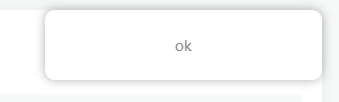
它出现了

 浙公网安备 33010602011771号