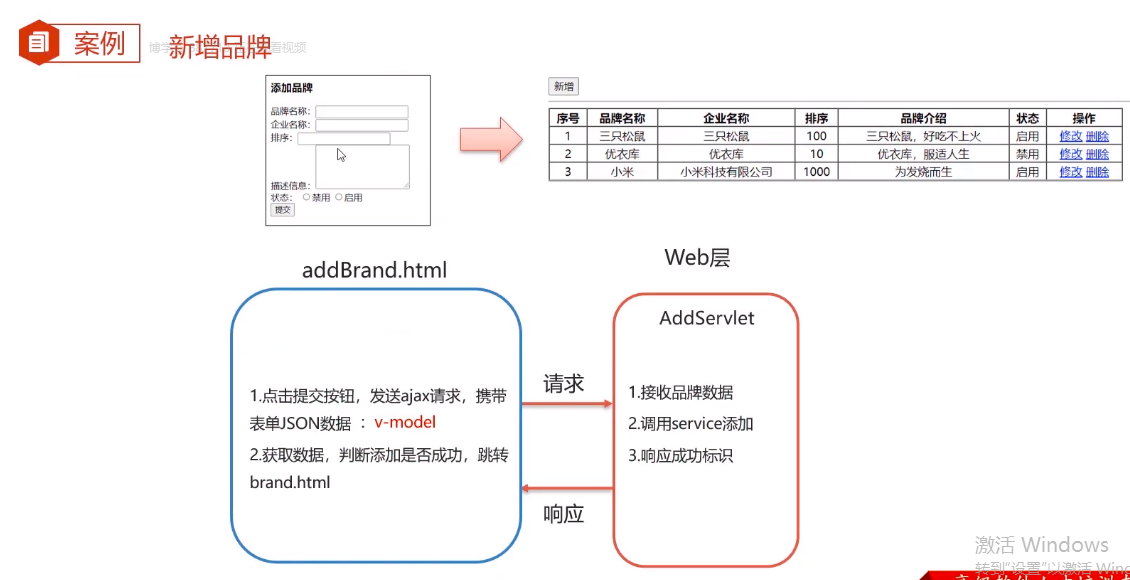
<!DOCTYPE html>
<html lang="en">

<head>
    <meta charset="UTF-8">
    <title>添加品牌</title>
</head>
<body>
<div id="app">
    <h3>添加品牌</h3>
    <form action="" method="post">
        品牌名称:<input id="brandName" v-model="brand.brandName" name="brandName"><br>
        企业名称:<input id="companyName" v-model="brand.companyName" name="companyName"><br>
        排序:<input id="ordered" v-model="brand.ordered" name="ordered"><br>
        描述信息:<textarea rows="5" cols="20" id="description" v-model="brand.description" name="description"></textarea><br>
        状态:
        <input type="radio" name="status" v-model="brand.status" value="0">禁用
        <input type="radio" name="status" v-model="brand.status" value="1">启用<br>

        <input type="button" id="btn" @click="submitFrom" value="提交">
    </form>
</div>
<script src="js/axios-0.18.0.js"></script>
<script src="js/vue.js"></script>

<script>

    new Vue({
        el:"#app",
        data(){
            return{
                brand:{}
            }

        },
        methods:{
            submitFrom(){
                var _this=this;
                //发送ajax请求,添加
                axios({
                    method: "post",
                    url: "http://localhost:8080/brand-demo/addServlet",
                    data: _this.brand
                }).then(function (resp) {
                    //判断响应数据是否为success
                    if (resp.data == "success") {
                        // 重新查询
                        location.href = "http://localhost:8080/brand-demo/brand.html";
                    }
                })

            }

        }
    })
   /* //1. 因为要用异步响应所以没用提交按钮,提交按钮是同步的
    // 给按钮绑定单击事件
    document.getElementById("btn").onclick = function () {
        // 将表单数据转为json
        let formData = {
            brandName: "",
            companyName: "",
            ordered: "",
            description: "",
            status: "",
        };
        // 获取表单数据
        let brandName = document.getElementById("brandName").value;
        //设置数据
        formData.brandName = brandName;

        // 获取表单数据
        let companyName = document.getElementById("companyName").value;
        //设置数据
        formData.companyName = companyName;

        // 获取表单数据
        let ordered = document.getElementById("ordered").value;
        //设置数据
        formData.ordered = ordered;

        // 获取表单数据
        let description = document.getElementById("description").value;
        //设置数据
        formData.description = description;

        // 获取表单数据
        let status = document.getElementsByName("status");
        //遍历status里的数据 1 0
        //使用checked那个被选中checked就为true
        //然后进入if把数据再设置给formData.status
        for (let i = 0; i < status.length; i++) {
            if (status[i].checked) {
                formData.status = status[i].value;
            }
        }
        //然后把所有设置过的数据输出
        console.log(formData);//console.log:它可以接受一个或多个参数,将它们连接起来输出

        //2. 发送ajax请求
        axios({
            method: "post",
            url: "http://localhost:8080/brand-demo/addServlet",
            data: formData
        }).then(function (resp) {
            //判断响应数据是否为success
            if (resp.data == "success") {
                // 重新查询
                location.href = "http://localhost:8080/brand-demo/brand.html";
            }
        })
    }*/
</script>


</body>
</html>


 浙公网安备 33010602011771号