
Jenkins插件开发指南
创建项目
更详细步骤建议直接参考Jenkins的官方文档
运行maven脚本生成项目
mvn -U archetype:generate -Dfilter="io.jenkins.archetypes:"
Choose archetype:
1: remote -> io.jenkins.archetypes:empty-plugin (Skeleton of a Jenkins plugin with a POM and an empty source tree.)
2: remote -> io.jenkins.archetypes:global-configuration-plugin (Skeleton of a Jenkins plugin with a POM and an example piece of global configuration.)
3: remote -> io.jenkins.archetypes:global-shared-library (Uses the Jenkins Pipeline Unit mock library to test the usage of a Global Shared Library)
4: remote -> io.jenkins.archetypes:hello-world-plugin (Skeleton of a Jenkins plugin with a POM and an example build step.)
5: remote -> io.jenkins.archetypes:scripted-pipeline (Uses the Jenkins Pipeline Unit mock library to test the logic inside a Pipeline script.)
Choose a number or apply filter (format: [groupId:]artifactId, case sensitive contains): :
选择生成的项目,这里建议选择4带有helloword的项目
Choose io.jenkins.archetypes:hello-world-plugin version:
1: 1.1
2: 1.2
3: 1.3
4: 1.4
5: 1.5
Choose a number: 5: 5
…
[INFO] Using property: groupId = unused
Define value for property 'artifactId': demo
Define value for property 'version' 1.0-SNAPSHOT: :
[INFO] Using property: package = io.jenkins.plugins.sample
Confirm properties configuration:
groupId: unused
artifactId: demo
version: 1.0-SNAPSHOT
package: io.jenkins.plugins.sample
填入相关的groupId/artifactId即可生成项目
运行/调试项目
运行项目命令 mvn hpi:run
打包项目 mvn package
打包项目后会在target目录下生成.hpi文件
插件debug
1.运行 set MAVEN_OPTS="-Xdebug -Xrunjdwp:transport=dt_socket,server=y,address=8000,suspend=n" 命令
2.运行插件 mvn hpi:run
3.在ide中配置远程调试
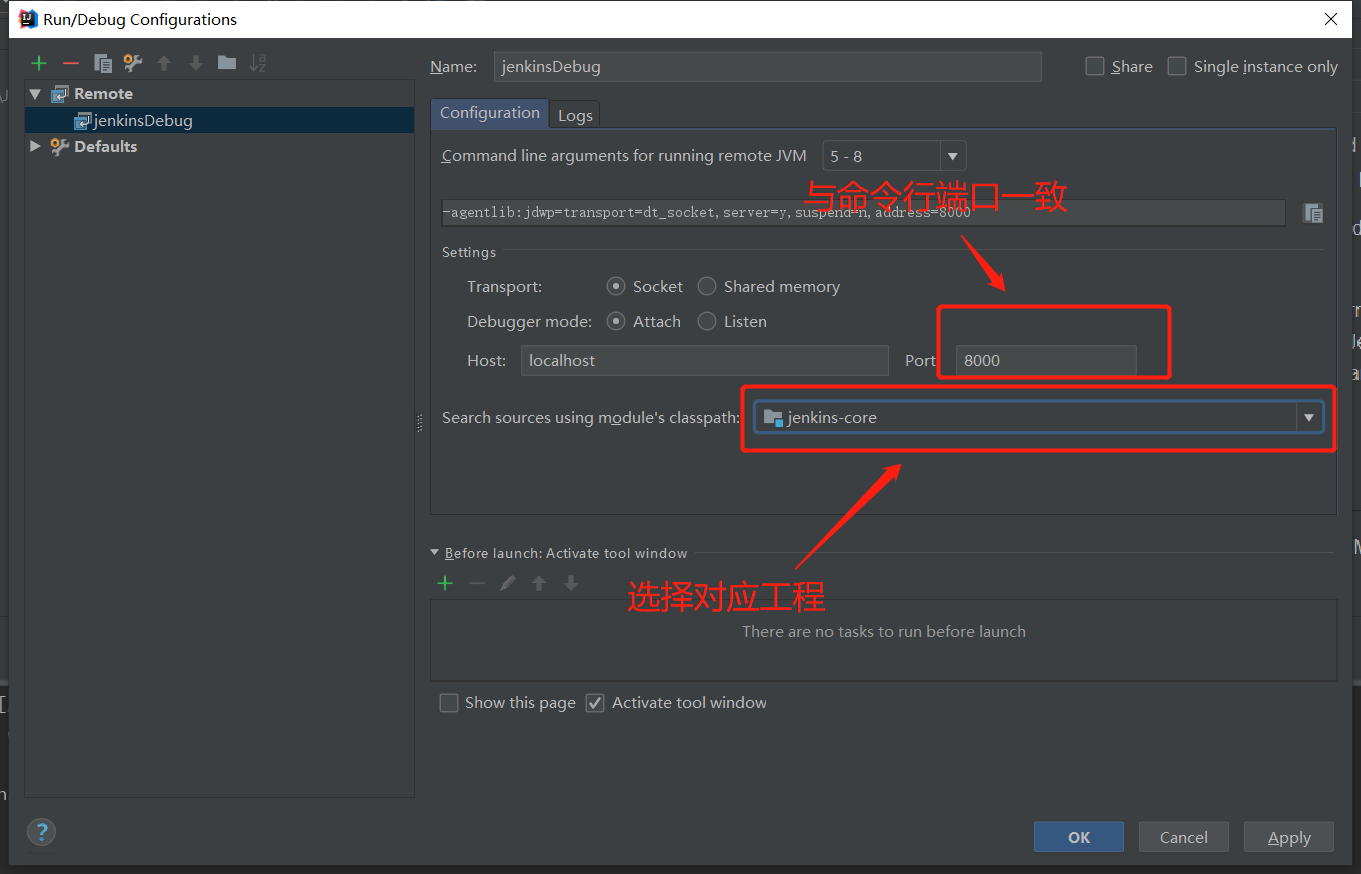
4.运行远程调试

jenkins插件切入点
插件的切入点决定了插件的运行时刻
在本次的开发中尝试了两种不同的切入点 构建步骤与构建后步骤
构建后步骤继承 hudson.tasks.Recoder
构建步骤继承 hudson.tasks.Builder
然后重写相应的 perform() 方法。在perform()方法中实现相应的逻辑即可。
更多拓展点可以参考官方文档
踩坑点
jenkins的分布式文件系统
当jenkins使用多个slave节点时会与,slave节点构成一套分布式系统,获取文件时不能使用常规的new File(path)来获取文件
jenkins中封装了一套分布式的文件系统的接口 hudson.FilePath 使用 new FilePath(hudson.remoting.VirtualChannel channel, String remote)
可以创建一个FilePath对象,其中channel 可以从jenkins提供的插件拓展点的参数中获取。remote 为文件路径。FilePath的API与java的内置File类似。更多关于FilePath的相关操作可以参考官方文档

 浙公网安备 33010602011771号