
celery异步任务和定时任务
项目结构:
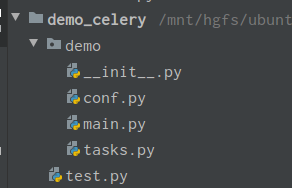
1.配置文件conf.py
 1 from celery.schedules import crontab
 2
 3 broker_url = 'redis://127.0.0.1:6379/8'  # broker 任务保存
 4 result_backend = 'redis://127.0.0.1:6379/9'  # result  结果保存
 5
 6 task_serializer = 'json'  # 任务序列化方式
 7 result_serializer = 'json'  # 结果的序列化方式
 8 accept_content = ['json']  # 允许的序列化方式,忽略其他方式
 9 result_expires = None
10 timezone = 'Asia/Shanghai'  # 时区
11 enable_utc = False  # 不使用UTC
12
13 # 任务执行错误时专用队列
14 task_routes = {
15     'tasks.add': 'low-priority',
16 }
17
18 # 执行任务限速 每分钟允许执行10个任务
19 task_annotations = {
20     'tasks.add': {'rate_limit': '10/m'}
21 }
22 # 定时任务
23 beat_schedule = {
24     'ice_tea': {
25         'task': 'ice',   # 任务名称
26         'schedule': crontab(minute='*/1'),  # 每分钟执行一次
27         'args':()  # 任务函数参数
28     },
29 }
2.main.py
1 from celery import Celery 2 3 app = Celery("test") 4 app.config_from_object('demo.conf') 5 app.autodiscover_tasks(['demo.tasks'])
3.tasks.py
1 from .main import app 2 import time 3 4 @app.task(name="add") 5 def test_add(x, y): 6 return x + y 7 8 @app.task(name='sub') 9 def test_sub(a, b): 10 return a * b 11 12 @app.task(name='ice') 13 def ice_tea(): 14 time.sleep(3) 15 print('ice_tea end') 16 return True
4.test.py
1 from demo.tasks import test_add
2 test_add.delay(2,3)   # 消费任务
执行命令:
执行定时任务时, Celery会通过celery beat进程来完成。Celery beat会保持运行, 一旦到了某一定时任务需要执行时, Celery beat便将其加入到queue中. 不像worker进程, Celery beat只需要一个即可。而且为了避免有重复的任务被发送出去,所以Celery beat仅能有一个。
hx@ubuntu:/mnt/hgfs/ubuntu share file/demo_celery$ celery -A demo.main beat
/mnt/hgfs/ubuntu share file/demo_celery$ celery -A demo.main worker -l info

 浙公网安备 33010602011771号