Android学习之——切换应用主题实现日间和夜间效果的更换
前言
智能手机的迅速普及,大大的丰富了我们的娱乐生活。现在大家都喜欢晚上睡觉前玩会儿手机,但是应用的日间模式往往亮度太大,对眼睛有较为严重的伤害。
因此,如今的应用往往开发了日间和夜间两种模式供用户切换使用,那日间和夜间模式切换究竟是怎样实现的呢?这就是我们今天学习的内容。
思路
- 设置主题:
setTheme(int resid)
setTheme()方法应该被在Context中的所有View被实例化之前被调用(例如在setContentView(View)之前)。如下所示:
setTheme(theme);
super.onCreate(savedInstanceState);
setContentView(R.layout.activity_main);
- 主题样式:
为了简单在这里我们使用继承自Theme.AppCompat.Light.DarkActionBar的主题样式来代替日间模式。如有其他要求,可以自定义来实现。
同理,使用继承自Theme.AppCompat的主题样式来代替夜间模式。
- 重新生成activity
由setTheme()方法只能在View实例化之前被调用,所以,在切换主题后,需要重新生成一次activity以调用setTheme()方法。
Intent intent = getIntent();
overridePendingTransition(0, 0);//不设置进入退出动画
intent.addFlags(Intent.FLAG_ACTIVITY_NO_ANIMATION);
finish();
overridePendingTransition(0, 0);
startActivity(intent);
- 保存主题到本地
使用SharedPreferences保存用户所选主题到本地。
public class SharedPreferrenceHelper {
private static final String THEME = "theme";
public static void settheme(Context context,String theme){
SharedPreferences sp = context.getSharedPreferences("demo",Context.MODE_PRIVATE);
SharedPreferences.Editor editor = sp.edit();
editor.putString(THEME,theme);
editor.apply();
}
public static String gettheme(Context context){
SharedPreferences sp = context.getSharedPreferences("demo",Context.MODE_PRIVATE);
return sp.getString(THEME,"1");
}
}
- 获得用户所选主题和切换主题
获得应用主题。
public static int getAppTheme(Context context){
String value = SharedPreferrenceHelper.gettheme(context);
switch (Integer.valueOf(value)){
case 1:
return R.style.AppTheme;
case 2:
return R.style.AppThemeDark;
default:
return R.style.AppTheme;
}
}
切换主题。
public static void switchAppTheme(Context context){
String value = SharedPreferrenceHelper.gettheme(context);
switch (Integer.valueOf(value)){
case 1:
SharedPreferrenceHelper.settheme(context,"2");
break;
case 2:
SharedPreferrenceHelper.settheme(context,"1");
break;
default:
SharedPreferrenceHelper.settheme(context,"1");
break;
}
}
全部代码
public class MainActivity extends ActionBarActivity {
TextView mTextView;
private int theme = 0;
private static final String TAG = "MainActivity";
@Override
protected void onResume() {
Log.d(TAG,"onResume");
super.onResume();
if(theme==Utils.getAppTheme(this)){
}else{
reload();
}
}
@Override
protected void onDestroy() {
super.onDestroy();
Log.d(TAG,"onDestroy");
}
@Override
protected void onSaveInstanceState(Bundle outState) {
super.onSaveInstanceState(outState);
outState.putInt("theme",theme);
}
@Override
protected void onCreate(Bundle savedInstanceState) {
if(savedInstanceState==null){
theme=Utils.getAppTheme(this);
}else{
theme=savedInstanceState.getInt("theme");
}
setTheme(theme);
super.onCreate(savedInstanceState);
Log.d(TAG,"onCreate");
setContentView(R.layout.activity_main);
...
}
@Override
public boolean onCreateOptionsMenu(Menu menu) {
// Inflate the menu; this adds items to the action bar if it is present.
getMenuInflater().inflate(R.menu.menu_main, menu);
return true;
}
@Override
public boolean onOptionsItemSelected(MenuItem item) {
// Handle action bar item clicks here. The action bar will
// automatically handle clicks on the Home/Up button, so long
// as you specify a parent activity in AndroidManifest.xml.
int id = item.getItemId();
//noinspection SimplifiableIfStatement
if (id == R.id.action_settings) {
return true;
}
if(id==R.id.action_switch_theme){
Utils.switchAppTheme(this);
reload();
return true;
}
return super.onOptionsItemSelected(item);
}
public void reload() {
Intent intent = getIntent();
overridePendingTransition(0, 0);//不设置进入退出动画
intent.addFlags(Intent.FLAG_ACTIVITY_NO_ANIMATION);
finish();
overridePendingTransition(0, 0);
startActivity(intent);
}
@Override
protected void onRestart() {
super.onRestart();
Log.d(TAG, "onRestart");
}
@Override
protected void onPause() {
super.onPause();
Log.d(TAG,"onPause");
}
}
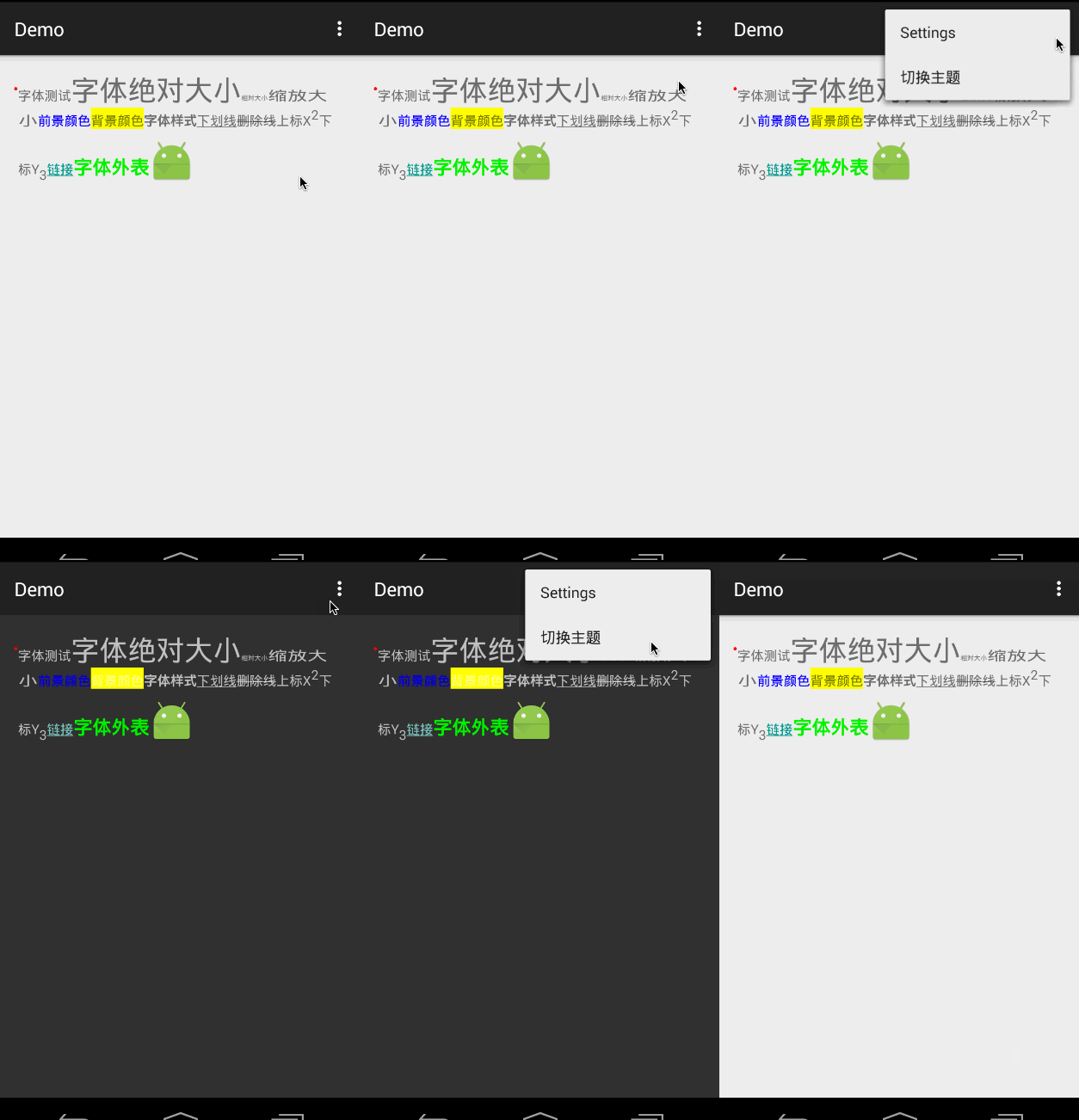
效果图

 浙公网安备 33010602011771号