

C# 委托异步调用及回调解析
本文将主要讲解委托的“同步调用”、“异步调用”、“异步回调”。
什么是委托、回调?
委托是一种方法类型,委托可以把方法的具体实现交给另一个类(委托对象)来管理。在一个类中调用另一个类的方法,此过程叫回调。
1、如下代码,首先定义一个方法模拟实际开发过程中比较耗时的业务逻辑处理过程。
 1  /// <summary>
 2         /// 模拟业务中比较耗时的操作
 3         /// </summary>
 4         /// <param name="sParm"></param>
 5         private void DoSomething(string sParm)
 6         {
 7             long Result = 0;
 8
 9             Console.WriteLine($"this is DoSomething Start  {Thread.CurrentThread.ManagedThreadId}");
10             for (int i = 0; i < 1000000; i++)
11             {
12                 Result += i;
13             }
14             Thread.Sleep(2000);
15             Console.WriteLine($"this is Domething End {Thread.CurrentThread.ManagedThreadId}");
16         }
2、Invoke实现委托同步调用,代码如下。
 1  #region 委托调用Invoke
 2         /// <summary>
 3         /// 同步方法执行顺序依次是
 4         /// button1_Click_同步方法  start
 5         /// this is DoSomething Start
 6         /// this is DoSomething End
 7         /// button1_Click_同步方法  End
 8         /// </summary>
 9         /// <param name="sender"></param>
10         /// <param name="e"></param>
11         private void btnSync_Click(object sender, EventArgs e)
12         {
13             Console.WriteLine("btnSync_Click同步方法  start");
14             Action<string> action = this.DoSomething;
15             action.Invoke("btnSync_Click");  //;利用委托调用Domething方法,这块实际上和直接调用Domething方法没什么区别
16             Console.WriteLine("btnSync_Click同步方法  End");
17         }
18
19 #endregion
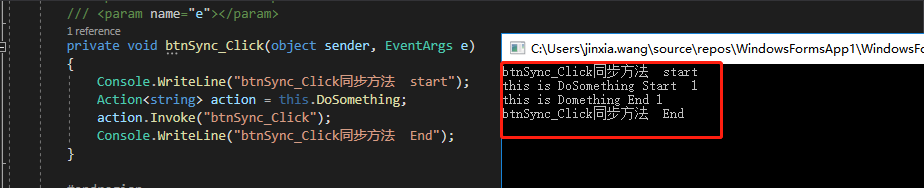
从控制台打印信息可以很直观的看到,同步调用时代码的执行顺序依次从上到下,一直等到被调用的DoSomething方法执行结束后,
代码才向下执行并且打印btnSync_Click同步方法 End
3、异步调用 :BeginInvoke 实现委托的异步调用,代码如下。
 1   #region  委托的异步调用及回调BeginInvoke
 2         /// <summary>
 3         /// 1、异步方法执行顺序
 4         /// 2、异步回调
 5         /// </summary>
 6         /// <param name="sender"></param>
 7         /// <param name="e"></param>
 8
 9         private void btn_Async_Click(object sender, EventArgs e)
10         {
11             Console.WriteLine("btn_Async_Click异步方法  start");
12             int P = 0;
13             AsyncCallback asyncCallback = t =>    //:t 参数实际上是委托的异步调用BeginInvoke返回的结果作为参数
14             {
15                 Console.WriteLine("在这里处理异步执行完成之后需要完成的业务操作");
16                 if (t.IsCompleted)
17                 {
18                      P=1;
19                     Console.WriteLine($"P={P}");
20                 }
21             };
22
23             Action<string> action = this.DoSomething;
24            //IAsyncResult tr = action.BeginInvoke("btn_Async_Click", new AsyncCallback(UpdateInstanceP), null);
25             action.BeginInvoke("btn_Async_Click", asyncCallback, null);  //:lambala表达式方式
26             Console.WriteLine("btn_Async_Click异步方法  End");
27         }
28         #endregion
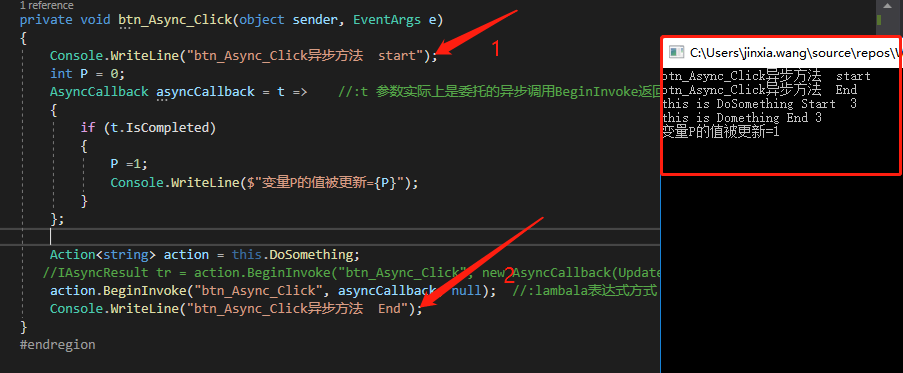
我们可以看到,异步方法执行顺序和同步方法不同。异步调用DoSomething方法之后,程序并没有等待方法处理完成,而是跳过等待继续往下执行。
并且我们可以看出回调函数一开始并没有执行,而是在DoSomething方法执行结束后才会执行回调函数。所以最后“变量P的值才被更新为1”。
4、以上我们定义的方法都没有返回值。但是当程序希望获取已完成的异步方法的结果时,可以检查BeginInvoke返回的IAsyncResult的IsCompleted属性,或者调用委托的EndInvoke方法来等待委托执行完成。 1 /// <summary>
 2         ///
 3         /// </summary>
 4         /// <param name="sender"></param>
 5         /// <param name="e"></param>
 6         private void btnAsyn_WithReturn_Click(object sender, EventArgs e)
 7         {
 8
 9             #region  判断加EndInvoke方式
10             Stopwatch watchStop = new Stopwatch();
11             watchStop.Start();
12             Func<string,long> func =this.ReturnResult;
13             IAsyncResult tr= func.BeginInvoke("",null,null);
14             while (!tr.IsCompleted)
15             {
16                 Thread.Sleep(200);  //:优点:1、边等待边操作,比如用户提示      2、不足点:可能存在误差,最多200ms
17             }
              //tr.AsyncWaitHandle.WaitOne();  //:优点:1、等到异步完成,没有损耗   2、不足:没办法做提示
              //tr.AsyncWaitHandle.WaitOne(2000);  //:优点:1、最多等待2000ms,可以做超时处理
18             long result = func.EndInvoke(tr);
19             Console.WriteLine( $"异步方法返回的结果值{result}");
20             watchStop.Stop();
21             Console.WriteLine("The second RunTime------watchStop-----:{0}", watchStop.ElapsedMilliseconds);
22             #endregion
23
24
25             #region  EndInvoke方式
26             Stopwatch watchStop1 = new Stopwatch();
27             watchStop1.Start();
28             Func<string, long> func1 = this.ReturnResult;
29             IAsyncResult tr1 = func1.BeginInvoke("", null, null);
30             long result1 = func1.EndInvoke(tr1);
31             Console.WriteLine($"异步方法返回的结果值{result1}");
32             watchStop1.Stop();
33             Console.WriteLine("The second RunTime1-----------watchStop1----------:{0}", watchStop1.ElapsedMilliseconds);
34             #endregion
35
36
37             #region 回调方式获取结果
38             Stopwatch watchStop2 = new Stopwatch();
39             watchStop2.Start();
40             AsyncCallback asyncCallback = t =>
41             {
42                 AsyncResult ar = (AsyncResult)t;
43                 Func<string, long> del = (Func<string, long>)ar.AsyncDelegate;
44                 //回调方法中调用了EndInvoke
45                 long result3 = del.EndInvoke(t);
46                 Console.WriteLine($"异步方法返回的结果值{result3}");
47                 watchStop2.Stop();
48                 Console.WriteLine("The second RunTime1-----------watchStop2----------:{0}", watchStop2.ElapsedMilliseconds);
49             };
50
51             Func<string, long> func2 = this.ReturnResult;
52             IAsyncResult tr2 = func2.BeginInvoke("", asyncCallback, null);
53             #endregion
54         }
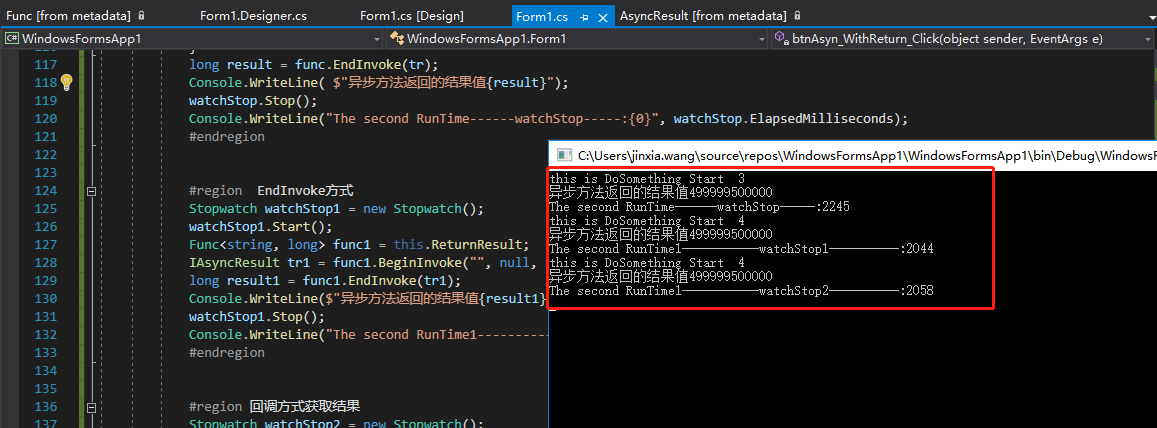
以下是执行结果。
5、总结
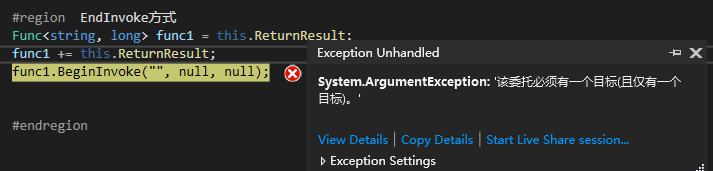
1、多播委托不能异步调用BeginInvoke
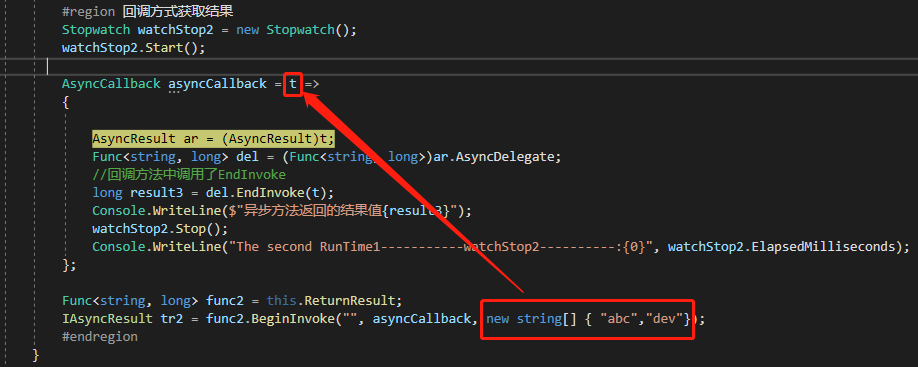
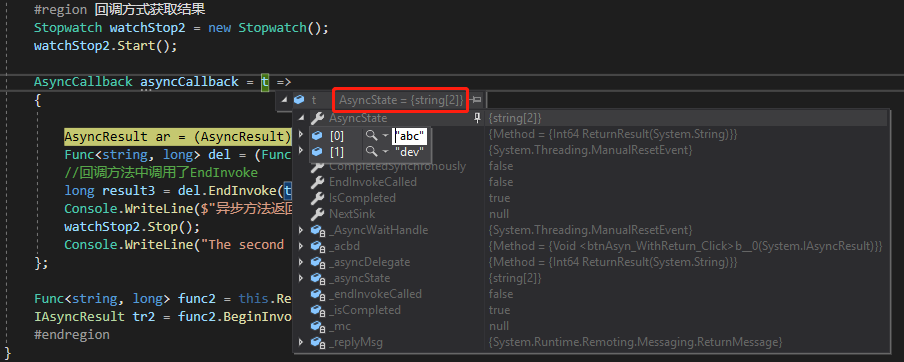
2、BeginInvoke 第三个参数,传递之后可以在回调函数 通过AsyncState属性获取,如下图所示。

 浙公网安备 33010602011771号