
Spring Boot 异步任务
Spring Boot 异步任务
在实际应用开发中,经常会遇到一些耗时操作(如发送邮件、发送短信、数据同步等),如果这些操作在主线程中执行,会导致接口响应缓慢,影响用户体验。Spring Boot 提供了便捷的异步任务支持,可将耗时操作异步化处理,不阻塞主线程,提升系统响应速度。
其他代码在另一篇博客,这儿不再复制粘贴 https://www.cnblogs.com/Jing61/p/19461983
实现步骤
开启异步任务支持
在 Spring Boot 启动类上添加 @EnableAsync 注解,开启异步任务功能。
package com.springboot;

import org.mybatis.spring.annotation.MapperScan;
import org.springframework.boot.SpringApplication;
import org.springframework.boot.autoconfigure.SpringBootApplication;
import org.springframework.scheduling.annotation.EnableAsync;
import org.springframework.scheduling.annotation.EnableScheduling;

@SpringBootApplication
@MapperScan("com.springboot.mapper") // 扫描Mapper接口(非异步必需,项目原有配置)
@EnableAsync // 开启异步任务支持(核心注解)
public class SpringbootApplication {
    public static void main(String[] args) {
        // 初始化 SpringBoot 环境
        SpringApplication.run(SpringbootApplication.class, args);
    }
}
定义异步任务类
创建异步任务类,通过 @Component 注解将其注册为 Spring Bean,在需要异步执行的方法上添加 @Async 注解。
支持两种类型的异步任务:无返回值和有返回值。
异步任务类完整代码
package com.springboot.aspect;

import org.springframework.scheduling.annotation.Async;
import org.springframework.scheduling.annotation.AsyncResult;
import org.springframework.stereotype.Component;

import java.util.concurrent.Future;

@Component // 注册为Spring Bean
public class AsyncTask {
    /**
     * 无返回值异步任务:模拟发送注册激活邮件
     * 特点:不返回结果,仅执行异步操作
     */
    @Async // 声明该方法为异步执行
    public void sendEmail() {
        System.out.println("开始发送邮件....");
        try {
            Thread.sleep(5000); // 模拟耗时操作(5秒)
        } catch (InterruptedException e) {
            System.out.println("发送邮件失败!");
            e.printStackTrace();
        }
        System.out.println("邮件发送成功!");
    }

    /**
     * 有返回值异步任务:模拟发送手机验证码
     * 特点:返回Future<T>类型结果,支持获取异步执行状态和结果
     * @param phone 接收验证码的手机号
     * @return Future<String> 异步执行结果
     */
    @Async
    public Future<String> sendCode(String phone) {
        System.out.println("开始发送验证码(手机号:" + phone + ")....");
        try {
            Thread.sleep(5000); // 模拟耗时操作(5秒)
        } catch (InterruptedException e) {
            System.out.println("发送验证码失败(手机号:" + phone + ")!");
            e.printStackTrace();
            return new AsyncResult<>("验证码发送失败!");
        }
        System.out.println("验证码发送成功(手机号:" + phone + ")!");
        return new AsyncResult<>("验证码发送成功!");
    }
}
关键说明
@Async:标记方法为异步执行,Spring 会自动为其创建异步代理,在独立线程中执行。Future<T>:有返回值异步任务的核心。AsyncResult<T>:Spring 提供的Future<T>实现类,用于封装异步执行结果。
业务层调用异步任务
在 Service 层中注入异步任务类实例,在业务逻辑中调用异步方法。
以用户注册为例(注册成功后异步发送激活邮件):
package com.springboot.service.bean;

import com.github.pagehelper.PageHelper;
import com.github.pagehelper.PageInfo;
import com.springboot.aspect.AsyncTask;
import com.springboot.entity.User;
import com.springboot.mapper.UserMapper;
import com.springboot.service.UserService;
import jakarta.annotation.Resource;
import org.springframework.stereotype.Service;
import org.springframework.transaction.annotation.Propagation;
import org.springframework.transaction.annotation.Transactional;

@Service
@Transactional // 事务管理(非异步必需,项目原有配置)
public class UserServiceBean implements UserService {
    @Resource
    private UserMapper userMapper; // 数据访问层接口(非异步必需)
    @Resource
    private AsyncTask asyncTask; // 注入异步任务类

    // 其他业务方法(略)...

    @Override
    @Transactional(propagation = Propagation.REQUIRED)
    public int insert(User user) {
        // 1. 执行同步业务:保存用户信息到数据库
        int insertCount = userMapper.insert(user);
        // 2. 调用异步任务:发送激活邮件(不阻塞主线程)
        asyncTask.sendEmail();
        return insertCount;
    }

    // 其他业务方法(略)...
}
控制层提供接口测试
创建 Controller 层接口,供前端调用,测试异步任务效果。
package com.springboot.controller;

import com.github.pagehelper.PageInfo;
import com.springboot.aspect.AsyncTask;
import com.springboot.entity.User;
import com.springboot.entity.dto.ResponseResult;
import com.springboot.service.UserService;
import jakarta.annotation.Resource;
import org.springframework.web.bind.annotation.*;

import java.util.concurrent.Future;

@RestController
@RequestMapping("/user")
public class UserController {
    @Resource
    private UserService userService; // 业务层接口
    @Resource
    private AsyncTask async; // 注入异步任务类

    // 其他接口(略)...

    /**
     * 测试无返回值异步任务:用户注册(异步发送邮件)
     */
    @PostMapping("/insert")
    public ResponseResult<String> insert() {
        // 构造测试用户
        User user = new User().setUsername("test_async").setPassword("test_async");
        // 调用业务层方法(内部触发异步邮件发送)
        userService.insert(user);
        // 主线程快速响应,无需等待邮件发送完成
        return ResponseResult.ok("用户注册成功,激活邮件已异步发送!");
    }

    /**
     * 测试有返回值异步任务:发送手机验证码
     * @param phone 手机号
     */
    @GetMapping("/async/{phone}")
    public ResponseResult<String> sendCodeAsync(@PathVariable String phone) {
        var future = async.sendCode(phone);
        return future == null ? ResponseResult.fail("发送验证码失败") : ResponseResult.ok(future.toString());
    }

    // 其他接口(略)...
}
测试验证
使用 Postman 等工具调用接口,验证异步任务效果。
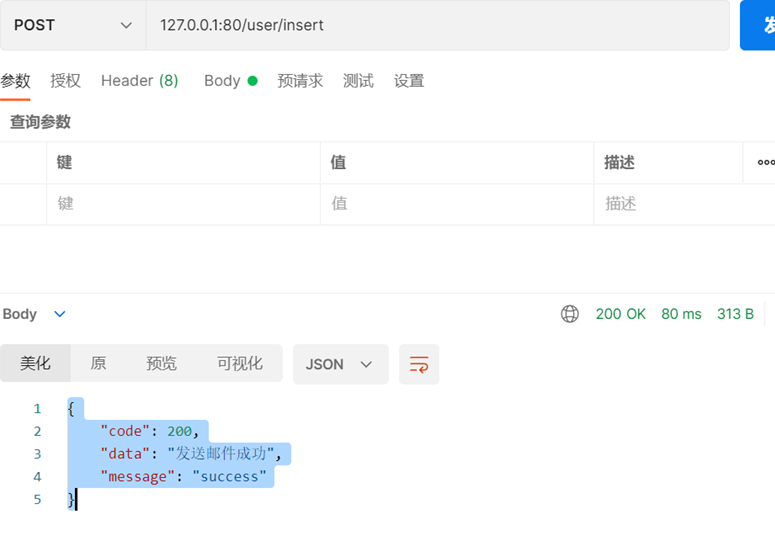
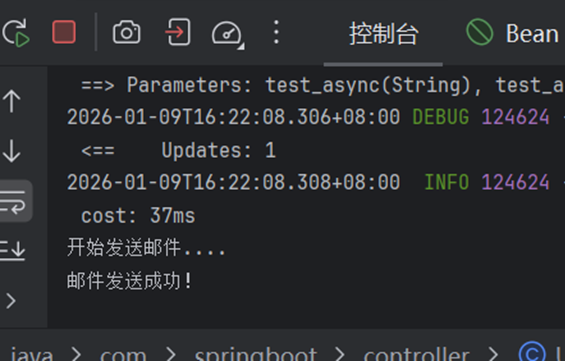
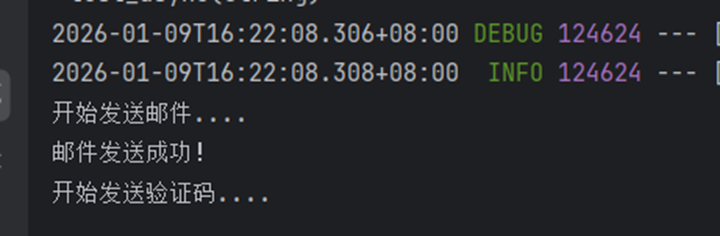
无返回值异步任务测试
- 请求地址:
POST http://127.0.0.1:80/user/insert - 测试结果:
![image]()
![image]()
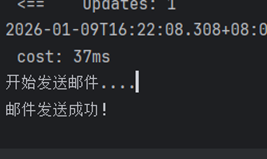
5秒后:
![image]()
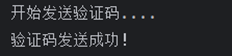
有返回值异步任务测试
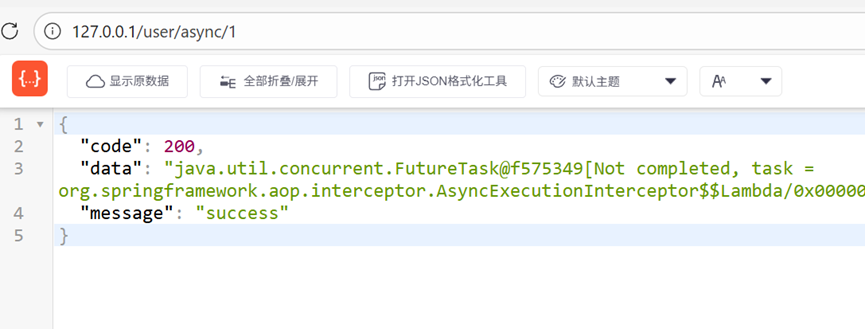
- 请求地址:
GET http://127.0.0.1:80/user/async/1 - 测试结果:
![image]()
![image]()
5秒后:
![image]()
关键注意事项
-
@Async 注解生效条件:
- 异步方法必须是 public 修饰(Spring AOP 代理要求)。
- 不能在同一个类中调用异步方法(会绕过代理,导致异步失效),需通过依赖注入的实例调用。
- 启动类必须添加
@EnableAsync注解。
-
事务与异步的关系:
- 异步任务方法若需事务支持,需在异步方法上单独添加
@Transactional注解(主线程事务不会传递到异步线程)。 - 示例中
insert方法的事务仅作用于用户保存操作,邮件发送的异步任务不受该事务影响。
- 异步任务方法若需事务支持,需在异步方法上单独添加

 浙公网安备 33010602011771号