
Spring Boot 定时任务
Spring Boot 定时任务
Spring Boot 提供了简洁高效的定时任务支持,通过注解驱动即可快速实现各类定时任务(固定频率、固定延迟、Cron 表达式等),还可以统一配置管理。
其他代码在另一篇博客,这儿不再复制粘贴 https://www.cnblogs.com/Jing61/p/19461983
基础定时任务实现
步骤 1:开启定时任务支持
在 Spring Boot 启动类上添加 @EnableScheduling 注解,开启定时任务功能:
package com.springboot;

import org.mybatis.spring.annotation.MapperScan;
import org.springframework.boot.SpringApplication;
import org.springframework.boot.autoconfigure.SpringBootApplication;
import org.springframework.scheduling.annotation.EnableScheduling;

@SpringBootApplication
@MapperScan("com.springboot.mapper") // MyBatis  mapper 扫描(非定时任务必需,根据项目需求保留)
@EnableScheduling // 关键注解:开启定时任务支持
public class SpringbootApplication {
    public static void main(String[] args) {
        SpringApplication.run(SpringbootApplication.class, args);
    }
}
步骤 2:定义定时任务类
创建定时任务类,使用 @Component 注解将其注入 Spring 容器,通过 @Scheduled 注解定义具体任务。
固定频率任务(fixedRate)
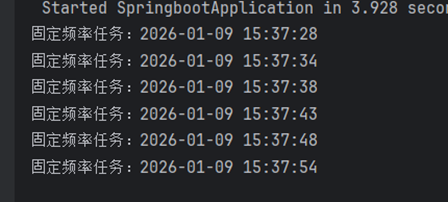
特点:以上次任务开始时间为基准,间隔固定时间执行(无论上次任务是否完成)。
package com.springboot.aspect;

import org.springframework.scheduling.annotation.Scheduled;
import org.springframework.stereotype.Component;

import java.time.LocalDateTime;
import java.time.format.DateTimeFormatter;

@Component // 注入 Spring 容器
public class ScheduledTasks {
    // 日期格式化工具(线程安全)
    private static final DateTimeFormatter FORMATTER = DateTimeFormatter.ofPattern("yyyy-MM-dd HH:mm:ss");

    /**
     * 固定频率任务:每 5000ms(5秒)执行一次
     */
    @Scheduled(fixedRate = 5000)
    public void taskWithFixedRate() {
        String now = LocalDateTime.now().format(FORMATTER);
        System.out.println("固定频率任务执行:" + now);
    }
}
启动后控制台输出示例:
初始延迟 + 固定延迟任务(fixedDelay + initialDelay)
特点:
initialDelay:项目启动后,延迟指定时间执行第一次任务;fixedDelay:以上次任务完成时间为基准,间隔固定时间执行(确保上次任务完成后再执行下次)。
@Component
public class ScheduledTasks {
    private static final DateTimeFormatter FORMATTER = DateTimeFormatter.ofPattern("yyyy-MM-dd HH:mm:ss");

    // 其他任务...

    /**
     * 初始延迟任务:项目启动后延迟 1000ms(1秒)执行第一次,后续每 5000ms(5秒)执行一次
     */
    @Scheduled(fixedDelay = 5000, initialDelay = 1000)
    public void taskWithFixedDelay() {
        String now = LocalDateTime.now().format(FORMATTER);
        System.out.println("初始延迟任务执行:" + now);
    }
}
Cron 表达式任务(灵活定时)
特点:支持复杂的定时规则(如每天固定时间、每周特定日期、每月特定时段等),功能最强大。
Cron 表达式语法
格式:秒 分 时 日 月 周(顺序不可乱)
| 位置 | 取值范围 | 特殊字符说明 |
|---|---|---|
| 秒 | 0-59 | *(任意)、-(区间)、/(步长)、,(枚举) |
| 分 | 0-59 | 同上 |
| 时 | 0-23 | 同上 |
| 日 | 1-31 | 同上 + ?(忽略,用于日和周互斥) |
| 月 | 1-12 或 JAN-DEC | 同上 |
| 周 | 1-7 或 SUN-SAT(1=周日,7=周六) | 同上 + ?(忽略) |
常用 Cron 表达式示例
| 表达式 | 含义 |
|---|---|
0 0 0 * * ? |
每天 00:00:00 执行 |
0 10 16 * * 5 |
每周五 16:10:00 执行 |
0 0/30 9-18 * * ? |
每天 9:00-18:00 每30分钟执行 |
0 0 12 ? * WED |
每周三 12:00:00 执行 |
代码实现
@Component
public class ScheduledTasks {
    private static final DateTimeFormatter FORMATTER = DateTimeFormatter.ofPattern("yyyy-MM-dd HH:mm:ss");

    // 其他任务...

    /**
     * Cron 任务:每周五 16:10:00 执行
     */
    @Scheduled(cron = "0 10 16 * * 5") // 每周五 16 点 10 分执行
    public void taskWithCron() {
        String now = LocalDateTime.now().format(FORMATTER);
        System.out.println("Cron 任务执行:" + now);
    }
}
统一管理
实现步骤:自定义定时任务配置类
将 @EnableScheduling 迁移至配置类(更规范),同时配置线程池:
package com.springboot.config;

import org.springframework.context.annotation.Configuration;
import org.springframework.scheduling.annotation.EnableScheduling;
import org.springframework.scheduling.annotation.SchedulingConfigurer;
import org.springframework.scheduling.concurrent.ThreadPoolTaskScheduler;
import org.springframework.scheduling.config.ScheduledTaskRegistrar;

@Configuration
@EnableScheduling // 开启定时任务(替代启动类上的注解)
public class SchedulerConfig implements SchedulingConfigurer {

    @Override
    public void configureTasks(ScheduledTaskRegistrar taskRegistrar) {
        // 1. 创建线程池任务调度器
        ThreadPoolTaskScheduler scheduler = new ThreadPoolTaskScheduler();

        // 2. 配置线程池参数
        scheduler.setPoolSize(10); // 线程池大小:根据任务数量合理设置
        scheduler.setThreadNamePrefix("scheduled-task-"); // 线程名称前缀:便于日志排查
        scheduler.setAwaitTerminationSeconds(60); // 等待终止时间:任务关闭时最多等待60秒
        scheduler.setWaitForTasksToCompleteOnShutdown(true); // 关闭时等待所有任务完成
        scheduler.initialize(); // 初始化线程池

        // 3. 绑定调度器到定时任务注册器
        taskRegistrar.setTaskScheduler(scheduler);
    }
}
配置说明
| 参数 | 作用 | 建议值 |
|---|---|---|
poolSize |
线程池最大线程数 | 5-20(根据任务并发量调整) |
threadNamePrefix |
线程名称前缀 | 便于日志中区分定时任务线程 |
awaitTerminationSeconds |
线程池关闭时的等待时间 | 30-60秒(确保任务正常收尾) |
waitForTasksToCompleteOnShutdown |
关闭时是否等待任务完成 | true(避免强制终止任务导致数据异常) |

 浙公网安备 33010602011771号