
Spring MVC 为控制器添加通知
Spring MVC 为控制器添加通知
与 Spring AOP 一样,Spring MVC 也可以为控制器加入通知,它主要涉及 4 个核心注解,各自承担不同的功能角色:
| 注解 | 作用描述 |
|---|---|
| @ControllerAdvice | 作用于类,标识为全局性的控制器拦截器,可指定作用范围(如特定包),应用于对应控制器 |
| @InitBinder | 允许在构造控制器参数时,加入自定义控制(如参数类型转换、格式化) |
| @ExceptionHandler | 控制器发生异常时,匹配异常类型并跳转至该方法处理,实现统一异常响应 |
| @ModelAttribute | 先于控制器方法执行,返回对象或向数据模型添加属性,传递给被拦截的控制器 |
@ControllerAdvice 与 @InitBinder
问题场景:日期参数类型转换失败
创建控制器 ConverterController,包含日期格式化接口,但直接请求会出现类型转换异常:
package com.controller;

import com.fasterxml.jackson.annotation.JsonFormat;
import org.springframework.stereotype.Controller;
import org.springframework.web.bind.annotation.RequestMapping;
import org.springframework.web.bind.annotation.ResponseBody;

import java.util.Date;

@Controller
public class ConverterController {

    @RequestMapping("/date")
    @ResponseBody
    @JsonFormat(pattern = "yyyy-MM-dd")
    public Date format(Date date) {
        return date;
    }
}
请求结果:
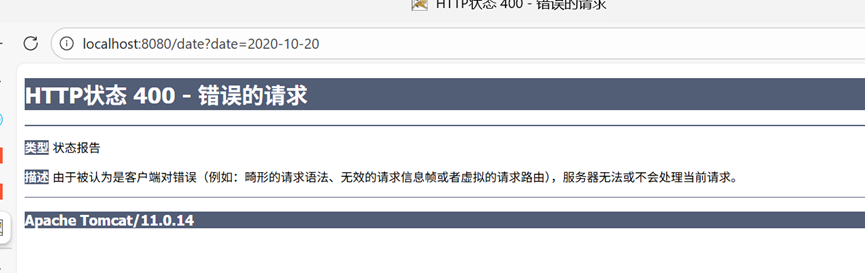
原因:默认无法将字符串 2020-10-20 转换为 Date 类型。
解决方案:通过 @ControllerAdvice + @InitBinder 自定义参数转换
创建全局通知类 CommonControllerAdvice,通过 @InitBinder 注册日期类型编辑器:
package com.controller.advice;

import org.springframework.beans.propertyeditors.CustomDateEditor;
import org.springframework.web.bind.WebDataBinder;
import org.springframework.web.bind.annotation.ControllerAdvice;
import org.springframework.web.bind.annotation.InitBinder;

import java.text.SimpleDateFormat;
import java.util.Date;

@ControllerAdvice(basePackages = "com.controller") // 指定拦截的包
public class CommonControllerAdvice {

    @InitBinder // 允许构造控制器参数的时候加入一定的自定义控制
    public void init(WebDataBinder binder) {
        // 针对日期类型的格式化,CustomDateEditor 是自定义编辑器
        // boolean 值表示是否允许为空(此处为 false,不允许为空)
        binder.registerCustomEditor(Date.class,
                new CustomDateEditor(new SimpleDateFormat("yyyy-MM-dd"),
                        false));
    }
}
关键说明:
@ControllerAdvice(basePackages = "com.controller"):指定仅拦截com.controller包下的控制器WebDataBinder:数据绑定器,用于注册参数转换规则CustomDateEditor:Spring 提供的日期编辑器,指定格式为yyyy-MM-dd
请求结果:
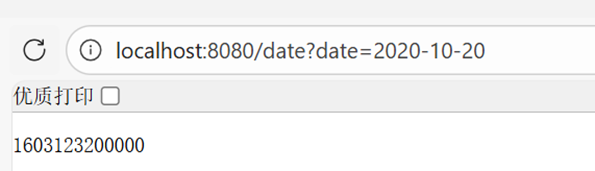
日期参数成功转换为时间戳返回,无需手动定义 Formatter。
@ExceptionHandler(统一异常处理)
问题场景:控制器抛出未处理异常
在 ConverterController 中添加会抛出算术异常的接口:
package com.controller;

import com.fasterxml.jackson.annotation.JsonFormat;
import org.springframework.stereotype.Controller;
import org.springframework.web.bind.annotation.RequestMapping;
import org.springframework.web.bind.annotation.ResponseBody;

import java.util.Date;

@Controller
public class ConverterController {

    // 省略 date 接口...

    @RequestMapping("/exception")
    @ResponseBody
    public String exception() {
        System.out.println(1/0); // 触发算术异常(除以零)
        return "exception";
    }
}
请求结果:
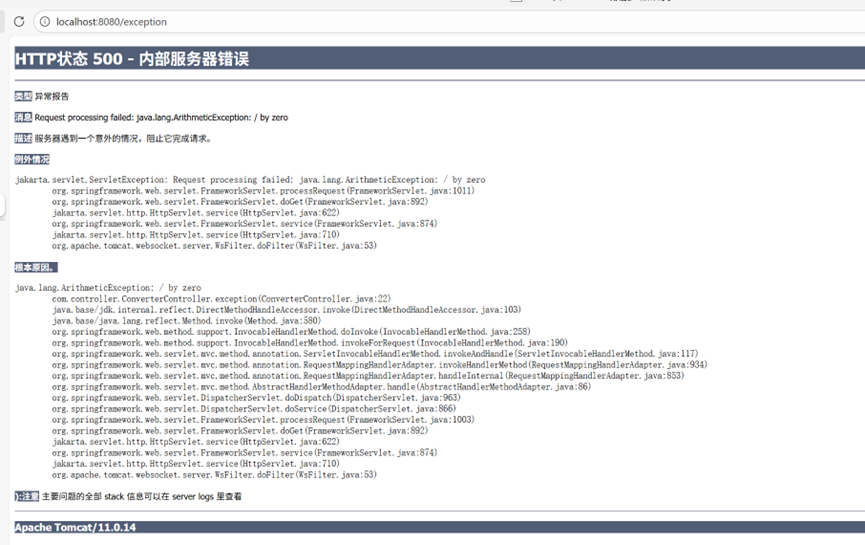
直接返回服务器异常页面,用户体验差。
解决方案:通过 @ExceptionHandler 统一处理异常
创建异常页面 error.jsp
<%--
  Created by IntelliJ IDEA.
  User: Jing61
  Date: 2025/12/29
  Time: 14:01
  To change this template use File | Settings | File Templates.
--%>
<%@ page contentType="text/html;charset=UTF-8" language="java" isErrorPage="true" %>
<html>
<head>
    <title>异常</title>
</head>
<body>
    出错:<%=exception.getMessage()%>
</body>
</html>
在 CommonControllerAdvice 中添加异常处理方法
package com.controller.advice;

import org.springframework.beans.propertyeditors.CustomDateEditor;
import org.springframework.web.bind.WebDataBinder;
import org.springframework.web.bind.annotation.ControllerAdvice;
import org.springframework.web.bind.annotation.ExceptionHandler;
import org.springframework.web.bind.annotation.InitBinder;

import java.text.SimpleDateFormat;
import java.util.Date;

@ControllerAdvice(basePackages = "com.controller") // 指定拦截的包
public class CommonControllerAdvice {

    // 省略 @InitBinder 方法...

    @ExceptionHandler(Exception.class) // 匹配所有 Exception 类型异常
    public String exception() {
        return "error"; // 返回异常视图(error.jsp)
    }
}
关键说明:
@ExceptionHandler(Exception.class):指定处理所有Exception及其子类异常,也可指定具体异常(如ArithmeticException.class)- 方法返回值为视图名称,Spring MVC 会跳转到对应的 JSP 页面
请求结果:
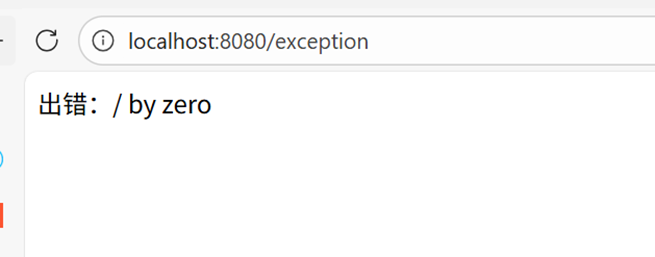
成功跳转到自定义异常页面,展示友好的错误信息。
@ModelAttribute 实战(全局数据模型)
功能说明
@ModelAttribute 注解的方法会在控制器方法执行前运行,可向数据模型(Model)中添加全局属性,所有被拦截的控制器都可访问该属性。
代码
在 CommonControllerAdvice 中添加 @ModelAttribute 方法
package com.controller.advice;

import org.springframework.beans.propertyeditors.CustomDateEditor;
import org.springframework.ui.Model;
import org.springframework.web.bind.WebDataBinder;
import org.springframework.web.bind.annotation.ControllerAdvice;
import org.springframework.web.bind.annotation.ExceptionHandler;
import org.springframework.web.bind.annotation.InitBinder;
import org.springframework.web.bind.annotation.ModelAttribute;

import java.text.SimpleDateFormat;
import java.util.Date;

@ControllerAdvice(basePackages = "com.controller") // 指定拦截的包
public class CommonControllerAdvice {

    // 省略 @InitBinder 方法...
    // 省略 @ExceptionHandler 方法...

    @ModelAttribute
    public void binding(Model model) {
        // 向模型添加全局属性:username = admin
        model.addAttribute("username", "admin");
    }
}
在控制器中获取全局属性
package com.controller;

import com.fasterxml.jackson.annotation.JsonFormat;
import org.springframework.stereotype.Controller;
import org.springframework.web.bind.annotation.ModelAttribute;
import org.springframework.web.bind.annotation.RequestMapping;
import org.springframework.web.bind.annotation.ResponseBody;

import java.util.Date;

@Controller
public class ConverterController {

    // 省略 date、exception 接口...

    @RequestMapping("/attr")
    @ResponseBody
    // 通过 @ModelAttribute 注解获取全局属性 username
    public String getAttr(@ModelAttribute(name = "username") String username) {
        return username; // 返回全局属性值
    }
}
关键说明:
@ModelAttribute方法的Model参数用于存储全局属性,键值对为username -> admin- 控制器方法通过
@ModelAttribute(name = "username")直接获取全局属性,无需手动从Model中提取
请求结果:
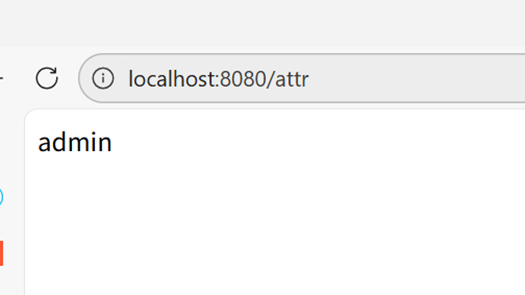
成功获取到全局数据模型中的 username 属性值。
核心注解总结
| 注解 | 执行时机 | 核心作用 |
|---|---|---|
| @ControllerAdvice | 全局生效,标识通知类 | 指定拦截范围(包、注解等),统一管理通知 |
| @InitBinder | 控制器参数绑定前 | 自定义参数转换、格式化(如日期、字符串) |
| @ExceptionHandler | 控制器抛出异常时 | 统一异常处理,返回友好响应(视图/JSON) |
| @ModelAttribute | 控制器方法执行前 | 向全局数据模型添加属性,供所有控制器访问 |

 浙公网安备 33010602011771号