
Spring MVC 表单数据校验
Spring MVC 表单数据校验
在实际工作中,获取数据后的首要步骤是校验数据正确性。前端虽可通过 JS 进行验证,但存在多种绕过方式,无法保障数据安全。因此,服务器端数据校验必不可少,Spring 提供的验证器(Validator)规则可满足这一需求,且验证器会由 Spring MVC 自动加载。本文将采用 JSR 303 校验规范,结合 Hibernate 提供的数据校验器实现数据校验。
JSR 303 注解说明
Spring 支持对 Bean 的功能校验,通过 @Valid 注解标明需要启用注解式验证的 Bean。在 javax.validation.constraints.* 中定义了一系列 JSR 303 规范注解,具体如下:
| 注解 | 限制说明 |
|---|---|
| @Null | 限制只能为 null |
| @NotNull | 限制必须不为 null |
| @AssertFalse | 限制必须为 false |
| @AssertTrue | 限制必须为 true |
| @DecimalMax(value) | 限制必须为一个不大于指定值的数字 |
| @DecimalMin(value) | 限制必须为一个不小于指定值的数字 |
| @Digits(integer, fraction) | 限制必须为一个小数,且整数部分的位数不能超过 integer,小数部分的位数不能超过 fraction |
| @Future | 限制必须是一个将来的日期 |
| @Max(value) | 限制必须为一个不大于指定值的数字 |
| @Min(value) | 限制必须为一个不小于指定值的数字 |
| @Past | 限制必须是一个过去的日期 |
| @Pattern(value) | 限制必须符合指定的正则表达式 |
| @Size(max, min) | 限制字符长度必须在 min 到 max 之间 |
| 限制为邮箱类型 | |
| @NotEmpty | 限制集合不为空 |
| @NotBlank | 限制不为空字符串 |
| @Positive | 限制为正数 |
| @PositiveOrZero | 限制为正数或 0 |
| @Negative | 限制为负数 |
| @NegativeOrZero | 限制为负数或 0 |
| @PastOrPresent | 限制为过去或者现在日期 |
| @FutureOrPresent | 限制为将来或者现在日期 |
依赖配置
使用 JSR 303 校验需添加以下依赖项:
implementation 'jakarta.validation:jakarta.validation-api:3.1.1'
implementation 'org.hibernate.validator:hibernate-validator:9.1.0.Final'
表单页面实现(JSP)
创建添加员工表单页面 add_emp.jsp,用于接收用户输入:
<%--
  Created by IntelliJ IDEA.
  User: Jing61
  Date: 2025/12/25
  Time: 09:39
  To change this template use File | Settings | File Templates.
--%>
<%@ page contentType="text/html;charset=UTF-8" language="java" %>
<html>
<head>
    <title>添加员工</title>
</head>
<body>
    <form action="/emp/save" method="post">
        <div>
            <label>username:</label>
            <input type="text" name="username" placeholder="用户名,长度在4-12位之间" />
        </div>
        <div>
            <label>password:</label>
            <input type="password" name="password" />
        </div>
        <div>
            <label>email:</label>
            <input type="email" name="email" placeholder="电子邮箱"/>
        </div>
        <div>
            <label>phone:</label>
            <input type="text" name="phone" placeholder="手机号码"/>
        </div>
        <div>
            <label>birthday:</label>
            <input type="date" name="birthday" placeholder="生日"/>
        </div>
        <div>
            <label>hire date:</label>
            <input type="date" name="hireDate" placeholder="入职日期"/>
        </div>

        <div>
            <label>salary:</label>
            <input type="number" name="salary" placeholder="薪水"/>
        </div>
        <div>
            <label>intro:</label> <br/>
            <textarea name="intro" rows="5" cols="40" placeholder="员工简介"></textarea>
        </div>
<div>
    <input type="submit" />
</div>

    </form>
</body>
</html>
校验规则定义
基础校验规则
| 字段 | 校验规则 |
|---|---|
| 用户名 | 1. 不允许为空;2. 长度在 4-12 位之间 |
| 密码 | 不允许为空或空串 |
| 电子邮箱 | 1. 不允许为空;2. 必须满足电子邮箱格式 |
| 手机号 | 符合正确的手机号码格式(正则:^1[358]\\d{9}$) |
| 生日 | 必须是一个过去的日期 |
| 入职时间 | 必须是现在或者将来的日期 |
| 工资 | 自定义校验规则:不能低于职位的最低工资,不能高于职位的最高工资 |
| 职位描述 | 长度不超过 200 个字符 |
POJO 类定义(结合注解)
创建 Employee 类,通过 JSR 303 注解定义校验规则:
package com.pojo;

import com.enums.Position;
import jakarta.validation.constraints.*;
import lombok.Data;
import java.time.LocalDate;

@Data
public class Employee {
    private Integer id;

    /**
     * 用户名:
     * 1. 不允许为空
     * 2. 长度在4-12位之间
     */
    @NotNull(message = "用户名不能为空")
    @Size(min = 4, max = 12, message = "用户名长度必须在4-12位之间")
    private String username;

    /**
     * 密码:不允许为空或空串
     */
    @NotBlank(message = "密码不能为空")
    private String password;

    /**
     * 电子邮箱
     * 1. 不允许为空
     * 2. 必须满足电子邮箱格式
     */
    @NotNull(message = "电子邮箱不能为空")
    @Email(message = "邮箱格式不正确")
    private String email;

    /**
     * 手机号:正确的手机号码
     * "^1[358]\\d{9}$":手机号格式:1 开头,第二位是 3、5、8,后面是 9 个数字
     */
    @Pattern(regexp = "^1[358]\\d{9}$", message = "手机号格式不正确")
    private String phone;

    /**
     * 生日:必须是一个过去的日期
     */
    @Past(message = "生日必须是一个过去的日期")
    private LocalDate birthday;

    /**
     * 入职时间:必须一个现在或者将来的日期
     */
    @FutureOrPresent(message = "入职时间必须一个现在或者将来的日期")
    private LocalDate hireDate;

    /**
     * 工资:自定义校验规则:不能低于职位的最低工资,不能高于职位的最高工资
     */
    private int salary;

    /**
     * 职位
     */
    private Position job = Position.CLERK;

    /**
     * 职位描述:长度不超过200个字符
     */
    @Size(max = 200, message = "职位描述长度不能超过200个字符")
    private String intro;
}
控制器实现(校验逻辑处理)
创建 EmployeeController,通过 @Validated 注解启用校验,BindingResult 接收校验错误信息:
package com.controller;

import com.pojo.Employee;
import org.springframework.stereotype.Controller;
import org.springframework.validation.BindingResult;
import org.springframework.validation.annotation.Validated;
import org.springframework.web.bind.annotation.ModelAttribute;
import org.springframework.web.bind.annotation.RequestMapping;

@Controller
@RequestMapping("/emp")
public class EmployeeController {

    /**
     * 注解 @Validated 表示使用JSR303校验
     * @param employee 表单数据
     * @param result 校验不通过时,错误信息会填充进该对象
     * @return 逻辑视图名称
     */
    @RequestMapping("/save")
    public String save(@Validated @ModelAttribute Employee employee, BindingResult result) {
        // 校验不通过
        if (result.hasErrors()) {
            result.getAllErrors().forEach(e -> {
                System.out.println("code:" + e.toString() + ";object name" + e.getObjectName() + ";message" + e.getDefaultMessage());
                System.out.println(e);
                System.out.println("========================================================");
            });
            // 返回添加员工视图
            return "add_emp";
        } else {
            // 保存员工信息
            return "employees";
        }
    }

    @RequestMapping("/add")
    public String saveEmployeeUI() {
        return "add_emp"; // 跳转到添加员工页面
    }
}
Spring MVC 配置(ServletConfig)
配置视图解析器、静态资源、跨域:
package com.config;

import org.hibernate.validator.HibernateValidator;
import org.jspecify.annotations.Nullable;
import org.springframework.context.MessageSource;
import org.springframework.context.annotation.ComponentScan;
import org.springframework.context.annotation.Configuration;
import org.springframework.context.support.ReloadableResourceBundleMessageSource;
import org.springframework.validation.Validator;
import org.springframework.validation.beanvalidation.LocalValidatorFactoryBean;
import org.springframework.web.servlet.config.annotation.*;
import org.springframework.web.servlet.view.InternalResourceViewResolver;

@Configuration
@ComponentScan(basePackages = "com.controller")
@EnableWebMvc // 以注解方式驱动 Spring MVC
public class ServletConfig implements WebMvcConfigurer {
    private final MessageSource messageSource;

    public ServletConfig(MessageSource messageSource) {
        this.messageSource = messageSource;
    }

    /**
     * 配置静态资源不被拦截
     * @param registry 资源处理器
     */
    @Override
    public void addResourceHandlers(ResourceHandlerRegistry registry) {
        registry.addResourceHandler("/**") // 静态资源URL:根路径下
                .addResourceLocations("/public/"); // 静态资源存放位置
    }

    /**
     * 全局跨域配置(局部跨域使用@CrossOrigin注解)
     * @param registry 跨域处理器
     */
    @Override
    public void addCorsMappings(CorsRegistry registry) {
        registry.addMapping("/**") // 允许所有请求跨域
                .allowedOrigins("http://localhost:5173") // 跨域来源(携带Cookie时不可设为*)
                .allowedHeaders("*") // 允许所有请求头
                .allowedMethods("GET", "POST", "PUT", "DELETE", "OPTIONS", "HEAD") // 允许的请求方式
                .allowCredentials(true) // 允许携带Cookie
                .maxAge(3600); // 跨域缓存时间(1小时)
    }

    /**
     * 配置视图解析器
     * @param registry 视图解析器
     */
    @Override
    public void configureViewResolvers(ViewResolverRegistry registry) {
        registry.viewResolver(
                new InternalResourceViewResolver("/WEB-INF/pages/", ".jsp")
        );
    }
}
员工列表页面(employees.jsp)
校验通过后跳转的页面:
<%--
  Created by IntelliJ IDEA.
  User: Jing61
  Date: 2025/12/25
  Time: 10:20
  To change this template use File | Settings | File Templates.
--%>
<%@ page contentType="text/html;charset=UTF-8" language="java" %>
<html>
<head>
    <title>Title</title>
</head>
<body>
员工列表
</body>
</html>
测试
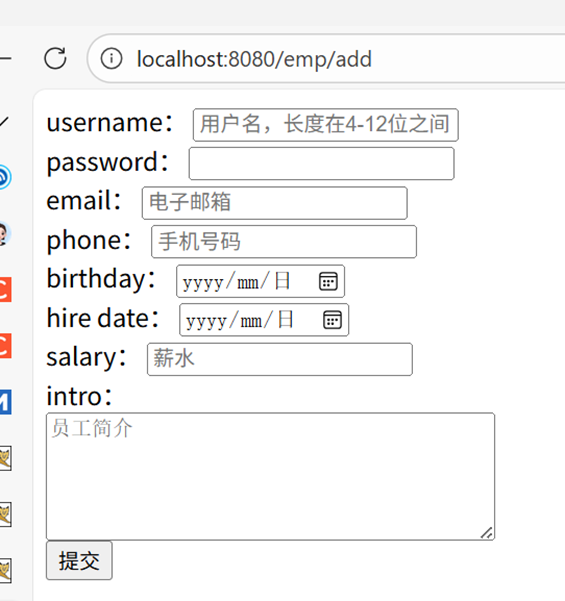
直接提交,控制台自行查看输出,会出现 System.out.println 打印的错误信息,且再次跳转到这个页面。
页面错误信息显示
jsp 页面
通过 Spring MVC 提供的标签库 <mvc:errors> 在页面显示校验错误信息,修改 add_emp.jsp:
<%@ taglib prefix="mvc" uri="http://www.springframework.org/tags/form" %>
<%--
  Created by IntelliJ IDEA.
  User: Jing61
  Date: 2025/12/25
  Time: 09:39
  To change this template use File | Settings | File Templates.
--%>
<%@ page contentType="text/html;charset=UTF-8" language="java" %>
<html>
<head>
    <title>添加员工</title>
    <style>
        .error {
            color: red;
        }
    </style>
</head>
<body>
    <mvc:form action="/emp/save" method="post" modelAttribute="employee">
        <div>
            <label>username:</label>
            <input type="text" name="username" placeholder="用户名,长度在4-12位之间" value="${employee.username}"/>
            <span class="error">
                <mvc:errors path="username" />
            </span>
        </div>
        <div>
            <label>password:</label>
            <input type="password" name="password" value="${employee.password}"/>
            <span class="error">
                <mvc:errors path="password" />
            </span>
        </div>
        <div>
            <label>email:</label>
            <input type="email" name="email" placeholder="电子邮箱" value="${employee.email}"/>
            <span class="error">
                <mvc:errors path="email" />
            </span>
        </div>
        <div>
            <label>phone:</label>
            <input type="text" name="phone" placeholder="手机号码" value="${employee.phone}"/>
            <span class="error">
                <mvc:errors path="phone" />
            </span>
        </div>
        <div>
            <label>birthday:</label>
            <input type="date" name="birthday" placeholder="生日" value="${employee.birthday}"/>
            <span class="error">
                <mvc:errors path="birthday" />
            </span>
        </div>
        <div>
            <label>hire date:</label>
            <input type="date" name="hireDate" placeholder="入职日期" value="${employee.hireDate}"/>
            <span class="error">
                <mvc:errors path="hireDate" />
            </span>
        </div>

        <div>
            <label>salary:</label>
            <input type="number" name="salary" placeholder="薪水" value="${employee.salary}"/>
            <span class="error">
                <mvc:errors path="salary" />
            </span>
        </div>
        <div>
            <label>intro:</label> <br/>
            <textarea name="intro" rows="5" cols="40" placeholder="员工简介" >${employee.intro}</textarea>
            <span class="error">
                <mvc:errors path="intro" />
            </span>
        </div>
        <div>
            <input type="submit" />
        </div>
    </mvc:form>
</body>
</html>
控制器
通过注解 @ModelAttribute 将表单数据封装成 Employee 对象。
package com.controller;

import com.pojo.Employee;
import org.springframework.stereotype.Controller;
import org.springframework.validation.BindingResult;
import org.springframework.validation.annotation.Validated;
import org.springframework.web.bind.annotation.ModelAttribute;
import org.springframework.web.bind.annotation.RequestMapping;

@Controller
@RequestMapping("/emp")
public class EmployeeController {

    /**
     * 注解 @Validated 表示使用JSR303校验,这个Bean将会被校验表单数据(是否满足定义的校验规则)
     * 注解 @ModelAttribute 表示将表单数据封装成 Employee 对象
     * @param employee 表单数据
     * @param result 校验不通过会将错误信息填充进该对象中
     * @return 逻辑视图名称
     */
    @RequestMapping("/save")
    public String save(@Validated @ModelAttribute Employee employee, BindingResult result) {
        // 校验不通过
        if (result.hasErrors()) {
            result.getAllErrors().forEach(e -> {
                System.out.println("code:" + e.toString() + ";object name" + e.getObjectName() + ";message" + e.getDefaultMessage());
                System.out.println(e);
                System.out.println("========================================================");
            });
            // 返回新添加员工视图
            return "add_emp";
        } else {
            // 保存员工信息
            return "employees";
        }
    }

    @RequestMapping("/add")
    public String saveEmployeeUI() {
        return "add_emp"; // 跳转到添加员工页面
    }
}
测试
访问 http://localhost:8080/emp/add ,点击提交:
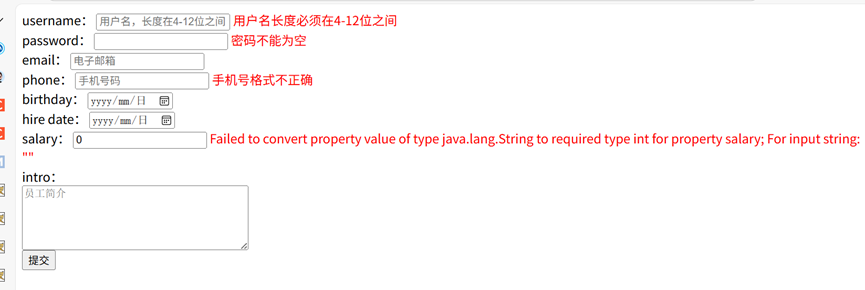
输入以下内容:
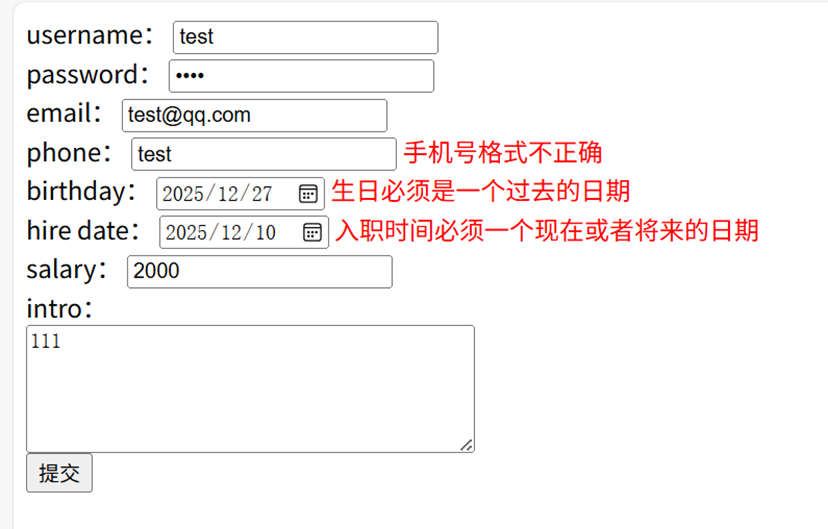
输入正确校验规则后提交:
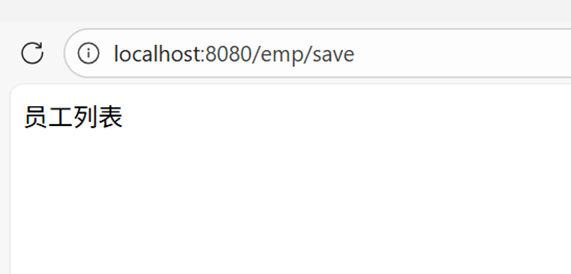
错误信息可配置化(避免硬编码)
看起来似乎非常不错,但是我们的message错误提示信息是硬编码在pojo身上,为了避免其硬编码而实现可配置,我们在src/main/resource下新建validation.properties文件。
创建配置文件
在 src/main/resource 下新建 validation.properties:
employee.username.null = 用户名不能为空
employee.username.size = 用户名长度必须在4-12位之间
employee.password.null = 密码不能为空
employee.email.null = 电子邮箱不能为空
employee.email.pattern = 邮箱格式不正确
employee.phone.pattern = 手机号格式不正确
employee.birthday = 生日必须是一个过去的日期
employee.hire_date = 入职时间必须一个现在或者将来的日期
# 自定义,未实现
employee.salary = 工资必须...
employee.intro = 职位描述长度不能超过200个字符
修改 POJO 注解及配置数据校验器
通过 {key} 引用配置文件中的错误信息:
@NotNull(message = "{employee.username.null}")
@Size(min = 4, max = 12, message = "{employee.username.size}")
private String username;
采用{}表达式对配置文件的key加以读取其对应的value。其它字段同理,到这里还不能读取指定配置文件,需要告诉spring的检验器加载什么样的配置文件,配置代码如下:
package com.config;

import org.hibernate.validator.HibernateValidator;
import org.jspecify.annotations.Nullable;
import org.springframework.context.MessageSource;
import org.springframework.context.annotation.ComponentScan;
import org.springframework.context.annotation.Configuration;
import org.springframework.context.support.ReloadableResourceBundleMessageSource;
import org.springframework.validation.Validator;
import org.springframework.validation.beanvalidation.LocalValidatorFactoryBean;
import org.springframework.web.servlet.config.annotation.*;
import org.springframework.web.servlet.view.InternalResourceViewResolver;

/**
 * Spring 为了方便 spring mvc 相关配置,创建了 WebMvcConfigurer 接口
 */
@Configuration
@ComponentScan(basePackages = "com.controller")
@EnableWebMvc // 以注解的方式驱动 Spring MVC(其中包含了注解映射的HandlerMapping以及HandlerAdapter等相关主键)
public class ServletConfig implements WebMvcConfigurer {
    private final MessageSource messageSource;

    public ServletConfig(MessageSource messageSource) {
        this.messageSource = messageSource;
    }
    // 实现 WebMvcConfig 接口

    /**
     * 配置静态资源不被拦截
     * 静态资源:css, js, 图片, 视频, 音频, 文档
     * @param registry 资源处理器
     */
    @Override
    public void addResourceHandlers(ResourceHandlerRegistry registry) {
        registry.addResourceHandler("/**") // 静态资源的url:根路径下
                .addResourceLocations("/public/"); // 静态资源存放的位置(访问链接就不用public)
    }

    /**
     * 处理跨域问题(全局),局部跨域跨域使用@CrossOrigin注解
     * @param registry 跨域处理器
     */
    @Override
    public void addCorsMappings(CorsRegistry registry) {
        registry.addMapping("/**") // 允许所有的请求跨域
                .allowedOrigins("http://localhost:5173") // 跨域来源为  http://localhost:5173 ,如果要携带cookie凭证,allowedOrigins不能设为*
                .allowedHeaders("*") // 允许所有的请求头
                .allowedMethods("GET", "POST", "PUT", "DELETE", "OPTIONS", "HEAD") // 允许的请求方式
                .allowCredentials(true) // 允许携带 cookie
                .maxAge(3600); // 1 个小时内都允许跨域访问
    }

    /**
     * 配置视图解析器
     * @param registry 视图解析器
     */
    @Override
    public void configureViewResolvers(ViewResolverRegistry registry) {
        registry.viewResolver(
                new InternalResourceViewResolver("/WEB-INF/pages/", ".jsp")
        );
    }

    /**
     * 配置数据校验器
     */
    @Override
    public @Nullable Validator getValidator() {
        var validator = new LocalValidatorFactoryBean();
        validator.setProviderClass(HibernateValidator.class);
        validator.setValidationMessageSource(messageSource());
        return validator;
    }

    private MessageSource messageSource() {
        var messageSource = new ReloadableResourceBundleMessageSource();
        // 加载资源文件(默认为 classpath:message)
        messageSource.setBasename("classpath:validation");
        messageSource.setDefaultEncoding("UTF-8");
        messageSource.setCacheSeconds(60); // 缓存时间, 60秒
        return messageSource;
    }

}
分组校验
当不同场景需要不同校验规则时,可使用分组校验。
定义分组接口
// 分组校验1
public interface ValidationGroup1 {
}

// 分组校验2
public interface ValidationGroup2 {
}
POJO 注解添加分组
@NotNull(message = "{employee.username.null}", groups = {ValidationGroup1.class})
@Size(min = 4, max = 12, message = "{employee.username.size}", groups = {ValidationGroup2.class})
private String username;
控制器指定分组
@RequestMapping("/save")
public String save(@Validated(ValidationGroup2.class) @ModelAttribute Employee employee, BindingResult result) {
    // 仅校验 ValidationGroup2 分组的规则(如用户名长度)
    if (result.hasErrors()) {
        // 错误处理逻辑
        return "add_emp";
    } else {
        return "employees";
    }
}
此时就只会校验用户名(分组不是ValidationGroup2.class都会不进行校验)是否满足长度要求
自定义校验(业务逻辑校验)
有时候除了简单的输入格式、非空性等校验,也需要一定的业务校验,Spring提供了Validator接口来实现校验,它将在进入控制器逻辑之前对参数的合法性进行校验。例如上面的薪水,比如:不低于该岗位最低薪水。
创建职位枚举
package com.enums;

import lombok.AllArgsConstructor;
import lombok.Getter;

@Getter
@AllArgsConstructor // 全参构造函数
public enum Position {
    CLERK(2000,"业务员"),
    SALESMAN(2000,"销售员"),
    ANALYST(5000,"分析员"),
    SEARCHER(3000,"搜索员"),
    MANAGER(6000,"经理"),
    ;

    private float lowSalary; // 职位最低工资
    private String value;
}
实现自定义校验器
package com.validation;

import com.pojo.Employee;
import org.springframework.validation.Errors;
import org.springframework.validation.Validator;

public class EmployeeValidator implements Validator {

    /**
     * 判断当前校验器是否用于检验指定类型的 POJO
     * @param clazz POJO 类型
     * @return true:启用校验;false:不校验
     */
    @Override
    public boolean supports(Class<?> clazz) {
        return clazz == Employee.class;
    }

    @Override
    public void validate(Object target, Errors errors) {
        var emp = (Employee) target;
        // 校验工资不低于当前职位最低工资
        if (emp.getSalary() < emp.getJob().getLowSalary()) {
            errors.rejectValue("salary", "LowSalary.employee.salary",
                               "当前职位的最低工资为:" + emp.getJob().getLowSalary());
        }
    }
}
绑定校验器到控制器
通过 @InitBinder 注解将自定义校验器与控制器绑定:
package com.controller;

import com.pojo.Employee;
import com.validation.EmployeeValidator;
import org.springframework.stereotype.Controller;
import org.springframework.validation.BindingResult;
import org.springframework.validation.DataBinder;
import org.springframework.validation.annotation.Validated;
import org.springframework.web.bind.annotation.InitBinder;
import org.springframework.web.bind.annotation.ModelAttribute;
import org.springframework.web.bind.annotation.RequestMapping;

@Controller
@RequestMapping("/emp")
public class EmployeeController {

    /**
     * 初始化数据绑定,添加自定义校验器
     * @param binder 数据绑定器
     */
    @InitBinder
    public void initBinder(DataBinder binder) {
        binder.addValidators(new EmployeeValidator());
    }

    @RequestMapping("/save")
    public String save(@Validated @ModelAttribute Employee employee, BindingResult result) {
        if (result.hasErrors()) {
            // 错误处理
            return "add_emp";
        } else {
            return "employees";
        }
    }

    @RequestMapping("/add")
    public String saveEmployeeUI() {
        return "add_emp";
    }
}

 浙公网安备 33010602011771号