

WordCount
一.Github:https://github.com/JiejieCM/WordCount
二.psp表格
因为做的时间比较零散,大多是估计,所以表格可能不太准确。
|
PSP2.1 |
PSP阶段 |
预估耗时 (分钟) |
实际耗时 (分钟) |
|
Planning |
计划 |
30 |
30 |
|
· Estimate |
· 估计这个任务需要多少时间 |
1440 |
1920 |
|
Development |
开发 |
1200 |
1200 |
|
· Analysis |
· 需求分析 (包括学习新技术) |
600 |
600
|
|
· Design Spec |
· 生成设计文档 |
0 |
0 |
|
· Design Review |
· 设计复审 (和同事审核设计文档) |
0 |
0 |
|
· Coding Standard |
· 代码规范 (为目前的开发制定合适的规范) |
0 |
0 |
|
· Design |
· 具体设计 |
60 |
60 |
|
· Coding |
· 具体编码 |
300 |
600 |
|
· Code Review |
· 代码复审 |
100 |
100 |
|
· Test |
· 测试(自我测试,修改代码,提交修改) |
120 |
240 |
|
Reporting |
报告 |
100 |
150 |
|
· Test Report |
· 测试报告 |
60 |
120 |
|
· Size Measurement |
· 计算工作量 |
20 |
0 |
|
· Postmortem & Process Improvement Plan |
· 事后总结, 并提出过程改进计划 |
20 |
30 |
|
|
合计 |
1300 |
1650 |
三.解题思路
使用c++,vs2015
拿到题目时,看到基础功能觉得自己还是可以完成的,因为想巩固基本语言c++,于是选择了使用c++进行编程。由于自己代码能力比较差,所以暂时只完成了基础功能,扩展功能写了一些但有点问题,所以没有提交。
【基础功能】
wc.exe -c file.c     //返回文件 file.c 的字符数
wc.exe -w file.c     //返回文件 file.c 的单词总数
wc.exe -l file.c     //返回文件 file.c 的总行数
wc.exe -o outputFile.txt     //将结果输出到指定文件outputFile.txt
统计字符:这个很简单,直接用函数strlen得出。
统计行数:读入文件时,我采用getline逐行读入,循环累加数则为文件行数。
统计单词:单词的统计则稍微复杂一点,这里我设置一个变量flag,用flag对此时读入的是否是单词进行标记,从而进行计数。
[参考]:http://blog.csdn.net/henry19850318/article/details/5929023
【指令读入与分析】
读取控制台指令是我以前没有接触过的,经查阅资料发现可以直接利用main函数的argv参数。
当控制台指令为wc.exe -c test.c时,这三个参数分别对应argv[]的argv[0],argv[1],argv[2],以此类推。
扫描指令,当遇到“-”时说明此事读入的是指令,然后根据“c”“w”“l”“o”来区分其执行的不同操作,否则读入的则为文件名(输入或者输出文件),从而对文件进行操作。
此时我遇到的问题是,当只有一个命令参数如-c时,传入文件名显然是argv[2],但传入多个参数时,不一定是argv[2],如是对参数进行遍历,当有“-”时,读入的是命令参数,此处用结构体进行标记。
不是“-”的话此时传入的即为文件名。
[参考]:http://blog.csdn.net/henry19850318/article/details/5929023

【读取文件及输出文件】
这里要用到头文件fstream,这里我直接用了两个函数,fstream infile(filename, ios::in),读取文件名为filename的文件,ios::in表示仅对文件进行读取,将结果输出到文件中使用了函数in.open(outputfile, ios::trunc)
将内容输出到outputfile中。在对文件进行读取时,采用了逐行读取,即getline(str, 256)。
四.代码分析
设置结构体,判断指令
struct Command {
	bool _c;
	bool _w;
	bool _l;
	bool _o;
	bool _s;
	Command() {
		_c = false;
		_w = false;
		_l = false;
		_o = false;
		_s = false;
	}
};
主要统计函数
void count(fstream &outfile, int *cnt)  //统计函数
{
	char str[256];
	int flag;
	while (outfile.getline(str, 256))
	{
		cnt[2]++;
		cnt[0] = cnt[0] + strlen(str);
		flag = 1;
		for (int i = 0; i < strlen(str); i++)
		{
			if (str[i] >= 'A' && str[i] <= 'z'&& flag == 1)

			{
				cnt[1]++;//统计单词数
				flag = 0;
			}
			if (str[i] == ' ' || str[i] == ',' || str[i] == '\t' || str[i] == '\n')
				flag = 1;
		}

	}

	return;
}
主函数
int main(int argc, char* argv[])
{

	int i;
	char filename[MAX_PATH_LENGTH];
	char outputfile[MAX_PATH_LENGTH] = "result.txt";
	int cnt[3] = { 0 };
	vector<string> files;
	Command command;

	for (i = 1;i < argc;i++) {
		if (argv[i][0] == '-')
		{
			if (argv[i][1] == 'c')
				command._c = true;
			if (argv[i][1] == 'w')
				command._w = true;
			if (argv[i][1] == 'l')
				command._l = true;
			if (argv[i][1] == 'o')
			{
				command._o = true;
				i++;
				strcpy_s(outputfile, argv[i]);
			}
			if (argv[i][1] == 's') {
				i++;
				command._s = true;
			}
		}
		else
			strcpy_s(filename, argv[i]);
	}
	if (command._s = true) {
		getFileName(filename, files);
		for (i = 0;i < files.size();i++)
		{
			if (strcmp(argv[i], "-c") == 0)
				cout << files[i] << "," << "字符数:" << cnt[0] << endl;
			if (strcmp(argv[i], "-w") == 0)
				cout << files[i] << "," << "单词数:" << cnt[1] << endl;
			if (strcmp(argv[i], "-l") == 0)
				cout << files[i] << "," << "行数:" << cnt[2] << endl;
			if (strcmp(argv[i], "-o") == 0)
			{
				ofstream in;//将结果输出到output文件
				in.open(outputfile, ios::trunc);
				in << "字符数:" << cnt[0] << endl;
				in << "单词数:" << cnt[1] << endl;
				in << "行数:" << cnt[2] << endl;
			}
		}
	}
	else {
		fstream infile(filename, ios::in);//打开文件用于读取
		count(infile, cnt);
		for (i = 0;i < argc; i++) {
			if (strcmp(argv[i], "-c") == 0)
				cout << filename << "," << "字符数:" << cnt[0] << endl;
			if (strcmp(argv[i], "-w") == 0)
				cout << filename << "," << "单词数:" << cnt[1] << endl;
			if (strcmp(argv[i], "-l") == 0)
				cout << filename << "," << "行数:" << cnt[2] << endl;
			if (strcmp(argv[i], "-o") == 0)
			{
				ofstream in;//将结果输出到output文件
				in.open(outputfile, ios::trunc);
				in << "字符数:" << cnt[0] << endl;
				in << "单词数:" << cnt[1] << endl;
				in << "行数:" << cnt[2] << endl;
			}
		}
		infile.close();
	}
五.测试
根据不同指令
1.wc.exe -c test.c

2.wc.exe -w test.c

3.wc.exe -l test.c

4.wc.exe -c -w test.c

5.wc.exe -c -l test.c

6.wc.exe -w -l test.c

7.wc.exe -c -w -l test.c
 8.wc.exe -o result.txt
取多个文件进行测试
9.文件test1
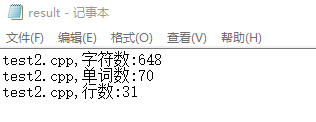

10.文件test2

六.参考
【1】http://blog.csdn.net/henry19850318/article/details/5929023
【2】http://blog.csdn.net/u010166404/article/details/46353263

 浙公网安备 33010602011771号