
用PaddleOCR训练模型的环境
GPU:GeForce GTX 1650
我把显卡插入Windows10系统之后,系统默认帮我按照了显卡的驱动程序,
通过nvidia-smi命令行工具查看到的CUDA Version:12.6
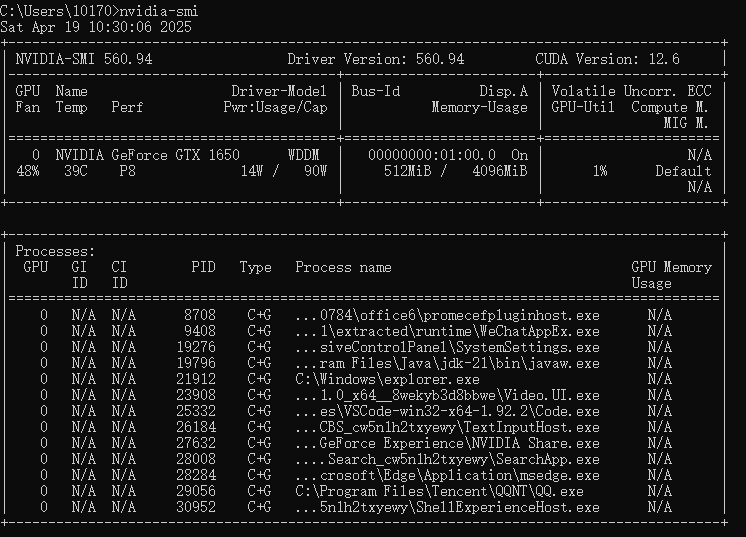
Sat Apr 19 10:30:06 2025
+-----------------------------------------------------------------------------------------+
| NVIDIA-SMI 560.94 Driver Version: 560.94 CUDA Version: 12.6 |
|-----------------------------------------+------------------------+----------------------+
| GPU Name Driver-Model | Bus-Id Disp.A | Volatile Uncorr. ECC |
| Fan Temp Perf Pwr:Usage/Cap | Memory-Usage | GPU-Util Compute M. |
| | | MIG M. |
|=========================================+========================+======================|
| 0 NVIDIA GeForce GTX 1650 WDDM | 00000000:01:00.0 On | N/A |
| 48% 39C P8 14W / 90W | 512MiB / 4096MiB | 1% Default |
| | | N/A |
+-----------------------------------------+------------------------+----------------------+
之后再下载安装CUDA,我下载的CUDA版本是:cuda_12.0.0_527.41_windows.exe
这里需要注意的是:显卡的驱动程序版本可以向下兼容CUDA的版本,也就是插入显卡系统自动安装的驱动版本号是:12.6是可以兼容CUDA的12.0版本的
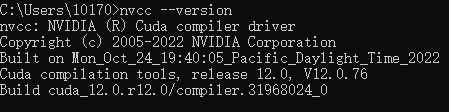
nvcc: NVIDIA (R) Cuda compiler driver
Copyright (c) 2005-2022 NVIDIA Corporation
Built on Mon_Oct_24_19:40:05_Pacific_Daylight_Time_2022
Cuda compilation tools, release 12.0, V12.0.76
Build cuda_12.0.r12.0/compiler.31968024_0
我安装paddlepaddle-gpu的版本是: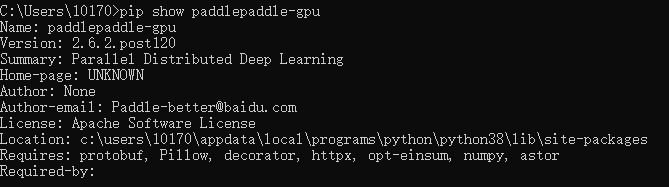
Name: paddlepaddle-gpu
Version: 2.6.2.post120
Summary: Parallel Distributed Deep Learning
Home-page: UNKNOWN
Author: None
Author-email: Paddle-better@baidu.com
License: Apache Software License
Location: c:\users\10170\appdata\local\programs\python\python38\lib\site-packages
Requires: protobuf, Pillow, decorator, httpx, opt-einsum, numpy, astor
Required-by:
我安装的PaddleOCR版本是:

Name: paddleocr
Version: 2.9.1
Summary: Awesome OCR toolkits based on PaddlePaddle(8.6M ultra-lightweight pre-trained model, support training and deployment among server, mobile, embedded and IoT devices)
Home-page: None
Author: None
Author-email: PaddlePaddle <Paddle-better@baidu.com>
License: Apache License 2.0
Location: c:\users\10170\appdata\local\programs\python\python38\lib\site-packages
Requires: requests, opencv-python, scikit-image, fonttools, lmdb, cython, albucore, beautifulsoup4, opencv-contrib-python, fire, albumentations, rapidfuzz, imgaug, tqdm, Pillow, numpy, python-docx, pyclipper, pyyaml, shapely
Required-by: PPOCRLabel
之后运行训练模型的脚本发现提示没有Cudnn
然后我下载了cudnn-windows-x86_64-8.8.0.121_cuda12-archive.zip手动安装cudnn,
安装完之后再次启动训练脚本提示:这个PaddleOCR是用cudnn版本8.9.x编译的,而我手动安装的cudnn版本是8.8.0,
次之我继续下载了cudnn-windows-x86_64-8.9.5.30_cuda12-archive.zip再次手动安装cudnn,
最终启动GPU的训练脚本成功
总结:
CUDA驱动版本:12.6
CUDA版本:12.0
Cudnn版本:8.9
paddlepadle-gpu版本:2.6.2
PaddleOCR版本:2.9.1
这样配套的所有组件版本才是有效

 浙公网安备 33010602011771号