


【转载】Qt 使用委托QItemDelegate 于 QTableView单元格添加控件
前言
前些阵子在写一个小demo时遇到一个问题,如何在QTableView中添加控件,也研究了一会,确实可以使用一些方法进行添加;但是控件一直都是显示在单元格上的,并不是我想要的效果,如下图(在单元格中添加QComboBox):
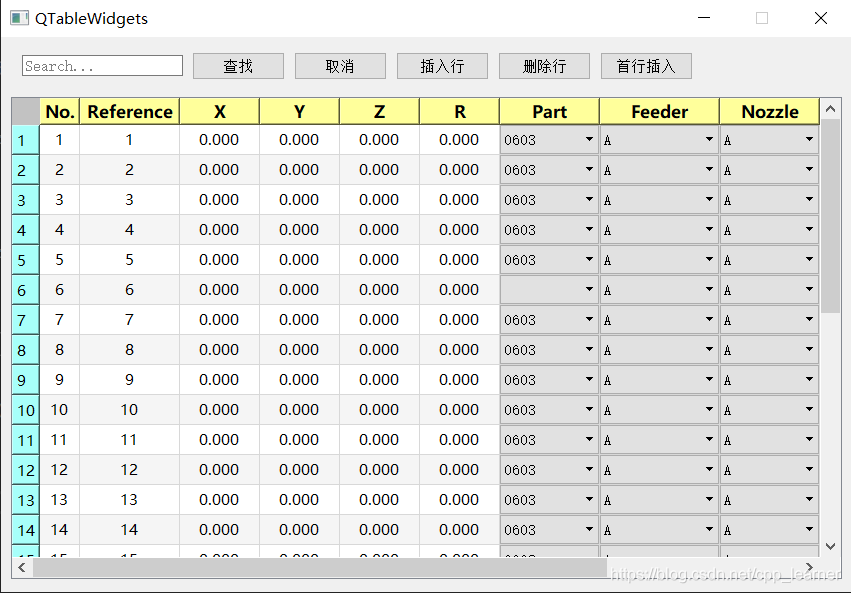
控件虽然添加到单元格中了,但是其显示得硬邦邦的,这并不好;于是乎,经过九牛二虎之力,发现使用委托可以实现我需要的那种效果,如下图:
其默认显示是和其他单元格一样的,但是只要我双击后,添加到单元格里面的QComboBox控件才进行显示。
定义
要想达到这种效果,首先必须得自定义类,然后继承QItemDelegate,最后重写其里面的一些方法即可。
需要包含头文件:#include <QItemDelegate>
-
继承于QItemDelegate
class WidgetDelegate : public QItemDelegate {
    // ...
}
重写以下四个方法
1 // 创建编辑器
2 virtual QWidget *createEditor(QWidget *parent, const QStyleOptionViewItem &option, const QModelIndex &index) const override;
3 // 设置编辑器数据
4 virtual void setEditorData(QWidget *editor, const QModelIndex &index) const override;
5 // 更新编辑器集合属性
6 virtual void updateEditorGeometry(QWidget *editor, const QStyleOptionViewItem &option, const QModelIndex &index) const override;
7 // 设置模型数据
8 virtual void setModelData(QWidget *editor, QAbstractItemModel *model, const QModelIndex &index) const override;
-
每个方法都有其独特的作用;当然QItemDelegate类也还有许多其他方法可以进行重写实现,有兴趣的小伙伴可以去参考QT帮助文档。
-
实现方法体
(1). 创建编辑器 createEditor
此方法的作用:创建自己需要的控件,进行返回。
1 // 创建编辑器
2 QWidget *WidgetDelegate::createEditor(QWidget *parent, const QStyleOptionViewItem &option, const QModelIndex &index) const {
3     // 创建自己需要的控件进行返回
4     QComboBox *editor = new QComboBox(parent);
5
6     return editor;
7 }
(2). 设置编辑器数据 setEditorData
此方法的作用:为创建的控件设值。
1 // 设置编辑器数据
2 void WidgetDelegate::setEditorData(QWidget *editor, const QModelIndex &index) const {
3     // 将参数editor转换为对应创建的控件,再进行数据初始设置就行
4     QComboBox *cob = static_cast<QComboBox *>(editor);
5     cob->addItems(m_comboBoxList);
6 }
(3). 更新编辑器集合属性 updateEditorGeometry
此方法的作用:设置控件的属性,例如将其设置为矩形、圆形等。
1 // 更新编辑器集合属性
2 void WidgetDelegate::updateEditorGeometry(QWidget *editor, const QStyleOptionViewItem &option, const QModelIndex &index) const {
3     // 将编辑器设置为矩形属性
4     editor->setGeometry(option.rect);
5 }
(4). 设置模型数据 setModelData
此方法的作用:设置控件对应单元格中显示的数据。
1 // 设置模型数据
2 void WidgetDelegate::setModelData(QWidget *editor, QAbstractItemModel *model, const QModelIndex &index) const {
3     QComboBox *comboBox = static_cast<QComboBox *>(editor);    // 类型转换
4     // 模型(单元格)显示的数据
5     model->setData(index, comboBox->currentText());
6 }
好了,到了这里,说明前期准备工作已经做得差不多了,接下来就可以去使用这个类了。
当然,也还可以定义几个自己的方法来对数据的管理。
 1 #pragma once
 2
 3 #include <QItemDelegate>
 4
 5 class WidgetDelegate : public QItemDelegate {
 6     Q_OBJECT
 7 public:
 8     WidgetDelegate(QItemDelegate *parent = nullptr);
 9     WidgetDelegate(QStringList list, QItemDelegate *parent = nullptr);
10     ~WidgetDelegate();
11
12     // ...
13
14     /*****根据项目需求增添辅佐函数*****/
15
16     // 获取索引数据
17     QString getCurrentComboBoxData(int index);
18     // 插入
19     void insertCoBData(QString str);
20     // 删除
21     void removeCobData(QString str);
22
23 private:
24     // 存储QComBoBox的数据
25     QStringList m_comboBoxList;
26 };
例如,我这里定义了一个私有字符串链表,用来存储QComboBox的数据;然后再定义了三个方法,用于获取、插入和删除QComboBox中的数据。
还定义了两个构造函数,一个默认定义即可,还有一个需要指定参数定义。
三个自定义方法体实现如下:
 1 // 获取索引处的数据返回
 2 QString WidgetDelegate::getCurrentComboBoxData(int index) {
 3     return this->m_comboBoxList.at(index);
 4 }
 5
 6 // 插入数据
 7 void WidgetDelegate::insertCoBData(QString str) {
 8     this->m_comboBoxList.append(str);
 9 }
10
11 // 移除数据
12 void WidgetDelegate::removeCobData(QString str) {
13 // 找到链表中与参数相同的字符串,然后将其移除掉
14     for (int i = 0; i < this->m_comboBoxList.size(); i++) {
15         if (str == this->m_comboBoxList[i]) {
16             this->m_comboBoxList.removeAt(i);
17             return;
18         }
19     }
20 }
可以根据自己的项目需求进行编写。
使用
 1 #include "WidgetDelegate"
 2 #include <QTableView>
 3
 4
 5 QStringList list;
 6 list << "A" << "B" << "C";
 7
 8 // 创建时指定数据传入
 9 WidgetDelegate *m_cBoxDelegate = new WidgetDelegate(list);
10
11 QTableView *tableView = new QTableView;
12
13 /*************************/
14 // 将某一列单元格设置为该委托
15 tableView->setItemDelegateForColumn(m_cBoxDelegate);
16 // 将某一行单元格设置为该委托
17 tableView->setItemDelegateForRow(m_cBoxDelegate);
18 // 将全部单元格设置为该委托
19 tableView->setItemDelegate(m_cBoxDelegate);
20 /*********************************/
自定义委托类代码
WidgetDelegate.h
 1 #pragma once
 2
 3 #include <QItemDelegate>
 4
 5 class WidgetDelegate : public QItemDelegate {
 6     Q_OBJECT
 7 public:
 8     WidgetDelegate(QItemDelegate *parent = nullptr);
 9     WidgetDelegate(QStringList list, QItemDelegate *parent = nullptr);
10     ~WidgetDelegate();
11
12
13     // 创建编辑器
14     virtual QWidget *createEditor(QWidget *parent, const QStyleOptionViewItem &option, const QModelIndex &index) const override;
15     // 设置编辑器数据
16     virtual void setEditorData(QWidget *editor, const QModelIndex &index) const override;
17     // 更新编辑器集合属性
18     virtual void updateEditorGeometry(QWidget *editor, const QStyleOptionViewItem &option, const QModelIndex &index) const override;
19     // 设置模型数据
20     virtual void setModelData(QWidget *editor, QAbstractItemModel *model, const QModelIndex &index) const override;
21
22
23     /*****根据项目需求增添辅佐函数*****/
24
25     // 获取索引数据
26     QString getCurrentComboBoxData(int index);
27     // 插入
28     void insertCoBData(QString str);
29     // 删除
30     void removeCobData(QString str);
31
32 private:
33     QStringList m_comboBoxList;
34 };
WidgetDelegate.cpp
 1 #include "WidgetDelegate.h"
 2
 3 #include <QComboBox>
 4
 5 WidgetDelegate::WidgetDelegate(QItemDelegate *parent) : QItemDelegate(parent) {
 6     this->m_comboBoxList << "";
 7 }
 8
 9 WidgetDelegate::WidgetDelegate(QStringList list, QItemDelegate *parent) :QItemDelegate(parent) {
10     this->m_comboBoxList = list;
11 }
12
13 WidgetDelegate::~WidgetDelegate() {
14
15 }
16 // 创建编辑器
17 QWidget *WidgetDelegate::createEditor(QWidget *parent, const QStyleOptionViewItem &option, const QModelIndex &index) const {
18     // 创建自己需要的控件进行返回
19     QComboBox *editor = new QComboBox(parent);
20
21     return editor;
22 }
23
24 // 设置编辑器数据
25 void WidgetDelegate::setEditorData(QWidget *editor, const QModelIndex &index) const {
26     // 将参数editor转换为对应创建的控件,再进行数据初始设置就行
27     QComboBox *cob = static_cast<QComboBox *>(editor);
28     cob->addItems(m_comboBoxList);
29 }
30
31 // 更新编辑器集合属性
32 void WidgetDelegate::updateEditorGeometry(QWidget *editor, const QStyleOptionViewItem &option, const QModelIndex &index) const {
33     // 将编辑器设置为矩形属性
34     editor->setGeometry(option.rect);
35 }
36
37 // 设置模型数据
38 void WidgetDelegate::setModelData(QWidget *editor, QAbstractItemModel *model, const QModelIndex &index) const {
39     QComboBox *comboBox = static_cast<QComboBox *>(editor);    // 类型转换
40     // 模型(单元格)显示的数据
41     model->setData(index, comboBox->currentText());
42 }
43
44 // 获取索引处的数据返回
45 QString WidgetDelegate::getCurrentComboBoxData(int index) {
46     return this->m_comboBoxList.at(index);
47 }
48
49 // 插入数据
50 void WidgetDelegate::insertCoBData(QString str) {
51     this->m_comboBoxList.append(str);
52 }
53
54 // 移除数据
55 void WidgetDelegate::removeCobData(QString str) {
56     for (int i = 0; i < this->m_comboBoxList.size(); i++) {
57         if (str == this->m_comboBoxList[i]) {
58             this->m_comboBoxList.removeAt(i);
59             return;
60         }
61     }
62 }
总结:
使用此方式进行单元格添加控件,对于管理上来说,还是蛮方便的,也理清了许多思路;当然除了可以添加QComboBox控件外,也还可以添加QSpinBox等控件也都是完全没问题的。
值得注意的是,不建议使用该方式进行添加QCheckBox,因为其是会自动隐藏的,需要双击单元格才会显示,所以不合适。
看到此篇博客的朋友如果也有此方面的需求,可以直接创建两个文件(.h和.cpp文件),将上面的代码赋值进去就可以直接使用该类了。
————————————————
版权声明:本文为CSDN博主「cpp_learners」的原创文章,遵循CC 4.0 BY-SA版权协议,转载请附上原文出处链接及本声明。
原文链接:https://blog.csdn.net/cpp_learner/article/details/113511113
// 更新编辑器集合属性void WidgetDelegate::updateEditorGeometry(QWidget *editor, const QStyleOptionViewItem &option, const QModelIndex &index) const {// 将编辑器设置为矩形属性editor->setGeometry(option.rect);}
 浙公网安备 33010602011771号