
网络编程
网络编程
1. 概述
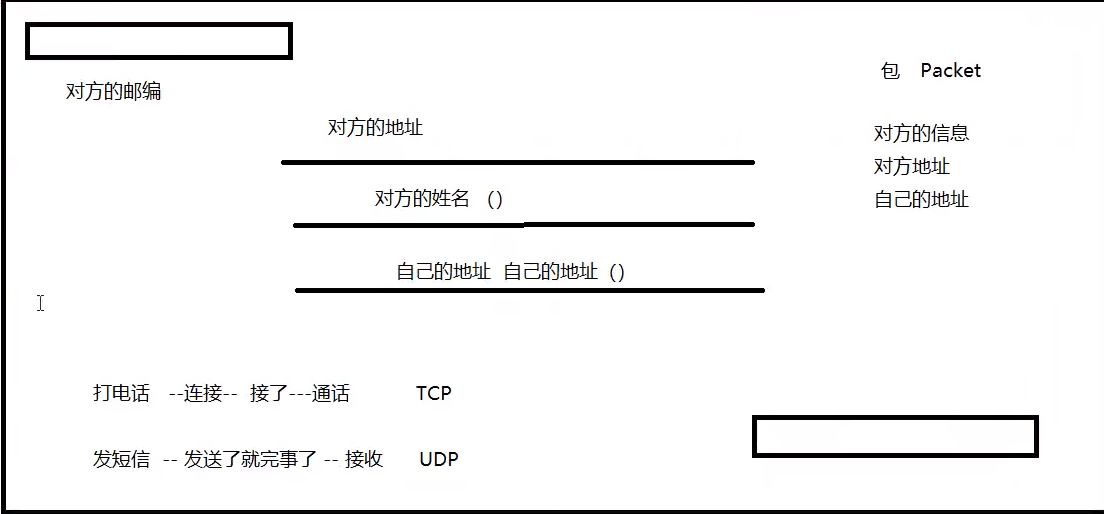
地球村:与国外的同学交流
信件:
1.1 计算机网络
计算机网络是指将地理位置不同的具有独立功能的多台计算机及其外部设备,通过通信线路连接起来,在网络操作系统,网络管理软件及网络通信协议的管理和协调下,实现资源共享和信息传递的计算机系统。
1.2 网络编程
网络编程最主要的工作就是在发送端把信息通过规定好的协议进行组装包,在接收端按照规定好的协议把包进行解析,从而提取出对应的信息,达到通信的目的。
1.3 前提条件
* 如何准确的定位网络上的一台主机(IP地址、端口)
* 找到了这个主机,如何传输数据
javaweb:网页编程 B/S
网络编程:TCP C/S
视频链接
2. 网络通信的要素
2.1 网络通信的实现方式
通信双方地址:
* IP 地址
* 端口
规则:网络通信协议
* TCP/IP参考协议
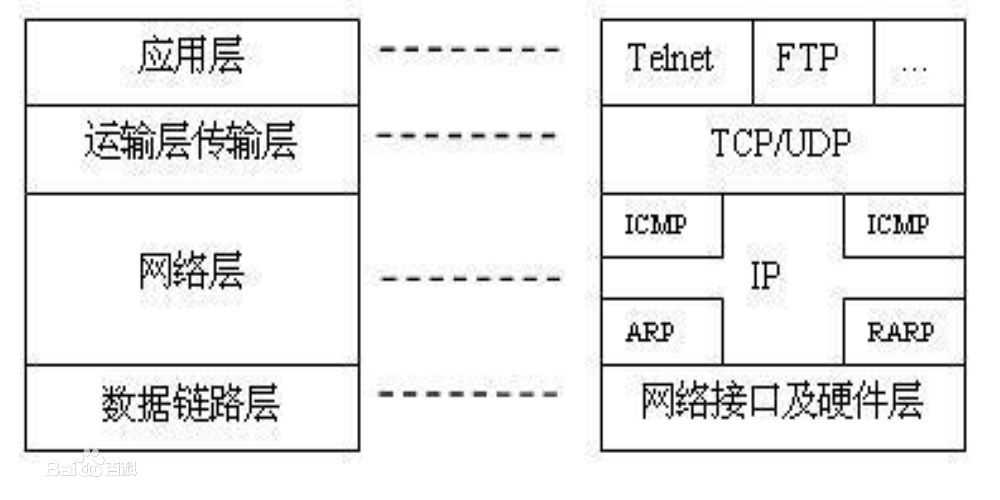
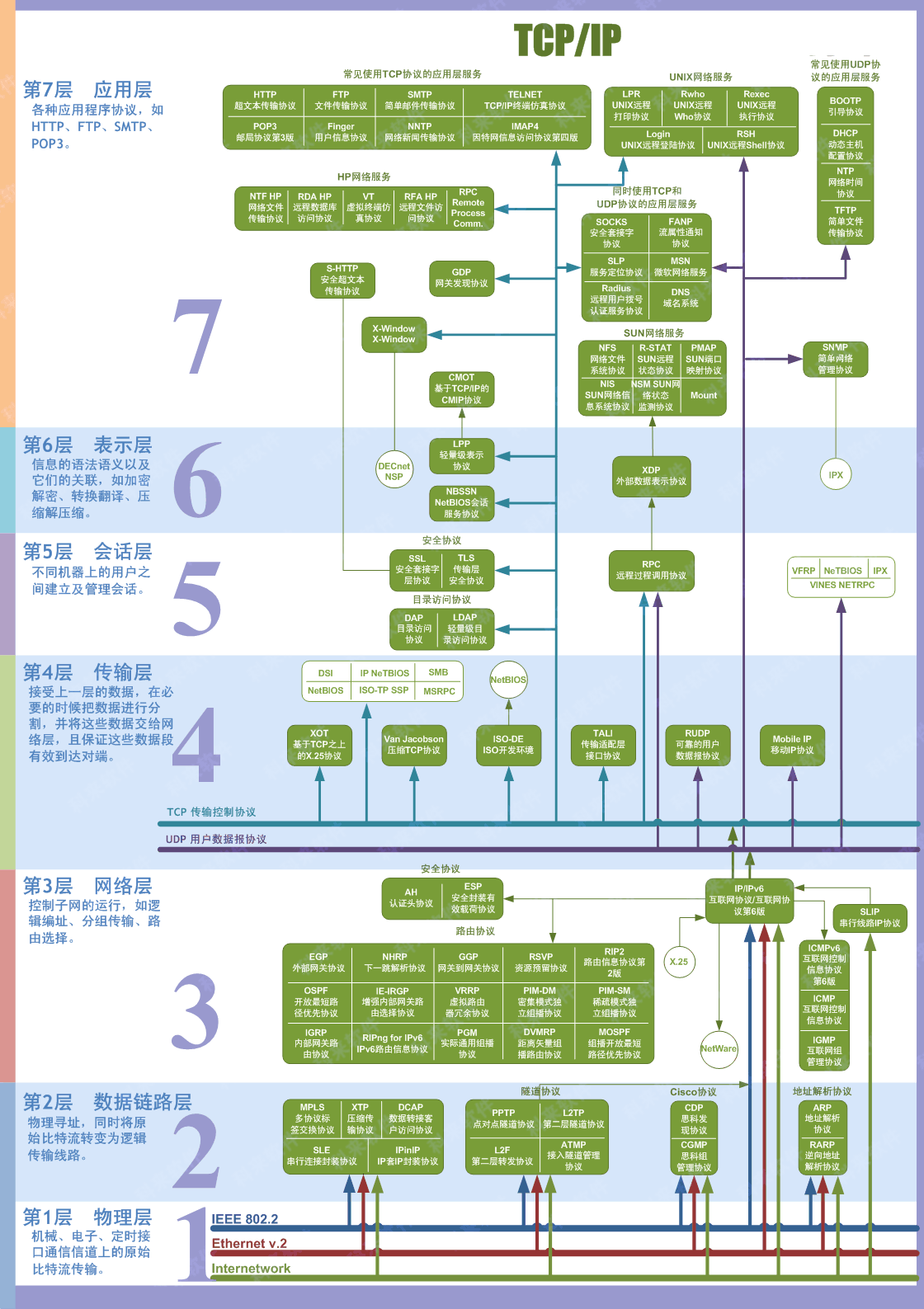
2.2 万物皆对象
1. 网络编程中有两个主要的问题
* 如何准确的定位到网络上的一台或多台主机
* 找到主机后如何进行通讯
2. 网络编程中的要素
* IP地址和端口号
* 网络通信协议
视频链接
3. IP
IP地址:InetAddress
* 唯一定位一台网络上计算机
* 127.0.0.1:本机localhost
* IP地址的分类
* IPV4/IPV6
* IPV4 127.0.0.1 :4个字节组成,0-255, 42亿 2011年用尽
* IPV6 fe80::6c61:9c78:5c7b:18e9%3(config) 256位, 8个无符号整数
2001:0bb2:aaaa:0015:0000:0000:1aaa:1312
* 公网(互联网)- 私网(局域网)
* ABCD类地址
* 192.168.xx.xx 专门给组织内部使用的
* 域名:记忆IP问题!
import java.net.InetAddress;
import java.net.UnknownHostException;
//查找IP地址
public class TestInetAddress {
    public static void main(String[] args) {
        try {
            InetAddress inetAddress1 = InetAddress.getByName("127.0.0.1");
            System.out.println(inetAddress1);
            InetAddress inetAddress2 = InetAddress.getByName("www.baidu.com");
            System.out.println(inetAddress2);
            InetAddress inetAddress3 = InetAddress.getByName("localhost");
            System.out.println(inetAddress3);
            InetAddress inetAddress4 = InetAddress.getLocalHost();
            System.out.println(inetAddress4);
        } catch (UnknownHostException e) {
            e.printStackTrace();
        }
    }
}
4. 端口
端口表示计算机上的一个程序的进程;
* 不同的进程有不同的端口号!用来区分软件!
* 单个协议下,端口号不能冲突
* 端口分类
* 公有端口 0 ~ 1023
* HTTP:80
* HTTPS: 443
* FTP:21
* Telent : 23
* 程序注册端口 1024 ~ 49151
* Tomcat: 8080
* MySQL: 3306
* Oracle:1521
* 动态、私有: 49152 ~ 65535
win + R --> **DOS命令 **
Dos 命令
netstat -ano //查看所有端口
netstat -ano|finderstr" " //查看指定的端口
tasklist|findstr "10092" //查看指定端口的进程
import java.net.InetSocketAddress;

public class TestInetSocketAddress {
    public static void main(String[] args) {
        InetSocketAddress inetSocketAddress1 = new InetSocketAddress("127.0.0.1", 8080);
        InetSocketAddress inetSocketAddress2 = new InetSocketAddress("localhost", 8080);
        System.out.println(inetSocketAddress1);
        System.out.println(inetSocketAddress2);

        System.out.println(inetSocketAddress1.getAddress());
        System.out.println(inetSocketAddress1.getHostName());
        System.out.println(inetSocketAddress1.getPort());
    }
}
5. 通信协议
协议:约定,就好比我们现在说的是普通话
网络通信协议:速率,传输码率,代码结构,传输控制......
TCP/IP协议簇(一种协议):
* TCP:用户传输协议
* UDP:用户数据报协议
* IP:网络互连协议
TCP UDP 对比:
TCP:打电话
* 连接,稳定
* 三次握手,四次挥手
* 客户端、服务端
* 传输完成,释放连接,效率低
UDP:发短信
* 不连接,不稳定
* 客户端、服务端:没有明确的界限
* 不管有没有准备好,都可以发给你
* 导弹
* DDOS:洪水攻击!(饱和攻击)
//三次握手,四次挥手
A:你瞅啥?
B: 瞅你咋地?
A:干一场!
A: 我要走了!
B: 你真的要走了吗?
B: 你真的真的要走了吗?
A:我走了!
6. TCP
6.1 基本框架
客户端:
1. 连接服务器Socket
2. 发送消息
import java.io.IOException;
import java.io.OutputStream;
import java.net.InetAddress;
import java.net.Socket;
import java.net.UnknownHostException;
import java.nio.charset.StandardCharsets;

public class TcpClientDemo1 {
    public static void main(String[] args) {
        Socket socket = null;
        OutputStream os = null;
        try {
            //1、要知道服务器的地址,端口号
            InetAddress serverIP = InetAddress.getByName("localhost");
            int port = 9999;
            //2、创建一个socket连接
            socket = new Socket(serverIP, port);
            //3、发射消息IO流
            os = socket.getOutputStream();
            os.write("Hello, Jay_Soul".getBytes());

        } catch (Exception e) {
            e.printStackTrace();
        }finally {
            if (socket != null){
                try {
                    socket.close();
                } catch (IOException e) {
                    e.printStackTrace();
                }
            }
        }

    }
}
服务器:
1. 建立服务的端口Server 和 Socket
2. 等待用户的连接 accept
3. 接受用的消息
import java.io.ByteArrayInputStream;
import java.io.ByteArrayOutputStream;
import java.io.IOException;
import java.io.InputStream;
import java.net.ServerSocket;
import java.net.Socket;

public class TcpServerDemo1 {
    public static void main(String[] args) {
        ServerSocket serverSocket = null;
        Socket socket = null;
        ByteArrayOutputStream baos = null;
        InputStream is = null;
        try {
            //1、我得有一个地址
            serverSocket = new ServerSocket(9999);
            while (true){
                //2、等待客户端连接过来
                socket = serverSocket.accept();
                //3、读取客户端的消息
                is = socket.getInputStream();
                //管道流
                baos = new ByteArrayOutputStream();
                byte[] buffer = new byte[1024];
                int len;
                while ((len = is.read(buffer)) != -1) {
                    baos.write(buffer, 0, len);
                }
                System.out.println(baos.toString());
            }

            /*
            byte[] buffer = new byte[1024];
                int len;
                while ((len = is.read(buffer)) != -1){
                    String msg = new String(buffer, 0 , len);
                    System.out.println(msg);
                }
             */


        } catch (IOException e) {
            e.printStackTrace();
        } finally {
            //关闭资源
            if (baos != null) {
                try {
                    baos.close();
                } catch (IOException e) {
                    e.printStackTrace();
                }
            }
            if (is != null){
                try {
                    is.close();
                } catch (IOException e) {
                    e.printStackTrace();
                }
            }

            if (socket != null){
                try {
                    socket.close();
                } catch (IOException e) {
                    e.printStackTrace();
                }
            }

            try {
                serverSocket.close();
            } catch (IOException e) {
                e.printStackTrace();
            }
        }

    }
}
6.2 文件上传
客户端
package com;

import java.io.*;
import java.net.InetAddress;
import java.net.Socket;

public class TcpClientDemo01 {
    public static void main(String[] args) throws IOException {
        //1.创建一个Socket连接
        Socket socket = new Socket(InetAddress.getByName("127.0.0.1"), 9000);
        //2.创建一个输出流
        OutputStream os = socket.getOutputStream();
        //3.文件流
        FileInputStream fis = new FileInputStream("1.jpg");
        //4.写出文件
        byte[] buffer = new byte[1024];
        int len;
        while ((len = fis.read(buffer)) != -1){
            os.write(buffer,0, len);
        }
        //5.通知服务器传输完毕
        socket.shutdownOutput();
        //6.确定接受完毕
        InputStream is = socket.getInputStream();
        ByteArrayOutputStream baos = new ByteArrayOutputStream();
        byte[] buffer2 = new byte[1024];
        int len2;
        while ((len2 = is.read(buffer2)) != -1){
            baos.write(buffer2,0,len2);
        }
        System.out.println(baos);

        //7.关闭资源
        baos.close();
        is.close();
        fis.close();
        os.close();
        socket.close();
    }
}
服务端
package com;

import java.io.*;
import java.net.ServerSocket;
import java.net.Socket;
import java.util.Scanner;

public class TcpServerDemo01 {
    public static void main(String[] args) throws IOException {
        //1.创建服务
        ServerSocket serverSocket = new ServerSocket(9000);
        //2.监听客户端的连接
        Socket socket = serverSocket.accept();//阻塞式监听,会一直等待客户端连接
        new Scanner(System.in);
        //3.获取输入流
        InputStream is = socket.getInputStream();
        //4.文件输出
        FileOutputStream fos = new FileOutputStream("receive.jpg");
        byte[] buffer = new byte[1024];
        int len;
        while ((len = is.read(buffer)) != -1){
            fos.write(buffer,0, len);
        }
        //5.通知客户端接收成功
        OutputStream os = socket.getOutputStream();
        os.write("接受成功".getBytes());
        //6. 关闭资源
        os.close();
        fos.close();
        is.close();
        socket.close();
        serverSocket.close();
    }
}
7. Tomcat
* 服务端
* 自定义 S
* Tomcat S
* 客户端
* 自定义 C
* 浏览器 B
视频链接
8. UDP
不用连接,需要得到对方地址
8.1 基本框架
发送端
package com;
import java.io.IOException;
import java.net.*;

public class UdpClientDemo01 {
    public static void main(String[] args) throws IOException {
        //1.建立一个Socket
        DatagramSocket socket = new DatagramSocket();
        //2.建立包
        String msg = "你好";
        InetAddress localhost = InetAddress.getByName("127.0.0.1");
        int port = 9090;
        DatagramPacket packet = new DatagramPacket(msg.getBytes(), 0, msg.getBytes().length, localhost, port);
        //3.发送包
        socket.send(packet);
        //4.关闭流
        socket.close();

    }
}
接收端
package com;

import java.io.IOException;
import java.net.DatagramPacket;
import java.net.DatagramSocket;
import java.net.SocketException;

public class UdpServerDemo01 {
    public static void main(String[] args) throws IOException {
        //开放端口
        DatagramSocket socket = new DatagramSocket(9090);
        //接受数据包
        byte[] buffer = new byte[1024];
        DatagramPacket packet = new DatagramPacket(buffer, 0, buffer.length);
        socket.receive(packet);//阻塞接受
        System.out.println(packet.getAddress().getHostAddress());
        System.out.println(new String(packet.getData(), 0, packet.getLength()));
        //关闭连接
        socket.close();
    }
}
8.2 循环接发消息
循环发送消息
package com.lesson03;

import java.io.BufferedReader;
import java.io.IOException;
import java.io.InputStreamReader;
import java.net.DatagramPacket;
import java.net.DatagramSocket;
import java.net.InetSocketAddress;

public class UdpSender01 {
    public static void main(String[] args) throws IOException {
        DatagramSocket socket = new DatagramSocket(8888);
        //准备数据:控制台读取System.in
        BufferedReader reader = new BufferedReader(new InputStreamReader(System.in));
        while (true) {
            String date = reader.readLine();
            byte[] dates = date.getBytes();
            DatagramPacket packet = new DatagramPacket(dates, 0, dates.length, new InetSocketAddress("localhost", 6666));
            socket.send(packet);
            if ("bye".equals(date)) break;
        }
        socket.close();
    }
}
循环接收消息
package com.lesson03;

import java.net.DatagramPacket;
import java.net.DatagramSocket;

public class UdpReceiver01 {
    public static void main(String[] args) throws Exception {
        DatagramSocket socket = new DatagramSocket(6666);
        while (true){
            //准备接收包裹
            byte[] container = new byte[1024];
            DatagramPacket packet = new DatagramPacket(container, 0, container.length);
            socket.receive(packet);

            byte[] date = packet.getData();
            String receive = new String(date, 0, packet.getLength());
            System.out.println(receive);

            if ("bye".equals(receive))  break;
        }
        socket.close();

    }
}
8.3 UDP多线程在线咨询
发送端
package com.lesson04;

import java.io.BufferedReader;
import java.io.InputStreamReader;
import java.net.DatagramPacket;
import java.net.DatagramSocket;
import java.net.InetSocketAddress;

public class TalkSend implements Runnable {
    DatagramSocket socket = null;
    BufferedReader reader = null;

    private int fromPort;
    private String toIp;
    private int toPort;

    public TalkSend(int fromPort, String toIp, int toPort) {
        this.fromPort = fromPort;
        this.toIp = toIp;
        this.toPort = toPort;
        try{
            socket = new DatagramSocket(fromPort);
            reader = new BufferedReader(new InputStreamReader(System.in));
        }catch (Exception e){
            e.printStackTrace();
        }
    }

    @Override
    public void run() {
        while (true) {
            try {
                String date = reader.readLine();
                byte[] dates = date.getBytes();
                DatagramPacket packet = new DatagramPacket(dates, 0, dates.length, new InetSocketAddress(this.toIp, this.toPort));
                socket.send(packet);
                if ("bye".equals(date)) break;
            } catch (Exception e) {
                e.printStackTrace();
            }

        }
        socket.close();
    }
}
接收端
package com.lesson04;

import java.net.DatagramPacket;
import java.net.DatagramSocket;

public class TalkReceive implements Runnable{
    DatagramSocket socket = null;
    private int port;
    private String msgFrom;

    public TalkReceive(int port, String msgFrom) {
        this.port = port;
        this.msgFrom = msgFrom;
        try{
            socket = new DatagramSocket(port);
        }catch (Exception e){
            e.printStackTrace();
        }
    }

    @Override
    public void run() {
        while (true){
            try {
                byte[] container = new byte[1024];
                DatagramPacket packet = new DatagramPacket(container, 0 , container.length);
                socket.receive(packet);

                byte[] date = packet.getData();
                String receive = new String(date, 0, packet.getLength());
                System.out.println(msgFrom +" :" + receive);
                if ("bye".equals(receive)) break;
            }catch (Exception e){
                e.printStackTrace();
            }

        }
        socket.close();
    }
}
学生端
package com.lesson04;

public class StudentSend {
    public static void main(String[] args) {
        new Thread(new TalkSend(7777,"localhost", 9999)).start();
        new Thread(new TalkReceive(8888,"王老师")).start();
    }
}
教师端
package com.lesson04;

public class TeacherSend {
    public static void main(String[] args) {
        new Thread(new TalkSend(5555,"localhost", 8888)).start();
        new Thread(new TalkReceive(9999,"张三")).start();
    }
}
9. URL
统一资源定位符:定位资源的,点位互联网上的某一个资源
协议://ip地址:端口/项目名/资源
package com.lesson05;

import java.net.MalformedURLException;
import java.net.URL;

public class URLDemo01 {
    public static void main(String[] args) throws MalformedURLException {
        URL url = new URL("http://localhost:8080/helloworld/index.jsp?username=kuangshen&password=123");
        System.out.println(url.getProtocol());//协议
        System.out.println(url.getHost());//主机IP
        System.out.println(url.getPort());//端口
        System.out.println(url.getPath());//全路径
        System.out.println(url.getFile());//文件
        System.out.println(url.getQuery());//参数
    }
}
package com.lesson05;

import java.io.FileOutputStream;
import java.io.InputStream;
import java.net.HttpURLConnection;
import java.net.MalformedURLException;
import java.net.URL;

public class URLDown {
    public static void main(String[] args) throws Exception {
        //1.下载地址
        URL url = new URL("http://localhost:8080//gdj//123.txt");
        //2.连接到这个资源
        HttpURLConnection urlConnection= (HttpURLConnection) url.openConnection();
        InputStream inputStream = urlConnection.getInputStream();
        FileOutputStream fos = new FileOutputStream("ware.txt");
        //3.写出数据
        byte[] buffer = new byte[1024];
        int len;
        while ((len = inputStream.read(buffer)) != -1){
            fos.write(buffer, 0, len);
        }
        //4.断开连接
        fos.close();
        inputStream.close();
        urlConnection.disconnect();

    }
}

 浙公网安备 33010602011771号