
EntityFramework配置三(Code First-属性映射约定配置)
上一篇中,EF 根据我们创建的Class和Student实体模型生成数据库表,虽然我们禁用了默认对数据库表名生成复数形式
但是,我们想要和我们实体类不同的数据库表名,这该怎么做呢,EF为我们提供了这样的配置。
映射关系配置:
有两种配置方式,Data Annotation和Fluent API
1、Data Annotation
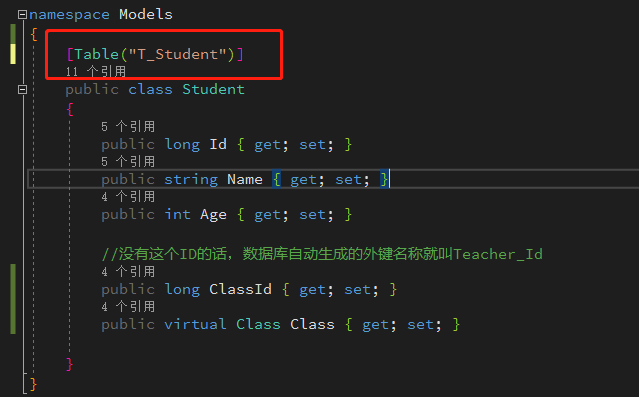
在实体类上加上Table("TableName")就可以生成与之自对应发的定义的数据库表名
2、Fluent API
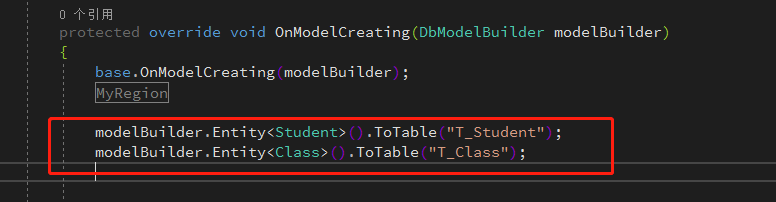
Fluent API实现配置Entity Framework Code First与数据库映射关系主要是通过继承DbContext并重写其中的OnModelCreating方法来进行的。
重写OnModelCreating方法,配置类对应于数据库中的表名:
表之间的关联关系配置:
1、一对多:一个班级对应多个学生,一个学生对应多个班级
Student中包含有一个Class类型的引用属性,Class类中包含Student类型的集合属性
Student类中定义Class Class引用属性;Class类中定义ICollection<Student> Studentts集合属性
或:仅在Student中包含有一个Class类型的引用属性
仅在Student类中:定义Class Class引用属性
或:仅在Class类中包含Student类型的集合属性
仅在Class类中定义:ICollection<Student> Studentts集合属性
2、多对多:一个老师对应多个学生,一个学生有多个老师
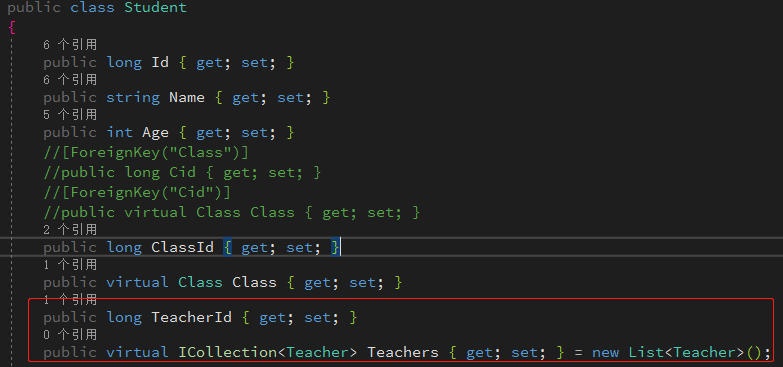
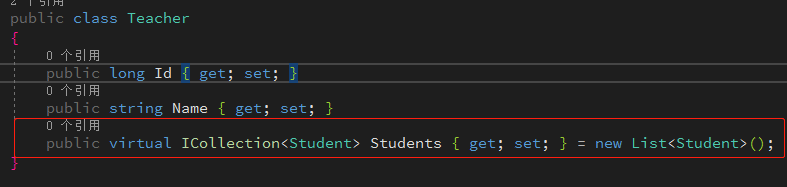
Student类中定一个Teacher类型的集合属性,同时在Teacher中定义一个Student类型的集合属性
Student类中:ICollection<Teacher> Studentts
Teacher类中:ICollection<Student> Studentts
3、一对一:一个学生对应一个学生信息,一个学生信息对应一个学生
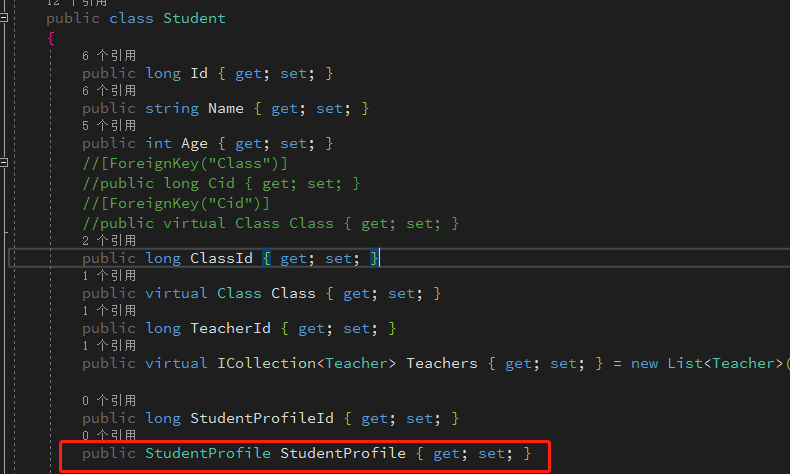
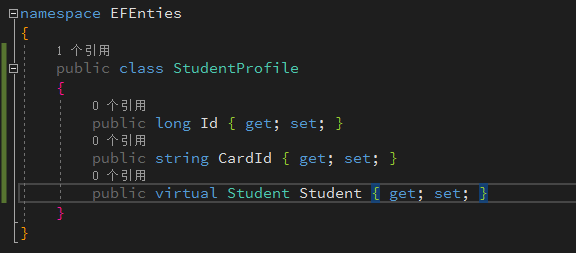
Student类中定义一个StudentProfile引用属性,同时在StudentProfile类中定义一个Student类型的引用属性
Student类中:StudentProfile StudentProfile
StudentProfile类中:Student Student
外键列名默认约束
Entity Framework Code First在根据默认约定创建外键时,外键列的名称存在3种方式。
1、[Target Type Key Name]:外键名为外键表的主键
2、[Target Type Name] + [Target Type Key Name]:外键名为外键表名+外键表的主键; Class_Id
3、[Navigation Property Name] + [Target Type Key Name]: 外键名为外导航属性名+外键表主键Id; Class_Id 这里的Class是Stuent表中Class导航属性名
优先级:1>3>2;
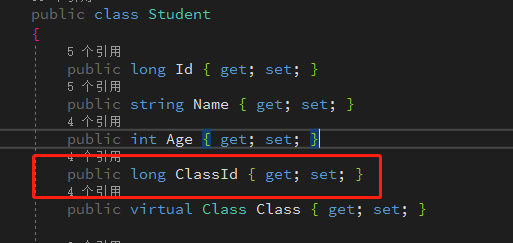
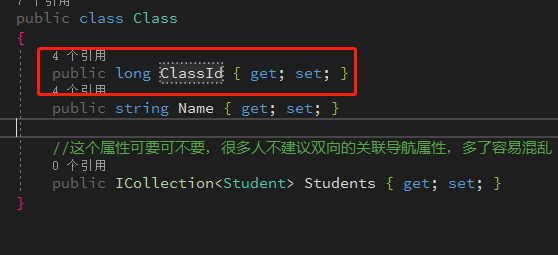
1、[Target Type Key Name]
Student中定义ClassId属性外键,Class中定义主键为ClassId
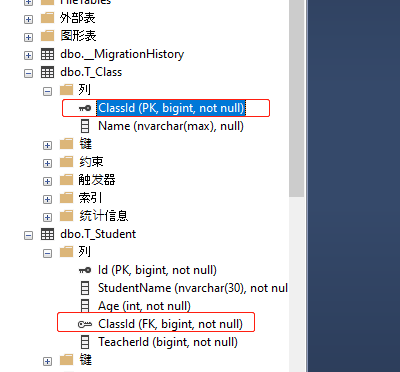
2、[Target Type Name] + [Target Type Key Name]
Student类中不要定义任何外键,会根据Class类中的类名称和主键Id生成Student表外键名称
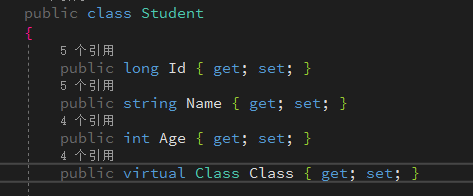

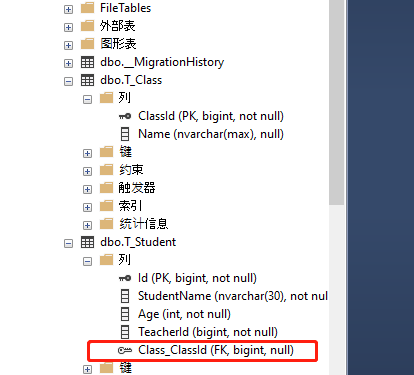
3、[Navigation Property Name] + [Target Type Key Name]
Stuent类中把Class属性名称改为ClassTest,Class类中去掉指向Student的集合属性。
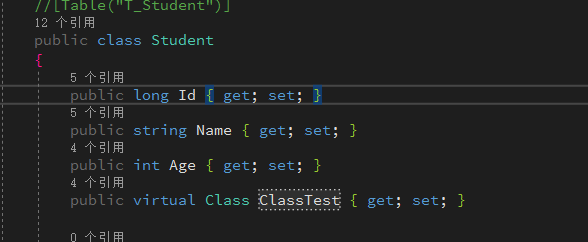
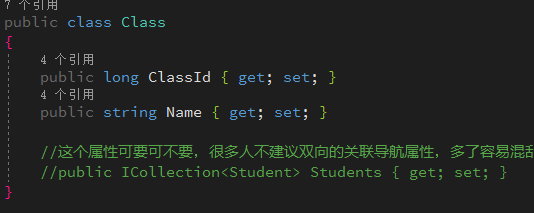
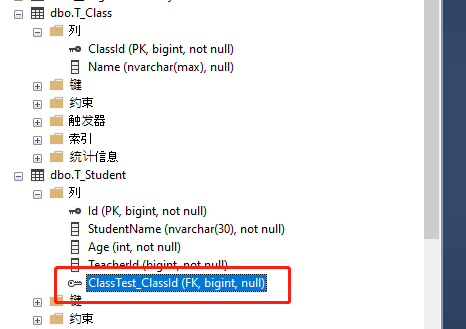
注意:导航属性要加上Virtual关键字才会有延迟加载,EF Code生成的有关联数据的表是启用级联删除的,
就是删除当前操作的这条数据,与它关联的导航属性的数据会被删除。
表关系的配置
1、一对多
EF按照默认约定的属性生成外键名,如果我们想用别的属性来做外键名呢?
用CId作为Student表的外键
Data Annotations方式
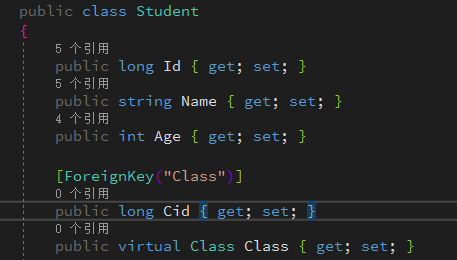 或
或 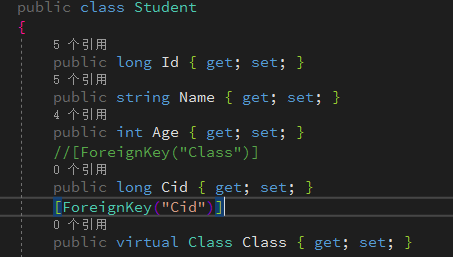
Fluent API方式
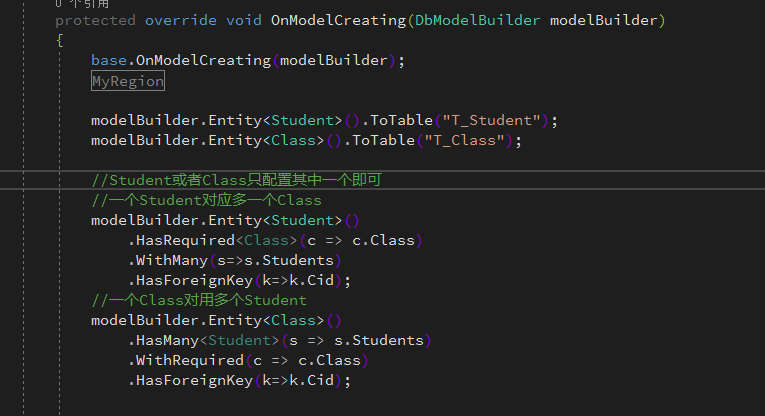
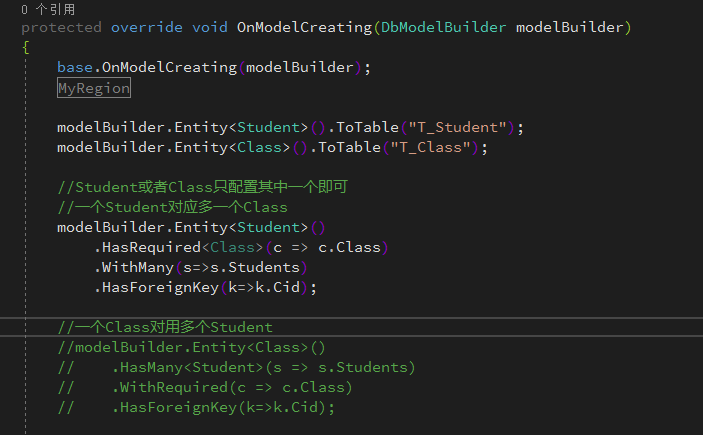
说明:在DataContext.cs的OnModelCreating方法中,对两个实体类Class及Stuent均添加了Fluent API形式的关系配置。对于Entity Framework Code First而言,两个实体类之间的关系,可以两个类中均添加关系映射配置,也可以只对其中任意一个实体类添加关系映射配置。即在DataContext.cs的OnModelCreating方法中可以只包含Class或只包含Student类的关系映射配置。这里从Entity Framework Code First的使用经验及技巧,建议将实体类之间关系映射配置在包含外键的类中。即OnModelCreating中只添加对Student实体类的关系映射配置,这样做有一个好处,当Class有多个表引用它时,可以将外键均配置在引用它的实体类中,从而降低Category类的复杂度,同时也有益于代码的维护。
在DataContext上下文类中的OnModelCreating方法只需下面的定义即可:
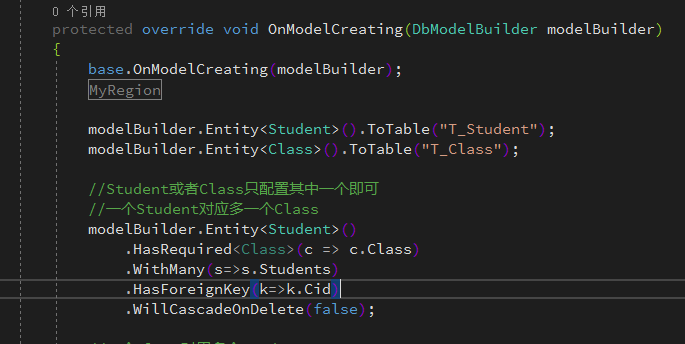
Entity Framework Code First根据一对多关系关系生成的外键引用约束默认是有级联删除的,可以通过以下方式禁用Class与Student之间的级联删除。
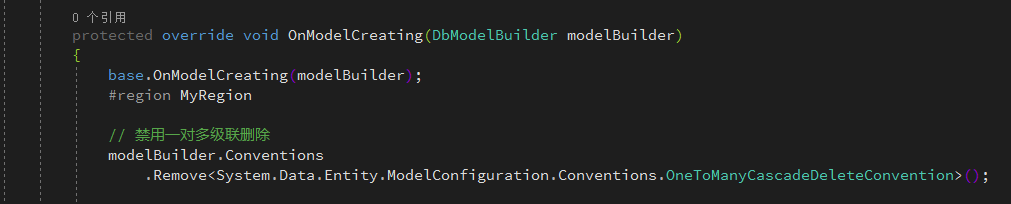
也可以在Entity Framework Code First生成的全部表中都统一设置禁用一对多级联删除。
还可以将映射数据的配置写在类文件中,
Student
using Models;
using System.Data.Entity.ModelConfiguration;

namespace EFEnties.EFConfig
{
    public class StudentMapConfig:EntityTypeConfiguration<Student>
    {
        public StudentMapConfig()
        {

            // Primary Key
            this.HasKey(t => t.Id);

            // Properties
            this.Property(t => t.Name)
                .IsRequired()
                .HasMaxLength(50);

            // Table & Column Mappings
            this.ToTable("T_Student");
            this.Property(t => t.Id).HasColumnName("StudentId");
            this.Property(t => t.Age).HasColumnName("StudentAge");
            this.Property(t => t.Name).HasColumnName("StudentName");
            this.Property(t => t.ClassId).HasColumnName("ClassId");
            this.Property(t => t.TeacherId).HasColumnName("TeacherId");

            // Relationships
            this.HasRequired(t => t.Class)
                .WithMany(t => t.Students)
                .HasForeignKey(d => d.ClassId);
        }
    }
}
Class
using Models;
using System.Data.Entity.ModelConfiguration;

namespace EFEnties.EFConfig
{
    public class ClassMapConfig:EntityTypeConfiguration<Class>
    {
        public ClassMapConfig()
        {
            // Primary Key
            this.HasKey(t => t.ClassId);

            // Properties
            this.Property(t => t.Name)
                .IsRequired()
                .HasMaxLength(50);

            // Table & Column Mappings
            this.ToTable("T_Class");
            this.Property(t => t.ClassId).HasColumnName("ClassId");//映射数据库列名称
            this.Property(t => t.Name).HasColumnName("ClassName");
        }
    }
}
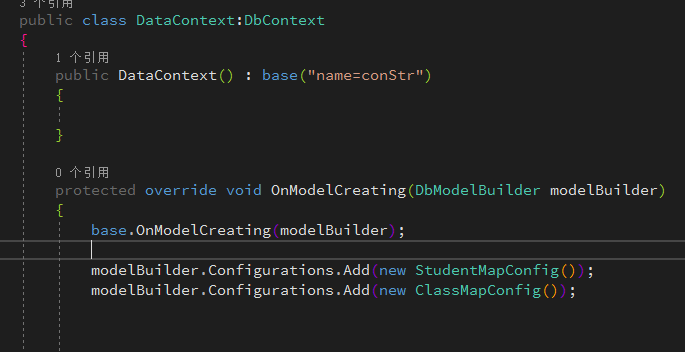
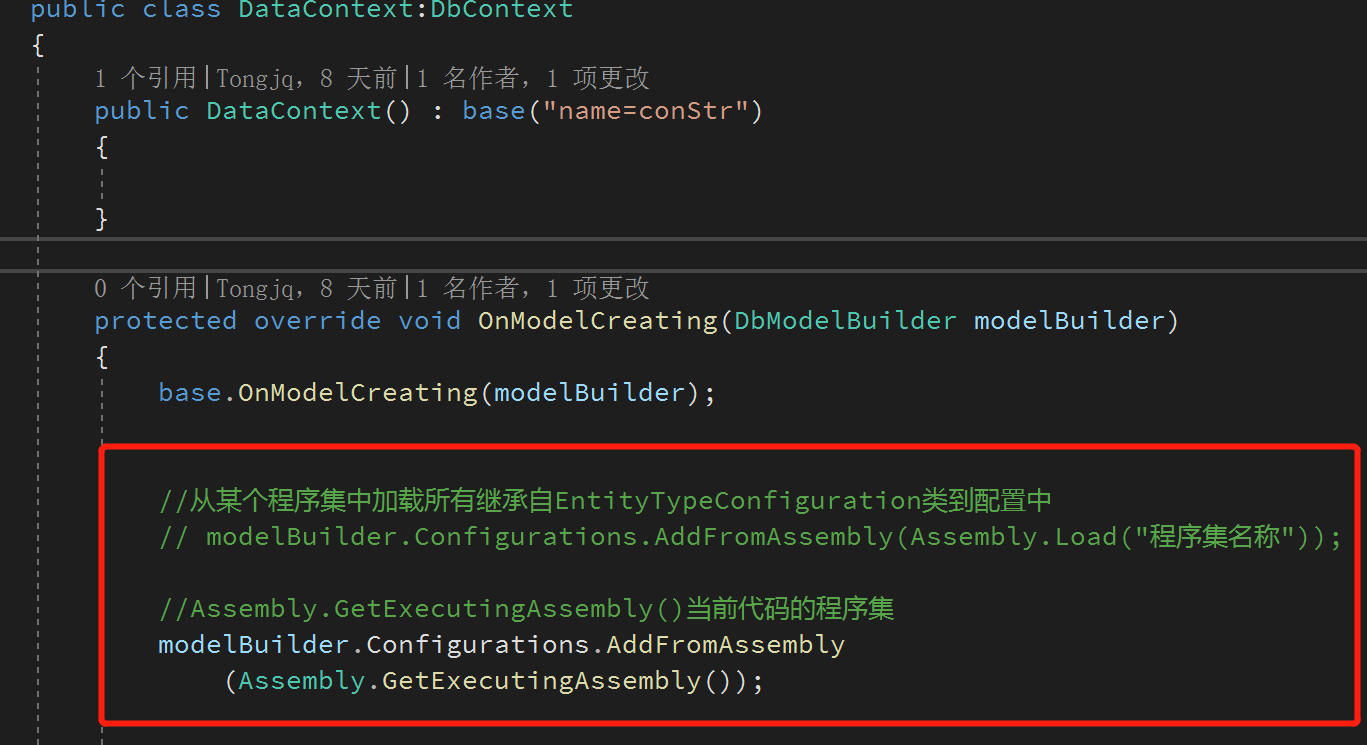
然后在DataContext.cs上下文中的OnModelCreating方法中注册配饰文件类:
有三种方式
直接通add (new 配置文件类)
加载程序集下所有的继承自EntityTypeConfiguration类的配置文件到EF上下文数据库配置中
2、多对多
Student和Teacher是多对多的关系
Student实体类
Teacher实体类
多对多EF默认还会成一个中间表,用于体现两个实体表之间的多对多的关系,
默认不配置的映射,中介表RoleUsers的字段生成规则按照 [目标类型名称]+[目标类型键名称] 的约定。
使用Fluent API方式配置映射
Teacher映射配置类
using System.Data.Entity.ModelConfiguration;

namespace EFEnties.EFConfig
{
    public class TeacherMapConfig:EntityTypeConfiguration<Teacher>
    {
        public TeacherMapConfig()
        {
            // Primary Key
            this.HasKey(t => t.Id);

            // Properties
            this.Property(t => t.Name)
                .HasMaxLength(50);

            // Table & Column Mappings
            this.ToTable("T_Teacher");
            this.Property(t => t.Id).HasColumnName("TeacherID");
            this.Property(t => t.Name).HasColumnName("TeacherName");

        }
    }
}
Student映射配置类
using Models;
using System.Data.Entity.ModelConfiguration;

namespace EFEnties.EFConfig
{
    public class StudentMapConfig:EntityTypeConfiguration<Student>
    {
        public StudentMapConfig()
        {

            // Primary Key
            this.HasKey(t => t.Id);

            // Properties
            this.Property(t => t.Name)
                .IsRequired()
                .HasMaxLength(50);

            // Table & Column Mappings
            this.ToTable("T_Student");
            this.Property(t => t.Id).HasColumnName("StudentId");
            this.Property(t => t.Age).HasColumnName("StudentAge");
            this.Property(t => t.Name).HasColumnName("StudentName");
            this.Property(t => t.ClassId).HasColumnName("ClassId");
            this.Property(t => t.TeacherId).HasColumnName("TeacherId");

            // Relationships
            this.HasRequired(t => t.Class)
                .WithMany(t => t.Students)
                .HasForeignKey(d => d.ClassId);

            //和Teacher多对多的关系
            this.HasMany(t=>t.Teachers)
                .WithMany(s=>s.Students)
                .Map(m =>
                {
                    m.ToTable("T_TeacherStudent");//中间表名
                    m.MapLeftKey("TeacherID");//列名
                    m.MapRightKey("StudentID");
                });
        }
    }
}
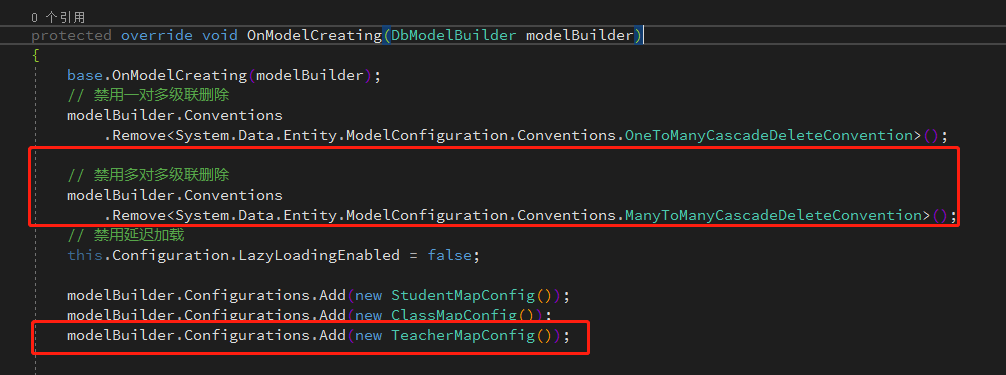
上下文类中注册,多对多默认也是有删除级联的功能,在OnModelCreating中关闭
一对一
Student和StudentProfile是一对一的关系
Student实体类
StudentProfile实体类
StudentProfile映射配置
using System.ComponentModel.DataAnnotations.Schema;
using System.Data.Entity.ModelConfiguration;

namespace EFEnties.EFConfig
{
    public class StudentProfileMapConfig: EntityTypeConfiguration<StudentProfile>
    {
        public StudentProfileMapConfig()
        {
            HasKey(s => s.Id);
            // 主键不自动增加
            Property(s => s.Id).HasDatabaseGeneratedOption(DatabaseGeneratedOption.None);
            // 设置StudentProfile实体类的CardId在生成的数据库表的列名为身份证号码
            Property(s => s.CardId).HasColumnName("身份证号码");
            // StudentProfile实体类生成的数据库表名为T_StudentProfile
            ToTable("T_StudentProfile");
        }
    }
}
Student映射类文件配置
Fluent API设置实体类生成的表引用与被引用通过WithRequiredPrincipal、WithRequiredDependent及WithOptionalPrincipal、WithOptionalDependent来设置,使用Principal属性的实体类将被另外的实体类生成的表引用,使用Dependent属性的实体类将引用另外的实体类。
using Models;
using System.Data.Entity.ModelConfiguration;

namespace EFEnties.EFConfig
{
    public class StudentMapConfig:EntityTypeConfiguration<Student>
    {
        public StudentMapConfig()
        {

            // Primary Key
            this.HasKey(t => t.Id);

            // Properties
            this.Property(t => t.Name)
                .IsRequired()
                .HasMaxLength(50);

            // Table & Column Mappings
            this.ToTable("T_Student");
            this.Property(t => t.Id).HasColumnName("StudentId");
            this.Property(t => t.Age).HasColumnName("StudentAge");
            this.Property(t => t.Name).HasColumnName("StudentName");
            this.Property(t => t.ClassId).HasColumnName("ClassId");
            this.Property(t => t.TeacherId).HasColumnName("TeacherId");

            // Relationships
            // 和Class一对多的关系
            this.HasRequired(t => t.Class)
                .WithMany(t => t.Students)
                .HasForeignKey(d => d.ClassId);

            // Relationships
            // 和Teacher多对多的关系
            this.HasMany(t=>t.Teachers)
                .WithMany(s=>s.Students)
                .Map(m =>
                {
                    m.ToTable("T_TeacherStudent");//中间表名
                    m.MapLeftKey("TeacherID");//列名
                    m.MapRightKey("StudentID");
                });

            // Relationships
            // 和StudentProfile一对一的关系
            this.HasRequired(t => t.StudentProfile)
                .WithRequiredDependent(t => t.Student);

        }
    }
}
部分类容参考: https://www.cnblogs.com/libingql/p/3353112.html#2
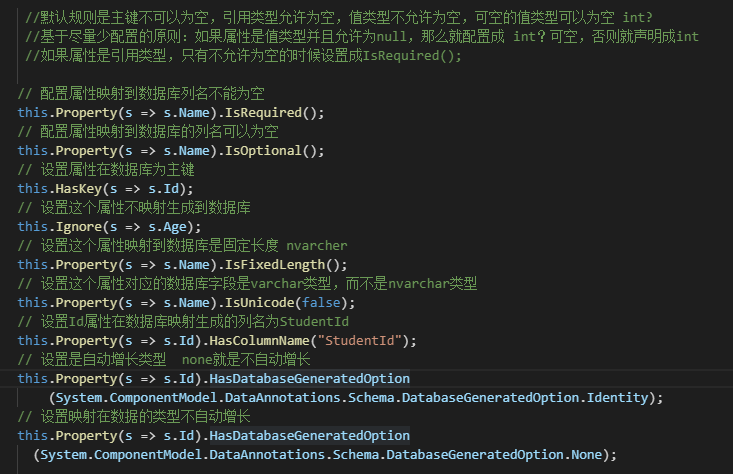
属性映射配置总结:

 浙公网安备 33010602011771号