
电脑初始化
电脑初始化
- 所有的软件安装在非系统盘,我习惯于安装在D盘根目录
- 我玩过的收费的软件99.9%已破解
- 我提供的地址全都是官方地址,百度网盘地址是我的网盘分享,绝对没病毒
- 电脑系统:Win11 (win10 95%一样)
系统设置
移动文件夹
把 C:\User\22840 的内容移动到非系统盘

改变量


此电脑显示

改缩放

改主题

开始菜单设置


Terminal改默认启动cmd


安装 Jetbrains Mono 字体(程序员必做)

打开 zip 文件 把 fonts\ttf 下的文件复制到 C:\Windows\Fonts 文件夹

将资源管理器设为我的电脑

NAVIDA 隐藏
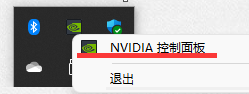

任务栏图标不隐藏

专注助手开启

安装等不提示

显示后缀名(程序员必做)

Chrome
下载
移动到D盘
-
先把下面两个程序关闭
 -
把
C:\Program Files和C:\Program Files (x86)下的 Google 文件夹移动到D盘 -
右击桌面 chrome 属性

 -
应用 > 确定
-
把桌面图标复制到
C:\ProgramData\Microsoft\Windows\Start Menu\Programs

设为默认浏览器


登录 Google 账户
跳到外网
- 下载 iGuge
https://chrome.zzzmh.cn/info?token=ncldcbhpeplkfijdhnoepdgdnmjkckij
-
把 crx 文件拖入 chrome 插件中心
 -
登录 iguge 账户
-
能打开如下页面,代表跳到外网成功

注册和登录 Google
- 可做可不做


开启同步功能

安装插件,让游览器更好用
https://chrome.google.com/webstore/category/extensions?hl=zh-CN

这是我的插件

Tampermonkey
介绍
- 这款插件可以破解会员,搜答案,购物优惠价等等好处,只有想不到,没有做不到的
官网

这是我常用的脚本
- CSDN阅读器:https://greasyfork.org/zh-CN/scripts/378351-%E6%8C%81%E7%BB%AD%E6%9B%B4%E6%96%B0-csdn%E5%B9%BF%E5%91%8A%E5%AE%8C%E5%85%A8%E8%BF%87%E6%BB%A4-%E4%BA%BA%E6%80%A7%E5%8C%96%E8%84%9A%E6%9C%AC%E4%BC%98%E5%8C%96-%E4%B8%8D%E7%94%A8%E5%86%8D%E7%99%BB%E5%BD%95%E4%BA%86-%E8%AE%A9%E4%BD%A0%E4%BD%93%E9%AA%8C%E4%BB%A4%E4%BA%BA%E6%83%8A%E5%96%9C%E7%9A%84%E5%B4%AD%E6%96%B0csdn
- VIP破解:https://greasyfork.org/zh-CN/scripts/390952-%E5%85%A8%E7%BD%91vip%E8%A7%86%E9%A2%91%E5%85%8D%E8%B4%B9%E7%A0%B4%E8%A7%A3%E5%8E%BB%E5%B9%BF%E5%91%8A-%E6%94%AF%E6%8C%81%E7%94%B5%E8%A7%86%E5%89%A7%E5%85%8D%E8%B7%B3%E5%87%BA%E9%80%89%E9%9B%86-%E5%85%A8%E7%BD%91%E9%9F%B3%E4%B9%90%E7%9B%B4%E6%8E%A5%E4%B8%8B%E8%BD%BD-%E7%9F%A5%E4%B9%8E%E8%A7%86%E9%A2%91%E4%B8%8B%E8%BD%BD-%E5%BF%85%E5%BA%94%E5%A3%81%E7%BA%B8%E4%B8%8B%E8%BD%BD%E7%AD%89%E5%A4%9A%E5%90%88%E4%B8%80%E7%BA%AF%E5%87%80%E8%84%9A%E6%9C%AC
- 百度网盘下载助手:https://greasyfork.org/zh-CN/scripts/425895-%E6%9C%80%E6%96%B0%E5%AE%8C%E7%BE%8E%E7%89%88-%E7%99%BE%E5%BA%A6%E7%BD%91%E7%9B%98%E4%B8%8B%E8%BD%BD%E5%8A%A9%E6%89%8B
Typora
下载
下载对应版本
安装


余下的傻瓜式点击
配置

base.user.css
/** initialize css counter
  * 从h2开始编号
  */
#write {
    counter-reset: h2
}

h1 {
    text-align:center
}

h2 {
    counter-reset: h3
}

h3 {
    counter-reset: h4
}

h4 {
    counter-reset: h5
}

h5 {
    counter-reset: h6
}

/** put counter result into headings */

#write h2:before {
    counter-increment: h2;
    content: counter(h2) "."
}

#write h3:before {
    counter-increment: h3;
    content: counter(h2) "." counter(h3) "."
}

#write h4:before,
h4.md-focus.md-heading:before /** override the default style for focused headings */ {
    counter-increment: h4;
    content: counter(h2) "." counter(h3) "." counter(h4) "."
}

#write h5:before,
h5.md-focus.md-heading:before {
    counter-increment: h5;
    content: counter(h2) "." counter(h3) "." counter(h4) "." counter(h5) "."
}

#write h6:before,
h6.md-focus.md-heading:before {
    counter-increment: h6;
    content: counter(h2) "." counter(h3) "." counter(h4) "." counter(h5) "." counter(h6) "."
}

/** override the default style for focused headings */
#write>h3.md-focus:before,
#write>h4.md-focus:before,
#write>h5.md-focus:before,
#write>h6.md-focus:before,
h3.md-focus:before,
h4.md-focus:before,
h5.md-focus:before,
h6.md-focus:before {
    color: inherit;
    border: inherit;
    border-radius: inherit;
    position: inherit;
    left:initial;
    float: none;
    top:initial;
    font-size: inherit;
    padding-left: inherit;
    padding-right: inherit;
    vertical-align: inherit;
    font-weight: inherit;
    line-height: inherit;
}

.sidebar-content {
    counter-reset: h2
}

.outline-h2 {
    counter-reset: h3
}

.outline-h3 {
    counter-reset: h4
}

.outline-h4 {
    counter-reset: h5
}

.outline-h5 {
    counter-reset: h6
}

.outline-h2>.outline-item>.outline-label:before {
    counter-increment: h2;
    content: counter(h2) "."
}

.outline-h3>.outline-item>.outline-label:before {
    counter-increment: h3;
    content: counter(h2) "." counter(h3) "."
}

.outline-h4>.outline-item>.outline-label:before {
    counter-increment: h4;
    content: counter(h2) "." counter(h3) "." counter(h4) "."
}

.outline-h5>.outline-item>.outline-label:before {
    counter-increment: h5;
    content: counter(h2) "." counter(h3) "." counter(h4) "." counter(h5) "."
}

.outline-h6>.outline-item>.outline-label:before {
    counter-increment: h6;
    content: counter(h2) "." counter(h3) "." counter(h4) "." counter(h5) "." counter(h6) "."
}

/**************************************
 * Header Counters in TOC
 **************************************/

/* No link underlines in TOC */
.md-toc-inner {
    text-decoration: none;
}

.md-toc-content {
    counter-reset: h2toc
}

.md-toc-h2 {
    font-size: 1.1rem;
    margin-left: 2rem;
    counter-reset: h3toc
}

.md-toc-h3 {
    margin-left: 3rem;
    font-size: .9rem;
    counter-reset: h4toc
}

.md-toc-h4 {
    margin-left: 4rem;
    font-size: .85rem;
    counter-reset: h5toc
}

.md-toc-h5 {
    margin-left: 5rem;
    font-size: .8rem;
    counter-reset: h6toc
}

.md-toc-h6 {
    margin-left: 6rem;
    font-size: .75rem;
}

.md-toc-h2 .md-toc-inner {
    margin-left: 0;
}

.md-toc-h2:before {
    color: black;
    counter-increment: h2toc;
    content: counter(h2toc) "."
}

.md-toc-h2 .md-toc-inner {
    margin-left: 0;
}

.md-toc-h3:before {
    color: black;
    counter-increment: h3toc;
    content: counter(h2toc) "." counter(h3toc) "."
}

.md-toc-h3 .md-toc-inner {
    margin-left: 0;
}

.md-toc-h4:before {
    color: black;
    counter-increment: h4toc;
    content: counter(h2toc) "." counter(h3toc) "." counter(h4toc) "."
}

.md-toc-h4 .md-toc-inner {
    margin-left: 0;
}

.md-toc-h5:before {
    color: black;
    counter-increment: h5toc;
    content: counter(h2toc) "." counter(h3toc) "." counter(h4toc) "." counter(h5toc) "."
}

.md-toc-h5 .md-toc-inner {
    margin-left: 0;
}

.md-toc-h6:before {
    color: black;
    counter-increment: h6toc;
    content: counter(h2toc) "." counter(h3toc) "." counter(h4toc) "." counter(h5toc) "." counter(h6toc) "."
}

.md-toc-h6 .md-toc-inner {
    margin-left: 0;
}
github.css
:root {
    --side-bar-bg-color: #fafafa;
    --control-text-color: #777;
  }

  @include-when-export url( https://fonts.loli.net/css?family=Open+Sans:400italic ,700italic,700,400&subset=latin,latin-ext);

  /* open-sans-regular - latin-ext_latin */
  @font-face {
    font-family: "Jetbrains Mono";
    font-style: normal;
    font-weight: normal;
    src: local("Jetbrains Mono Regular"), local("JetbrainsMono-Regular"),
      url("./github/open-sans-v17-latin-ext_latin-regular.woff2") format("woff2");
    unicode-range: U+0000-00FF, U+0131, U+0152-0153, U+02BB-02BC, U+02C6, U+02DA,
      U+02DC, U+2000-206F, U+2074, U+20AC, U+2122, U+2191, U+2193, U+2212, U+2215,
      U+FEFF, U+FFFD, U+0100-024F, U+0259, U+1E00-1EFF, U+2020, U+20A0-20AB,
      U+20AD-20CF, U+2113, U+2C60-2C7F, U+A720-A7FF;
  }
  /* open-sans-italic - latin-ext_latin */
  @font-face {
    font-family: "Jetbrains Mono";
    font-style: italic;
    font-weight: normal;
    src: local("Jetbrains Mono Italic"), local("JetbrainsMono-Italic"),
      url("./github/open-sans-v17-latin-ext_latin-italic.woff2") format("woff2");
    unicode-range: U+0000-00FF, U+0131, U+0152-0153, U+02BB-02BC, U+02C6, U+02DA,
      U+02DC, U+2000-206F, U+2074, U+20AC, U+2122, U+2191, U+2193, U+2212, U+2215,
      U+FEFF, U+FFFD, U+0100-024F, U+0259, U+1E00-1EFF, U+2020, U+20A0-20AB,
      U+20AD-20CF, U+2113, U+2C60-2C7F, U+A720-A7FF;
  }
  /* open-sans-700 - latin-ext_latin */
  @font-face {
    font-family: "Jetbrains Mono";
    font-style: normal;
    font-weight: bold;
    src: local("Jetbrains Mono Bold"), local("JetbrainsMono-Bold"),
      url("./github/open-sans-v17-latin-ext_latin-700.woff2") format("woff2");
    unicode-range: U+0000-00FF, U+0131, U+0152-0153, U+02BB-02BC, U+02C6, U+02DA,
      U+02DC, U+2000-206F, U+2074, U+20AC, U+2122, U+2191, U+2193, U+2212, U+2215,
      U+FEFF, U+FFFD, U+0100-024F, U+0259, U+1E00-1EFF, U+2020, U+20A0-20AB,
      U+20AD-20CF, U+2113, U+2C60-2C7F, U+A720-A7FF;
  }
  /* open-sans-700italic - latin-ext_latin */
  @font-face {
    font-family: "Jetbrains Mono";
    font-style: italic;
    font-weight: bold;
    src: local("Jetbrains Mono Bold Italic"), local("JetbrainsMono-BoldItalic"),
      url("./github/open-sans-v17-latin-ext_latin-700italic.woff2")
        format("woff2");
    unicode-range: U+0000-00FF, U+0131, U+0152-0153, U+02BB-02BC, U+02C6, U+02DA,
      U+02DC, U+2000-206F, U+2074, U+20AC, U+2122, U+2191, U+2193, U+2212, U+2215,
      U+FEFF, U+FFFD, U+0100-024F, U+0259, U+1E00-1EFF, U+2020, U+20A0-20AB,
      U+20AD-20CF, U+2113, U+2C60-2C7F, U+A720-A7FF;
  }

  html {
    font-size: 16px;
  }

  body {
    font-family: "Jetbrains Mono", "Clear Sans", "Helvetica Neue", Helvetica,
      Arial, sans-serif;
    color: rgb(51, 51, 51);
    line-height: 1.6;
  }

  #write {
    max-width: 860px;
    margin: 0 auto;
    padding: 30px;
    padding-bottom: 100px;
  }

  @media only screen and (min-width: 1400px) {
    #write {
      max-width: 1024px;
    }
  }

  @media only screen and (min-width: 1800px) {
    #write {
      max-width: 1200px;
    }
  }

  #write > ul:first-child,
  #write > ol:first-child {
    margin-top: 30px;
  }

  a {
    color: #4183c4;
  }
  h1,
  h2,
  h3,
  h4,
  h5,
  h6 {
    position: relative;
    margin-top: 1rem;
    margin-bottom: 1rem;
    font-weight: bold;
    line-height: 1.4;
    cursor: text;
  }
  h1:hover a.anchor,
  h2:hover a.anchor,
  h3:hover a.anchor,
  h4:hover a.anchor,
  h5:hover a.anchor,
  h6:hover a.anchor {
    text-decoration: none;
  }
  h1 tt,
  h1 code {
    font-size: inherit;
  }
  h2 tt,
  h2 code {
    font-size: inherit;
  }
  h3 tt,
  h3 code {
    font-size: inherit;
  }
  h4 tt,
  h4 code {
    font-size: inherit;
  }
  h5 tt,
  h5 code {
    font-size: inherit;
  }
  h6 tt,
  h6 code {
    font-size: inherit;
  }
  h1 {
    font-size: 2.25em;
    line-height: 1.2;
    border-bottom: 1px solid #eee;
  }
  h2 {
    font-size: 1.75em;
    line-height: 1.225;
    border-bottom: 1px solid #eee;
  }

  /*@media print {
      .typora-export h1,
      .typora-export h2 {
          border-bottom: none;
          padding-bottom: initial;
      }

      .typora-export h1::after,
      .typora-export h2::after {
          content: "";
          display: block;
          height: 100px;
          margin-top: -96px;
          border-top: 1px solid #eee;
      }
  }*/

  h3 {
    font-size: 1.5em;
    line-height: 1.43;
  }
  h4 {
    font-size: 1.25em;
  }
  h5 {
    font-size: 1em;
  }
  h6 {
    font-size: 1em;
    color: #777;
  }
  p,
  blockquote,
  ul,
  ol,
  dl,
  table {
    margin: 0.8em 0;
  }
  li > ol,
  li > ul {
    margin: 0 0;
  }
  hr {
    height: 2px;
    padding: 0;
    margin: 16px 0;
    background-color: #e7e7e7;
    border: 0 none;
    overflow: hidden;
    box-sizing: content-box;
  }

  li p.first {
    display: inline-block;
  }
  ul,
  ol {
    padding-left: 30px;
  }
  ul:first-child,
  ol:first-child {
    margin-top: 0;
  }
  ul:last-child,
  ol:last-child {
    margin-bottom: 0;
  }
  blockquote {
    border-left: 4px solid #dfe2e5;
    padding: 0 15px;
    color: #777777;
  }
  blockquote blockquote {
    padding-right: 0;
  }
  table {
    padding: 0;
    word-break: initial;
  }
  table tr {
    border-top: 1px solid #dfe2e5;
    margin: 0;
    padding: 0;
  }
  table tr:nth-child(2n),
  thead {
    background-color: #f8f8f8;
  }
  table th {
    font-weight: bold;
    border: 1px solid #dfe2e5;
    border-bottom: 0;
    margin: 0;
    padding: 6px 13px;
  }
  table td {
    border: 1px solid #dfe2e5;
    margin: 0;
    padding: 6px 13px;
  }
  table th:first-child,
  table td:first-child {
    margin-top: 0;
  }
  table th:last-child,
  table td:last-child {
    margin-bottom: 0;
  }

  .CodeMirror-lines {
    padding-left: 4px;
  }

  .code-tooltip {
    box-shadow: 0 1px 1px 0 rgba(0, 28, 36, 0.3);
    border-top: 1px solid #eef2f2;
  }

  .md-fences,
  code,
  tt {
    border: 1px solid #e7eaed;
    background-color: #f8f8f8;
    border-radius: 3px;
    padding: 0;
    padding: 2px 4px 0px 4px;
    font-size: 0.9em;
  }

  code {
    background-color: #f3f4f4;
    padding: 0 2px 0 2px;
  }

  .md-fences {
    margin-bottom: 15px;
    margin-top: 15px;
    padding-top: 8px;
    padding-bottom: 6px;
  }

  .md-task-list-item > input {
    margin-left: -1.3em;
  }

  @media print {
    html {
      font-size: 13px;
    }
    table,
    pre {
      page-break-inside: avoid;
    }
    pre {
      word-wrap: break-word;
    }
  }

  .md-fences {
    background-color: #f8f8f8;
  }
  #write pre.md-meta-block {
    padding: 1rem;
    font-size: 85%;
    line-height: 1.45;
    background-color: #f7f7f7;
    border: 0;
    border-radius: 3px;
    color: #777777;
    margin-top: 0 !important;
  }

  .mathjax-block > .code-tooltip {
    bottom: 0.375rem;
  }

  .md-mathjax-midline {
    background: #fafafa;
  }

  #write > h3.md-focus:before {
    left: -1.5625rem;
    top: 0.375rem;
  }
  #write > h4.md-focus:before {
    left: -1.5625rem;
    top: 0.285714286rem;
  }
  #write > h5.md-focus:before {
    left: -1.5625rem;
    top: 0.285714286rem;
  }
  #write > h6.md-focus:before {
    left: -1.5625rem;
    top: 0.285714286rem;
  }
  .md-image > .md-meta {
    /*border: 1px solid #ddd;*/
    border-radius: 3px;
    padding: 2px 0px 0px 4px;
    font-size: 0.9em;
    color: inherit;
  }

  .md-tag {
    color: #a7a7a7;
    opacity: 1;
  }

  .md-toc {
    margin-top: 20px;
    padding-bottom: 20px;
  }

  .sidebar-tabs {
    border-bottom: none;
  }

  #typora-quick-open {
    border: 1px solid #ddd;
    background-color: #f8f8f8;
  }

  #typora-quick-open-item {
    background-color: #fafafa;
    border-color: #fefefe #e5e5e5 #e5e5e5 #eee;
    border-style: solid;
    border-width: 1px;
  }

  /** focus mode */
  .on-focus-mode blockquote {
    border-left-color: rgba(85, 85, 85, 0.12);
  }

  header,
  .context-menu,
  .megamenu-content,
  footer {
    font-family: "Segoe UI", "Arial", sans-serif;
  }

  .file-node-content:hover .file-node-icon,
  .file-node-content:hover .file-node-open-state {
    visibility: visible;
  }

  .mac-seamless-mode #typora-sidebar {
    background-color: #fafafa;
    background-color: var(--side-bar-bg-color);
  }

  .md-lang {
    color: #b4654d;
  }

  .html-for-mac .context-menu {
    --item-hover-bg-color: #e6f0fe;
  }

  #md-notification .btn {
    border: 0;
  }

  .dropdown-menu .divider {
    border-color: #e5e5e5;
  }

  .ty-preferences .window-content {
    background-color: #fafafa;
  }

  .ty-preferences .nav-group-item.active {
    color: white;
    background: #999;
  }
Badizip
下载
安装


FastStoneCapture
下载
链接:https://pan.baidu.com/s/1w3JE3buQlmVjQfK9EVMUTg
提取码:s7y8
安装
直接解压即可
配置

Office
下载
链接:https://pan.baidu.com/s/1KkHs9ivaJROHr0iIlNmmqA
提取码:6tq0
安装
解压ProPlus2019Retail,双击 setup.exe
选中复制到桌面

- 可以更新,登录账户
QQ 微信
下载
安装


VMware Workstation
下载
https://www.vmware.com/cn/products/workstation-pro/workstation-pro-evaluation.html
安装
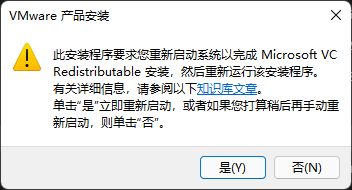
必须点是,要重启


一直点中间的


密钥:*****-*****-*****-*****-*****
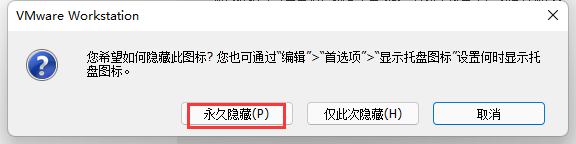
永久隐藏托盘图标
百度网盘
下载
安装

搜狗输入法
下载
安装

配置


同步

卸载默认输入法

网易云音乐
下载
安装

配置

VS code
下载
安装


同步

汉化

- 安装好插件重启
Pandoc
下载
安装


MariaDB
下载


安装


登录
要经过配置环境变量
mysql -uroot -p密码
出现如下画面代表成功

Navicat
下载
链接:https://pan.baidu.com/s/1mG10_tn5ujJ5X70j8mQt0Q
提取码:keke
安装

SQLYog
下载
链接:https://pan.baidu.com/s/1aaLrNTc9p_Zk9w4Fr6-Ktg
提取码:keke
安装

破解
Ultimate 版本: (终极是最好的)
注册名:luoye2562
注册码: 8d8120df-a5c3-4989-8f47-5afc79c56e7c

Nodejs
下载
https://nodejs.org/en/

安装

JDK
https://blog.csdn.net/weixin_43344151/article/details/118917382
IDEA
下载

安装
直接解压即可
配置
https://blog.csdn.net/weixin_43344151/article/details/122544912
Git
下载
安装

配置
git config --global user.name "XXX"
git config --global user.email "XXX@XXX.com"
TortoriseGit
下载安装包和汉化包


Eclipse (极其不推荐)
下载


安装
直接解压即可
安装 STS


lombok
下载
安装
放到 Eclipse 根目录下,双击


选择 Eclipse 根目录

STS (极其推荐)
下载

安装
双击 jar 文件 解压即可
lombok
下载
安装
放到STS根目录下,双击


选择 STS 根目录

Postman
下载
安装
双击自动安装
移动文件夹
把 C:\Users\22840\AppData\Local 下的 Postman 文件夹移动到非系统盘

把桌面图标复制到 C:\Users\22840\AppData\Roaming\Microsoft\Windows\Start Menu\Programs\Postman

同步

设置主题

WinSCP
下载
安装


入门


- 此刻可以互传文件了
XMind
下载
安装
双击自动安装
移动文件夹
把 C:\Program Files 下的XMind 文件夹移动到非系统盘

把桌面图标复制到 C:\Users\22840\AppData\Roaming\Microsoft\Windows\Start Menu\Programs\Postman
MobalXterm
下载

安装
直接解压即可
入门


- 此刻已经进入了 Linux 终端,可以玩命令了
VS2019
下载

安装


QT
下载

安装

自己随便注册个


配置环境变量

极速PDF
下载
安装

MIUI+(小米手机用户专用)
Uninstall_Tools
介绍
此软件是一款卸载软件就清理注册表,设置开机启动项
下载
链接:https://pan.baidu.com/s/1PbTu8B1soKg-R9olYkaiIQ
提取码:keke
安装
- 直接拖到桌面即可
向日葵
介绍
向日葵是一个远程控制软件,还有互传文件的功能
下载
不安装


安装


设置开机不启动


 浙公网安备 33010602011771号