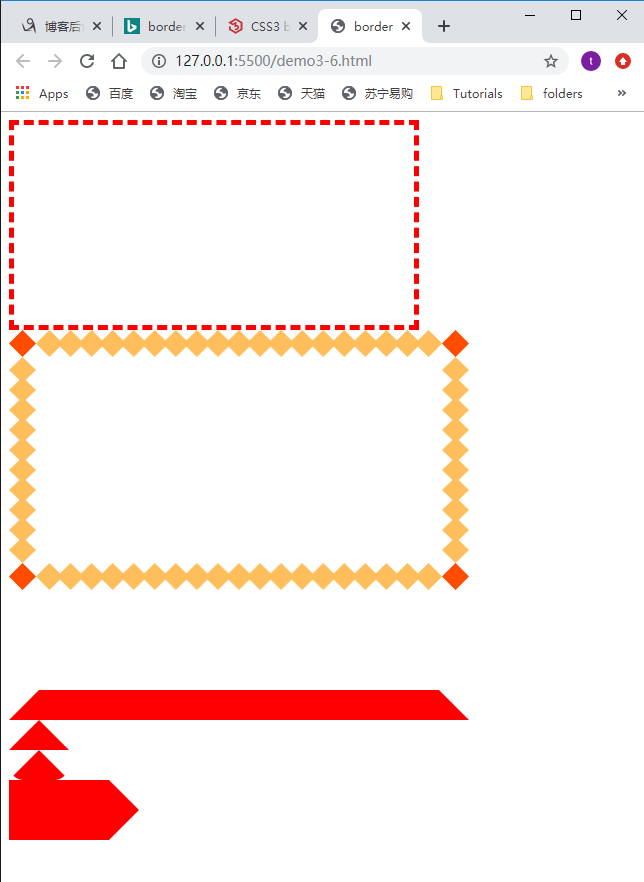
边框的属性:大小 线型 颜色 1px solid grey
边框的背景图
边框的衔接: 三角形
<!DOCTYPE html>
<html>
<head>
    <meta charset="UTF-8">
    <meta name="viewport" content="width=device-width, initial-scale=1.0">
    <meta http-equiv="X-UA-Compatible" content="ie=edge">
    <title>border</title>
    <style>
        .c1{
            width:400px;
            height: 200px;
            /* 可以一次性设置所有border */
            /* border-width: 1px;
            border-style: solid;
            border-color: grey; */
            /* 可以单独设置每一条border */
            /* border-bottom-color:rgb(255, 0, 0);
            border-bottom-style:dashed;
            border-bottom-width: */
            /* width, style, color可以简写 */
            /* border: 1px solid red; */
            /* border:5px solid red; */
            /* border:5px dotted red; */
            border:5px dashed red;
        }
        .c2{
            width:400px;
            height: 200px;

            /* 设置边框背景图片时,border style必须是solid */
            border:30px solid transparent;
            /* border-image: url, 角上的像素(不要带px),指定图片的重复方式; */
            border-image:url(./demo3-6.png) 30 round;
        }
        .c3{
            width:400px;
            height: 100px;
            border-bottom:30px solid red;
            /* border-right:30px solid blue; */
            border-left:30px solid transparent;
            border-right:30px solid transparent;
        }
        /* 基于border来实现三角形 */
        .c4 {
            /* width为0是重点 */
            width: 0px;
            border-bottom: 30px solid red;
            border-left: 30px solid transparent;
            border-right: 30px solid transparent;
        }
        /* 基于border来实现扇形 */
        .c5 {
            width: 0px;
            /* 重点是设置border-radius */
            border-radius: 20px;
            border-bottom: 30px solid red;
            border-left: 30px solid transparent;
            border-right: 30px solid transparent;
        }
        .c6 {
            width: 100px;
            border-bottom: 30px solid red;
            border-right: 30px solid transparent;
        }
        .c7 {
            width: 100px;
            border-top: 30px solid red;
            border-right: 30px solid transparent;
        }
    </style>
</head>
<body>
    <div class="c1">

    </div>
    <div class="c2">

    </div>
    <div class="c3">

    </div>
    <div class="c4">

    </div>
    <div class="c5">

    </div>
    <div class="c6"></div>
    <div class="c7"></div>
</body>
</html>
![]()


 浙公网安备 33010602011771号