H3C 6805交换机版本升级 -FTP方式
1 背景
用户处1台H3C 6805交换机, 要升级版本
当前版本: Version 7.1.070, Release 6616
目标版本:Version 7.1.070, Release 6715
交换机管理接口直连笔记本电脑网卡
交换机管理接口配置IP: 10.19.246.146
笔记本电脑: 10.19.246.5
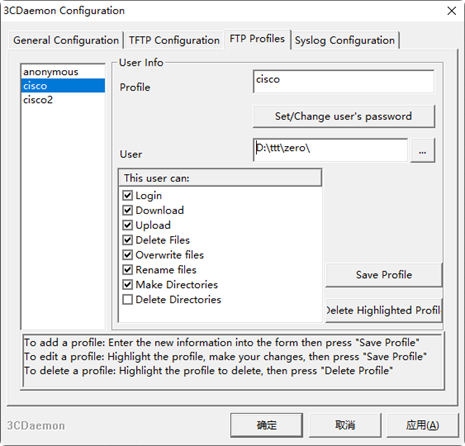
笔记本电脑安装FTP server软件,本次使用的是3Cdeamon

准备版本文件,放到FTP的目录下

2 升级步骤
2.1 交换机管理接口配置IP
interface M-GigabitEthernet0/0/0
ip address 10.19.246.176 255.255.255.0
配置完成后,测试一下到ftp server的可达性
[sw1-M-GigabitEthernet0/0/0]ping 10.19.246.5
Ping 10.19.246.5 (10.19.246.5): 56 data bytes, press CTRL+C to break
56 bytes from 10.19.246.5: icmp_seq=0 ttl=128 time=7.825 ms
56 bytes from 10.19.246.5: icmp_seq=1 ttl=128 time=0.878 ms
56 bytes from 10.19.246.5: icmp_seq=2 ttl=128 time=0.481 ms
56 bytes from 10.19.246.5: icmp_seq=3 ttl=128 time=0.632 ms
56 bytes from 10.19.246.5: icmp_seq=4 ttl=128 time=3.904 ms
2.2 交换机连接FTP server
<sw1>ftp 10.19.246.5
Press CTRL+C to abort.
Connected to 10.19.246.5 (10.19.246.5).
220 3Com 3CDaemon FTP Server Version 2.0
User (10.19.246.5:(none)): cisco   //输入 ftp username
331 User name ok, need password
Password:   		//输入 ftp password
230 User logged in
Remote system type is UNIX.
Using binary mode to transfer files.
进入bindary模式
ftp> binary
200 Type set to I.
获取文件
命令:get 文件名
ftp> get S6805-CMW710-R6715&HS08.ipe
227 Entering passive mode (10,19,246,5,252,199)   //可以看到,用的是被动模式
125 Using existing data connection
...........................................................................................................................................................................................................................
2.3 拷贝完成, 指定用新的文件启动
<sw1> boot-loader file flash:/S6805-CMW710-R6715&HS08.ipe all main
Verifying the file flash:/S6805-CMW710-R6715&HS08.ipe on slot 1.....Done.
H3C S6805-54HF images in IPE:
  s6805-cmw710-boot-r6715.bin
  s6805-cmw710-system-r6715.bin
  S6805-CMW710-R6715HS08.bin
是否继续, 输入Y 回车
This command will set the main startup software images. Continue? [Y/N]:y
交换机会自动解压为多个bin文件
Add images to slot 1.
Decompressing file s6805-cmw710-boot-r6715.bin to flash:/s6805-cmw710-boot-r6715.bin...Done.
Decompressing file s6805-cmw710-system-r6715.bin to flash:/s6805-cmw710-system-r6715.bin...Done.
Decompressing file S6805-CMW710-R6715HS08.bin to flash:/S6805-CMW710-R6715HS08.bin...Done.
Verifying the file flash:/s6805-cmw710-boot-r6715.bin on slot 1...Done.
Verifying the file flash:/s6805-cmw710-system-r6715.bin on slot 1....Done.
Verifying the file flash:/S6805-CMW710-R6715HS08.bin on slot 1...Done.
The images that have passed all examinations will be used as the main startup software images at the next reboot on slot 1.
Decompression completed.
询问是否删除源文件, 输入Y回车
Do you want to delete flash:/S6805-CMW710-R6715&HS08.ipe now? [Y/N]:y
<sw1>%Jan  2 03:23:24:625 2001 sw1 PKG/5/PKG_BOOTLOADER_FILE_SUCCESS: -IPAddr=**-User=**: Executed the boot-loader file command successfully
2.4 保存配置,重启
<sw1>save force
<sw1>reboot
重启过程中看到加载了新的版本
Done.
Press Ctrl+B to access EXTENDED BOOT MENU...0
Loading the main image files...
Loading file flash:/s6805-cmw710-system-r6715.bin...............................
................................................................................
...............................................................Done.
Loading file flash:/S6805-CMW710-R6715HS08.bin......................Done.
Loading file flash:/s6805-cmw710-boot-r6715.bin..........................Done.

Image file flash:/s6805-cmw710-boot-r6715.bin is self-decompressing............
Done.
System is starting...
2.5 Display version确认新版本生效
<switch2>display version
H3C Comware Software, Version 7.1.070, Release 6715
Copyright (c) 2004-2024 New H3C Technologies Co., Ltd. All rights reserved.
H3C S6805-54HF uptime is 0 weeks, 0 days, 0 hours, 3 minutes
Last reboot reason : Cold reboot

Boot image: flash:/s6805-cmw710-boot-r6715.bin
Boot image version: 7.1.070, Release 6715
  Compiled Feb 02 2024 11:00:00
System image: flash:/s6805-cmw710-system-r6715.bin
System image version: 7.1.070, Release 6715
  Compiled Feb 02 2024 11:00:00
Patch image(s) list:
  flash:/S6805-CMW710-R6715HS08.bin, version: R6715HS08
    Compiled Feb 02 2024 11:00:00

 浙公网安备 33010602011771号