组网需求:ISP只有1条线,但是有2台防火墙,并且没有接入交换机,如何组网
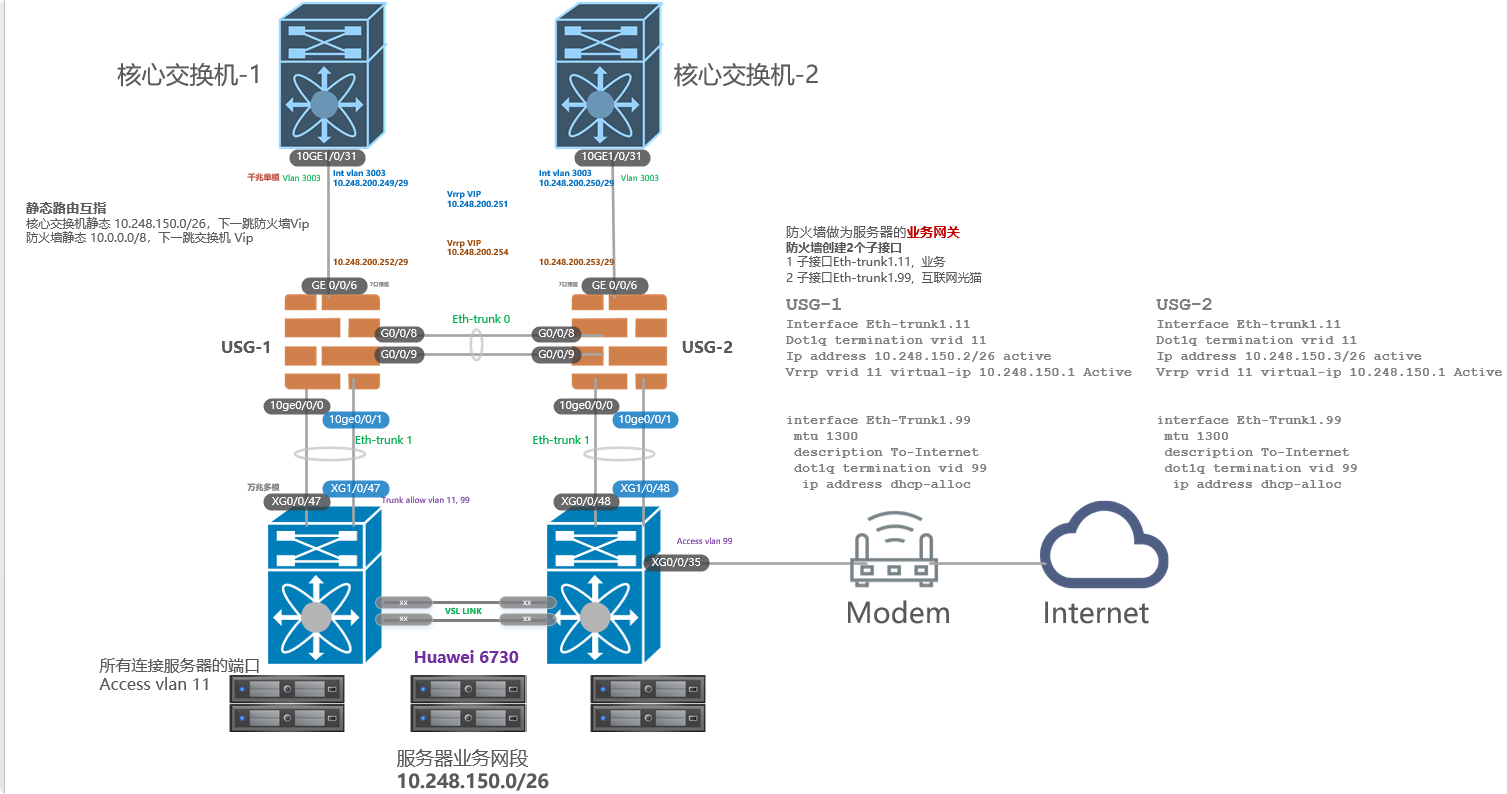
1 拓扑如下:
2 需求:
- 服务器接入
- Ipsec vpn与阿里云对接
- 集团对接
- USG防火墙实现访问控制
Internet出口部分
ISP只有1条线,但是有2台防火墙,并且没有接入交换机,如何组网?
如果Modem的线落在1台USG防火墙上,如果墙宕机,或发生了主备切换,那么Intenret就会中断。
处理方法:
ISP的线路连接到下面的接入交换机上,端口划入1个独立的vlan
USG防火墙下连华为6730交换机接口启用2个独立子接口
- 子接口Eth-trunk1.11, 业务
- 子接口Eth-trunk1.99, 互联网光猫
3 USG防火墙配置
3.1 USG-1
interface Eth-Trunk1
 mode lacp-static

interface 10GE0/0/0
 eth-trunk 1
 device transceiver 10GBASE-FIBER
#
interface 10GE0/0/1
 eth-trunk 1
 device transceiver 10GBASE-FIBER
#
Interface Eth-trunk1.11
Dot1q termination vrid 11
Ip address 10.248.150.2/26 active
Vrrp vrid 11 virtual-ip 10.248.150.1 Active


interface Eth-Trunk1.99
 mtu 1300
 description To-Internet
 dot1q termination vid 99
  ip address dhcp-alloc
## 3.2   USG3.2

```bash
interface Eth-Trunk1
 mode lacp-static

interface 10GE0/0/0
 eth-trunk 1
 device transceiver 10GBASE-FIBER
#
interface 10GE0/0/1
 eth-trunk 1
 device transceiver 10GBASE-FIBER
#
Interface Eth-trunk1.11
Dot1q termination vrid 11
Ip address 10.248.150.3/26 active
Vrrp vrid 11 virtual-ip 10.248.150.1 Active


interface Eth-Trunk1.99
 mtu 1300
 description To-Internet
 dot1q termination vid 99
  ip address dhcp-alloc
4 接入交换机华为6730配置
以下是与USG互联的端口配置
2台USG是独立防火墙,所有需要配置2个eth-trunk
interface Eth-Trunk1
 port link-type trunk
 port trunk allow-pass vlan 11 99
 mode lacp
#
interface XGigabitEthernet0/0/47
 eth-trunk 1
#
interface XGigabitEthernet1/0/47
 eth-trunk 1
#
interface Eth-Trunk2
 port link-type trunk
 port trunk allow-pass vlan 11 99
 mode lacp
 #
interface XGigabitEthernet0/0/48
 eth-trunk 2
#
interface XGigabitEthernet1/0/48
 eth-trunk 2
#
以下是连接Intenret线路的端口
interface XGigabitEthernet0/0/35
 description ToInternet-Modem
 port link-type access
 port default vlan 99
 stp edged-port enable
5 状态确认
Eth-trunk 状态
display eth-trunk
USG到internt确认
display ip interface brief
可以看到获取到了Ip地址 (dhcp方式,从Modem获取的)
6 其他配置
6.1 usg防火墙上需要进行NAT配置
因为下面的服务器区域(10.248.150.0/26) 需要访问Internet
而Modem上面是没有回指路由的, 所以需要USG在出向时将 10.248.150.0/26网段转换为untrust区域的IP 。 NAT类型为 source-nat easy-ip 方式。
但是由于本次项目还有ipsec对接需求,所以NAT中要将ipsec 两端的通信网段排除掉
配置示例:
nat-policy
 rule name nonat
  source-address 10.248.15.0 mask 255.255.255.192
  destination-address 172.16.0.0 mask 255.255.255.0
  action no-nat

 rule name PAT
  source-zone trust
  egress-interface Eth-Trunk1.99
  source-address 10.248.150.0 mask 255.255.255.192
  action source-nat easy-ip
6.2 usg 策略配置
还有重要的1点,就是策略也需要放行
如何放行?
服务器区域为trust
Internet为 untrust
如果是服务器访问Intenet,只需要放行 trust to untrust
但由于存在ipsec vpn,双向都会有主动访问需求,所以还需要放行 untrust to trust
配置如下:
security-policy
 rule name trust-to-Internet
  source-zone trust
  destination-zone untrust
  source-address 10.248.150.0 mask 255.255.255.192
  action permit
#
 rule name ipsecvpn
  source-zone untrust
  destination-zone trust
  source-address 172.16.0.0 mask 255.255.255.0
  destination-address 10.248.150.0 mask 255.255.255.192
  action permit

 浙公网安备 33010602011771号