Cisco Nexus VPC配置模板configuration example
Cisco Nexus VPC配置模板
目录
1 简介 1
1.1 拓扑 2
1.2 端口规划 2
2 配置步骤 2
2.1 开启特性 2
2.2 Keeplive相关配置 3
2.2.1 创建vrf,用于keepalive 3
2.2.2 物理接口配置 3
2.3 建立VPC domain 4
2.3.1 第1台93128 4
2.3.2 第2台93128 4
2.4 Peerlink配置 4
2.4.1 物理接口配置,加入捆绑组 4
2.5 Peer gateway 5
2.6 针对下连配置VPC 5
2.6.1 Nexus下连端口配置 5
2.6.2 下连普通交换机端口配置 8
2.7 验证及排错 9
3 扫盲 11
3.1 Peer keepalive和peer link作用分别是什么? 11
3.2 为什么故障时要关闭secondary 上的成员端口? 11
3.3 Peer keepalive和peer link故障场景分析 11
3.4 VPC keepalive通过普通3层接口建立 12
3.5 Nexus 2000 1
3.6 About 5000 and 6000 1
4 VPC其他参数 1
4.1 Peer gateway 2
4.2 Peer-switch 3
4.2.1 正常情况下 3
4.2.2 取消peer-switch 4
4.2.3 再次查看 4
4.3 Auto recovery 5
5 其他命令 7
5.1 如何查看vpc的角色 7
5.2 如何查看peer-keepalive的端口号 7
5.3 如何查看peer-Link的端口号 8
5.4 查看某个vpc状态 8
5.5 一致性检查 9
5.5.1 verify specified vpc 9
5.5.2 verify vlans 10
5.5.3 verify global 10
5.5.4 verify the orphan port 11
5.5.5 verify statistics of peer-keepalive and peerlink 12
5.5.6 XX 13
1 简介
vPC即跨设备的port-channel。Virtual port-channel。VPC是cisco的叫法,公用标准一般称为MClag, Multi chassis link aggregation.
对于下面的交换机来说,可以将对端2台Nexus交换机看做1台设备,配置普通的port-channel即可。
哪些型号支持vpc?
Nexus全产品系都支持。7000, 5000,6000,3000。包括后来出的9000 series.
1.1 拓扑
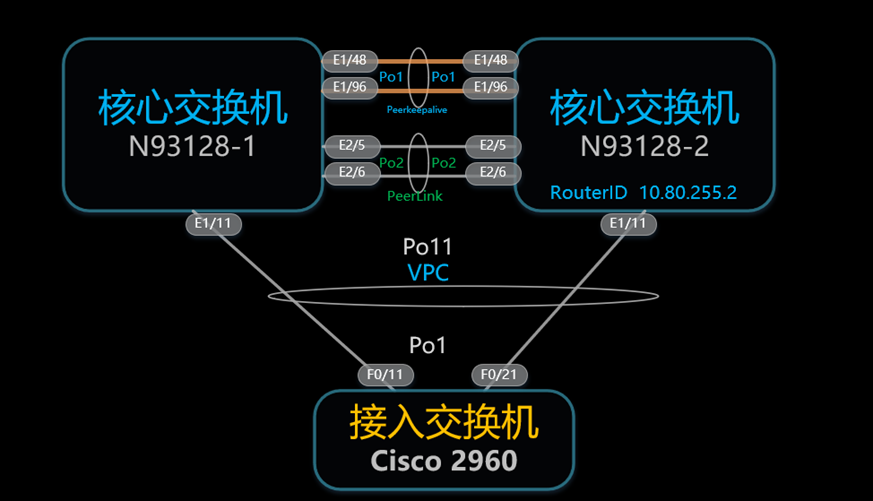
1.2 端口规划
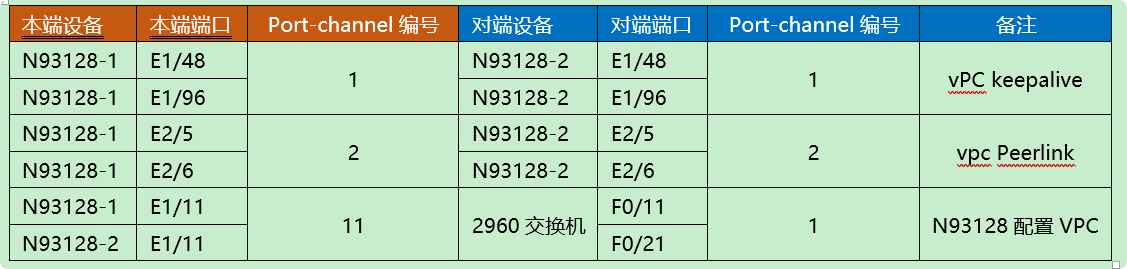
2 配置步骤
2.1 开启特性
Nexus系列使用的IOS是NX-OS,所携带的所有特性默认是关闭的,都需要通过feature xx进行启用。
Feature vpc
2.2 Keeplive相关配置
2.2.1 创建vrf,用于keepalive
VRF的名称可以自定义
vrf context vpc-keepalive
2.2.2 物理接口配置
物理口加入portchannel
Portchannel接口划入vrf,并配置IP
第1台Nexus交换机
interface Ethernet1/48
  no switchport
  channel-group 1 mode active
  no shutdown

interface Ethernet1/96
  no switchport
  channel-group 1 mode active
no shutdown

interface port-channel1
  no switchport
  vrf member vpc-keepalive
  ip address 10.6.128.89/30
第2台Nexus交换机
interface Ethernet1/48
  no switchport
  channel-group 1 mode active
  no shutdown

interface Ethernet1/96
  no switchport
  channel-group 1 mode active
no shutdown

interface port-channel1
  no switchport
  vrf member vpc-keepalive
  ip address 10.6.128.90/30
2.3 建立VPC domain
指定VPC domain编号,一台设备只能有1个domain,但可以有多个VPC
指定本地优先级
指定对端IP和本地IP
物理端口千兆,万兆,40G都可以
2.3.1 第1台93128
vpc domain 1
  role priority 5000
  peer-keepalive destination 10.6.128.90 source 10.6.128.89 vrf vpc-keepalive
2.3.2 第2台93128
vpc domain 1
  role priority 2000
  peer-keepalive destination 10.6.128.89 source 10.6.128.90 vrf vpc-keepalive
2.4 Peerlink配置
2.4.1 物理接口配置,加入捆绑组
两台设备配置一致
可以单链路,但建议2根以上做port-channel
端口速率必须为10G或以上,千兆端口无法做为peerlink
Portchannel接口加入vpc peer-link
interface Ethernet2/5
  switchport mode trunk
  channel-group 2 mode active

interface Ethernet2/6
  switchport mode trunk
channel-group 2 mode active

interface port-channel2
  switchport mode trunk
vpc peer-link
配置后STP端口类型从network变为vPC peer-,STP Bridge Assurance将会开启,并且不能被关闭。
2.5 Peer gateway
vpc domain 1
peer-gateway
VPC最终配置如下:
93128-1# sh run vpc
feature vpc

vpc domain 1
  peer-switch
  role priority 5000
  peer-keepalive destination 10.6.130.68 source 10.6.130.69 vrf default
  peer-gateway
  auto-recovery
  ip arp synchronize

interface port-channel2
  vpc peer-link
2.6 针对下连配置VPC
2.6.1 Nexus下连端口配置
93128-1 93128-2
93128-1#show run interface E1/11
interface Ethernet1/11
  description 2960-1:F0/11
  switchport mode trunk
channel-group 12 mode active

interface port-channel12
  switchport mode trunk
  vpc 12
93128-2# sh run int e1/11
interface Ethernet1/11
  description 2960-2:F0/21
  switchport mode trunk
channel-group 12 mode active

interface port-channel12
  switchport mode trunk
  vpc 12
查看VPC状态,第1台
93128-1# show vpc
Legend:
                (*) - local vPC is down, forwarding via vPC peer-link

vPC domain id                     : 1
Peer status                       : peer adjacency formed ok
vPC keep-alive status             : peer is alive
Configuration consistency status  : success
Per-vlan consistency status       : success
Type-2 consistency status         : success
vPC role                          : primary
Number of vPCs configured         : 2
Peer Gateway                      : Enabled
Dual-active excluded VLANs        : -
Graceful Consistency Check        : Enabled
Auto-recovery status              : Enabled, timer is off.(timeout = 240s)
Delay-restore status              : Timer is off.(timeout = 30s)
Delay-restore SVI status          : Timer is off.(timeout = 10s)

vPC Peer-link status
---------------------------------------------------------------------
id   Port   Status Active vlans
--   ----   ------ --------------------------------------------------
1    Po2    up     1,50,176-177,3900

vPC status
----------------------------------------------------------------------
id   Port   Status Consistency Reason                     Active vlans
--   ----   ------ ----------- ------                     ------------

12   Po12   up     success     success                    1,50,176-17
                                                          7,3900
第2台93128查看状态
93128-1# sh vpc
Legend:
                (*) - local vPC is down, forwarding via vPC peer-link

vPC domain id                     : 1
Peer status                       : peer adjacency formed ok
vPC keep-alive status             : peer is alive
Configuration consistency status  : success
Per-vlan consistency status       : success
Type-2 consistency status         : success
vPC role                          : secondary
Number of vPCs configured         : 2
Peer Gateway                      : Enabled
Dual-active excluded VLANs        : -
Graceful Consistency Check        : Enabled
Auto-recovery status              : Enabled, timer is off.(timeout = 240s)
Delay-restore status              : Timer is off.(timeout = 30s)
Delay-restore SVI status          : Timer is off.(timeout = 10s)

vPC Peer-link status
---------------------------------------------------------------------
id   Port   Status Active vlans
--   ----   ------ --------------------------------------------------
1    Po2    up     1,50,176-177,3900

vPC status
----------------------------------------------------------------------
id   Port   Status Consistency Reason                     Active vlans
--   ----   ------ ----------- ------                     ------------
12   Po12   up     success     success                    1,50,176-17
                                                          7,3900


                                                          7,3900
93128-1# show port-channel summary
Flags:  D - Down        P - Up in port-channel (members)
        I - Individual  H - Hot-standby (LACP only)
        s - Suspended   r - Module-removed
        S - Switched    R - Routed
        U - Up (port-channel)
        p - Up in delay-lacp mode (member)
        M - Not in use. Min-links not met
--------------------------------------------------------------------------------
Group Port-       Type     Protocol  Member Ports
      Channel
--------------------------------------------------------------------------------
1     Po1(RU)     Eth      LACP      Eth1/48(P)   Eth1/96(P)
2     Po2(SU)     Eth      LACP      Eth2/5(P)    Eth2/6(P)
12    Po12(SU)    Eth      LACP      Eth1/11(P)
2.6.2 下连2960交换机端口配置
interface FastEthernet0/11
 switchport mode trunk
 channel-group 2 mode active

interface FastEthernet0/21
 switchport mode trunk
 channel-group 2 mode active

2960-2#sh etherchannel summary
Flags:  D - down        P - in port-channel
        I - stand-alone s - suspended
        H - Hot-standby (LACP only)
        R - Layer3      S - Layer2
        U - in use      f - failed to allocate aggregator
        u - unsuitable for bundling
        w - waiting to be aggregated
        d - default port


Number of channel-groups in use: 1
Number of aggregators:           1

Group  Port-channel  Protocol    Ports
------+-------------+-----------+-----------------------------------------------
2      Po2(SU)         LACP      Fa0/11(P)   Fa0/21(P)
最终Neuxs上的配置如下:
93128-1# sh run vpc

feature vpc

vpc domain 1
  peer-switch
  role priority 5000
  peer-keepalive destination 10.6.130.68 source 10.6.130.69 vrf default
  peer-gateway
  auto-recovery
  ip arp synchronize

interface port-channel2
  vpc peer-link

interface port-channel12
  vpc 12
2.7 验证及排错
验证:
Egypt# show vpc
Legend:
(*) - local vPC is down, forwarding via vPC peer-link
vPC domain id                   : 1
Peer status                     : peer adjacency formed ok
vPC keep-alive status           : peer is alive
Configuration consistency status: success
vPC role                        : secondary
Number of vPCs configured       : 0
Peer Gateway                    : Disabled
Dual-active excluded VLANs      : -
vPC Peer-link status
---------------------------------------------------------------------id   Port   Status Active vlans
--   ----   ------ --------------------------------------------------1    Po100  up     1-20,100
如果Configuration consistency status状态为any,可以通过下面命令检查具体不一致的信息
Congo# show vpc consistency-parameters global
Legend:
Type 1 : vPC will be suspended in case of mismatch
Name                        Type  Local Value            Peer Value
-------------               ----  ---------------------- -----------------------
STP Mode                    1     Rapid-PVST             Rapid-PVST
STP Disabled                1     VLANs 91               VLANs 91
STP MST Region Name         1     customer               customer
STP MST Region Revision     1     1                      1
STP MST Region Instance to  1
VLAN Mapping
STP Loopguard               1     Disabled               Disabled
STP Bridge Assurance        1     Enabled                Enabled
STP Port Type, Edge         1     Normal, Disabled,      Normal,Disabled,
BPDUFilter, Edge BPDUGuard        Disabled               Disabled
STP MST Simulate PVST       1     Enabled                Enabled
Interface-vlan admin up     2     40-43,50,60,70-71,91,1 40-43,50,60,70-71,91,100-103                 00-103
Allowed VLANs               -     40-43,50,60,91,100-103 9,40-43,50,60,91,100-1,1000                  03,1000
Local suspended VLANs       -     -                      -
配置完成员端口后再查看
验证VPC
Congo# show vpc
Legend:
(*) - local vPC is down, forwarding via vPC peer-link
vPC domain id                   : 1
Peer status                     : peer adjacency formed ok
vPC keep-alive status           : peer is alive
Configuration consistency status: success
vPC role                        : primary
Number of vPCs configured       : 1
Peer Gateway                    : Disabled
Dual-active excluded VLANs      : -vPC Peer-link status
---------------------------------------------------------------------id   Port   Status Active vlans
--   ----   ------ --------------------------------------------------1    Po100  up     1-20,100
vPC status
----------------------------------------------------------------------id   Port   Status Consistency Reason                     Active vlans
--   ----   ------ ----------- -------------------------- ------------1    Po1    up     success     success                    1-20,100
3 扫盲
3.1 Peer keepalive和peer link作用分别是什么?
首先,peer keepalive链路上是不会有任何数据流量的,只有VPC 检测报文,只是一条心跳线。
在正常情况下,peer keepalive没有任何作用。只有当peer link中断时,才会触发行为。
3.2 为什么故障时要关闭secondary 上的成员端口?
当peer-link中断,而keepalive正常时,Secondary设备会关闭自己的所有vpc memberport 和SVI,为何这样设计?如果不这样设计会有什么问题?
已有表象的流量(如mac,)不受影响,但新的单播会受影响,可能收到重复数据包。
3.3 Peer keepalive和peer link故障场景分析
分为以下情况
Peer keepalive中断,但peer link正常
正常转发,不受影响
Peer keepalive正常,但peer link中断
Secondary角色的设备会将所有vpc成员端口shutdown
3.4 VPC keepalive通过普通3层接口建立
普遍的做法是2台交换机之间通过物理端口直连网线或光纤,用作keepalive链路。
实际上也可以直接通过3层来实现,即只要定义的两个IP地址可达,keepalive状态就是成功的。例如新建1个loopack 接口,并通过underlay可达。
设备可以节省物理端口占用,另外只要3层可达,则keepalive状态一直是OK的。
当然思科推荐还是物理口直连。以下是思科的建议:
SW1	SW2
93128-1# sh run int loopback 1

!Command: show running-config interface loopback1
!Time: Wed Jul 27 15:12:21 2016

version 7.0(3)I2(2e)

interface loopback1
  description vpc-keeplive
  ip address 10.6.130.68/32
  ip router ospf 100 area 0.0.0.0

93128-2# sh run int loopback 1

!Command: show running-config interface loopback1
!Time: Wed Jul 27 15:15:45 2016

version 7.0(3)I2(2e)

interface loopback1
  description vpc-keeplive
  ip address 10.6.130.69/32
  ip router ospf 100 area 0.0.0.0


SW1	SW2
vpc domain 1
  peer-switch
  role priority 2000
  peer-keepalive destination 10.6.130.69 source 10.6.130.68
  peer-gateway
  auto-recovery
  ip arp synchronize	vpc domain 1
  peer-switch
  role priority 5000
  peer-keepalive destination 10.6.130.68 source 10.6.130.69
  peer-gateway
  auto-recovery
  ip arp synchronize

配置后出现log
93128-1(config-vpc-domain)# 2016 Jul 27 15:18:26 93128-1 %VPC-2-PEER_KEEP_ALIVE_SEND_FAIL: In domain 1, VPC peer keep-alive send has failed

查看VPC状态

93128-1# show vpc
Legend:
                (*) - local vPC is down, forwarding via vPC peer-link

vPC domain id                     : 1
Peer status                       : peer adjacency formed ok
vPC keep-alive status             : peer is not reachable through peer-keepalive
Configuration consistency status  : success
Per-vlan consistency status       : success
Type-2 consistency status         : success
vPC role                          : primary
Number of vPCs configured         : 0
Peer Gateway                      : Enabled
Dual-active excluded VLANs        : -
Graceful Consistency Check        : Enabled
Auto-recovery status              : Enabled, timer is off.(timeout = 240s)
Delay-restore status              : Timer is off.(timeout = 30s)
Delay-restore SVI status          : Timer is off.(timeout = 10s)

vPC Peer-link status
---------------------------------------------------------------------
id   Port   Status Active vlans
--   ----   ------ --------------------------------------------------
1    Po2    up     1,50,176-177,3900
经过检查发现即使是在全局路由下,也必须加vrf default,
vpc domain 1
  peer-switch
  role priority 2000
  peer-keepalive destination 10.6.130.69 source 10.6.130.68 vrf default
  peer-gateway
  auto-recovery
  ip arp synchronize
最后添加vrf default后正常。
当一边加,一边不加vrf default时,2侧的VPC keeplive状态也不一样。
Swi1
Sw2
vpc domain 1
peer-switch
role priority 2000
peer-keepalive destination 10.6.130.69 source 10.6.130.68
peer-gateway
auto-recovery
ip arp synchronize
vpc domain 1
  peer-switch
  role priority 5000
  peer-keepalive destination 10.6.130.68 source 10.6.130.69 vrf default
  peer-gateway
  auto-recovery
  ip arp synchronize
93128-1# sh vpc
Legend:
(*) - local vPC is down, forwarding via vPC peer-link
vPC domain id : 1
Peer status : peer adjacency formed ok
vPC keep-alive status : peer is alive
Configuration consistency status : success
Per-vlan consistency status : success
Type-2 consistency status : success
vPC role : primary
Number of vPCs configured : 0
Peer Gateway : Enabled
Dual-active excluded VLANs : -
Graceful Consistency Check : Enabled
Auto-recovery status : Enabled, timer is off.(timeout = 240s)
Delay-restore status : Timer is off.(timeout = 30s)
Delay-restore SVI status : Timer is off.(timeout = 10s) 93128-2# sh vpc
Legend:
(*) - local vPC is down, forwarding via vPC peer-link
vPC domain id : 1
Peer status : peer adjacency formed ok
vPC keep-alive status : Suspended (Destination IP not reachable)
Configuration consistency status : success
Per-vlan consistency status : success
Type-2 consistency status : success
vPC role : secondary
Number of vPCs configured : 0
Peer Gateway : Enabled
Dual-active excluded VLANs : -
Graceful Consistency Check : Enabled
Auto-recovery status : Enabled, timer is off.(timeout = 240s)
Delay-restore status : Timer is off.(timeout = 30s)
Delay-restore SVI status : Timer is off.(timeout = 10s)
全部加上vrf default 后正常
Swi1
Sw2
vpc domain 1
peer-switch
role priority 2000
peer-keepalive destination 10.6.130.69 source 10.6.130.68 vrf default
peer-gateway
auto-recovery
ip arp synchronize
vpc domain 1
peer-switch
role priority 5000
peer-keepalive destination 10.6.130.68 source 10.6.130.69 vrf default
peer-gateway
auto-recovery
ip arp synchronize
93128-1# sh vpc
Legend:
(*) - local vPC is down, forwarding via vPC peer-link
vPC domain id : 1
Peer status : peer adjacency formed ok
vPC keep-alive status : peer is alive
Configuration consistency status : success
Per-vlan consistency status : success
Type-2 consistency status : success
vPC role : primary
Number of vPCs configured : 0
Peer Gateway : Enabled
Dual-active excluded VLANs : -
Graceful Consistency Check : Enabled
Auto-recovery status : Enabled, timer is off.(timeout = 240s)
Delay-restore status : Timer is off.(timeout = 30s)
Delay-restore SVI status : Timer is off.(timeout = 10s) 93128-2# sh vpc
Legend:
(*) - local vPC is down, forwarding via vPC peer-link
vPC domain id : 1
Peer status : peer adjacency formed ok
vPC keep-alive status : peer is alive
Configuration consistency status : success
Per-vlan consistency status : success
Type-2 consistency status : success
vPC role : secondary
Number of vPCs configured : 0
Peer Gateway : Enabled
Dual-active excluded VLANs : -
Graceful Consistency Check : Enabled
Auto-recovery status : Enabled, timer is off.(timeout = 240s)
Delay-restore status : Timer is off.(timeout = 30s)
Delay-restore SVI status : Timer is off.(timeout = 10s)
3.5 Nexus 2000
Nexus 2000可以看作是一块line card,本身没有任何转发能力,所以即使你将2台终端连接在Nexus 2000上也是无法通信的。必须上连到母体,,即9K,7K,5K,3K,作为一块远端板卡。Nexus 2000下挂的终端通信流量必须上行到父系交换机。
而且Nexus 2000设备本身也没有console口。
而且Nexus 2000所有端口属于host interface,即主机端口。不能下连交换机。
What happened if connect a switch to Nexus 2000
The interface will be in err-disable status once received any BPDU.
3.6 About 5000 and 6000
原来是两个不同的平台,后来cisco将其合并,现在系列为56系列。
4 VPC其他参数
VPC有一些优化的配置,命令如下:
4.1 Peer gateway
vpc domain 1
peer-switch
role priority 5000
peer-keepalive destination 10.6.130.68 source 10.6.130.69 vrf default
peer-gateway
auto-recovery
ip arp synchronize
Peer-Gateway用于fast-path functionality。(存储,应用服务器)
节点发送返回流量到发送方的一个特殊的mac地址而不是hsrp mac地址(由于VPC防环机制,默认情况这种流量会被丢弃------不允许将VPC peer link收到的流量发送到VPC端口–VPC防环机制)
VPC Peer-Gateway使VPC对端(peer)设备转发目的MAC地址为对端路由器的本地mac地址的流量
配置:Congo(config-vpc-domain)# peer-gateway
应用场景:
有一些NAS设备( NETAPP Fast-Path 或 EMC IP-Reflect ) 回应的时候使用的是发送设备的实MAC地址,而不是HSRP网关的虚拟MAC地址
报文被负载分担到非实MAC所在VPC设备时,会通过peer-link发送到实MAC所在的VPC设备上,而由于重复帧防护机制,该设备会把报文丢弃.
Vpc peer-gateway 解决方案:
当目标MAC地址为peer vpc设备的三层报文发送到本地时,该功能允许本地vpc设备网关正常转发该报文.
4.2 Peer-switch
2台设备都成为spanning tree的ROOT。
那问题来了? 通过peer-switch使用2台设备都成为spannning tree的ROOT,作用何在?
4.2.1 正常情况下
使2台设备都成为spanning tree Root
93128-1# sh spanning-tree root

                                        Root  Hello Max Fwd
Vlan                   Root ID          Cost  Time  Age Dly  Root Port
---------------- -------------------- ------- ----- --- ---  ----------------
VLAN0001         32769 0023.04ee.be01       0    2   20  15  This bridge is root
VLAN0050         32818 0023.04ee.be01       0    2   20  15  This bridge is root
VLAN0176         32944 0023.04ee.be01       0    2   20  15  This bridge is root
VLAN0177         32945 0023.04ee.be01       0    2   20  15  This bridge is root
VLAN3900         36668 0023.04ee.be01       0    2   20  15  This bridge is root

93128-1# sh spanning-tree root

                                        Root  Hello Max Fwd
Vlan                   Root ID          Cost  Time  Age Dly  Root Port
---------------- -------------------- ------- ----- --- ---  ----------------
VLAN0001         32769 0023.04ee.be01       0    2   20  15  This bridge is root
VLAN0050         32818 0023.04ee.be01       0    2   20  15  This bridge is root
VLAN0176         32944 0023.04ee.be01       0    2   20  15  This bridge is root
VLAN0177         32945 0023.04ee.be01       0    2   20  15  This bridge is root
VLAN3900         36668 0023.04ee.be01       0    2   20  15  This bridge is root
4.2.2 取消peer-switch
93128-1(config-vpc-domain)# no peer-switch
93128-1(config-vpc-domain)# 2016 Jul 27 15:49:13 93128-1 %STP-2-VPC_PEERSWITCH_CONFIG_DISABLED: vPC peer-switch configuration is disabled. Please make sure to change spanning tree "bridge" priority as per the recommended guidelines.
4.2.3 再次查看
4.2.3.1 N93128-1
93128-1# sh spanning-tree root

                                        Root  Hello Max Fwd
Vlan                   Root ID          Cost  Time  Age Dly  Root Port
---------------- -------------------- ------- ----- --- ---  ----------------
VLAN0001         32769 0024.98d5.ea80      19    2   20  15      Ethernet1/11
VLAN0050         32818 5c83.8f5f.1da3       0    2   20  15  This bridge is root
VLAN0176         32944 0024.98d6.1980      20    2   20  15     port-channel2
VLAN0177         32945 5c83.8f5f.1da3       0    2   20  15  This bridge is root
VLAN3900         36668 5c83.8f5f.1da3       0    2   20  15  This bridge is root
4.2.3.2 N93128-2
93128-1# sh spanning-tree root

                                        Root  Hello Max Fwd
Vlan                   Root ID          Cost  Time  Age Dly  Root Port
---------------- -------------------- ------- ----- --- ---  ----------------
VLAN0001         32769 0024.98d5.ea80      20    2   20  15     port-channel2
VLAN0050         32818 5c83.8f5f.1da3       1    2   20  15     port-channel2
VLAN0176         32944 0024.98d6.1980      19    2   20  15      Ethernet1/59
VLAN0177         32945 5c83.8f5f.1da3       1    2   20  15     port-channel2
VLAN3900         36668 5c83.8f5f.1da3       1    2   20  15     port-channel2
4.3 Auto recovery
字面直译是自动恢复,那是恢复了个啥?
这个特性主要是在以下的场景发挥作用。
场景 1:
在数据中心停机或断电时,导致2台Nexus都断电。这时如果只有其中一台Nexus加电(这种场景在生产环境中遇到过多次,比如另1台在重启时失败,或电源出现故障)
由于另1台Nexus处于关闭状态,因此peer-link 和peer-keepalive也处于关闭状态。这种情况下,已经开机的这1台nexus也不会打开vPC。所有vPC配置都必须从该Nexus的端口通道中删除,以使端口通道工作。
啥意思呢? 就是说这时vpc状态就是卡死的,无法正常转发,需要删除vpc的配置,
操作就是删除port-channel接口下的vpc xx,命令如下:
Interface port-channel 11
No vpc 11
场景 2:
由于某种原因,vPC peer-link断开。由于vPC peer-keepalive链路还是正常状态,因此vPC secondary会由于双活检测而关闭其所有vPC成员端口。因此,所有流量都通过vPC主交换机。如果这时由于某种原因(比如掉电),vPC主交换机也关闭。此交换机问题会使流量黑洞,因为secondary这台交换机vPC仍处于关闭状态,因为它在vPC主交换机关闭之前检测到双活检测。
说了这么多,怎么解决?
加1条命令
SW1(config)# vpc domain 1
SW1(config-vpc-domain)# auto-recovery
加上这条命令后再次show vpc
SW1# show vpc
Legend:
                (*) - local vPC is down, forwarding via vPC peer-link

vPC domain id                     : 1
Peer status                       : peer adjacency formed ok
vPC keep-alive status             : peer is alive
Configuration consistency status  : success
Per-vlan consistency status       : success
Type-2 consistency status         : success
vPC role                          : primary
Number of vPCs configured         : 1
Peer Gateway                      : Enabled
Peer gateway excluded VLANs       : -
Dual-active excluded VLANs        : -
Graceful Consistency Check        : Enabled
Auto-recovery status              : Enabled (timeout = 240 seconds)
现在解释一下工作原理
本节分别讨论背景部分中提到的两个场景。(假设在两个交换机上都配置了vPC auto-recovery,并相应保存到启动配置中)
场景1:
SW1和SW2同时关电,只有SW2再次启动的场景
SW2等待vPC auto-recovery超时(默认为240秒,可以使用 auto-recovery reload-delay x 命令进行配置,其中x为240-3600秒),以验证vPC peer-link或 peer-keepalive link状态是否开启。如果其中任何一个链路处于打开状态,则不会触发 auto-recovery 。
超时之后,如果两个链路都处于关闭状态,则vPC将启用自动恢复,SW2将成为主设备并启动其本地vPC。由于没有peers,所以会绕过一致性检查。
之后SW1启动恢复,此时SW2保留其主角色,SW1作为备角色,执行一致性检查,并采取适当的操作。
场景2:
首先vPC peer-link关闭,然后vPC主设备关闭的场景
SW2等待三个连续peer-keepalive消息丢失。出于某种原因,如果vPC peer-link恢复或者SW2收到peer-keepalive消息,那么auto-recovery将不会启用。
如果vPC peer-link仍然中断,并且丢失了三个连续的peer-keepalive消息,则vPC auto-recovery 启用。
SW2承担主角色,并启用它的本地vPC,会绕过一致性检查。
之后SW1启动恢复,此时SW2仍保留其主角色,SW1作为备角色,执行一致性检查,并采取适当的操作。
5 其他命令
5.1 如何查看vpc的角色
Nexus# show vpc role

vPC Role status
----------------------------------------------------
vPC role                        : primary, operational secondary
Dual Active Detection Status    : 0
vPC system-mac                  : 00:23:04:ee:be:01
vPC system-priority             : 32667
vPC local system-mac            : a0:23:9f:80:9f:7c
vPC local role-priority         : 100
vPC local config role-priority  : 100
vPC peer system-mac             : 70:70:8b:df:d6:01
vPC peer role-priority          : 150
vPC peer config role-priority   : 150
5.2	如何查看peer-keepalive的端口号

NEXUS# sh vpc peer-keepalive

vPC keep-alive status             : peer is alive
--Peer is alive for             : (130945) seconds, (483) msec
--Send status                   : Success
--Last send at                  : 2019.03.11 13:34:50 312 ms
--Sent on interface             : Po100
--Receive status                : Success
--Last receive at               : 2019.03.11 13:34:50 313 ms
--Received on interface         : Po100
--Last update from peer         : (0) seconds, (287) msec

vPC Keep-alive parameters
--Destination                   : 1.1.1.2
--Keepalive interval            : 1000 msec
--Keepalive timeout             : 5 seconds
--Keepalive hold timeout        : 3 seconds
--Keepalive vrf                 : vpc-keepalive
--Keepalive udp port            : 3200
--Keepalive tos                 : 192
NEXUS#
5.3 如何查看peer-Link的端口号
NEXUS# show vpc brief
Legend:
                (*) - local vPC is down, forwarding via vPC peer-link

vPC domain id                     : 1
Peer status                       : peer adjacency formed ok
vPC keep-alive status             : peer is alive
Configuration consistency status  : success
Per-vlan consistency status       : success
Type-2 consistency status         : failed
Type-2 inconsistency reason       : SVI type-2 configuration incompatible
vPC role                          : primary, operational secondary
Number of vPCs configured         : 16
Peer Gateway                      : Enabled
Dual-active excluded VLANs        : -
Graceful Consistency Check        : Enabled
Auto-recovery status              : Enabled, timer is off.(timeout = 240s)
Delay-restore status              : Timer is off.(timeout = 30s)
Delay-restore SVI status          : Timer is off.(timeout = 10s)
Operational Layer3 Peer-router    : Disabled

vPC Peer-link status
---------------------------------------------------------------------
id    Port   Status Active vlans
--    ----   ------ -------------------------------------------------
1     Po101  up     1,2000-2010,2021-2028,2041-2048,2061-2062,2101-2110
5.4 查看某个vpc状态
NEXUS# show vpc 23


vPC status
----------------------------------------------------------------------------
Id    Port          Status Consistency Reason                Active vlans
--    ------------  ------ ----------- ------                ---------------
23    Po23          up     success     success               2101-2110

5.5	一致性检查
5.5.1	verify specified vpc

NEXUS# show vpc consistency-parameters vpc 23

    Legend:
        Type 1 : vPC will be suspended in case of mismatch

Name                        Type  Local Value            Peer Value
-------------               ----  ---------------------- -----------------------
delayed-lacp                1     disabled               disabled
mode                        1     active                 active
Switchport Isolated         1     0                      0
Interface type              1     port-channel           port-channel
LACP Mode                   1     on                     on
Virtual-ethernet-bridge     1     Disabled               Disabled
Speed                       1     10 Gb/s                10 Gb/s
Duplex                      1     full                   full
MTU                         1     1500                   1500
Port Mode                   1     trunk                  trunk
Native Vlan                 1     1                      1
Admin port mode             1     trunk                  trunk
STP Port Guard              1     Default                Default
STP Port Type               1     Default                Default
STP MST Simulate PVST       1     Default                Default
lag-id                      1     [(7f9b,                [(7f9b,
                                  0-23-4-ee-be-1, 8017,  0-23-4-ee-be-1, 8017,
                                  0, 0), (8000,          0, 0), (8000,
                                  70-70-8b-b8-14-93, 1,  70-70-8b-b8-14-93, 1,
                                  0, 0)]                 0, 0)]
Allow-Multi-Tag             1     Disabled               Disabled
Vlan xlt mapping            1     Disabled               Disabled
vPC card type               1     N3K                    N3K
Allowed VLANs               -     2101-2110              2101-2110
Local suspended VLANs       -     -                      -
NEXUS#
5.5.2 verify vlans
NEXUS# show vpc consistency-parameters vlans

Name                        Type  Reason Code             Pass Vlans
-------------               ----  ---------------------- -----------------------
STP MST Simulate PVST       1     success                0-4095
STP Port Type, Edge         1     success                0-4095
BPDUFilter, Edge BPDUGuard
STP MST Region Name         1     success                0-4095
STP Disabled                1     success                0-4095
STP Mode                    1     success                0-4095
STP Bridge Assurance        1     success                0-4095
STP Loopguard               1     success                0-4095
STP MST Region Instance to  1     success                0-4095
 VLAN Mapping
STP MST Region Revision     1     success                0-4095
Pass Vlans                  -                            0-4095
NEXUS# ^C
5.5.3 verify global
NEXUS# show vpc consistency-parameters global

    Legend:
        Type 1 : vPC will be suspended in case of mismatch

Name                        Type  Local Value            Peer Value
-------------               ----  ---------------------- -----------------------
STP MST Simulate PVST       1     Enabled                Enabled
STP Port Type, Edge         1     Normal, Disabled,      Normal, Disabled,
BPDUFilter, Edge BPDUGuard        Disabled               Disabled
STP MST Region Name         1     ""                     ""
STP Disabled                1     None                   None
STP Mode                    1     Rapid-PVST             Rapid-PVST
STP Bridge Assurance        1     Enabled                Enabled
STP Loopguard               1     Disabled               Disabled
STP MST Region Instance to  1
 VLAN Mapping
STP MST Region Revision     1     0                      0
Interface-vlan admin up     2     2009-2010
Interface-vlan routing      2     1,2009-2010            1
capability
QoS (Cos)                   2     ([0-7], [], [], [],    ([0-7], [], [], [],
                                  [], [])                [], [])
Network QoS (MTU)           2     (1500, 1500, 1500,     (1500, 1500, 1500,
                                  1500, 1500, 1500)      1500, 1500, 1500)
Network Qos (Pause:         2     (F, F, F, F, F, F)     (F, F, F, F, F, F)
T->Enabled, F->Disabled)
Input Queuing (Bandwidth)   2     (100, 0, 0, 0, 0, 0)   (100, 0, 0, 0, 0, 0)
Input Queuing (Absolute     2     (F, F, F, F, F, F)     (F, F, F, F, F, F)
Priority: T->Enabled,
F->Disabled)
Output Queuing (Bandwidth   2     (100, 0, 0, 0, 0, 0)   (100, 0, 0, 0, 0, 0)
Remaining)
Output Queuing (Absolute    2     (F, F, F, F, F, F)     (F, F, F, F, F, F)
Priority: T->Enabled,
F->Disabled)
HW profile Forwarding Mode  1     normal                 normal
Allowed VLANs               -     1,100,2000-2010,2021-2 1,2000-2010,2021-2028,
                                  028,2041-2048,2061-206 2041-2048,2061-2062,21
                                  2,2101-2110            01-2110
Local suspended VLANs       -     100                    -
NEXUS#
5.5.4 verify the orphan port
NEXUS# sh vpc orphan-ports
Note:
--------::Going through port database. Please be patient.::--------

VLAN           Orphan Ports
-------        -------------------------
1              Eth1/3, Eth1/4
2009           Eth1/25
2010           Eth1/27
5.5.5 verify statistics of peer-keepalive and peerlink
NEXUS# show vpc statistics peer-keepalive


vPC keep-alive statistics
----------------------------------------------------
peer-keepalive tx count:          131917
peer-keepalive rx count:          131890
average interval for peer rx:     986
Count of peer state changes:      0
NEXUS#
NEXUS#
NEXUS# show vpc statistics peer-link
port-channel101 is up
admin state is up,
  Hardware: Port-Channel, address: a023.9f80.9f56 (bia a023.9f80.9f56)
  Description: ***To_CN-QDP1-BD04-WAN-DS02_PeerLink***
  MTU 9216 bytes, BW 20000000 Kbit, DLY 10 usec
  reliability 255/255, txload 1/255, rxload 1/255
  Encapsulation ARPA, medium is broadcast
  Port mode is trunk
  full-duplex, 10 Gb/s
  Input flow-control is off, output flow-control is off
  Auto-mdix is turned off
  Switchport monitor is off
  EtherType is 0x8100
  Members in this channel: Eth1/47, Eth1/48
  Last clearing of "show interface" counters never
  1 interface resets
  Load-Interval #1: 30 seconds
    30 seconds input rate 34320 bits/sec, 32 packets/sec
    30 seconds output rate 1051776 bits/sec, 308 packets/sec
    input rate 34.32 Kbps, 32 pps; output rate 1.05 Mbps, 308 pps
  Load-Interval #2: 5 minute (300 seconds)
    300 seconds input rate 32944 bits/sec, 29 packets/sec
    300 seconds output rate 1118816 bits/sec, 241 packets/sec
    input rate 32.94 Kbps, 29 pps; output rate 1.12 Mbps, 241 pps
  RX
    264875 unicast packets  5337108 multicast packets  1198 broadcast packets
    5603181 input packets  574344157 bytes
    0 jumbo packets  0 storm suppression packets
    0 runts  0 giants  0 CRC  0 no buffer
    0 input error  0 short frame  0 overrun   0 underrun  0 ignored
    0 watchdog  0 bad etype drop  0 bad proto drop  0 if down drop
    0 input with dribble  0 input discard
    0 Rx pause
  TX
    14170085 unicast packets  2004227 multicast packets  529134 broadcast packets
    16703446 output packets  4760929780 bytes
    0 jumbo packets
    0 output error  0 collision  0 deferred  0 late collision
    0 lost carrier  0 no carrier  0 babble  0 output discard
    0 Tx pause

 浙公网安备 33010602011771号