华为CE6800交换机堆叠配置案例
新到了2台华为CE6857交换机, 需要配置堆叠
硬件型号:CE6857F-48S6CQ
示例拓扑:
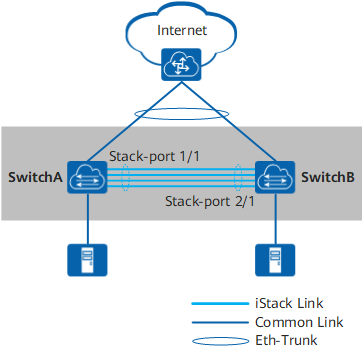
实际物理拓扑

配置思路
采用如下的思路配置:
- 提前规划好堆叠方案。
- 按照前期的规划,完成各台交换机的堆叠配置,包括堆叠成员ID、堆叠优先级、堆叠域编号、堆叠端口等。完成后保存配置并将交换机下电。
- 连接交换机之间的堆叠线缆,然后将交换机上电。
- 检查堆叠组建是否成功。
操作步骤
1 提前规划堆叠方案。
    规划SwitchA的堆叠成员ID为1,SwitchB的成员ID为2。
    规划SwitchA作为主交换机,其堆叠优先级最高,为150。SwitchB的堆叠优先级为120。
    规划堆叠域编号(Domain ID)为10,不与网络中其他堆叠系统的域编号冲突。
    规划SwitchA和SwitchB用于堆叠连接的端口为100GE1/0/1~100GE1/0/2。
2 配置堆叠属性。
配置SwitchA的堆叠优先级为150,Domain ID为10。缺省情况下,设备的堆叠成员ID为1。此处默认SwitchA的堆叠成员ID为1,无需配置。
<HUAWEI> system-view
[~HUAWEI] sysname SwitchA
[*HUAWEI] commit
[~SwitchA] stack
[~SwitchA-stack] stack member 1 priority 150
Info: The operation will take effect after reboot.
[*SwitchA-stack] stack member 1 domain 10
Info: The operation takes effect only after the save command is executed. The device with a lower priority then will be reset in the stack merging scenario.
[*SwitchA-stack] quit
[*SwitchA] commit
** 配置SwitchB的堆叠成员ID为2,优先级为120,Domain ID为10。**
<HUAWEI> system-view
[~HUAWEI] sysname SwitchB
[*HUAWEI] commit
[~SwitchB] stack
[~SwitchB-stack] stack member 1 priority 120
Info: The operation will take effect after reboot.
[*SwitchB-stack] stack member 1 domain 10
Info: The operation takes effect only after the save command is executed. The device with a lower priority then will be reset in the stack merging scenario.
[*SwitchB-stack] stack member 1 renumber 2 inherit-config
Warning: The stack configuration of member ID 1 will be inherited to member ID 2 after the device resets. Continue? [Y/N]: y
[*SwitchB-stack] quit
[*SwitchB] commit
说明:
由于SwitchB尚未重启,当前堆叠成员ID为1,此时需要使用member 1来进行堆叠配置。
Switch B使用stack member 1 renumber 2 inherit-config命令修改堆叠成员ID时,需要指定inherit-config参数。
如果不指定inherit-config参数,member 2不会继承member 1的堆叠配置,需要使用member 2重新进行堆叠配置。
指定inherit-config参数后,member 2可直接继承member 1的堆叠配置。
3 配置堆叠端口
配置堆叠端口。
将SwitchA的业务口100GE1/0/1~100GE1/0/2加入堆叠端口1/1。
[~SwitchA] interface stack-port 1/1
[*SwitchA-Stack-Port1/1] port member-group interface 100ge 1/0/1 to 1/0/2
Warning: After the configuration is complete,
1.The interface(s) (100GE1/0/1-1/0/2) will be converted to stack mode and be configured with the port crc-statistics trigger error-down command if the configuration does not exist.
2.The interface(s) may go Error-Down (crc-statistics) because there is no shutdown configuration on the interfaces.Continue? [Y/N]: y
[*SwitchA-Stack-Port1/1] commit
[~SwitchA-Stack-Port1/1] return
被配置为堆叠物理成员端口后,端口下会自动配置port crc-statistics trigger error-down。
将SwitchB的业务口100GE1/0/1~10GE1/0/2加入堆叠端口1/1。
[~SwitchB] interface stack-port 1/1
[*SwitchB-Stack-Port1/1] port member-group interface 100ge 1/0/1 to 1/0/2
Warning: After the configuration is complete,
1.The interface(s) (100GE1/0/1-1/0/2) will be converted to stack mode and be configured with the port crc-statistics trigger error-down command if the configuration does not exist.
2.The interface(s) may go Error-Down (crc-statistics) because there is no shutdown configuration on the interfaces.Continue? [Y/N]: y
[*SwitchB-Stack-Port1/1] commit
[~SwitchB-Stack-Port1/1] return
4 检查堆叠配置信息。
上述配置完成后,执行命令display stack configuration查看配置是否与规划的一致,如果不一致,需要修改配置。以查看SwitchA为例。
<SwitchA> display stack configuration
Oper          : Operation
Conf          : Configuration
*             : Offline configuration
Isolated Port : The port is in stack mode, but does not belong to any Stack-Port

Attribute Configuration:
-----------------------------------------
 MemberID      Domain         Priority
Oper(Conf)   Oper(Conf)      Oper(Conf)
-----------------------------------------
1(1)         --(10)          100(150)
-----------------------------------------

Stack-Port Configuration:
--------------------------------------------------------------------------------
Stack-Port      Member Ports
--------------------------------------------------------------------------------
Stack-Port1/1   100GE1/0/1           100GE1/0/2
--------------------------------------------------------------------------------
5 保存配置后将设备下电。
保存SwitchA和SwitchB的配置,然后将设备下电。SwitchB的配置与SwitchA相同,略。
save
Warning: The current configuration will be written to the device. Continue? [Y/N]: y
6 按照前期规划及配置,连接堆叠线缆。线缆连接完成后将设备上电。
建议先将高优先级设备上电,以使其先完成启动,优先竞争为主交换机。
7 验证配置结果。
等待几分钟后,在主交换机SwitchA上使用命令display stack查看堆叠是否组建成功。
 <SwitchA>display stack
--------------------------------------------------------------------------------
MemberID Role     MAC              Priority   DeviceType         Description
--------------------------------------------------------------------------------
1        Master   7c33-f906-6880   150				CE6857F-48S6CQ
2        Standby  e4dc-ccc3-08f0   120        CE6857F-48S6CQ
--------------------------------------------------------------------------------
如上所示,显示两台交换机的信息,表示堆叠建立成功,且主交换机为成员ID为1的设备,即SwitchA。
查看堆叠系统拓扑信息。
<SwitchA> display stack topology
Stack Topology:
----------------------------------------------
            Stack-Port 1      Stack-Port 2
MemberID   Status Neighbor   Status Neighbor
----------------------------------------------
1          up     2          --     --
2          up     1          --     --
----------------------------------------------

Stack Link:
----------------------------------------------------------------------------
Stack-Port       Port               Status     PeerPort           PeerStatus
----------------------------------------------------------------------------
Stack-Port1/1    100GE1/0/1         up         100GE2/0/1         up
Stack-Port1/1    100GE1/0/2         up         100GE2/0/2         up
Stack-Port2/1    100GE2/0/1         up         100GE1/0/1         up
Stack-Port2/1    100GE2/0/2         up         100GE1/0/2         up
----------------------------------------------------------------------------
8 保存堆叠系统配置。
<SwitchA> save
Warning: The current configuration will be written to the device. Continue? [Y/N]: y
配置文件
堆叠系统的配置文件
#
sysname SwitchA
#
stack
 #
 stack member 1 domain 10
 stack member 1 priority 150
 #
 stack member 2 domain 10
 stack member 2 priority 120
#
interface Stack-Port1/1
#
interface Stack-Port2/1
#
interface 100GE1/0/1
 port mode stack
 stack-port 1/1
 port crc-statistics trigger error-down
#
interface 100GE1/0/2
 port mode stack
 stack-port 1/1
 port crc-statistics trigger error-down
#
interface 100GE2/0/1
 port mode stack
 stack-port 2/1
 port crc-statistics trigger error-down
#
interface 100GE2/0/2
 port mode stack
 stack-port 2/1
 port crc-statistics trigger error-down

#
return
**至此,堆叠完成, 但为了防止2条堆叠线缆都中断引发的脑裂,建议配置双活检测 dual-active **
9 双活检测配置
接口为2台交换机的47,48直连,放到同1个eth-trunk中
interface Eth-Trunk100
 stp disable
 dual-active detect mode relay
 #
 interface 10GE1/0/47
 eth-trunk 100
#
interface 10GE1/0/48
 eth-trunk 100
#
interface 10GE2/0/47
 eth-trunk 100
#
interface 10GE2/0/48
 eth-trunk 100
确认dual active已经生效
<SwitchA>display dual-active
Stack domainID: 10
Dual-active status: Normal
Dual-active detect mode: Relay
Dual-active detect configuration of MEth: Disable
Dual-active direct detect interfaces configured:
 --
Dual-active relay detect interfaces configured:
 Eth-Trunk100
   10GE1/0/47       up  (Physical)  up  (Protocol)  10   (PeerDomain)
   10GE1/0/48       up  (Physical)  up  (Protocol)  10   (PeerDomain)
   10GE2/0/47       up  (Physical)  up  (Protocol)  10   (PeerDomain)
   10GE2/0/48       up  (Physical)  up  (Protocol)  10   (PeerDomain)
Excluded ports(configurable):
 --
Excluded ports(can not be configured):
 100GE1/0/1
 100GE1/0/2
 100GE2/0/1
 100GE2/0/2

 浙公网安备 33010602011771号