
css3新增选择器使用--小技巧
css2中的属性选择器:
    element[attr]{ } 指定了属性名,但没有指定属性值得element元素
    element[attr=value]{ } 指定了属性名,并且指定了属性值为value的element元素
    element[attr~=value]{ } 指定了属性名,并且属性值可以为词列表中的包含指定属性值value的element元素

css3中的属性选择器:
    element[attr^=value]{ } 指定了属性名,并且属性值以value开头的element元素
    element[attr$=value]{ } 指定了属性名,并且属性值以value结尾的element元素
    element[attr*=value]{ } 指定了属性名,并且属性值中包含value的element元素
<!DOCTYPE html>
<html>
<head>
<meta charset="utf-8">
<title></title>
<style>
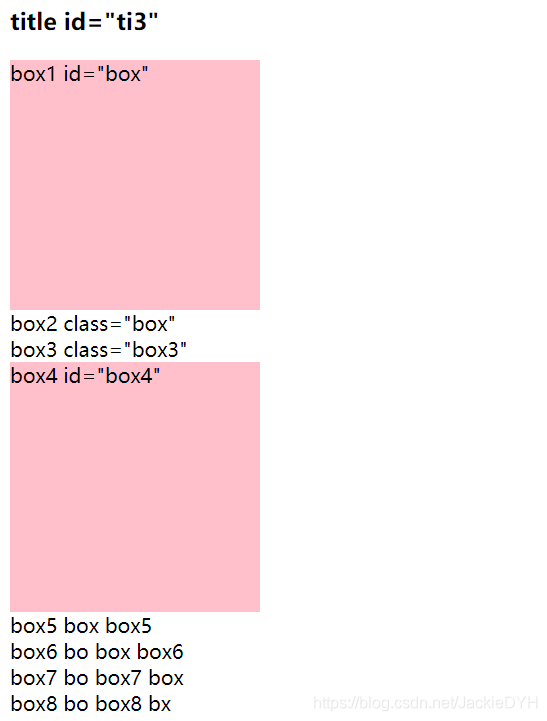
/*1 选择 div标签 id */
div[id]{
width: 200px;
height: 200px;
background: pink;
}
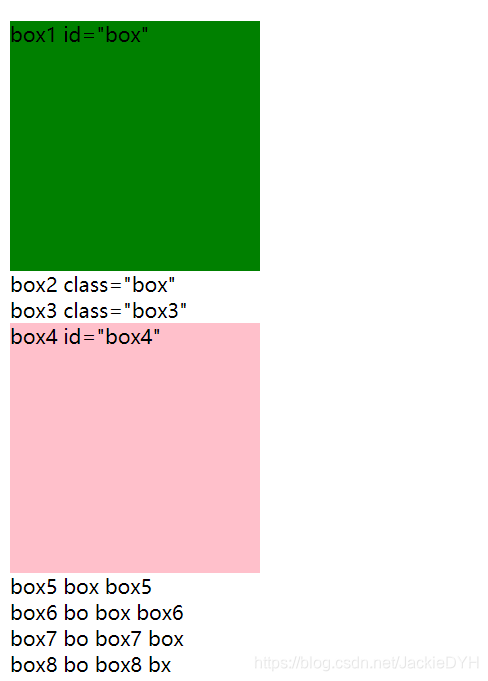
/*2 选择 div标签 id=box */
div[id=box]{
background: green;
}
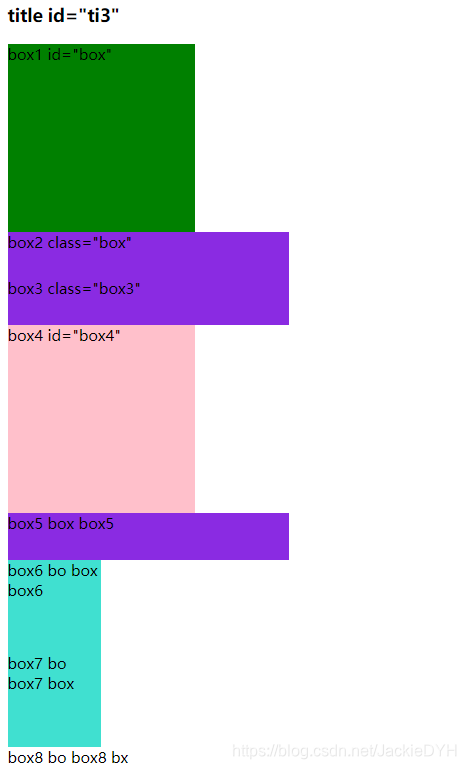
/*3 选择 div标签 class=box */
div[class=box]{
width: 100px;
height: 100px;
background: #f0f;
}
/*4 选择 div标签 class中包含box的 */
div[class~=box]{
width: 100px;
height: 100px;
background: turquoise;
}
/* 以上css2选择器 */
/*5 选择 div标签 class中box开头 */
div[class^=box]{
width: 300px;
height: 50px;
background: blueviolet;
}
/*6 选择 div标签 class中box结尾 */
div[class$=box]{
width: 400px;
height: 100px;
background: yellow;
}
/*7 选择 div标签 class中包含box连续的 */
div[class*=box]{
width: 500px;
height: 100px;
background: lightgreen;
}
</style>
</head>
<body>
<h3 id="ti3">title id="ti3"</h3>
<div id="box">box1 id="box"</div>
<div class="box">box2 class="box"</div>
<div class="box3">box3 class="box3"</div>
<div id="box4">box4 id="box4"</div>
<div class="box box5">box5 box box5</div>
<div class="bo box box6">box6 bo box box6</div>
<div class="bo box7 box">box7 bo box7 box</div>
<div class="bo box8 bx">box8 bo box8 bx</div>
</body>
</html>
所有 CSS 伪类
| 选择器 | 例子 | 例子描述 |
|---|---|---|
| :active | a:active | 选择活动的链接。 |
| :checked | input:checked | 选择每个被选中的 <input> 元素。 |
| :disabled | input:disabled | 选择每个被禁用的 <input> 元素。 |
| :empty | p:empty | 选择没有子元素的每个 <p> 元素。 |
| :enabled | input:enabled | 选择每个已启用的 <input> 元素。 |
| :first-child | p:first-child | 选择作为其父的首个子元素的每个 <p> 元素。 |
| :first-of-type | p:first-of-type | 选择作为其父的首个 <p> 元素的每个 <p> 元素。 |
| :focus | input:focus | 选择获得焦点的 <input> 元素。 |
| :hover | a:hover | 选择鼠标悬停其上的链接。 |
| :in-range | input:in-range | 选择具有指定范围内的值的 <input> 元素。 |
| :invalid | input:invalid | 选择所有具有无效值的 <input> 元素。 |
| :lang(language) | p:lang(it) | 选择每个 lang 属性值以 "it" 开头的 <p> 元素。 |
| :last-child | p:last-child | 选择作为其父的最后一个子元素的每个 <p> 元素。 |
| :last-of-type | p:last-of-type | 选择作为其父的最后一个 <p> 元素的每个 <p> 元素。 |
| :link | a:link | 选择所有未被访问的链接。 |
| :not(selector) | :not(p) | 选择每个非 <p> 元素的元素。 |
| :nth-child(n) | p:nth-child(2) | 选择作为其父的第二个子元素的每个 <p> 元素。 |
| :nth-last-child(n) | p:nth-last-child(2) | 选择作为父的第二个子元素的每个<p>元素,从最后一个子元素计数。 |
| :nth-last-of-type(n) | p:nth-last-of-type(2) | 选择作为父的第二个<p>元素的每个<p>元素,从最后一个子元素计数 |
| :nth-of-type(n) | p:nth-of-type(2) | 选择作为其父的第二个 <p> 元素的每个 <p> 元素。 |
| :only-of-type | p:only-of-type | 选择作为其父的唯一 <p> 元素的每个 <p> 元素。 |
| :only-child | p:only-child | 选择作为其父的唯一子元素的 <p> 元素。 |
| :optional | input:optional | 选择不带 "required" 属性的 <input> 元素。 |
| :out-of-range | input:out-of-range | 选择值在指定范围之外的 <input> 元素。 |
| :read-only | input:read-only | 选择指定了 "readonly" 属性的 <input> 元素。 |
| :read-write | input:read-write | 选择不带 "readonly" 属性的 <input> 元素。 |
| :required | input:required | 选择指定了 "required" 属性的 <input> 元素。 |
| :root | root | 选择元素的根元素。 |
| :target | #news:target | 选择当前活动的 #news 元素(单击包含该锚名称的 URL)。 |
| :valid | input:valid | 选择所有具有有效值的 <input> 元素。 |
| :visited | a:visited | 选择所有已访问的链接。 |
CSS 伪元素
| 选择器 | 例子 | 例子描述 |
|---|---|---|
| ::after | p::after | 在每个 <p> 元素之后插入内容。 |
| ::before | p::before | 在每个 <p> 元素之前插入内容。 |
| ::first-letter | p::first-letter | 选择每个 <p> 元素的首字母。 |
| ::first-line | p::first-line | 选择每个 <p> 元素的首行。 |
| ::selection | p::selection | 选择用户选择的元素部分。 |
CSS 属性选择器
| 选择器 | 例子 | 例子描述 |
|---|---|---|
| [attribute] | [target] | 选择带有 target 属性的所有元素。 |
| [attribute=value] | [target=_blank] | 选择带有 target="_blank" 属性的所有元素。 |
| [attribute~=value] | [title~=flower] | 选择带有包含 "flower" 一词的 title 属性的所有元素。 |
| [attribute|=value] | [lang|=en] | 选择带有以 "en" 开头的 lang 属性的所有元素。 |
| [attribute^=value] | a[href^="https"] | 选择其 href 属性值以 "https" 开头的每个 <a> 元素。 |
| [attribute$=value] | a[href$=".pdf"] | 选择其 href 属性值以 ".pdf" 结尾的每个 <a> 元素。 |
| [attribute*=value] | a[href*="w3school"] | 选择其 href 属性值包含子串 "w3school" 的每个 <a> 元素。 |
第1种
第2种
第3种

第4种

第5种
第6种

第7种

本文来自博客园,作者:JackieDYH,转载请注明原文链接:https://www.cnblogs.com/JackieDYH/p/17634900.html

 浙公网安备 33010602011771号