


SpringBoot EasyExcel导出Excel模版
1.需要用到的架包
        <dependency>
            <groupId>com.alibaba</groupId>
            <artifactId>easyexcel</artifactId>
            <version>3.1.2</version>
        </dependency>
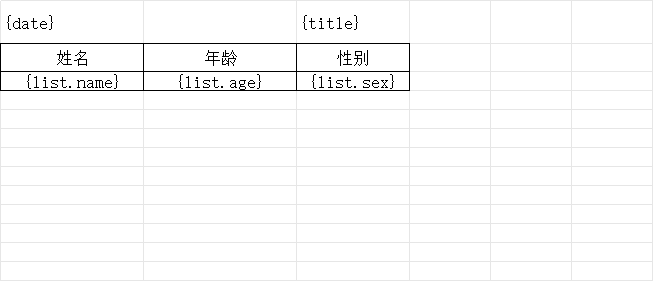
2.Excel模版文件:template.xlsx
注意文件必须是xlsx
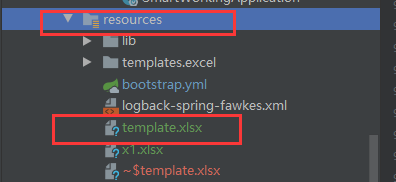
springboot项目放到resources文件夹下
4.Controller层
    @PostMapping("/easyExcelWriter")
    public void easyExcelWriter(HttpServletResponse response) throws  Exception{
        Map map = new HashMap<>();
        map.put("title", "测试用户");
        map.put("date", "2024年5月26日01:26:36");
        List<User> list = new ArrayList<>();
        list.add(new User("John1", 18,"男"));
        list.add(new User("John2", 20,"女"));
        list.add(new User("John3", 22,"女"));

     InputStream templateFileName = this.getClass().getClassLoader().getResourceAsStream("template.xlsx");
        response.setContentType("application/vnd.ms-excel");
        response.setCharacterEncoding("utf-8");
        response.addHeader("Content-Disposition", "attachment;filename=" + URLEncoder.encode("测试.xlsx", "UTF-8"));
        ExcelWriter excelWriter = EasyExcel.write(response.getOutputStream()).withTemplate((templateFileName)).build();
        WriteSheet writeSheet = EasyExcel.writerSheet().build();
        //设置map数据
        excelWriter.fill(map, writeSheet);
        //设置list集合数据
        excelWriter.fill(new FillWrapper("list", list), writeSheet);
        excelWriter.finish();
        templateFileName.close();
    }

    class User{

        String name;

        Integer age;

        String sex;

        public String getName() {
            return name;
        }

        public void setName(String name) {
            this.name = name;
        }

        public Integer getAge() {
            return age;
        }

        public void setAge(Integer age) {
            this.age = age;
        }

        public String getSex() {
            return sex;
        }

        public void setSex(String sex) {
            this.sex = sex;
        }

        public User(String name, Integer age, String sex){
            this.name = name;
            this.age = age;
            this.sex = sex;
        }
    }
最终效果
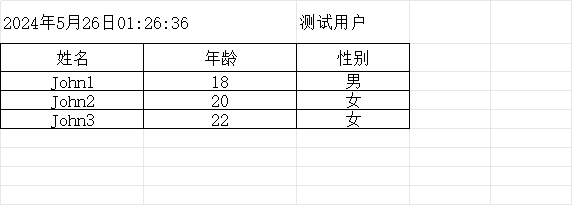
参考easyExcel官网:https://easyexcel.opensource.alibaba.com/docs/3.0.x/quickstart/fill
https://github.com/alibaba/easyexcel/tree/master

 浙公网安备 33010602011771号