caffe中的BatchNorm层
[Batch Normalization] Predict中BN是怎么计算的?
http://www.caffecn.cn/?/question/165
深度学习中 Batch Normalization为什么效果好?
https://www.zhihu.com/question/38102762
Must Know Tips/Tricks in Deep Neural Networks (by Xiu-Shen Wei)(需要认真学习)
http://lamda.nju.edu.cn/weixs/project/CNNTricks/CNNTricks.html
====================================================================================
Tricks in Deep Neural Networks的翻译
http://blog.csdn.net/pandav5/article/details/51178032
http://blog.csdn.net/dp_bupt/article/details/49308641
=====================================================================================
==========================================================================================================================================================
bn层中训练和测试改写
http://blog.csdn.net/lien0906/article/details/78056728
Detailed Description about BatchNormLayer
“Normalizes the input to have 0-mean and/or unit (1) variance across the batch.
This layer computes Batch Normalization as described in [1]. For each channel in the data (i.e. axis 1), it subtracts the mean and divides by the variance, where both statistics are computed across both spatial dimensions and across the different examples in the batch.
By default, during training time, the network is computing global mean/variance statistics via a running average, which is then used at test time to allow deterministic outputs for each input. You can manually toggle whether the network is accumulating or using the statistics via the use_global_stats option. For reference, these statistics are kept in the layer’s three blobs: (0) mean, (1) variance, and (2) moving average factor.”
遇见的问题
用的普通卷积层堆叠的网络,不加BN层时训练已经有效果并且运行正常,当加上BN层后,出现loss一直为87.3365不收敛的情况。
加入BN层后loss为87.3365的解决办法
BN层中有一个参数use_ global_stats,在训练时我们需要将其设置为false,这样BN层才能更新计算均值和方差,如果设置为true的话,就是初始固定的了,不会更新。在测试时,需要将其设置为true。将网络中该参数修改过来就训练正常了。
其他可能导致不收敛的问题(如loss为87.3365,loss居高不下等)解决方案
- 可以在solver里面设置:debug_info: true,看看各个层的data和diff是什么值,一般这个时候那些值不是NAN(无效数字)就是INF(无穷大);
- 检查数据标签是否从0开始并且连续;
- 把学习率base_lr调低;
- 数据问题,lmdb生成有误;
- 中间层没有归一化,导致经过几层后,输出的值已经很小了,这个时候再计算梯度就比较尴尬了,可以尝试在各个卷积层后加入BN层和SCALE层;
- 把base_lr调低,然后batchsize也调高;
- 把data层的输入图片进行归一化,就是从0-255归一化到0-1,使用的参数是:
 transform_param {
    scale: 0.00390625//像素归一化,1/255
  }
- 网络参数太多,网络太深,删掉几层看看,可能因为数据少,需要减少中间层的num_output;
- 记得要shuffle数据,否则数据不够随机,几个batch之间的数据差异很小。
==========================================================================================================================================================
caffe 中 BatchNorm layer设定
http://www.tk4479.net/zml1991105/article/details/77715993
转载于/u012939857/article/details/70740283
BN层的设定一般是按照conv->bn->scale->relu的顺序来形成一个block。
关于bn,有一个注意点,caffe实现中的use_global_stats参数在训练时设置为false,测试时设置为true。
因为在训练时bn作用的对象是一个batch_size,而不是整个训练集,如果没有将其设置为false,则有可能造成bn后数据更加偏离中心点,导致nan或87.3365的问题。
caffe 中为什么bn层要和scale层一起使用
这个问题首先要理解batchnormal是做什么的。它其实做了两件事。
1) 输入归一化 x_norm = (x-u)/std, 其中u和std是个累计计算的均值和方差。
2)y=alpha×x_norm + beta,对归一化后的x进行比例缩放和位移。其中alpha和beta是通过迭代学习的。
那么caffe中的bn层其实只做了第一件事。scale层做了第二件事。
这样也就理解了scale层里为什么要设置bias_term=True,这个偏置就对应2)件事里的beta。
代码:
第一种情况,phase: TRAIN/TEST都不加 ,caffe会自动匹配去设置use_global_stats的值
layer {
	name: "conv1"
	type: "Convolution"
	bottom: "data"
    top: "conv1"
	param{
		lr_mult:1
		decay_mult:1
	}
	param{
	    lr_mult:2
		decay_mult:0
	}
    convolution_param{
		num_output:32
		kernel_size:5
		weight_filler{
			type:"xavier"
		}
		bias_filler{
			type:"constant"
		}
	}
}
layer {
  name: "BatchNorm1"
  type: "BatchNorm"
  bottom: "conv1"
  top: "conv1"
  param {
    lr_mult: 0
    decay_mult: 0
  }
  param {
    lr_mult: 0
    decay_mult: 0
  }
  param {
    lr_mult: 0
    decay_mult: 0
  }
}

layer {
  name: "scale1"
  type: "Scale"
  bottom: "conv1"
  top: "conv1"
  scale_param {
    bias_term: true
  }
}
layer{
	name:"relu1"
	type:"ReLU"
	bottom:"conv1"
	top:"conv1"
}
第二种情况:加上use_global_stats, 测试的时候再改成true
layer {
  name: "BatchNorm1"
  type: "BatchNorm"
  bottom: "conv1"
  top: "conv1"
  param {
    lr_mult: 0
    decay_mult: 0
  }
  param {
    lr_mult: 0
    decay_mult: 0
  }
  param {
    lr_mult: 0
    decay_mult: 0
  }
  batch_norm_param {
		use_global_stats: false
	}
}
==========================================================================================================================================================
http://blog.csdn.net/yelena_11/article/details/53924225
一、简介
如果将googlenet称之为google家的inception v1的话,其Batch Normalization(http://arxiv.org/pdf/1502.03167v3.pdf)文章讲的就是BN-inception v1。
它不是网络本身本质上的内容修改,而是为了将conv层的输出做normalization以使得下一层的更新能够更快,更准确。
二、网络分析
caffe官方将BN层拆成两个层来实验,一个是https://github.com/BVLC/caffe/blob/master/include/caffe/layers/batch_norm_layer.hpp,
另外一个是https://github.com/BVLC/caffe/blob/master/include/caffe/layers/scale_layer.hpp。
其具体使用方法可以参考:https://github.com/KaimingHe/deep-residual-networks/blob/master/prototxt/ResNet-50-deploy.prototxt
中的BatchNorm与Scale。
BN-inceptionv1训练速度较原googlenet快了14倍,在imagenet分类问题的top5上达到4.8%,超过了人类标注top5准确率
在Caffe中使用Batch Normalization需要注意以下两点,
1. 要配合Scale层一起使用,具体参见http://blog.csdn.net/sunbaigui/article/details/50807398以及Residual Network
2. 训练的时候,将BN层的use_global_stats设置为false,然后测试的时候将use_global_stats设置为true,不然训练的时候会报“NAN”或者模型不收敛 —— 这个其实挺难注意到的
==========================================================================================================================================================
http://blog.csdn.net/wangkun1340378/article/details/77161243
转自:https://zhidao.baidu.com/question/621624946902864092.html
caffe 中为什么bn层要和scale层一起使用
这个问题首先你要理解batchnormal是做什么的。它其实做了两件事。
1) 输入归一化 x_norm = (x-u)/std, 其中u和std是个累计计算的均值和方差。
2)y=alpha×x_norm + beta,对归一化后的x进行比例缩放和位移。其中alpha和beta是通过迭代学习的。
那么caffe中的bn层其实只做了第一件事。scale层做了第二件事。
这样你也就理解了scale层里为什么要设置bias_term=True,这个偏置就对应2)件事里的beta。
==========================================================================================================================================================
浅谈Batch Normalization及其Caffe实现
http://mlnote.com/2016/12/20/Neural-Network-Batch-Normalization-and-Caffe-Code/
摘要:2015年2月份,Google和MSRA的paper相继在arxiv.org上横空出世,宣布在ImagenNet图像数据集上取得了比人类更高的识别能力. 此突破意义重大,文章发布后引起一片热潮,在图像领域具有普适的应用.
本文中笔者仅就Google的Batch Normalization谈谈粗浅的理解.
Motivation
1.1 internal convariate shit
传统的浅层学习模型,如单层的logistic regression, SVMs以及2层结构的FMs等模型,每次更新参数均从稳定的训练数据上拟合. 深度学习因其多层结构,浅层输出作为下一层输入.除了梯度消失问题外,在学习过程中,每层网络的参数不断更新,导致下一层输入的分布不断变化. 因而无法跟浅层模型一样,每次都在稳定的数据上学习参数. 除了降低学习率外,还要初始化一组良好的参数,调得一手好参.
1.2 为什么要初始化一组良好的参数
学习过UFLDL或者做过图像实验的同学会发现对数据进行预处理,例如PCA Whitening或者简单的z-score都是可以加速收敛的.
首先图像数据是局部高度相关的,并且个维度上的数据取值在[0,255]之间. 简化到2维,图像数据仅会落到第一象限,如下图: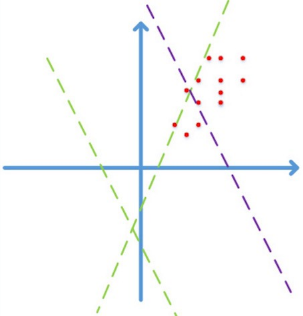
图片来自happynear的博客2
假设激活函数为ReLuf(x)=max(Wx+b)f(x)=max(Wx+b), 如果不通过精心设计或者fine-tune,而随机初始化WW, 学习的前期阶段很可能是图中的绿色虚线,需要经过长时间的迭代才能收敛到紫色虚线,得到一个好的拟合结果。
如果对数据做预处理,例如z-score/PCA whitening等线性变化,映射到0均值单位方差的平移后空间里,那么收敛效果会有显著提升。因为减去均值后,数据能分散到各个象限;更进一步的,对数据做去相关操作,提高收敛效率.
1.3 为什么做的是线性变换而不能做非线性变换呢?
Batch Normalization是数据层面的改进,要保留数据的原貌,即保留特征的非线性关系.
Normalization via Mini-Batch Statistics
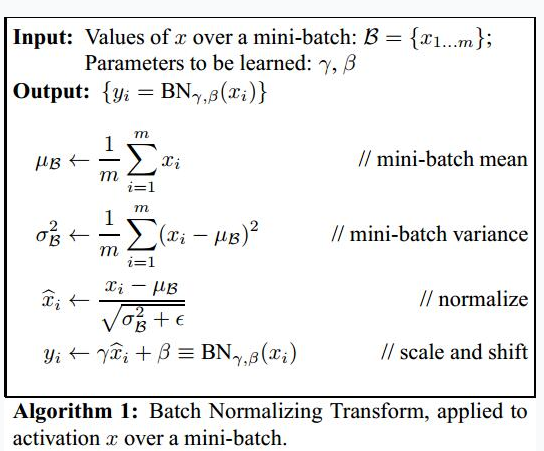 算法示意图
算法示意图
前向反馈时,在每个Batch中,从特征维度上计算出mini-batch和mini-batch variance之后完成normalization.
理想情况下,均值和方差应该是在整个数据集上计算的,然而不能穿越得到unseen data,因此,退而求其次,用Batch中统计的均值和方差作为整个数据集的估计.
完成normalization之后算法似乎该结束了,但是如果把特征都normalize到N(0,1)N(0,1),那么因为特征只在激活函数上线性区域上激活,会降低特征的表达能力. 如下图虚线和Sigmoid曲线的重叠的部分.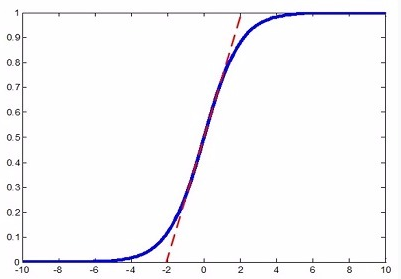
容易混淆的是,Hinton老爷子曾在公开课Neural Networks for Machine Learning3里提到神经网络的weight应该初始化在N(0,1)N(0,1)附近,防止梯度消失.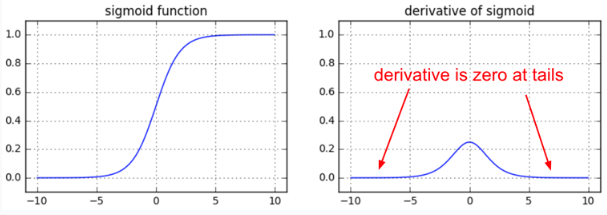
但是,如果使用PReLU或者ELU等激活函数,是不会有这个问题的!
针对上述问题,在算法结束之前,作者对normalization之后的数据^xixi^设置了两个参数γγ和ββ. 很显然如果γ=√σ2βγ=σβ2,β=μββ=μβ,那么对xixi scale
and shift之后的yiyi就还原成xixi了. 至于是否需要对yiyi进行还原,由构建好的模型自动从训练数据中学习决定, learning from data.
反向传播时,SGD也在Batch中计算,梯度公式很简单,请大家停下10分钟,在白纸上推导一遍,保证清楚理解链式法则计算梯度的思路. 这很重要,因为目前所有的学习算法都是基于链式法则的反向传播.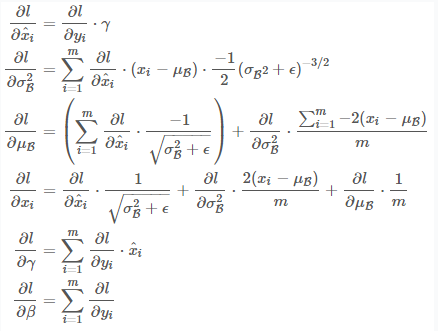 梯度的反向传播公式
Implementation in Caffe
笔者接下来介绍Batch Normalization在Caffe中的实现.
实际应用中,μβμβ和σ2βσβ2通常是在训练集上计算,测试的时候直接使用训练时计算得到的值. 此外,Batch Normalization Layer的backward pass实际并没有被调用,因此笔者仅分析forward pass部分的代码.
首先Batch Normalization在proto中默认参数配置如下:
|
1
2
3
4
5
6
7
8
9
10
11
|
message BatchNormParameter {
// If false, accumulate global mean/variance values via a moving average. If
// true, use those accumulated values instead of computing mean/variance
// across the batch.
optional bool use_global_stats = 1;
// How much does the moving average decay each iteration?
optional float moving_average_fraction = 2 [default = .999];
// Small value to add to the variance estimate so that we don't divide by
// zero.
optional float eps = 3 [default = 1e-5];
}
|
因为一些历史原因(可能是scale and shift只对使用sigmoid作为激活函数有效), Caffe的normalize step 和scale and shift step至今不在同一个layer中实现, 导致很多人在使用的时候经常出现不知道该怎么用或者这么用对不对的问题. 笔者建议参考ResNet4,并建议在BatchNorm中不显示配置batch_norm_param,而是有代码运行时自动判断是否use_global_stats,此外不建议做scale and shift step,因为sigmoid function效果通常是很差的,导致更多的是一开始就选择PReLu等激活函数:
|
1
2
3
4
5
6
7
8
9
10
11
12
13
14
15
16
17
18
19
20
|
layer {
bottom: "conv1"
top: "conv1"
name: "bn_conv1"
type: "BatchNorm"
// 不建议配置batch_norm_param.
batch_norm_param {
use_global_stats: true
}
}
layer {
bottom: "conv1"
top: "conv1"
name: "scale_conv1"
type: "Scale"
scale_param {
bias_term: true
}
}
|
详细代码走读参见笔者的github.
总结
本文首先解释了Batch Normalization的motivation以及该方法为什么work. 接着对算法内容进行详解,给出并建议读者朋友们动手在白纸上推导反向传播计算μβμβ和σ2βσβ2的梯度公式. 最后在github上提供了一份Caffe的bn代码走读.
欢迎并鼓励对本文和github上代码走读有不同见解的朋友们留言或者联系本站站长!
参考文献
==========================================================================================================================================================
https://www.cnblogs.com/rainsoul/p/6249022.html
在训练一个小的分类网络时,发现加上BatchNorm层之后的检索效果相对于之前,效果会有提升,因此将该网络结构记录在这里,供以后查阅使用:
添加该层之前:

  1 layer {
  2   name: "conv1"
  3   type: "Convolution"
  4   bottom: "data"
  5   top: "conv1"
  6   param {
  7     lr_mult: 1
  8     decay_mult: 1
  9   }
 10   param {
 11     lr_mult: 2
 12     decay_mult: 0
 13   }
 14   convolution_param {
 15     num_output: 64
 16     kernel_size: 7
 17     stride: 2
 18     weight_filler {
 19       type: "gaussian"
 20       std: 0.01
 21     }
 22     bias_filler {
 23       type: "constant"
 24       value: 0
 25     }
 26   }
 27 }
 28 layer {
 29   name: "relu1"
 30   type: "ReLU"
 31   bottom: "conv1"
 32   top: "conv1"
 33 }
 34 layer {
 35   name: "pool1"
 36   type: "Pooling"
 37   bottom: "conv1"
 38   top: "pool1"
 39   pooling_param {
 40     pool: MAX
 41     kernel_size: 3
 42     stride: 2
 43   }
 44 }
 45 layer {
 46   name: "norm1"
 47   type: "LRN"
 48   bottom: "pool1"
 49   top: "norm1"
 50   lrn_param {
 51     local_size: 5
 52     alpha: 0.0001
 53     beta: 0.75
 54   }
 55 }
 56 layer {
 57   name: "conv2"
 58   type: "Convolution"
 59   bottom: "norm1"
 60   top: "conv2"
 61   param {
 62     lr_mult: 1
 63     decay_mult: 1
 64   }
 65   param {
 66     lr_mult: 2
 67     decay_mult: 0
 68   }
 69   convolution_param {
 70     num_output: 128
 71     pad: 2
 72     kernel_size: 5
 73     stride: 2
 74     group: 2
 75     weight_filler {
 76       type: "gaussian"
 77       std: 0.01
 78     }
 79     bias_filler {
 80       type: "constant"
 81       value: 1
 82     }
 83   }
 84 }
 85 layer {
 86   name: "relu2"
 87   type: "ReLU"
 88   bottom: "conv2"
 89   top: "conv2"
 90 }
 91 layer {
 92   name: "pool2"
 93   type: "Pooling"
 94   bottom: "conv2"
 95   top: "pool2"
 96   pooling_param {
 97     pool: MAX
 98     kernel_size: 3
 99     stride: 2
100   }
101 }
102 layer {
103   name: "norm2"
104   type: "LRN"
105   bottom: "pool2"
106   top: "norm2"
107   lrn_param {
108     local_size: 5
109     alpha: 0.0001
110     beta: 0.75
111   }
112 }
113 layer {
114   name: "conv3"
115   type: "Convolution"
116   bottom: "norm2"
117   top: "conv3"
118   param {
119     lr_mult: 1
120     decay_mult: 1
121   }
122   param {
123     lr_mult: 2
124     decay_mult: 0
125   }
126   convolution_param {
127     num_output: 192
128     pad: 1
129     stride: 2
130     kernel_size: 3
131     weight_filler {
132       type: "gaussian"
133       std: 0.01
134     }
135     bias_filler {
136       type: "constant"
137       value: 0
138     }
139   }
140 }
141 layer {
142   name: "relu3"
143   type: "ReLU"
144   bottom: "conv3"
145   top: "conv3"
146 }
147 layer {
148   name: "conv4"
149   type: "Convolution"
150   bottom: "conv3"
151   top: "conv4"
152   param {
153     lr_mult: 1
154     decay_mult: 1
155   }
156   param {
157     lr_mult: 2
158     decay_mult: 0
159   }
160   convolution_param {
161     num_output: 192
162     pad: 1
163     kernel_size: 3
164     group: 2
165     weight_filler {
166       type: "gaussian"
167       std: 0.01
168     }
169     bias_filler {
170       type: "constant"
171       value: 1
172     }
173   }
174 }
175 layer {
176   name: "relu4"
177   type: "ReLU"
178   bottom: "conv4"
179   top: "conv4"
180 }
181 layer {
182   name: "conv5"
183   type: "Convolution"
184   bottom: "conv4"
185   top: "conv5"
186   param {
187     lr_mult: 1
188     decay_mult: 1
189   }
190   param {
191     lr_mult: 2
192     decay_mult: 0
193   }
194   convolution_param {
195     num_output: 128
196     pad: 1
197     stride: 2
198     kernel_size: 3
199     group: 2
200     weight_filler {
201       type: "gaussian"
202       std: 0.01
203     }
204     bias_filler {
205       type: "constant"
206       value: 1
207     }
208   }
209 }
210 layer {
211   name: "relu5"
212   type: "ReLU"
213   bottom: "conv5"
214   top: "conv5"
215 }
216 layer {
217   name: "pool5"
218   type: "Pooling"
219   bottom: "conv5"
220   top: "pool5"
221   pooling_param {
222     pool: MAX
223     kernel_size: 2
224     stride: 1
225   }
226 }
227 layer {
228   name: "fc6_srx"
229   type: "InnerProduct"
230   bottom: "pool5"
231   top: "fc6"
232   param {
233     lr_mult: 1
234     decay_mult: 1
235   }
236   param {
237     lr_mult: 2
238     decay_mult: 0
239   }
240   inner_product_param {
241     num_output: 768
242     weight_filler {
243       type: "gaussian"
244       std: 0.005
245     }
246     bias_filler {
247       type: "constant"
248       value: 1
249     }
250   }
251 }
252 layer {
253   name: "relu7"
254   type: "ReLU"
255   bottom: "fc6"
256   top: "fc6"
257 }
258 layer {
259   name: "drop7"
260   type: "Dropout"
261   bottom: "fc6"
262   top: "fc6"
263   dropout_param {
264     dropout_ratio: 0.5
265   }
266 }
267 layer {
268   name: "fc7_srx"
269   type: "InnerProduct"
270   bottom: "fc6"
271   top: "fc7"
272   param {
273     lr_mult: 1
274     decay_mult: 1
275   }
276   param {
277     lr_mult: 2
278     decay_mult: 0
279   }
280   inner_product_param {
281     num_output: 5275
282     weight_filler {
283       type: "gaussian"
284       std: 0.01
285     }
286     bias_filler {
287       type: "constant"
288       value: 0
289     }
290   }
291 }
292 layer{
293   name: "loss"
294   type: "SoftmaxWithLoss"
295   top: "SoftmaxWithLoss"
296   bottom: "fc7"
297   bottom: "label"
298   include {
299     phase: TRAIN
300   }
301 }
302 layer {
303   name: "accuracy"
304   type: "Accuracy"
305   bottom: "fc7"
306   bottom: "label"
307   top: "accuracy"
308   include {
309     phase: TEST
310   }
311 }
添加该层之后:
  1 layer {
  2   name: "conv1"
  3   type: "Convolution"
  4   bottom: "data"
  5   top: "conv1"
  6   param {
  7     lr_mult: 1
  8     decay_mult: 1
  9   }
 10   param {
 11     lr_mult: 2
 12     decay_mult: 0
 13   }
 14   convolution_param {
 15     num_output: 64
 16     kernel_size: 7
 17     stride: 2
 18     weight_filler {
 19       type: "gaussian"
 20       std: 0.01
 21     }
 22     bias_filler {
 23       type: "constant"
 24       value: 0
 25     }
 26   }
 27 }
 28 ##############
 29 layer {
 30   bottom: "conv1"
 31   top: "conv1"
 32   name: "bn1"
 33   type: "BatchNorm"
 34   param {
 35     lr_mult: 0
 36   }
 37   param {
 38     lr_mult: 0
 39   }
 40   param {
 41     lr_mult: 0
 42   }
 43 }
 44 ##############
 45 layer {
 46   name: "relu1"
 47   type: "ReLU"
 48   bottom: "conv1"
 49   top: "conv1"
 50 }
 51 layer {
 52   name: "pool1"
 53   type: "Pooling"
 54   bottom: "conv1"
 55   top: "pool1"
 56   pooling_param {
 57     pool: MAX
 58     kernel_size: 3
 59     stride: 2
 60   }
 61 }
 62
 63 layer {
 64   name: "conv2"
 65   type: "Convolution"
 66   bottom: "pool1"
 67   top: "conv2"
 68   param {
 69     lr_mult: 1
 70     decay_mult: 1
 71   }
 72   param {
 73     lr_mult: 2
 74     decay_mult: 0
 75   }
 76   convolution_param {
 77     num_output: 128
 78     pad: 2
 79     kernel_size: 5
 80     stride: 2
 81     group: 2
 82     weight_filler {
 83       type: "gaussian"
 84       std: 0.01
 85     }
 86     bias_filler {
 87       type: "constant"
 88       value: 1
 89     }
 90   }
 91 }
 92 ##############
 93 layer {
 94   bottom: "conv2"
 95   top: "conv2"
 96   name: "bn2"
 97   type: "BatchNorm"
 98   param {
 99     lr_mult: 0
100   }
101   param {
102     lr_mult: 0
103   }
104   param {
105     lr_mult: 0
106   }
107 }
108 ##############
109 layer {
110   name: "relu2"
111   type: "ReLU"
112   bottom: "conv2"
113   top: "conv2"
114 }
115 layer {
116   name: "pool2"
117   type: "Pooling"
118   bottom: "conv2"
119   top: "pool2"
120   pooling_param {
121     pool: MAX
122     kernel_size: 3
123     stride: 2
124   }
125 }
126
127 layer {
128   name: "conv3"
129   type: "Convolution"
130   bottom: "pool2"
131   top: "conv3"
132   param {
133     lr_mult: 1
134     decay_mult: 1
135   }
136   param {
137     lr_mult: 2
138     decay_mult: 0
139   }
140   convolution_param {
141     num_output: 192
142     pad: 1
143     stride: 2
144     kernel_size: 3
145     weight_filler {
146       type: "gaussian"
147       std: 0.01
148     }
149     bias_filler {
150       type: "constant"
151       value: 0
152     }
153   }
154 }
155 ##############
156 layer {
157   bottom: "conv3"
158   top: "conv3"
159   name: "bn3"
160   type: "BatchNorm"
161   param {
162     lr_mult: 0
163   }
164   param {
165     lr_mult: 0
166   }
167   param {
168     lr_mult: 0
169   }
170 }
171 ##############
172 layer {
173   name: "relu3"
174   type: "ReLU"
175   bottom: "conv3"
176   top: "conv3"
177 }
178 layer {
179   name: "conv4"
180   type: "Convolution"
181   bottom: "conv3"
182   top: "conv4"
183   param {
184     lr_mult: 1
185     decay_mult: 1
186   }
187   param {
188     lr_mult: 2
189     decay_mult: 0
190   }
191   convolution_param {
192     num_output: 192
193     pad: 1
194     kernel_size: 3
195     group: 2
196     weight_filler {
197       type: "gaussian"
198       std: 0.01
199     }
200     bias_filler {
201       type: "constant"
202       value: 1
203     }
204   }
205 }
206 ##############
207 layer {
208   bottom: "conv4"
209   top: "conv4"
210   name: "bn4"
211   type: "BatchNorm"
212   param {
213     lr_mult: 0
214   }
215   param {
216     lr_mult: 0
217   }
218   param {
219     lr_mult: 0
220   }
221 }
222 ##############
223 layer {
224   name: "relu4"
225   type: "ReLU"
226   bottom: "conv4"
227   top: "conv4"
228 }
229 layer {
230   name: "conv5"
231   type: "Convolution"
232   bottom: "conv4"
233   top: "conv5"
234   param {
235     lr_mult: 1
236     decay_mult: 1
237   }
238   param {
239     lr_mult: 2
240     decay_mult: 0
241   }
242   convolution_param {
243     num_output: 128
244     pad: 1
245     stride: 2
246     kernel_size: 3
247     group: 2
248     weight_filler {
249       type: "gaussian"
250       std: 0.01
251     }
252     bias_filler {
253       type: "constant"
254       value: 1
255     }
256   }
257 }
258 ##############
259 layer {
260   bottom: "conv5"
261   top: "conv5"
262   name: "bn5"
263   type: "BatchNorm"
264   param {
265     lr_mult: 0
266   }
267   param {
268     lr_mult: 0
269   }
270   param {
271     lr_mult: 0
272   }
273 }
274 ##############
275 layer {
276   name: "relu5"
277   type: "ReLU"
278   bottom: "conv5"
279   top: "conv5"
280 }
281 layer {
282   name: "pool5"
283   type: "Pooling"
284   bottom: "conv5"
285   top: "pool5"
286   pooling_param {
287     pool: MAX
288     kernel_size: 2
289     stride: 1
290   }
291 }
292 layer {
293   name: "fc6_srx"
294   type: "InnerProduct"
295   bottom: "pool5"
296   top: "fc6"
297   param {
298     lr_mult: 5
299     decay_mult: 2
300   }
301   param {
302     lr_mult: 8
303     decay_mult: 0
304   }
305   inner_product_param {
306     num_output: 768
307     weight_filler {
308       type: "gaussian"
309       std: 0.005
310     }
311     bias_filler {
312       type: "constant"
313       value: 1
314     }
315   }
316 }
317 layer {
318   name: "relu7"
319   type: "ReLU"
320   bottom: "fc6"
321   top: "fc6"
322 }
323 layer {
324   name: "drop7"
325   type: "Dropout"
326   bottom: "fc6"
327   top: "fc6"
328   dropout_param {
329     dropout_ratio: 0.5
330   }
331 }
332 layer {
333   name: "fc7_srx"
334   type: "InnerProduct"
335   bottom: "fc6"
336   top: "fc7"
337   param {
338     lr_mult: 5
339     decay_mult: 2
340   }
341   param {
342     lr_mult: 8
343     decay_mult: 0
344   }
345   inner_product_param {
346     num_output: 5275
347     weight_filler {
348       type: "gaussian"
349       std: 0.01
350     }
351     bias_filler {
352       type: "constant"
353       value: 0
354     }
355   }
356 }
357 layer{
358   name: "loss"
359   type: "SoftmaxWithLoss"
360   top: "SoftmaxWithLoss"
361   bottom: "fc7"
362   bottom: "label"
363   include {
364     phase: TRAIN
365   }
366 }
367 layer {
368   name: "accuracy"
369   type: "Accuracy"
370   bottom: "fc7"
371   bottom: "label"
372   top: "accuracy"
373   include {
374     phase: TEST
375   }
376 }

 浙公网安备 33010602011771号