
每日总结2023/3/9
今天学习了数据在Activity之间的传播:向下一级传播
这是第一个页面Java代码
public class MainActivity extends AppCompatActivity implements View.OnClickListener {
    private TextView tv_text;

    @Override
    protected void onCreate(Bundle savedInstanceState) {
        super.onCreate(savedInstanceState);
        setContentView(R.layout.activity_main);
        tv_text = findViewById(R.id.tv_text);
        findViewById(R.id.bt_fa).setOnClickListener(MainActivity.this);
    }

    @Override
    public void onClick(View v) {
        Intent intent = new Intent(MainActivity.this, MainActivity2.class);
        Bundle bundle = new Bundle();
        bundle.putString("request_time", Time_now.getNowTime());
        bundle.putString("request_content", tv_text.getText().toString());
        intent.putExtras(bundle);
        startActivity(intent);
    }
}
xml文件
<TextView
            android:id="@+id/tv_text"
            android:layout_width="wrap_content"
            android:layout_height="wrap_content"
            android:layout_marginTop="20dp"
            android:text="这是一张图片" />

        <Button
            android:id="@+id/bt_fa"
            android:layout_width="200dp"
            android:layout_height="wrap_content"
            android:layout_alignTop="@id/tv_text"
            android:layout_marginTop="30dp"
            android:text="点击发送"
            android:textStyle="bold" />
第二个页面
public class MainActivity2 extends AppCompatActivity {
    private TextView tv_record;

    @Override
    protected void onCreate(Bundle savedInstanceState) {
        super.onCreate(savedInstanceState);
        setContentView(R.layout.activity_main2);
        tv_record = findViewById(R.id.tv_record);
        Bundle bundle = getIntent().getExtras();
        String request_time = bundle.getString("request_time");
        String request_content = bundle.getString("request_content");
        String desc = String.format("收到请求信息: \n请求时间为%s\n请求内容为%s", request_time,request_content);
        tv_record.setText(desc);
    }
}
 <TextView
        android:id="@+id/tv_record"
        android:layout_width="wrap_content"
        android:layout_height="wrap_content"
        android:textSize="20dp"
        android:text="这里是接受信息" />
具体是通过Bundle 来传播数据
成果: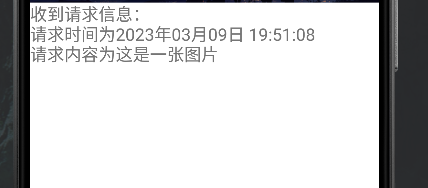

 浙公网安备 33010602011771号