cad.net 颜色对话框+背景色
主题颜色
0:深色主题; 1浅色主题;
public class Color {
    static SolidColorBrush _blackColor = new() {
        Color = System.Windows.Media.Color.FromArgb(255, 34, 41, 51),
        Opacity = 1
    };

    static SolidColorBrush _whiteColor = new() {
        Color = System.Windows.Media.Color.FromArgb(255, 245, 245, 245),
        Opacity = 1
    };

    public void Init() {
        Acap.SystemVariableChanged += (s, e) => {
            if (string.Equals(e.Name, "ColorTheMe", StringComparison.OrdinalIgnoreCase)
                return;
            var colorTheMe = (short)Acap.GetSystemVariable("ColorTheMe");
            Env.Print(colorTheMe == 0 ? "切换到黑色主题" : "切换到白色主题");
            // colorTheMe == 0 ? _blackColor : _whiteColor;
        };
    }
}
粉色CAD主题(评论区)
using System.Drawing;
using System.Linq;
using System.Windows.Forms;
using Autodesk.AutoCAD.Runtime;

namespace ThemeChange;

public class AdjustTheme : Form
{
    const int bdrPrc = 20;
    string _message = "";
    Brush _brush;

    public AdjustTheme(Brush brush, string message)
    {
        _brush = brush;
        _message = message;

        TopMost = true;
        ShowInTaskbar = false;
        FormBorderStyle = FormBorderStyle.None;
        BackColor = Color.Plum;
        TransparencyKey = Color.Plum;
        Width = Screen.PrimaryScreen.Bounds.Width;
        Height = Screen.PrimaryScreen.Bounds.Height;

        Paint += (s, e) => {
            int bdrWid = Height * bdrPrc / 100;
            var border = new Rectangle(0, 0, Width, Height);
            e.Graphics.DrawRectangle(new Pen(_brush, bdrWid), border);
            var f = new Font("Arial", bdrWid / 2.5f);
            var sz = e.Graphics.MeasureString(_message, f);
            int wid = (int)sz.Width;
            int hgt = (int)sz.Height;
            var rect = new Rectangle(
                (Width - wid) / 2, (Height - hgt) / 2,
                (int)(wid * 1.2), hgt
            );
            e.Graphics.DrawString(_message, f, _brush, rect);
        };
    }
}

// 主功能类
public class ThemeChanger {
    static AdjustTheme _form;
    static Timer _timer;
    static int _times = 0;
    static int _maxTimes = 0;

    // 更改主题方法
    public static void ChangeTheme(Brush brush, string message, int times, double secs)
    {
        _form = new AdjustTheme(brush, message);
        _form.Show();
        _maxTimes = (times * 2) - 1;
        _timer = new Timer() {
            Interval = (int)(secs * 1000),
            Enabled = true
        };

        _timer.Tick += (s, e) => {
            if (_times++ >= _maxTimes) {
                _form.Hide();
                _form.Dispose();
                _form = null;

                _timer.Stop();
                _timer.Dispose();
                _timer = null;
                _times = 0;
                return;
            }
            if (_form.Visible) _form.Hide();
            else _form.Show();
        };
    }
}


public class Commands {
    [CommandMethod(nameof(PinkTheme)]
    public void PinkTheme() {
        var ds = new double[] {
            17.25,27.5,26.5,27.75,30.25,8,16.25,28,28.5,26.25,27,
            8,17.5,27.75,27.75,27,28.75,36.5,8,17,24.25,30.25,8.25
        };

        ThemeChanger.ChangeTheme(
            Brushes.HotPink,
            new string(
                  ds.Select<double,char>(x =>(char)(int)(x*4))
                      .ToArray<char>()), 4, 2
            );
        }
    }
}
调用cad的颜色对话框
#if !HC2020
using Autodesk.AutoCAD.DatabaseServices;
using Autodesk.AutoCAD.EditorInput;
using Autodesk.AutoCAD.Geometry;
using Autodesk.AutoCAD.Runtime;
using Acap = Autodesk.AutoCAD.ApplicationServices.Application;
#else
using GrxCAD.DatabaseServices;
using GrxCAD.EditorInput;
using GrxCAD.Runtime;
using Acap = GrxCAD.ApplicationServices.Application;
#endif
using System.Collections.Generic;

public class CmdTestClass
{
    [CommandMethod("CmdTest_ShowDialog")]
    public void CmdTest_ShowDialog()
    {
        var dm = Acap.DocumentManager;
        var doc = dm.MdiActiveDocument;
        var ed = doc.Editor;
        var db = doc.Database;
        ed.WriteMessage("\n测试cad颜色面板+线型面板");

        var cd = new Autodesk.AutoCAD.Windows.ColorDialog();
        var dr = cd.ShowDialog();
        if (dr == System.Windows.Forms.DialogResult.OK)
            ed.WriteMessage("\ncad颜色选择了: " + cd.Color.ToString());

        var ld = new Autodesk.AutoCAD.Windows.LinetypeDialog();
        dr = ld.ShowDialog();
        if (dr == System.Windows.Forms.DialogResult.OK)
            ed.WriteMessage("\ncad线型选择了: " + ld.Linetype.ToString());

        var dlg = new System.Windows.Forms.ColorDialog();
        dr = dlg.ShowDialog();
        if (dr == System.Windows.Forms.DialogResult.OK)
            ed.WriteMessage("\n系统颜色选择了: " + dlg.Color.ToString());

        // 条形工具条 Graphics.FillRectangle  Graphics.DrawRectangle
    }
}
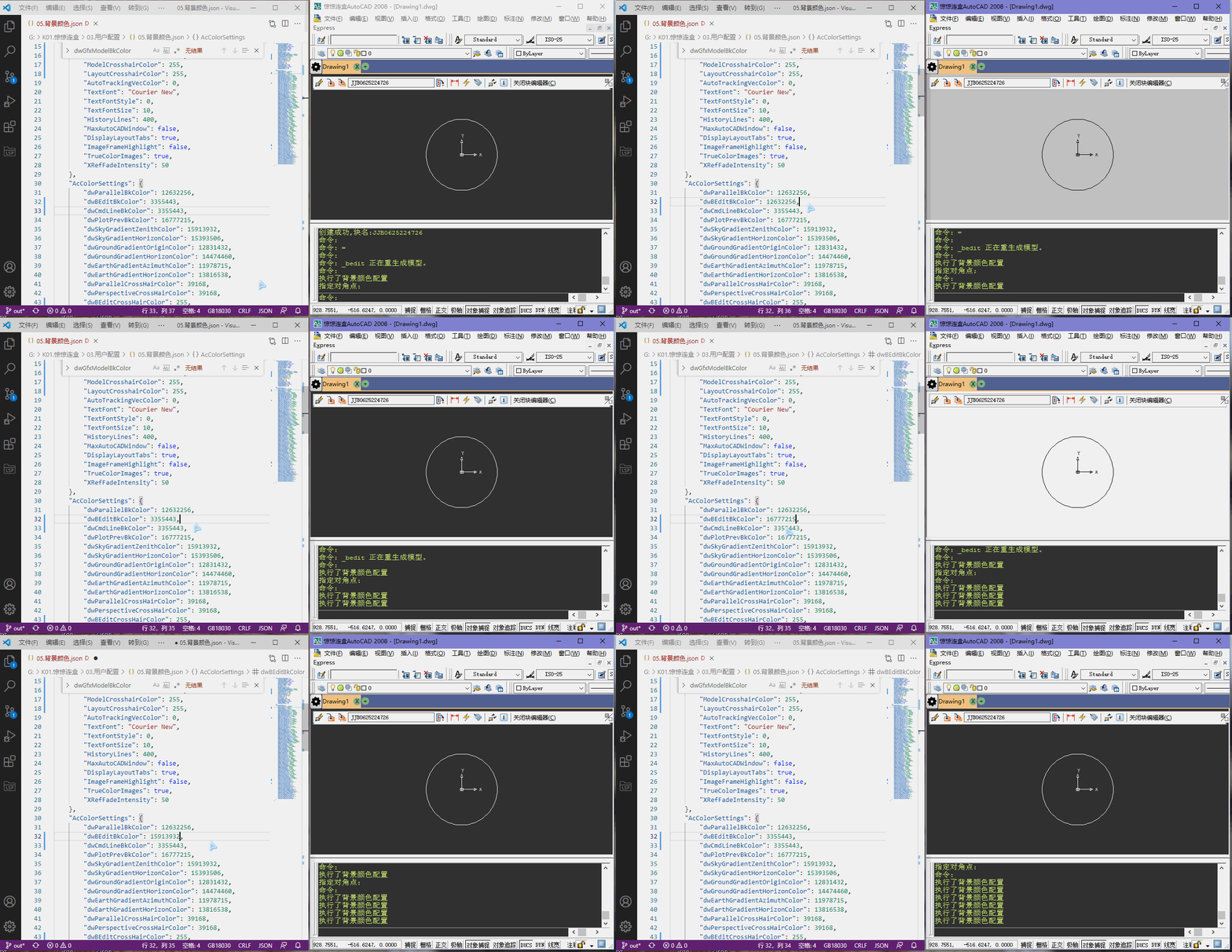
背景色
cad的背景色修改分成两个方法,
一个是Com,一个是调用ArxAPI,我两种都有用到.
Com方式修改颜色
using Acap = Autodesk.AutoCAD.ApplicationServices.Application;
using Autodesk.AutoCAD.Interop;
using Autodesk.AutoCAD.Interop.Common;
using System;
using Newtonsoft.Json;

// 利用com修改背景颜色:
// https://developer.aliyun.com/article/366934
// 以下属性在反序列化后,修改了就同步更新cad界面
namespace JoinBox;
[Serializable]
public class AcColorPreferencesDisplay : AcadPreferencesDisplay {
    AcadPreferencesDisplay _acadDisplay;
    public AcColorPreferencesDisplay() {
        // 访问首选项对象
        var comPre = (AcadPreferences)Acap.Preferences;
        _acadDisplay = comPre.Display;
        // com接口初始化
        Application = (AcadApplication)Acap.AcadApplication;
    }

#if NET8_0_OR_GREATER
    // ac2025
    [JsonIgnore]
    public AcadApplication Application { get; private set; }
#else
    [JsonIgnore]
    public IAcadApplication Application { get; private set; }
#endif

    /// <summary>
    /// 布局显示边距
    /// </summary>
    public bool LayoutDisplayMargins {
        get => _acadDisplay.LayoutDisplayMargins;
        set => _acadDisplay.LayoutDisplayMargins = value;
    }
    /// <summary>
    /// 布局显示纸
    /// </summary>
    public bool LayoutDisplayPaper {
        get => _acadDisplay.LayoutDisplayPaper;
        set => _acadDisplay.LayoutDisplayPaper = value;
    }
    /// <summary>
    /// 布局显示纸张阴影
    /// </summary>
    public bool LayoutDisplayPaperShadow {
        get => _acadDisplay.LayoutDisplayPaperShadow;
        set => _acadDisplay.LayoutDisplayPaperShadow = value;
    }
    /// <summary>
    /// 布局显示绘图设置
    /// </summary>
    public bool LayoutShowPlotSetup {
        get => _acadDisplay.LayoutShowPlotSetup;
        set => _acadDisplay.LayoutShowPlotSetup = value;
    }
    /// <summary>
    /// 布局创建视口
    /// </summary>
    public bool LayoutCreateViewport {
        get => _acadDisplay.LayoutCreateViewport;
        set => _acadDisplay.LayoutCreateViewport = value;
    }
    /// <summary>
    /// 显示滚动条
    /// </summary>
    public bool DisplayScrollBars {
        get => _acadDisplay.DisplayScrollBars;
        set => _acadDisplay.DisplayScrollBars = value;
    }
    /// <summary>
    /// 显示屏幕菜单
    /// </summary>
    public bool DisplayScreenMenu {
        get => _acadDisplay.DisplayScreenMenu;
        set => _acadDisplay.DisplayScreenMenu = value;
    }
    /// <summary>
    /// 使用光标十字的大小
    /// </summary>
    public int CursorSize {
        get => _acadDisplay.CursorSize;
        set => _acadDisplay.CursorSize = value;
    }
    /// <summary>
    /// 停靠的可见线
    /// </summary>
    public int DockedVisibleLines {
        get => _acadDisplay.DockedVisibleLines;
        set => _acadDisplay.DockedVisibleLines = value;
    }
    /// <summary>
    /// 显示光栅图像
    /// </summary>
    public bool ShowRasterImage {
        get => _acadDisplay.ShowRasterImage;
        set => _acadDisplay.ShowRasterImage = value;
    }

    /*
            //(princ "\n3模型背景颜色: ")(princ(getenv "Background"))
            CadSystem.Setenv("Background", bkys2);
            //(princ "\n4布局背景颜色: ")(princ(getenv "Layout background"))
            CadSystem.Setenv("Layout background", bkys2);
     */
    /// <summary>
    /// 模型背景颜色
    /// </summary>
    public uint GraphicsWinModelBackgrndColor {
        get => _acadDisplay.GraphicsWinModelBackgrndColor;
        set => _acadDisplay.GraphicsWinModelBackgrndColor = value;
    }
    /// <summary>
    /// 布局背景颜色
    /// </summary>
    public uint GraphicsWinLayoutBackgrndColor {
        get => _acadDisplay.GraphicsWinLayoutBackgrndColor;
        set => _acadDisplay.GraphicsWinLayoutBackgrndColor = value;
    }

    /*
        // (princ "\n7命令栏win文本背景颜色: ")(princ(getenv "TextWindow.BackColor"))
        CadSystem.Setenv("TextWindow.BackColor", mlbjs.ToString());
        // (princ "\n8命令栏win文本字体颜色: ")(princ(getenv "TextWindow.ForeColor"))
        CadSystem.Setenv("TextWindow.ForeColor", mlzts.ToString());

        // 修改一下两行不会产生作用
        // (princ "\n7命令栏背景颜色: ")(princ(getenv "CmdLine.BackColor"))
        // (princ "\n8命令栏字体颜色: ")(princ(getenv "CmdLine.ForeColor"))
     */
    /// <summary>
    /// 命令栏win文本背景颜色
    /// </summary>
    public uint TextWinBackgrndColor {
        get => _acadDisplay.TextWinBackgrndColor;
        set => _acadDisplay.TextWinBackgrndColor = value;
    }

    /// <summary>
    /// 命令栏win文本字体颜色
    /// </summary>
    public uint TextWinTextColor {
        get => _acadDisplay.TextWinTextColor;
        set => _acadDisplay.TextWinTextColor = value;
    }

    /*
        var szgbs2 = szgbs.ToString();
        // (princ "\n5模型鼠标十字颜色: ")(princ(getenv "XhairPickboxEtc"))
        CadSystem.Setenv("XhairPickboxEtc", szgbs2);
        // (princ "\n6布局鼠标十字颜色: ")(princ(getenv "LayoutXhairPickboxEtc"))
        CadSystem.Setenv("LayoutXhairPickboxEtc", szgbs2);
     */
    /// <summary>
    /// 模型鼠标十字颜色
    /// </summary>
    public uint ModelCrosshairColor {
        get => _acadDisplay.ModelCrosshairColor;
        set => _acadDisplay.ModelCrosshairColor = value;
    }
    /// <summary>
    /// 布局鼠标十字颜色
    /// </summary>
    public uint LayoutCrosshairColor {
        get => _acadDisplay.LayoutCrosshairColor;
        set => _acadDisplay.LayoutCrosshairColor = value;
    }

    /// <summary>
    /// 自动跟踪VEC颜色
    /// </summary>
    public uint AutoTrackingVecColor {
        get => _acadDisplay.AutoTrackingVecColor;
        set => _acadDisplay.AutoTrackingVecColor = value;
    }

    #region 设置这三个东西会命令行会跳屏
    /// <summary>
    /// 文本字体
    /// </summary>
    public string TextFont {
        get => _acadDisplay.TextFont;
        set {
            if (_acadDisplay.TextFont != value)
                _acadDisplay.TextFont = value;
        }
    }
    /// <summary>
    /// 文本字体样式
    /// </summary>
    public AcTextFontStyle TextFontStyle {
        get => _acadDisplay.TextFontStyle;
        set {
            if (_acadDisplay.TextFontStyle != value)
                _acadDisplay.TextFontStyle = value;
        }
    }
    /// <summary>
    /// 文本字体大小
    /// </summary>
    public int TextFontSize {
        get => _acadDisplay.TextFontSize;
        set {
            if (_acadDisplay.TextFontSize != value)
                _acadDisplay.TextFontSize = value;
        }
    }
    #endregion

    /// <summary>
    /// 历史文本的容量
    /// </summary>
    public int HistoryLines {
        get => _acadDisplay.HistoryLines;
        set {
            if (_acadDisplay.HistoryLines != value) {
                if (value > 2048) throw new("最多2048");
                _acadDisplay.HistoryLines = value;
            }
        }
    }
    /// <summary>
    /// 最大化自动设置窗体
    /// </summary>
    public bool MaxAutoCADWindow {
        get => _acadDisplay.MaxAutoCADWindow;
        set => _acadDisplay.MaxAutoCADWindow = value;
    }
    /// <summary>
    /// 显示布局选项卡
    /// </summary>
    public bool DisplayLayoutTabs {
        get => _acadDisplay.DisplayLayoutTabs;
        set => _acadDisplay.DisplayLayoutTabs = value;
    }
    /// <summary>
    /// 图像框架亮点
    /// </summary>
    public bool ImageFrameHighlight {
        get => _acadDisplay.ImageFrameHighlight;
        set => _acadDisplay.ImageFrameHighlight = value;
    }
    /// <summary>
    /// 真彩色图像
    /// </summary>
    public bool TrueColorImages {
        get => _acadDisplay.TrueColorImages;
        set => _acadDisplay.TrueColorImages = value;
    }
    /// <summary>
    /// 参照淡化
    /// </summary>
    public int XRefFadeIntensity {
        get => _acadDisplay.XRefFadeIntensity;
        set => _acadDisplay.XRefFadeIntensity = value;
    }
}
lisp修改颜色
它也是只能用com的
(defun c:bj (/ DISPLAY)
    (princ "\n模型背景色黑色与灰色切换")
    (setq display (vla-get-display (vla-get-preferences (vla-get-application (vlax-get-acad-object)))))
    (if (= (getenv "Background") "0")
        (vla-put-GraphicsWinModelBackgrndColor display 8421504)
        (vla-put-GraphicsWinModelBackgrndColor display 0)
    )
    (prin1)
)
Arx方式修改颜色
看了com之后发现,它并不完全能修改全部的背景色,因此需要引入ArxAPI.
例如通过环境变量(Setenv "BEditBackground")
修改块编辑器的背景颜色是无法立即刷新的.
更通用的方案
using System;
using System.Runtime.InteropServices;

// 编辑器背景色修改,参考:
// https://forums.autodesk.com/t5/net/auto-setup-autocad-options-options-command-using-c-net/td-p/9540872
// 顺着他的个人资料找到了它的所在,是个在班加罗尔的印度人 https://github.com/MadhukarMoogala

namespace JoinBox;

[Serializable]
public struct AcColorSettings {
        [Newtonsoft.Json.JsonIgnore]
        public uint dwGfxModelBkColor;//等价com的 GraphicsWinModelBackgrndColor
        [Newtonsoft.Json.JsonIgnore]
        public uint dwGfxLayoutBkColor;//等价com的 GraphicsWinLayoutBackgrndColor
        public uint dwParallelBkColor;
        public uint dwBEditBkColor;//块编辑器的背景颜色
        public uint dwCmdLineBkColor;
        public uint dwPlotPrevBkColor;
        public uint dwSkyGradientZenithColor;
        public uint dwSkyGradientHorizonColor;
        public uint dwGroundGradientOriginColor;
        public uint dwGroundGradientHorizonColor;
        public uint dwEarthGradientAzimuthColor;
        public uint dwEarthGradientHorizonColor;
        [Newtonsoft.Json.JsonIgnore]
        public uint dwModelCrossHairColor;//等价com的 ModelCrosshairColor
        [Newtonsoft.Json.JsonIgnore]
        public uint dwLayoutCrossHairColor;//等价com的 LayoutCrosshairColor
        public uint dwParallelCrossHairColor;
        public uint dwPerspectiveCrossHairColor;
        public uint dwBEditCrossHairColor;//块编辑器的鼠标颜色
        public uint dwParallelGridMajorLines;
        public uint dwPerspectiveGridMajorLines;
        public uint dwParallelGridMinorLines;
        public uint dwPerspectiveGridMinorLines;
        public uint dwParallelGridAxisLines;
        public uint dwPerspectiveGridAxisLines;
        [Newtonsoft.Json.JsonIgnore]
        public uint dwTextForeColor;//等价com的 TextWinTextColor
        [Newtonsoft.Json.JsonIgnore]
        public uint dwTextBkColor;//等价com的 TextWinBackgrndColor
        [Newtonsoft.Json.JsonIgnore]
        public uint dwCmdLineForeColor;//等价com的 TextWinTextColor(和cmdline也一样)
        public uint dwAutoTrackingVecColor;
        public uint dwLayoutATrackVecColor;
        public uint dwParallelATrackVecColor;
        public uint dwPerspectiveATrackVecColor;
        public uint dwBEditATrackVecColor;
        public uint dwModelASnapMarkerColor;
        public uint dwLayoutASnapMarkerColor;
        public uint dwParallelASnapMarkerColor;
        public uint dwPerspectiveASnapMarkerColor;
        public uint dwBEditASnapMarkerColor;
        public uint dwModelDftingTooltipColor;
        public uint dwLayoutDftingTooltipColor;
        public uint dwParallelDftingTooltipColor;
        public uint dwPerspectiveDftingTooltipColor;
        public uint dwBEditDftingTooltipColor;
        public uint dwModelDftingTooltipBkColor;
        public uint dwLayoutDftingTooltipBkColor;
        public uint dwParallelDftingTooltipBkColor;
        public uint dwPerspectiveDftingTooltipBkColor;
        public uint dwBEditDftingTooltipBkColor;
        public uint dwModelLightGlyphs;
        public uint dwLayoutLightGlyphs;
        public uint dwParallelLightGlyphs;
        public uint dwPerspectiveLightGlyphs;
        public uint dwBEditLightGlyphs;
        public uint dwModelLightHotspot;
        public uint dwLayoutLightHotspot;
        public uint dwParallelLightHotspot;
        public uint dwPerspectiveLightHotspot;
        public uint dwBEditLightHotspot;
        public uint dwModelLightFalloff;
        public uint dwLayoutLightFalloff;
        public uint dwParallelLightFalloff;
        public uint dwPerspectiveLightFalloff;
        public uint dwBEditLightFalloff;
        public uint dwModelLightStartLimit;
        public uint dwLayoutLightStartLimit;
        public uint dwParallelLightStartLimit;
        public uint dwPerspectiveLightStartLimit;
        public uint dwBEditLightStartLimit;
        public uint dwModelLightEndLimit;
        public uint dwLayoutLightEndLimit;
        public uint dwParallelLightEndLimit;
        public uint dwPerspectiveLightEndLimit;
        public uint dwBEditLightEndLimit;
        public uint dwModelCameraGlyphs;
        public uint dwLayoutCameraGlyphs;
        public uint dwParallelCameraGlyphs;
        public uint dwPerspectiveCameraGlyphs;
        public uint dwModelCameraFrustrum;
        public uint dwLayoutCameraFrustrum;
        public uint dwParallelCameraFrustrum;
        public uint dwPerspectiveCameraFrustrum;
        public uint dwModelCameraClipping;
        public uint dwLayoutCameraClipping;
        public uint dwParallelCameraClipping;
        public uint dwPerspectiveCameraClipping;
        public int nModelCrosshairUseTintXYZ;
        public int nLayoutCrosshairUseTintXYZ;
        public int nParallelCrosshairUseTintXYZ;
        public int nPerspectiveCrosshairUseTintXYZ;
        public int nBEditCrossHairUseTintXYZ;
        public int nModelATrackVecUseTintXYZ;
        public int nLayoutATrackVecUseTintXYZ;
        public int nParallelATrackVecUseTintXYZ;
        public int nPerspectiveATrackVecUseTintXYZ;
        public int nBEditATrackVecUseTintXYZ;
        public int nModelDftingTooltipBkUseTintXYZ;
        public int nLayoutDftingTooltipBkUseTintXYZ;
        public int nParallelDftingTooltipBkUseTintXYZ;
        public int nPerspectiveDftingTooltipBkUseTintXYZ;
        public int nBEditDftingTooltipBkUseTintXYZ;
        public int nParallelGridMajorLineTintXYZ;
        public int nPerspectiveGridMajorLineTintXYZ;
        public int nParallelGridMinorLineTintXYZ;
        public int nPerspectiveGridMinorLineTintXYZ;
        public int nParallelGridAxisLineTintXYZ;
        public int nPerspectiveGridAxisLineTintXYZ;

#if AC2008
        [DllImport("acad.exe", CharSet = CharSet.Auto, CallingConvention = CallingConvention.Cdecl,
            EntryPoint = "?acedGetCurrentColors@@YAHPAUAcColorSettings@@@Z")]
        public static extern bool Get(out AcColorSettings colorSettings);

        [DllImport("acad.exe", CharSet = CharSet.Auto, CallingConvention = CallingConvention.Cdecl,
            EntryPoint = "?acedSetCurrentColors@@YAHPAUAcColorSettings@@@Z")]
        public static extern bool Set(ref AcColorSettings colorSettings);
#endif

#if !AC2008
        // 高版本是什么版本开始的?
        [DllImport("accore.dll", CallingConvention = CallingConvention.Cdecl,
           EntryPoint = "?acedGetCurrentColors@@YA_NPEAUAcColorSettings@@@Z")]
        public static extern bool Get(out AcColorSettings colorSettings);

        [DllImport("accore.dll", CallingConvention = CallingConvention.Cdecl,
            EntryPoint = "?acedSetCurrentColors@@YA_NPEAUAcColorSettings@@@Z" )]
        public static extern bool Set(ref AcColorSettings colorSettings );
#endif
}
调用例子
public class ColorsCommands {
    public static string FullPath = AutoGo.ConfigPath + "03.用户配置\\05.背景颜色2.json";

    /// <summary>
    /// 设置块编辑器颜色
    /// </summary>
    [CommandMethod(nameof(SetCurrentColors))]
    public void SetCurrentColors() {
        AcColorSettings.Get(out var cs);

        // 白色,不要使用已知的颜色,而是使用argb
        var bkClr = Color.FromArgb(0, 255, 255, 255);
        var col = ColorToUInt(bkClr);

        if (cs.dwBEditBkColor == col) {
            bkClr = Color.FromArgb(0, 125, 52, 58);
            col   = ColorToUInt(bkClr);
        }
        cs.dwBEditBkColor = col;
        AcColorSettings.Set(ref cs);

        // 序列化
        var str = JsonConvert.SerializeObject(cs);
        File.WriteAllText(FullPath, str);
    }

    public uint ColorToUInt(Color color) {
        return (uint)((color.A << 24) | (color.R << 16) |
             (color.G << 8) | (color.B << 0));
    }

    public Color UIntToColor(uint color) {
        byte a = (byte)(color >> 24);
        byte r = (byte)(color >> 16);
        byte g = (byte)(color >> 8);
        byte b = (byte)(color >> 0);
        return Color.FromArgb(a, r, g, b);
    }

    public string UIntToColorStr(uint color) {
        return UIntToColor(color).ToString();
    }
}
(完)

 浙公网安备 33010602011771号