
ASP.NET笔记(五)
一、创建支持 Ajax 的网站(UpdatePanel,UpdateProgress)
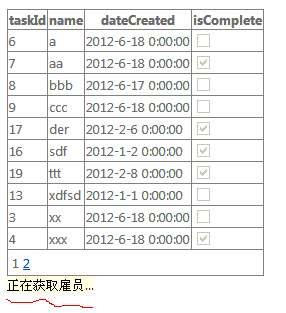
<asp:UpdatePanel ID="UpdatePanel1" runat="server">
<ContentTemplate>
<asp:GridView ID="GridView1" runat="server" AllowPaging="True"
AutoGenerateColumns="False" DataKeyNames="taskId" DataSourceID="SqlDataSource1"
onpageindexchanged="GridView1_PageIndexChanged">
<Columns>
<asp:BoundField DataField="taskId" HeaderText="taskId" InsertVisible="False"
ReadOnly="True" SortExpression="taskId" />
<asp:BoundField DataField="name" HeaderText="name" SortExpression="name" />
<asp:BoundField DataField="dateCreated" HeaderText="dateCreated"
SortExpression="dateCreated" />
<asp:CheckBoxField DataField="isComplete" HeaderText="isComplete"
SortExpression="isComplete" />
</Columns>
</asp:GridView>
<asp:UpdateProgress ID="UpdateProgress1" runat="server"
AssociatedUpdatePanelID="UpdatePanel1">
<ProgressTemplate>
<span style="color: rgb(0, 0, 0); font-family: 'Segoe UI', Verdana, Arial; font-size: 13px; font-style: normal; font-variant: normal; font-weight: normal; letter-spacing: normal; line-height: normal; orphans: 2; text-align: left; text-indent: 0px; text-transform: none; white-space: normal; widows: 2; word-spacing: 0px; -webkit-text-size-adjust: auto; -webkit-text-stroke-width: 0px; background-color: rgb(255, 255, 225); display: inline !important; float: none; ">
正在获取雇员...</span>
</ProgressTemplate>
</asp:UpdateProgress>
<asp:SqlDataSource ID="SqlDataSource1" runat="server"
ConnectionString="<%$ ConnectionStrings:TasksConnectionString %>"
SelectCommand="SELECT * FROM [TasksList] ORDER BY [name]">
</asp:SqlDataSource>
</ContentTemplate>
</asp:UpdatePanel>
<ContentTemplate>
<asp:GridView ID="GridView1" runat="server" AllowPaging="True"
AutoGenerateColumns="False" DataKeyNames="taskId" DataSourceID="SqlDataSource1"
onpageindexchanged="GridView1_PageIndexChanged">
<Columns>
<asp:BoundField DataField="taskId" HeaderText="taskId" InsertVisible="False"
ReadOnly="True" SortExpression="taskId" />
<asp:BoundField DataField="name" HeaderText="name" SortExpression="name" />
<asp:BoundField DataField="dateCreated" HeaderText="dateCreated"
SortExpression="dateCreated" />
<asp:CheckBoxField DataField="isComplete" HeaderText="isComplete"
SortExpression="isComplete" />
</Columns>
</asp:GridView>
<asp:UpdateProgress ID="UpdateProgress1" runat="server"
AssociatedUpdatePanelID="UpdatePanel1">
<ProgressTemplate>
<span style="color: rgb(0, 0, 0); font-family: 'Segoe UI', Verdana, Arial; font-size: 13px; font-style: normal; font-variant: normal; font-weight: normal; letter-spacing: normal; line-height: normal; orphans: 2; text-align: left; text-indent: 0px; text-transform: none; white-space: normal; widows: 2; word-spacing: 0px; -webkit-text-size-adjust: auto; -webkit-text-stroke-width: 0px; background-color: rgb(255, 255, 225); display: inline !important; float: none; ">
正在获取雇员...</span>
</ProgressTemplate>
</asp:UpdateProgress>
<asp:SqlDataSource ID="SqlDataSource1" runat="server"
ConnectionString="<%$ ConnectionStrings:TasksConnectionString %>"
SelectCommand="SELECT * FROM [TasksList] ORDER BY [name]">
</asp:SqlDataSource>
</ContentTemplate>
</asp:UpdatePanel>
public partial class _Default : System.Web.UI.Page
{
protected void Page_Load(object sender, EventArgs e)
{
}
protected void GridView1_PageIndexChanged(object sender, EventArgs e)
{
//Include three second delay for example only.
System.Threading.Thread.Sleep(3000);
}
}
{
protected void Page_Load(object sender, EventArgs e)
{
}
protected void GridView1_PageIndexChanged(object sender, EventArgs e)
{
//Include three second delay for example only.
System.Threading.Thread.Sleep(3000);
}
}
参考:http://msdn.microsoft.com/zh-cn/library/bb386580
二、创建支持 Ajax 的数据应用程序(LinqDataSource,GridView,DropDownList,UpdatePanel)
参考:http://msdn.microsoft.com/zh-cn/library/bb763182
<form id="form1" runat="server">
<asp:UpdatePanel ID="UpdatePanel1" runat="server">
<ContentTemplate>
<p>
<asp:LinqDataSource ID="LinqDataSource1" runat="server"
ContextTypeName="TasksDataContext" EnableDelete="True" EnableInsert="True"
EnableUpdate="True" EntityTypeName="" TableName="TasksList" AutoGenerateWhereClause="true">
<WhereParameters>
<asp:ControlParameter
Name="isComplete"
ControlID="DropDownList1"
Type="Boolean" />
</WhereParameters>
</asp:LinqDataSource>
</p>
<p>
<asp:ScriptManager ID="ScriptManager1" runat="server">
</asp:ScriptManager>
<span id="filter">
Current List Filter:
<asp:DropDownList ID="DropDownList1"
AutoPostBack="true"
runat="server">
<asp:ListItem Text="Active" Value="False" />
<asp:ListItem Text="Completed" Value="True" />
</asp:DropDownList>
</span>
<hr id="separator" />
<asp:ListView ID="ListView1" runat="server" DataKeyNames="taskId"
DataSourceID="LinqDataSource1" InsertItemPosition="LastItem">
<AlternatingItemTemplate>
<tr style="background-color: #FAFAD2;color: #284775;">
<td>
<asp:Button ID="DeleteButton" runat="server" CommandName="Delete" Text="删除" />
<asp:Button ID="EditButton" runat="server" CommandName="Edit" Text="编辑" />
</td>
<td>
<asp:Label ID="taskIdLabel" runat="server" Text='<%# Eval("taskId") %>' />
</td>
<td>
<asp:Label ID="nameLabel" runat="server" Text='<%# Eval("name") %>' />
</td>
<td>
<asp:Label ID="dateCreatedLabel" runat="server"
Text='<%# Eval("dateCreated") %>' />
</td>
<td>
<asp:CheckBox ID="isCompleteCheckBox" runat="server"
Checked='<%# Eval("isComplete") %>' Enabled="false" />
</td>
</tr>
</AlternatingItemTemplate>
<EditItemTemplate>
<tr style="background-color: #FFCC66;color: #000080;">
<td>
<asp:Button ID="UpdateButton" runat="server" CommandName="Update" Text="更新" />
<asp:Button ID="CancelButton" runat="server" CommandName="Cancel" Text="取消" />
</td>
<td>
<asp:Label ID="taskIdLabel1" runat="server" Text='<%# Eval("taskId") %>' />
</td>
<td>
<asp:TextBox ID="nameTextBox" runat="server" Text='<%# Bind("name") %>' />
</td>
<td>
<asp:TextBox ID="dateCreatedTextBox" runat="server"
Text='<%# Bind("dateCreated") %>' />
</td>
<td>
<asp:CheckBox ID="isCompleteCheckBox" runat="server"
Checked='<%# Bind("isComplete") %>' />
</td>
</tr>
</EditItemTemplate>
<EmptyDataTemplate>
<table id="Table1" runat="server"
style="background-color: #FFFFFF;border-collapse: collapse;border-color: #999999;border-style:none;border-width:1px;">
<tr>
<td>
未返回数据。</td>
</tr>
</table>
</EmptyDataTemplate>
<InsertItemTemplate>
<tr style="">
<td>
<asp:Button ID="InsertButton" runat="server" CommandName="Insert" Text="插入" />
<asp:Button ID="CancelButton" runat="server" CommandName="Cancel" Text="清除" />
</td>
<td>
</td>
<td>
<asp:TextBox ID="nameTextBox" runat="server" Text='<%# Bind("name") %>' />
</td>
<td>
<asp:TextBox ID="dateCreatedTextBox" runat="server"
Text='<%# Bind("dateCreated") %>' />
</td>
<td>
<asp:CheckBox ID="isCompleteCheckBox" runat="server"
Checked='<%# Bind("isComplete") %>' />
</td>
</tr>
</InsertItemTemplate>
<ItemTemplate>
<tr style="background-color: #FFFBD6;color: #333333;">
<td>
<asp:Button ID="DeleteButton" runat="server" CommandName="Delete" Text="删除" />
<asp:Button ID="EditButton" runat="server" CommandName="Edit" Text="编辑" />
</td>
<td>
<asp:Label ID="taskIdLabel" runat="server" Text='<%# Eval("taskId") %>' />
</td>
<td>
<asp:Label ID="nameLabel" runat="server" Text='<%# Eval("name") %>' />
</td>
<td>
<asp:Label ID="dateCreatedLabel" runat="server"
Text='<%# Eval("dateCreated") %>' />
</td>
<td>
<asp:CheckBox ID="isCompleteCheckBox" runat="server"
Checked='<%# Eval("isComplete") %>' Enabled="false" />
</td>
</tr>
</ItemTemplate>
<LayoutTemplate>
<table id="Table2" runat="server">
<tr id="Tr1" runat="server">
<td id="Td1" runat="server">
<table ID="itemPlaceholderContainer" runat="server" border="1"
style="background-color: #FFFFFF;border-collapse: collapse;border-color: #999999;border-style:none;border-width:1px;font-family: Verdana, Arial, Helvetica, sans-serif;">
<tr id="Tr2" runat="server" style="background-color: #FFFBD6;color: #333333;">
<th id="Th1" runat="server">
</th>
<th id="Th2" runat="server">
taskId</th>
<th id="Th3" runat="server">
name</th>
<th id="Th4" runat="server">
dateCreated</th>
<th id="Th5" runat="server">
isComplete</th>
</tr>
<tr ID="itemPlaceholder" runat="server">
</tr>
</table>
</td>
</tr>
<tr id="Tr3" runat="server">
<td id="Td2" runat="server"
style="text-align: center;background-color: #FFCC66;font-family: Verdana, Arial, Helvetica, sans-serif;color: #333333;">
<asp:DataPager ID="DataPager1" runat="server">
<Fields>
<asp:NextPreviousPagerField ButtonType="Button" ShowFirstPageButton="True"
ShowLastPageButton="True" />
</Fields>
</asp:DataPager>
</td>
</tr>
</table>
</LayoutTemplate>
<SelectedItemTemplate>
<tr style="background-color: #FFCC66;font-weight: bold;color: #000080;">
<td>
<asp:Button ID="DeleteButton" runat="server" CommandName="Delete" Text="删除" />
<asp:Button ID="EditButton" runat="server" CommandName="Edit" Text="编辑" />
</td>
<td>
<asp:Label ID="taskIdLabel" runat="server" Text='<%# Eval("taskId") %>' />
</td>
<td>
<asp:Label ID="nameLabel" runat="server" Text='<%# Eval("name") %>' />
</td>
<td>
<asp:Label ID="dateCreatedLabel" runat="server"
Text='<%# Eval("dateCreated") %>' />
</td>
<td>
<asp:CheckBox ID="isCompleteCheckBox" runat="server"
Checked='<%# Eval("isComplete") %>' Enabled="false" />
</td>
</tr>
</SelectedItemTemplate>
</asp:ListView>
</p>
</ContentTemplate>
</asp:UpdatePanel>
</form>
<asp:UpdatePanel ID="UpdatePanel1" runat="server">
<ContentTemplate>
<p>
<asp:LinqDataSource ID="LinqDataSource1" runat="server"
ContextTypeName="TasksDataContext" EnableDelete="True" EnableInsert="True"
EnableUpdate="True" EntityTypeName="" TableName="TasksList" AutoGenerateWhereClause="true">
<WhereParameters>
<asp:ControlParameter
Name="isComplete"
ControlID="DropDownList1"
Type="Boolean" />
</WhereParameters>
</asp:LinqDataSource>
</p>
<p>
<asp:ScriptManager ID="ScriptManager1" runat="server">
</asp:ScriptManager>
<span id="filter">
Current List Filter:
<asp:DropDownList ID="DropDownList1"
AutoPostBack="true"
runat="server">
<asp:ListItem Text="Active" Value="False" />
<asp:ListItem Text="Completed" Value="True" />
</asp:DropDownList>
</span>
<hr id="separator" />
<asp:ListView ID="ListView1" runat="server" DataKeyNames="taskId"
DataSourceID="LinqDataSource1" InsertItemPosition="LastItem">
<AlternatingItemTemplate>
<tr style="background-color: #FAFAD2;color: #284775;">
<td>
<asp:Button ID="DeleteButton" runat="server" CommandName="Delete" Text="删除" />
<asp:Button ID="EditButton" runat="server" CommandName="Edit" Text="编辑" />
</td>
<td>
<asp:Label ID="taskIdLabel" runat="server" Text='<%# Eval("taskId") %>' />
</td>
<td>
<asp:Label ID="nameLabel" runat="server" Text='<%# Eval("name") %>' />
</td>
<td>
<asp:Label ID="dateCreatedLabel" runat="server"
Text='<%# Eval("dateCreated") %>' />
</td>
<td>
<asp:CheckBox ID="isCompleteCheckBox" runat="server"
Checked='<%# Eval("isComplete") %>' Enabled="false" />
</td>
</tr>
</AlternatingItemTemplate>
<EditItemTemplate>
<tr style="background-color: #FFCC66;color: #000080;">
<td>
<asp:Button ID="UpdateButton" runat="server" CommandName="Update" Text="更新" />
<asp:Button ID="CancelButton" runat="server" CommandName="Cancel" Text="取消" />
</td>
<td>
<asp:Label ID="taskIdLabel1" runat="server" Text='<%# Eval("taskId") %>' />
</td>
<td>
<asp:TextBox ID="nameTextBox" runat="server" Text='<%# Bind("name") %>' />
</td>
<td>
<asp:TextBox ID="dateCreatedTextBox" runat="server"
Text='<%# Bind("dateCreated") %>' />
</td>
<td>
<asp:CheckBox ID="isCompleteCheckBox" runat="server"
Checked='<%# Bind("isComplete") %>' />
</td>
</tr>
</EditItemTemplate>
<EmptyDataTemplate>
<table id="Table1" runat="server"
style="background-color: #FFFFFF;border-collapse: collapse;border-color: #999999;border-style:none;border-width:1px;">
<tr>
<td>
未返回数据。</td>
</tr>
</table>
</EmptyDataTemplate>
<InsertItemTemplate>
<tr style="">
<td>
<asp:Button ID="InsertButton" runat="server" CommandName="Insert" Text="插入" />
<asp:Button ID="CancelButton" runat="server" CommandName="Cancel" Text="清除" />
</td>
<td>
</td>
<td>
<asp:TextBox ID="nameTextBox" runat="server" Text='<%# Bind("name") %>' />
</td>
<td>
<asp:TextBox ID="dateCreatedTextBox" runat="server"
Text='<%# Bind("dateCreated") %>' />
</td>
<td>
<asp:CheckBox ID="isCompleteCheckBox" runat="server"
Checked='<%# Bind("isComplete") %>' />
</td>
</tr>
</InsertItemTemplate>
<ItemTemplate>
<tr style="background-color: #FFFBD6;color: #333333;">
<td>
<asp:Button ID="DeleteButton" runat="server" CommandName="Delete" Text="删除" />
<asp:Button ID="EditButton" runat="server" CommandName="Edit" Text="编辑" />
</td>
<td>
<asp:Label ID="taskIdLabel" runat="server" Text='<%# Eval("taskId") %>' />
</td>
<td>
<asp:Label ID="nameLabel" runat="server" Text='<%# Eval("name") %>' />
</td>
<td>
<asp:Label ID="dateCreatedLabel" runat="server"
Text='<%# Eval("dateCreated") %>' />
</td>
<td>
<asp:CheckBox ID="isCompleteCheckBox" runat="server"
Checked='<%# Eval("isComplete") %>' Enabled="false" />
</td>
</tr>
</ItemTemplate>
<LayoutTemplate>
<table id="Table2" runat="server">
<tr id="Tr1" runat="server">
<td id="Td1" runat="server">
<table ID="itemPlaceholderContainer" runat="server" border="1"
style="background-color: #FFFFFF;border-collapse: collapse;border-color: #999999;border-style:none;border-width:1px;font-family: Verdana, Arial, Helvetica, sans-serif;">
<tr id="Tr2" runat="server" style="background-color: #FFFBD6;color: #333333;">
<th id="Th1" runat="server">
</th>
<th id="Th2" runat="server">
taskId</th>
<th id="Th3" runat="server">
name</th>
<th id="Th4" runat="server">
dateCreated</th>
<th id="Th5" runat="server">
isComplete</th>
</tr>
<tr ID="itemPlaceholder" runat="server">
</tr>
</table>
</td>
</tr>
<tr id="Tr3" runat="server">
<td id="Td2" runat="server"
style="text-align: center;background-color: #FFCC66;font-family: Verdana, Arial, Helvetica, sans-serif;color: #333333;">
<asp:DataPager ID="DataPager1" runat="server">
<Fields>
<asp:NextPreviousPagerField ButtonType="Button" ShowFirstPageButton="True"
ShowLastPageButton="True" />
</Fields>
</asp:DataPager>
</td>
</tr>
</table>
</LayoutTemplate>
<SelectedItemTemplate>
<tr style="background-color: #FFCC66;font-weight: bold;color: #000080;">
<td>
<asp:Button ID="DeleteButton" runat="server" CommandName="Delete" Text="删除" />
<asp:Button ID="EditButton" runat="server" CommandName="Edit" Text="编辑" />
</td>
<td>
<asp:Label ID="taskIdLabel" runat="server" Text='<%# Eval("taskId") %>' />
</td>
<td>
<asp:Label ID="nameLabel" runat="server" Text='<%# Eval("name") %>' />
</td>
<td>
<asp:Label ID="dateCreatedLabel" runat="server"
Text='<%# Eval("dateCreated") %>' />
</td>
<td>
<asp:CheckBox ID="isCompleteCheckBox" runat="server"
Checked='<%# Eval("isComplete") %>' Enabled="false" />
</td>
</tr>
</SelectedItemTemplate>
</asp:ListView>
</p>
</ContentTemplate>
</asp:UpdatePanel>
</form>

三、使用 ASP.NET 用户控件创建可重用元素(LinqDataSource,GridView,DropDownList,UpdatePanel)
参考:http://msdn.microsoft.com/zh-cn/library/3457w616
ListPicker.ascx
<%@ Control Language="C#" AutoEventWireup="true" CodeFile="ListPicker.ascx.cs" Inherits="ListPicker" %>
<style type="text/css">
.style1
{
width: 100%;
}
</style>
<table class="style1">
<tr>
<td>
<span style="color: rgb(0, 0, 0); font-family: 'Segoe UI', Verdana, Arial; font-size: 13px; font-style: normal; font-variant: normal; font-weight: normal; letter-spacing: normal; line-height: normal; orphans: 2; text-align: left; text-indent: 0px; text-transform: none; white-space: normal; widows: 2; word-spacing: 0px; -webkit-text-size-adjust: auto; -webkit-text-stroke-width: 0px; background-color: rgb(255, 255, 225); display: inline !important; float: none; ">
Available<br />
<br />
</span>
<asp:ListBox ID="SourceList" runat="server" Height="200px" Width="200px">
<asp:ListItem>A</asp:ListItem>
<asp:ListItem>B</asp:ListItem>
<asp:ListItem>C</asp:ListItem>
</asp:ListBox>
</td>
<td>
<asp:Button ID="AddAll" runat="server" onclick="AddAll_Click" Text=">>" />
<asp:Button ID="AddOne" runat="server" onclick="AddOne_Click" Text=" > " />
<asp:Button ID="Remove" runat="server" onclick="Remove_Click" Text=" X " />
</td>
<td>
<span style="color: rgb(0, 0, 0); font-family: 'Segoe UI', Verdana, Arial; font-size: 13px; font-style: normal; font-variant: normal; font-weight: normal; letter-spacing: normal; line-height: normal; orphans: 2; text-align: left; text-indent: 0px; text-transform: none; white-space: normal; widows: 2; word-spacing: 0px; -webkit-text-size-adjust: auto; -webkit-text-stroke-width: 0px; background-color: rgb(255, 255, 225); display: inline !important; float: none; ">
Selected<br />
<br />
<asp:ListBox ID="TargetList" runat="server" Height="200px" Width="200px">
</asp:ListBox>
</span>
</td>
</tr>
</table> <style type="text/css">
.style1
{
width: 100%;
}
</style>
<table class="style1">
<tr>
<td>
<span style="color: rgb(0, 0, 0); font-family: 'Segoe UI', Verdana, Arial; font-size: 13px; font-style: normal; font-variant: normal; font-weight: normal; letter-spacing: normal; line-height: normal; orphans: 2; text-align: left; text-indent: 0px; text-transform: none; white-space: normal; widows: 2; word-spacing: 0px; -webkit-text-size-adjust: auto; -webkit-text-stroke-width: 0px; background-color: rgb(255, 255, 225); display: inline !important; float: none; ">
Available<br />
<br />
</span>
<asp:ListBox ID="SourceList" runat="server" Height="200px" Width="200px">
<asp:ListItem>A</asp:ListItem>
<asp:ListItem>B</asp:ListItem>
<asp:ListItem>C</asp:ListItem>
</asp:ListBox>
</td>
<td>
<asp:Button ID="AddAll" runat="server" onclick="AddAll_Click" Text=">>" />
<asp:Button ID="AddOne" runat="server" onclick="AddOne_Click" Text=" > " />
<asp:Button ID="Remove" runat="server" onclick="Remove_Click" Text=" X " />
</td>
<td>
<span style="color: rgb(0, 0, 0); font-family: 'Segoe UI', Verdana, Arial; font-size: 13px; font-style: normal; font-variant: normal; font-weight: normal; letter-spacing: normal; line-height: normal; orphans: 2; text-align: left; text-indent: 0px; text-transform: none; white-space: normal; widows: 2; word-spacing: 0px; -webkit-text-size-adjust: auto; -webkit-text-stroke-width: 0px; background-color: rgb(255, 255, 225); display: inline !important; float: none; ">
Selected<br />
<br />
<asp:ListBox ID="TargetList" runat="server" Height="200px" Width="200px">
</asp:ListBox>
</span>
</td>
</tr>
HostUserControl.aspx:
<%@ Page Language="C#" AutoEventWireup="true" CodeFile="HostUserControl.aspx.cs" Inherits="HostUserControl" %>
<%@ Register src="ListPicker.ascx" tagname="ListPicker" tagprefix="uc1" %>
<!DOCTYPE html PUBLIC "-//W3C//DTD XHTML 1.0 Transitional//EN" "http://www.w3.org/TR/xhtml1/DTD/xhtml1-transitional.dtd">
<html xmlns="http://www.w3.org/1999/xhtml">
<head runat="server">
<title></title>
</head>
<body>
<form id="form1" runat="server">
<div>
<uc1:ListPicker ID="ListPicker1" runat="server" />
</div>
</form>
</body>
<%@ Register src="ListPicker.ascx" tagname="ListPicker" tagprefix="uc1" %>
<!DOCTYPE html PUBLIC "-//W3C//DTD XHTML 1.0 Transitional//EN" "http://www.w3.org/TR/xhtml1/DTD/xhtml1-transitional.dtd">
<html xmlns="http://www.w3.org/1999/xhtml">
<head runat="server">
<title></title>
</head>
<body>
<form id="form1" runat="server">
<div>
<uc1:ListPicker ID="ListPicker1" runat="server" />
</div>
</form>
</body>
</html>
CSS-Positioning:http://www.barelyfitz.com/screencast/html-training/css/positioning/
css参考:http://msdn.microsoft.com/zh-cn/library/ee371223(v=expression.40)
BlueRobot:http://www.bluerobot.com/

 浙公网安备 33010602011771号