
ASP.NET笔记(四)
一、网页中的基本数据访问(GridView,SqlDataSource)
若要在 ASP.NET 网页上显示数据,需要下列元素:
-
与数据源(如数据库)的连接。
在下面的过程中,您将创建一个到 SQL Server Northwind 数据库的连接。
-
该页上的一个数据源控件,该控件执行查询并管理查询结果。
-
该页上的一个用于实际显示数据的控件。
在下面的过程中,您将通过 GridView 控件显示数据。 GridView 控件将从 SqlDataSource 控件中获取其数据。
可以单独地将这三个元素添加到网站中。 但通过使用 GridView 控件对数据显示进行可视化处理,然后使用向导创建连接和数据源控件,更容易着手一些。 下面的过程解释如何创建在该页上显示数据所必需的所有这三个元素。
通过运行该向导,完成了下列两项任务:
-
该向导创建并配置了一个 SqlDataSource 控件(名为“SqlDataSource1”),该控件包括指定的连接和查询信息。
-
该向导将 GridView 控件绑定到了 SqlDataSource。 因此,GridView 控件将显示 SqlDataSource 控件所返回的数据。
如果查看 SqlDataSource 控件的属性,可以看到该向导已为 ConnectionString 和 SelectQuery 属性创建了相应的属性值。
 注意 注意 |
|---|
|
可以很容易更改 GridView 控件的外观。 在“设计”视图中,右击 GridView 控件,然后单击“显示智能标记”。 在“GridView 任务”菜单上,单击“自动套用格式”,然后应用一个主题。 |
Default.aspx
<!DOCTYPE html PUBLIC "-//W3C//DTD XHTML 1.0 Transitional//EN" "http://www.w3.org/TR/xhtml1/DTD/xhtml1-transitional.dtd">
<html xmlns="http://www.w3.org/1999/xhtml">
<head runat="server">
<title></title>
</head>
<body>
<form id="form1" runat="server">
<div>
<asp:GridView ID="GridView1" runat="server" DataSourceID="SqlDataSource1"
AutoGenerateColumns="False">
<Columns>
<asp:BoundField DataField="Name" HeaderText="Name" SortExpression="Name" />
<asp:BoundField DataField="Descn" HeaderText="Descn" SortExpression="Descn" />
</Columns>
</asp:GridView>
<asp:SqlDataSource ID="SqlDataSource1" runat="server"
ConnectionString="<%$ ConnectionStrings:MSPetShop4ConnectionString %>"
SelectCommand="SELECT [Name], [Descn] FROM [Category]"></asp:SqlDataSource>
</div>
</form>
</body>
</html>
条件筛选:
<!DOCTYPE html PUBLIC "-//W3C//DTD XHTML 1.0 Transitional//EN" "http://www.w3.org/TR/xhtml1/DTD/xhtml1-transitional.dtd">
<html xmlns="http://www.w3.org/1999/xhtml">
<head runat="server">
<title></title>
</head>
<body>
<form id="form1" runat="server">
<div>
<asp:GridView ID="GridView1" runat="server" DataSourceID="SqlDataSource1"
AllowPaging="True" AllowSorting="True" AutoGenerateColumns="False">
<Columns>
<asp:BoundField DataField="Name" HeaderText="Name" SortExpression="Name" />
<asp:BoundField DataField="Descn" HeaderText="Descn" SortExpression="Descn" />
</Columns>
</asp:GridView>
<asp:TextBox ID="TextBox1" runat="server"></asp:TextBox>
<asp:Button ID="Button1" runat="server" Text="Button" />
<asp:SqlDataSource ID="SqlDataSource1" runat="server"
ConnectionString="<%$ ConnectionStrings:MSPetShop4ConnectionString %>"
SelectCommand="SELECT [Name], [Descn] FROM [Category] WHERE ([Name] = @Name)">
<SelectParameters>
<asp:ControlParameter ControlID="TextBox1" Name="Name" PropertyName="Text"
Type="String" />
</SelectParameters>
</asp:SqlDataSource>
</div>
</form>
</body>
</html>
二、在 Visual Studio 中创建主/详细信息网页(GridView,SqlDataSource,DropDownList)
很多网页都以多种方式显示数据,通常显示的是相关表的数据。 本演练演示处理多个控件中的数据以及多个表(包括具有主/详细信息关系的表)的数据的各种方法。 本演练涉及以下任务:
-
使用数据库数据填充下拉列表。
-
创建筛选器 -- 带有 WHERE 子句的 SQL 语句(参数化查询)。
-
根据用户在下拉列表中的选择显示筛选的数据。
-
使用 DetailsView 控件显示所选记录的详细信息。
-
在一个页中选择一条记录,然后在另一个页中显示一条相关记录。
<!DOCTYPE html PUBLIC "-//W3C//DTD XHTML 1.0 Transitional//EN" "http://www.w3.org/TR/xhtml1/DTD/xhtml1-transitional.dtd">
<html xmlns="http://www.w3.org/1999/xhtml">
<head runat="server">
<title></title>
</head>
<body>
<form id="form1" runat="server">
<div>
<!--DropDownList: display category-->
<asp:DropDownList ID="DropDownList1" runat="server" AutoPostBack="true"
DataSourceID="SqlDataSource1" DataTextField="Name" DataValueField="CategoryId">
</asp:DropDownList>
<asp:SqlDataSource ID="SqlDataSource1" runat="server"
ConnectionString="<%$ ConnectionStrings:MSPetShop4ConnectionString2 %>"
SelectCommand="SELECT [CategoryId], [Name] FROM [Category]">
</asp:SqlDataSource>
<!--GridView: display product in above category-->
<asp:GridView ID="GridView1" runat="server" AutoGenerateColumns="False"
DataKeyNames="ProductId" DataSourceID="SqlDataSource2">
<Columns>
<asp:BoundField DataField="ProductId" HeaderText="ProductId" ReadOnly="True"
SortExpression="ProductId" />
<asp:BoundField DataField="CategoryId" HeaderText="CategoryId"
SortExpression="CategoryId" />
<asp:BoundField DataField="Name" HeaderText="Name" SortExpression="Name" />
</Columns>
</asp:GridView>
<asp:SqlDataSource ID="SqlDataSource2" runat="server"
ConnectionString="<%$ ConnectionStrings:MSPetShop4ConnectionString3 %>"
SelectCommand="SELECT [ProductId], [CategoryId], [Name] FROM [Product] WHERE ([CategoryId] = @CategoryId)">
<SelectParameters>
<asp:ControlParameter ControlID="DropDownList1" Name="CategoryId"
PropertyName="SelectedValue" Type="String" />
</SelectParameters>
</asp:SqlDataSource>
</div>
</form>
</body>
</html>
使用网格可以选择单个类别。 下一步是添加 DetailsView 控件,该控件将显示详细信息记录 -- 与选定类别关联的产品。 DetailsView 控件将使用另一个 SQL 查询来获取其数据,因此它需要另一个数据源控件。
<!DOCTYPE html PUBLIC "-//W3C//DTD XHTML 1.0 Transitional//EN" "http://www.w3.org/TR/xhtml1/DTD/xhtml1-transitional.dtd">
<html xmlns="http://www.w3.org/1999/xhtml">
<head runat="server">
<title></title>
</head>
<body>
<form id="form1" runat="server">
<div>
<asp:GridView ID="GridView1" runat="server" AutoGenerateColumns="False"
DataKeyNames="CategoryId" DataSourceID="SqlDataSource4">
<Columns>
<asp:BoundField DataField="CategoryId" HeaderText="CategoryId" ReadOnly="True"
SortExpression="CategoryId" />
<asp:BoundField DataField="Name" HeaderText="Name" SortExpression="Name" />
<asp:CommandField SelectText="详细信息" ShowSelectButton="True" />
</Columns>
</asp:GridView>
<br />
<asp:DetailsView ID="DetailsView1" runat="server" AutoGenerateRows="False"
DataKeyNames="ProductId" DataSourceID="SqlDataSource5" Height="50px"
Width="125px">
<Fields>
<asp:BoundField DataField="Name" HeaderText="Name" SortExpression="Name" />
<asp:BoundField DataField="CategoryId" HeaderText="CategoryId"
SortExpression="CategoryId" />
<asp:BoundField DataField="ProductId" HeaderText="ProductId" ReadOnly="True"
SortExpression="ProductId" />
</Fields>
</asp:DetailsView>
<asp:SqlDataSource ID="SqlDataSource5" runat="server"
ConnectionString="<%$ ConnectionStrings:MSPetShop4ConnectionString4 %>"
SelectCommand="SELECT [Name], [CategoryId], [ProductId] FROM [Product] WHERE ([CategoryId] = @CategoryId)">
<SelectParameters>
<asp:ControlParameter ControlID="GridView1" Name="CategoryId"
PropertyName="SelectedValue" Type="String" />
</SelectParameters>
</asp:SqlDataSource>
<asp:SqlDataSource ID="SqlDataSource4" runat="server"
ConnectionString="<%$ ConnectionStrings:MSPetShop4ConnectionString4 %>"
SelectCommand="SELECT [CategoryId], [Name] FROM [Category]">
</asp:SqlDataSource>
</div>
</form>
</body>
</html>
在不同的页中显示主/详细信息数据
(HyperLinkField,QueryStringParameter)
主记录再次显示在网格中,其中网格包含对应于每条记录的超链接。 当用户单击超链接时,他们会导航到另一个页,在该页中,他们可在显示产品全部记录的 DetailsView 控件中查看详细信息记录。
<!DOCTYPE html PUBLIC "-//W3C//DTD XHTML 1.0 Transitional//EN" "http://www.w3.org/TR/xhtml1/DTD/xhtml1-transitional.dtd">
<html xmlns="http://www.w3.org/1999/xhtml">
<head runat="server">
<title></title>
</head>
<body>
<form id="form1" runat="server">
<div>
<asp:GridView ID="GridView1" runat="server" AutoGenerateColumns="False"
DataKeyNames="CategoryId" DataSourceID="SqlDataSource4">
<Columns>
<asp:BoundField DataField="CategoryId" HeaderText="CategoryId" ReadOnly="True"
SortExpression="CategoryId" />
<asp:BoundField DataField="Name" HeaderText="Name" SortExpression="Name" />
<asp:HyperLinkField DataNavigateUrlFields="CategoryId"
DataNavigateUrlFormatString="DetailsProducts.aspx?custid={0}" Text="详细信息" />
</Columns>
</asp:GridView>
<asp:SqlDataSource ID="SqlDataSource4" runat="server"
ConnectionString="<%$ ConnectionStrings:MSPetShop4ConnectionString4 %>"
SelectCommand="SELECT [CategoryId], [Name] FROM [Category]">
</asp:SqlDataSource>
</div>
</form>
</body>
</html>
<!DOCTYPE html PUBLIC "-//W3C//DTD XHTML 1.0 Transitional//EN" "http://www.w3.org/TR/xhtml1/DTD/xhtml1-transitional.dtd">
<html xmlns="http://www.w3.org/1999/xhtml">
<head runat="server">
<title></title>
</head>
<body>
<form id="form1" runat="server">
<div>
<asp:GridView ID="GridView1" runat="server" AutoGenerateColumns="False"
DataKeyNames="ProductId" DataSourceID="SqlDataSource1">
<Columns>
<asp:BoundField DataField="ProductId" HeaderText="ProductId" ReadOnly="True"
SortExpression="ProductId" />
<asp:BoundField DataField="CategoryId" HeaderText="CategoryId"
SortExpression="CategoryId" />
<asp:BoundField DataField="Name" HeaderText="Name" SortExpression="Name" />
</Columns>
</asp:GridView>
<asp:SqlDataSource ID="SqlDataSource1" runat="server"
ConnectionString="<%$ ConnectionStrings:MSPetShop4ConnectionString4 %>"
SelectCommand="SELECT [ProductId], [CategoryId], [Name] FROM [Product] WHERE ([CategoryId] = @CategoryId)">
<SelectParameters>
<asp:QueryStringParameter Name="CategoryId" QueryStringField="custid"
Type="String" />
</SelectParameters>
</asp:SqlDataSource>
<br />
</div>
</form>
</body>
</html>
三、在 ASP.NET 中创建数据访问和业务逻辑层(LINQ to SQL类,LinqDataSource,GridView)
在本演练中,将创建一个新数据库以跟踪各个任务项。

在本节中,将创建一个新的 SQL Server Express 数据库,以存储待办事项列表中的任务信息。
向网站中添加数据库
-
在“解决方案资源管理器”中,右击网站的名称,然后单击“添加新项”。
将显示“添加新项”窗口。
-
选择“SQL 数据库”,并将数据库命名为 Tasks.mdf。
-
单击“确定”。
-
当 Visual Web Developer 询问是否应将该数据库存储在 App_Data 文件夹中时,请单击“是”。
为 Tasks 数据库创建架构和示例数据
您可以使用数据库设计和编辑功能为存储任务项的表创建架构。
为 Tasks 数据库定义架构并添加数据
-
在“解决方案资源管理器”中打开“App_Data”文件夹,然后双击 Tasks.mdf。
随即将在“服务器资源管理器”中打开“Tasks”数据库节点。
-
右击“表”文件夹,然后单击“添加新表”。
将显示表定义窗口。
-
在表中创建以下列:
列名
数据类型
属性
taskId
int
不为 null
name
nvarchar(50)
不为 null
dateCreated
datetime
不为 null
isComplete
bit
不为 null
-
选择 taskId 列所在的行,右击该行,然后单击“设置主键”。
-
在“属性”窗口中,将“标识列”属性设置为 taskId 列。
-
保存该表,将其命名为“TasksList”,然后关闭表定义窗口。
-
在“服务器资源管理器”中右击该表,然后单击“显示表数据”。
将显示一个编辑窗口,您可以在其中查看、添加和编辑数据。
-
向该表中添加四到五个记录。
您无需指定 taskId 列的值,因为它是标识列,所以会被自动赋值。
若要为刚才创建的数据库创建数据访问层和业务逻辑层,可以有多种方式。 您可以使用自己的业务逻辑自定义这些类。
在本演练中,将创建一个表示数据库实体的类。 随后,您可以将自己的业务逻辑添加到这些生成的类中 (在本演练中,将不向类中添加业务逻辑)。
在本演练中,将使用语言集成查询 (LINQ) 处理数据。 LINQ 将面向对象的编程原则应用于关系数据。 LINQ 提供了一种用于在不同类型的数据源中查询和更新数据的统一编程模型,并将数据功能直接扩展到 C# 和 Visual Basic 语言中。 有关 LINQ 的更多信息,请参见LINQ(语言集成查询)。
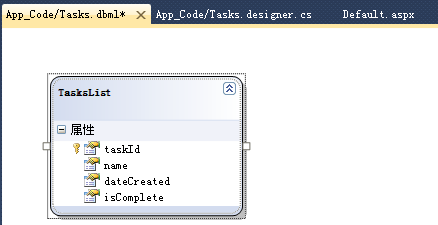
您将使用 LINQ to SQL 类作为数据访问层。 此外,还要使用 Visual Web Developer 中的“对象关系设计器”窗口生成表示数据的实体类。
将 Tasks 数据库映射到 SQL 数据上下文类
若要创建数据访问层,首先要向项目中添加类型化数据集。
创建 Tasks 表的类
-
如果网站中还没有 App_Code 文件夹,请在“解决方案资源管理器”中右击相应的项目,再单击“添加 ASP.NET 文件夹”,然后单击“App_Code”。
-
右击 App_Code 文件夹,然后单击“添加新项”。
显示“添加新项”对话框。
-
在“Visual Studio 已安装的模板”下,选择“LINQ to SQL 类”模板,然后将该文件重命名为“Tasks.dbml”。
-
单击“添加”。
此时将显示“对象关系设计器”窗口。
-
在“服务器资源管理器”中,将 TasksList 表拖到“对象关系设计器”窗口中。
-
保存 Tasks.dbml 文件。
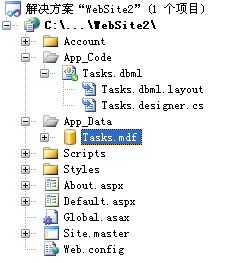
Visual Web Developer 将在“App_Code”文件夹中 Tasks.dbml 的下方创建 Tasks.dbml.layout 文件。 此外,它还会创建 Tasks.designer.cs 或 Tasks.designer.vb,具体取决于您所使用的编程语言。
-
在“解决方案资源管理器”中,打开 Tasks.designer.cs 或 Tasks.designer.vb 文件。
请注意,该代码包含名为 TasksDataContext 和 TasksList 的类。 TasksDataContext 类表示数据库,TasksList 类则表示数据库表。 TasksDataContext 类的无参数构造函数将从网站的配置文件 (Web.config) 中读取数据库连接字符串。
-
打开 Web.config 文件。
请注意,Tasks 数据库的连接字符串已添加到 connectionStrings 元素中。
-
关闭类文件和 Web.config 文件。
现在您已拥有一个数据库表以及若干表示数据库实体的类,下面便可以使用 ASP.NET 网页上的 LinqDataSource 来访问数据库。 LinqDataSource 控件通过 ASP.NET 数据源控件结构向 Web 开发人员提供 LINQ 功能。
LinqDataSource 控件用于创建在数据库中选择、插入、更新和删除对象的代码。 业务逻辑可以调用这些类来执行数据库函数并应用业务逻辑规则。
创建和配置 LinqDataSource 控件
-
打开或切换到 Default.aspx 页。
-
切换到“设计”视图。
-
从“工具箱”的“数据”选项卡中,将 LinqDataSource 控件拖到网页上。
您可以将 ID 属性保留为 LinqDataSource1。
-
在“LinqDataSource 任务”智能标记面板中,单击“配置数据源”。
-
在上下文对象列表中,选择“TasksDataContext”,然后单击“下一步”。
-
在列表中,选择“TasksList(表<TasksList>)”,然后单击“完成”。
-
在“LinqDataSource 任务”智能标记面板中,选中“启用删除”、“启用插入”和“启用更新”复选框。
-
保存页。
请注意,您不必为选择数据指定任何数据库命令。
要为通过 LinqDataSource 控件提供的数据创建用户界面,您可以使用各种数据控件。 在本演练中,您将向页中添加 GridView 控件,以查看、更新和编辑“TasksList”表中的数据。
创建和配置 GridView 控件
-
在 Default.aspx 页中,切换到“设计”视图。
-
从“工具箱”的“数据”选项卡中,将 GridView 控件拖到网页上
-
在“GridView 任务”智能标记面板中,选择“LinqDataSource1”作为数据源。 (如果您在创建 LinqDataSource 控件时指定了其他名称,请使用该名称)。
-
在“GridView 任务”智能标记面板中,选择“启用编辑”和“启用删除”选项。
-
按 Ctrl+F5 运行该页。
该页将显示您之前在本演练中输入的数据,并允许您编辑或删除行。
-
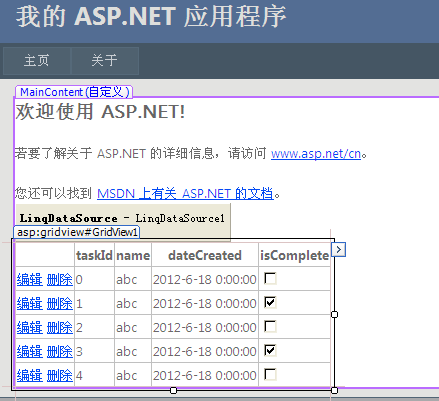
CodeFile="Default.aspx.cs" Inherits="_Default" %>
<asp:Content ID="HeaderContent" runat="server" ContentPlaceHolderID="HeadContent">
</asp:Content>
<asp:Content ID="BodyContent" runat="server" ContentPlaceHolderID="MainContent">
<h2>
欢迎使用 ASP.NET!
</h2>
<p>
若要了解关于 ASP.NET 的详细信息,请访问 <a href="http://www.asp.net/cn" title="ASP.NET 网站">www.asp.net/cn</a>。
</p>
<p>
您还可以找到 <a href="http://go.microsoft.com/fwlink/?LinkID=152368"
title="MSDN ASP.NET 文档">MSDN 上有关 ASP.NET 的文档</a>。
<asp:LinqDataSource ID="LinqDataSource1" runat="server"
ContextTypeName="TasksDataContext" EnableDelete="True" EnableInsert="True"
EnableUpdate="True" EntityTypeName="" TableName="TasksList">
</asp:LinqDataSource>
<asp:GridView ID="GridView1" runat="server" AutoGenerateColumns="False"
DataKeyNames="taskId" DataSourceID="LinqDataSource1">
<Columns>
<asp:CommandField ShowDeleteButton="True" ShowEditButton="True" />
<asp:BoundField DataField="taskId" HeaderText="taskId" InsertVisible="False"
ReadOnly="True" SortExpression="taskId" />
<asp:BoundField DataField="name" HeaderText="name" SortExpression="name" />
<asp:BoundField DataField="dateCreated" HeaderText="dateCreated"
SortExpression="dateCreated" />
<asp:CheckBoxField DataField="isComplete" HeaderText="isComplete"
SortExpression="isComplete" />
</Columns>
</asp:GridView>
</p>
</asp:Content>
//------------------------------------------------------------------------------
// <auto-generated>
// 此代码由工具生成。
// 运行时版本:4.0.30319.1
//
// 对此文件的更改可能会导致不正确的行为,并且如果
// 重新生成代码,这些更改将会丢失。
// </auto-generated>
//------------------------------------------------------------------------------
using System;
using System.Collections.Generic;
using System.ComponentModel;
using System.Data;
using System.Data.Linq;
using System.Data.Linq.Mapping;
using System.Linq;
using System.Linq.Expressions;
using System.Reflection;
[global::System.Data.Linq.Mapping.DatabaseAttribute(Name="Tasks")]
public partial class TasksDataContext : System.Data.Linq.DataContext
{
private static System.Data.Linq.Mapping.MappingSource mappingSource = new AttributeMappingSource();
#region 可扩展性方法定义
partial void OnCreated();
partial void InsertTasksList(TasksList instance);
partial void UpdateTasksList(TasksList instance);
partial void DeleteTasksList(TasksList instance);
#endregion
public TasksDataContext() :
base(global::System.Configuration.ConfigurationManager.ConnectionStrings["TasksConnectionString"].ConnectionString, mappingSource)
{
OnCreated();
}
public TasksDataContext(string connection) :
base(connection, mappingSource)
{
OnCreated();
}
public TasksDataContext(System.Data.IDbConnection connection) :
base(connection, mappingSource)
{
OnCreated();
}
public TasksDataContext(string connection, System.Data.Linq.Mapping.MappingSource mappingSource) :
base(connection, mappingSource)
{
OnCreated();
}
public TasksDataContext(System.Data.IDbConnection connection, System.Data.Linq.Mapping.MappingSource mappingSource) :
base(connection, mappingSource)
{
OnCreated();
}
public System.Data.Linq.Table<TasksList> TasksList
{
get
{
return this.GetTable<TasksList>();
}
}
}
[global::System.Data.Linq.Mapping.TableAttribute(Name="dbo.TasksList")]
public partial class TasksList : INotifyPropertyChanging, INotifyPropertyChanged
{
private static PropertyChangingEventArgs emptyChangingEventArgs = new PropertyChangingEventArgs(String.Empty);
private int _taskId;
private string _name;
private System.DateTime _dateCreated;
private bool _isComplete;
#region 可扩展性方法定义
partial void OnLoaded();
partial void OnValidate(System.Data.Linq.ChangeAction action);
partial void OnCreated();
partial void OntaskIdChanging(int value);
partial void OntaskIdChanged();
partial void OnnameChanging(string value);
partial void OnnameChanged();
partial void OndateCreatedChanging(System.DateTime value);
partial void OndateCreatedChanged();
partial void OnisCompleteChanging(bool value);
partial void OnisCompleteChanged();
#endregion
public TasksList()
{
OnCreated();
}
[global::System.Data.Linq.Mapping.ColumnAttribute(Storage="_taskId", AutoSync=AutoSync.OnInsert, DbType="Int NOT NULL IDENTITY", IsPrimaryKey=true, IsDbGenerated=true)]
public int taskId
{
get
{
return this._taskId;
}
set
{
if ((this._taskId != value))
{
this.OntaskIdChanging(value);
this.SendPropertyChanging();
this._taskId = value;
this.SendPropertyChanged("taskId");
this.OntaskIdChanged();
}
}
}
[global::System.Data.Linq.Mapping.ColumnAttribute(Storage="_name", DbType="NVarChar(50) NOT NULL", CanBeNull=false)]
public string name
{
get
{
return this._name;
}
set
{
if ((this._name != value))
{
this.OnnameChanging(value);
this.SendPropertyChanging();
this._name = value;
this.SendPropertyChanged("name");
this.OnnameChanged();
}
}
}
[global::System.Data.Linq.Mapping.ColumnAttribute(Storage="_dateCreated", DbType="DateTime NOT NULL")]
public System.DateTime dateCreated
{
get
{
return this._dateCreated;
}
set
{
if ((this._dateCreated != value))
{
this.OndateCreatedChanging(value);
this.SendPropertyChanging();
this._dateCreated = value;
this.SendPropertyChanged("dateCreated");
this.OndateCreatedChanged();
}
}
}
[global::System.Data.Linq.Mapping.ColumnAttribute(Storage="_isComplete", DbType="Bit NOT NULL")]
public bool isComplete
{
get
{
return this._isComplete;
}
set
{
if ((this._isComplete != value))
{
this.OnisCompleteChanging(value);
this.SendPropertyChanging();
this._isComplete = value;
this.SendPropertyChanged("isComplete");
this.OnisCompleteChanged();
}
}
}
public event PropertyChangingEventHandler PropertyChanging;
public event PropertyChangedEventHandler PropertyChanged;
protected virtual void SendPropertyChanging()
{
if ((this.PropertyChanging != null))
{
this.PropertyChanging(this, emptyChangingEventArgs);
}
}
protected virtual void SendPropertyChanged(String propertyName)
{
if ((this.PropertyChanged != null))
{
this.PropertyChanged(this, new PropertyChangedEventArgs(propertyName));
}
}
}
#pragma warning restore 1591
四、使用 ListView Web 服务器控件对数据进行显示、分页和排序(ListView)
本演练演示以下任务:
若要在 ASP.NET 网页上显示数据,需要下列元素:
-
与数据源(如数据库)的连接。 在下面的过程中,将创建一个到 SQL Server AdventureWorks 数据库的连接。
-
该页上一个用于与数据源(数据库)进行交互以读写数据的数据源控件。 在本演练中,将使用 SqlDataSource 控件与 SQL Server AdventureWorks 数据库进行交互。
-
该页上一个用于显示数据的控件。 在下面的过程中,将在 ListView 控件中显示数据,该控件从 SqlDataSource 控件获取其数据。
参考:http://msdn.microsoft.com/zh-cn/library/bb515102
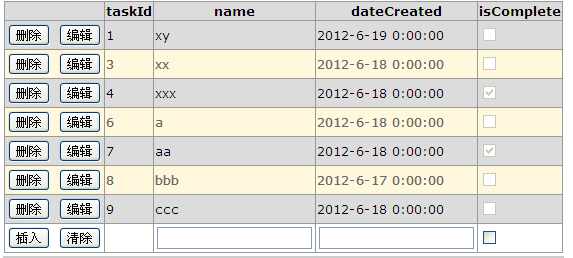
现在,将向 ListView 控件添加排序功能。 通过向 ListView 控件添加一个按钮并配置该按钮,可以提供此功能。
向 ListView 控件添加排序功能
-
在 Default.aspx 文件中,切换到“源”视图。
-
从“工具箱”的“标准”选项卡中,将两个 Button 控件拖放到 LayoutTemplate 元素中的 table 元素之后。
-
在“属性”窗口中,按照以下方式更改按钮的属性:
-
将第一个按钮的 Text 属性设置为“按名排序”,将 CommandName 属性设置为“排序”,将 CommandArgument 设置为“FirstName”。
-
将第二个按钮的 Text 属性设置为“按姓排序”,将 CommandName 属性设置为“排序”,将 CommandArgument 设置为“LastName”。
CommandArgument properties are set to a sort expression." data-guid="541f3fb242c60a106a705ca2762be606">将按钮的 CommandArgument 属性设置为排序表达式。 对于数据库数据,这通常是某个列的名称。
-
CodeFile="Default.aspx.cs" Inherits="_Default" %>
<asp:Content ID="HeaderContent" runat="server" ContentPlaceHolderID="HeadContent">
</asp:Content>
<asp:Content ID="BodyContent" runat="server" ContentPlaceHolderID="MainContent">
<h2>
欢迎使用 ASP.NET!
</h2>
<p>
若要了解关于 ASP.NET 的详细信息,请访问 <a href="http://www.asp.net/cn" title="ASP.NET 网站">www.asp.net/cn</a>。
</p>
<p>
您还可以找到 <a href="http://go.microsoft.com/fwlink/?LinkID=152368"
title="MSDN ASP.NET 文档">MSDN 上有关 ASP.NET 的文档</a>。
<asp:ListView ID="ListView1" runat="server" DataKeyNames="taskId"
DataSourceID="SqlDataSource1" InsertItemPosition="LastItem">
<AlternatingItemTemplate>
<tr style="background-color: #FFF8DC;">
<td>
<asp:Button ID="DeleteButton" runat="server" CommandName="Delete" Text="删除" />
<asp:Button ID="EditButton" runat="server" CommandName="Edit" Text="编辑" />
</td>
<td>
<asp:Label ID="taskIdLabel" runat="server" Text='<%# Eval("taskId") %>' />
</td>
<td>
<asp:Label ID="nameLabel" runat="server"
Text='<%# Eval("name") %>' />
</td>
<td>
<asp:Label ID="dateCreatedLabel" runat="server"
Text='<%# Eval("dateCreated") %>' />
</td>
<td>
<asp:CheckBox ID="isCompleteCheckBox" runat="server"
Checked='<%# Eval("isComplete") %>' Enabled="false" />
</td>
</tr>
</AlternatingItemTemplate>
<EditItemTemplate>
<tr style="background-color: #008A8C; color: #FFFFFF;">
<td>
<asp:Button ID="UpdateButton" runat="server" CommandName="Update" Text="更新" />
<asp:Button ID="CancelButton" runat="server" CommandName="Cancel" Text="取消" />
</td>
<td>
<asp:Label ID="taskIdLabel1" runat="server" Text='<%# Eval("taskId") %>' />
</td>
<td>
<asp:TextBox ID="nameTextBox" runat="server" Text='<%# Bind("name") %>' />
</td>
<td>
<asp:TextBox ID="dateCreatedTextBox" runat="server"
Text='<%# Bind("dateCreated") %>' />
</td>
<td>
<asp:CheckBox ID="isCompleteCheckBox" runat="server"
Checked='<%# Bind("isComplete") %>' />
</td>
</tr>
</EditItemTemplate>
<EmptyDataTemplate>
<table runat="server"
style="background-color: #FFFFFF;border-collapse: collapse;border-color: #999999;border-style:none;border-width:1px;">
<tr>
<td>
未返回数据。</td>
</tr>
</table>
</EmptyDataTemplate>
<InsertItemTemplate>
<tr style="">
<td>
<asp:Button ID="InsertButton" runat="server" CommandName="Insert" Text="插入" />
<asp:Button ID="CancelButton" runat="server" CommandName="Cancel" Text="清除" />
</td>
<td>
</td>
<td>
<asp:TextBox ID="nameTextBox" runat="server" Text='<%# Bind("name") %>' />
</td>
<td>
<asp:TextBox ID="dateCreatedTextBox" runat="server"
Text='<%# Bind("dateCreated") %>' />
</td>
<td>
<asp:CheckBox ID="isCompleteCheckBox" runat="server"
Checked='<%# Bind("isComplete") %>' />
</td>
</tr>
</InsertItemTemplate>
<ItemTemplate>
<tr style="background-color: #DCDCDC; color: #000000;">
<td>
<asp:Button ID="DeleteButton" runat="server" CommandName="Delete" Text="删除" />
<asp:Button ID="EditButton" runat="server" CommandName="Edit" Text="编辑" />
</td>
<td>
<asp:Label ID="taskIdLabel" runat="server" Text='<%# Eval("taskId") %>' />
</td>
<td>
<asp:Label ID="nameLabel" runat="server"
Text='<%# Eval("name") %>' />
</td>
<td>
<asp:Label ID="dateCreatedLabel" runat="server"
Text='<%# Eval("dateCreated") %>' />
</td>
<td>
<asp:CheckBox ID="isCompleteCheckBox" runat="server"
Checked='<%# Eval("isComplete") %>' Enabled="false" />
</td>
</tr>
</ItemTemplate>
<LayoutTemplate>
<table runat="server">
<tr runat="server">
<td runat="server">
<table ID="itemPlaceholderContainer" runat="server" border="1"
style="background-color: #FFFFFF;border-collapse: collapse;border-color: #999999;border-style:none;border-width:1px;font-family: Verdana, Arial, Helvetica, sans-serif;">
<tr runat="server" style="background-color: #DCDCDC; color: #000000;">
<th runat="server">
</th>
<th runat="server">
taskId</th>
<th runat="server">
name</th>
<th runat="server">
dateCreated</th>
<th runat="server">
isComplete</th>
</tr>
<tr ID="itemPlaceholder" runat="server">
</tr>
</table>
</td>
</tr>
<tr runat="server">
<td runat="server"
style="text-align: center;background-color: #CCCCCC; font-family: Verdana, Arial, Helvetica, sans-serif;color: #000000">
</td>
</tr>
</table>
</LayoutTemplate>
<SelectedItemTemplate>
<tr style="background-color: #008A8C; font-weight: bold;color: #FFFFFF;">
<td>
<asp:Button ID="DeleteButton" runat="server" CommandName="Delete" Text="删除" />
<asp:Button ID="EditButton" runat="server" CommandName="Edit" Text="编辑" />
</td>
<td>
<asp:Label ID="taskIdLabel" runat="server" Text='<%# Eval("taskId") %>' />
</td>
<td>
<asp:Label ID="nameLabel" runat="server"
Text='<%# Eval("name") %>' />
</td>
<td>
<asp:Label ID="dateCreatedLabel" runat="server"
Text='<%# Eval("dateCreated") %>' />
</td>
<td>
<asp:CheckBox ID="isCompleteCheckBox" runat="server"
Checked='<%# Eval("isComplete") %>' Enabled="false" />
</td>
</tr>
</SelectedItemTemplate>
</asp:ListView>
</p>
<p>
<asp:SqlDataSource ID="SqlDataSource1" runat="server"
ConnectionString="<%$ ConnectionStrings:TasksConnectionString %>"
SelectCommand="SELECT * FROM [TasksList]"
DeleteCommand="DELETE FROM [TasksList] WHERE [taskId] = @taskId"
InsertCommand="INSERT INTO [TasksList] ([name], [dateCreated], [isComplete]) VALUES (@name, @dateCreated, @isComplete)"
UpdateCommand="UPDATE [TasksList] SET [name] = @name, [dateCreated] = @dateCreated, [isComplete] = @isComplete WHERE [taskId] = @taskId">
<DeleteParameters>
<asp:Parameter Name="taskId" Type="Int32" />
</DeleteParameters>
<InsertParameters>
<asp:Parameter Name="name" Type="String" />
<asp:Parameter Name="dateCreated" Type="DateTime" />
<asp:Parameter Name="isComplete" Type="Boolean" />
</InsertParameters>
<UpdateParameters>
<asp:Parameter Name="name" Type="String" />
<asp:Parameter Name="dateCreated" Type="DateTime" />
<asp:Parameter Name="isComplete" Type="Boolean" />
<asp:Parameter Name="taskId" Type="Int32" />
</UpdateParameters>
</asp:SqlDataSource>
</p>
<p>
</p>
</asp:Content>

 浙公网安备 33010602011771号