
vue使用h函数封装dialog组件,以命令的形式使用dialog组件
场景
有些时候我们的页面是有很多的弹窗
如果我们把这些弹窗都写html中会有一大坨
因此:我们需要把弹窗封装成命令式的形式
命令式弹窗
// 使用弹窗的组件
<template>
  <div>
    <el-button @click="openMask">点击弹窗</el-button>
  </div>
</template>

<script setup lang="ts">
import childTest from '@/components/childTest.vue'
import { renderDialog } from '@/hooks/dialog'
function openMask(){
  // 第1个参数:表示的是组件,你写弹窗中的组件
  // 第2个参数:表示的组件属性,比如:确认按钮的名称等
  // 第3个参数:表示的模态框的属性。比如:模态宽的宽度,标题名称,是否可移动
  renderDialog(childTest,{},{title:'测试弹窗'})
}
</script>
// 封装的弹窗
import { createApp, h } from "vue";
import { ElDialog } from "element-plus";
export function renderDialog(component:any,props:any, modalProps:any){
 const dialog  = h(
    ElDialog,   // 模态框组件
    {
      ...modalProps, // 模态框属性
      modelValue:true, // 模态框是否显示
    }, // 因为是模态框组件,肯定是模态框的属性
    {
      default:()=>h(component, props ) // 插槽,el-dialog下的内容
    }
  )
 console.log(dialog)
  // 创建一个新的 Vue 应用实例。这个应用实例是独立的,与主应用分离。
  const app = createApp(dialog)
  const div = document.createElement('div')
  document.body.appendChild(div)
  app.mount(div)
}
//childTest.vue 组件
<template>
  <div>
    <span>It's a modal Dialog</span>
    <el-form :model="form" label-width="auto" style="max-width: 600px">
    <el-form-item label="Activity name">
      <el-input v-model="form.name" />
    </el-form-item>
    <el-form-item label="Activity zone">
      <el-select v-model="form.region" placeholder="please select your zone">
        <el-option label="Zone one" value="shanghai" />
        <el-option label="Zone two" value="beijing" />
      </el-select>
    </el-form-item>
  </el-form>
  </div>
</template>
<script setup lang="ts">
import { ref,reactive } from 'vue'
const dialogVisible = ref(true)
const form = reactive({
  name: '',
  region: '',
})
const onSubmit = () => {
  console.log('submit!')
}
</script>
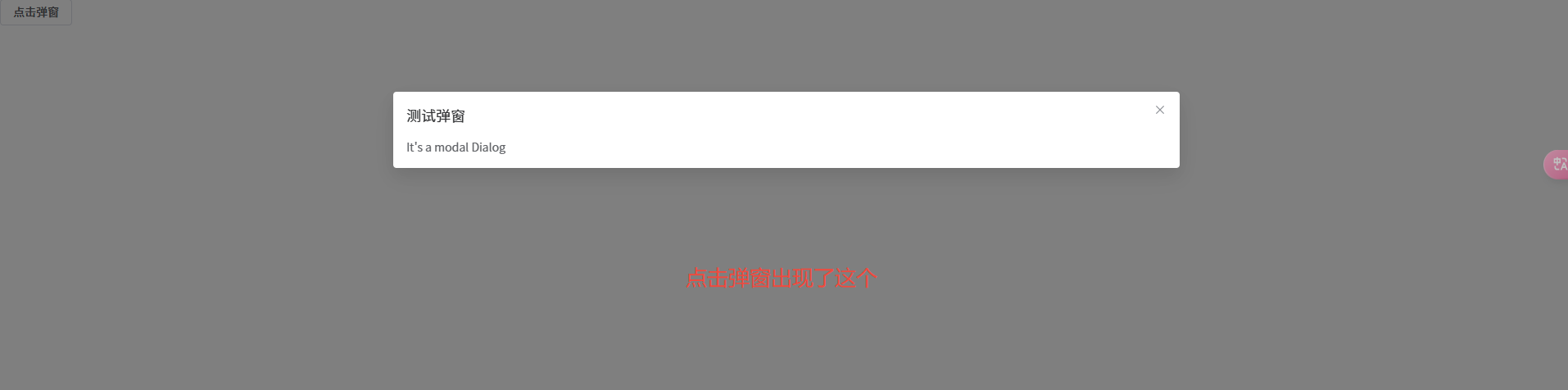
为啥弹窗中的表单不能够正常展示呢?
在控制台会有下面的提示信息:
Failed to resolve component:
el-form If this is a native custom element,
make sure to exclude it from component resolution via compilerOptions.isCustomElement
翻译过来就是
无法解析组件:el-form如果这是一个原生自定义元素,
请确保通过 compilerOptions.isCustomElement 将其从组件解析中排除
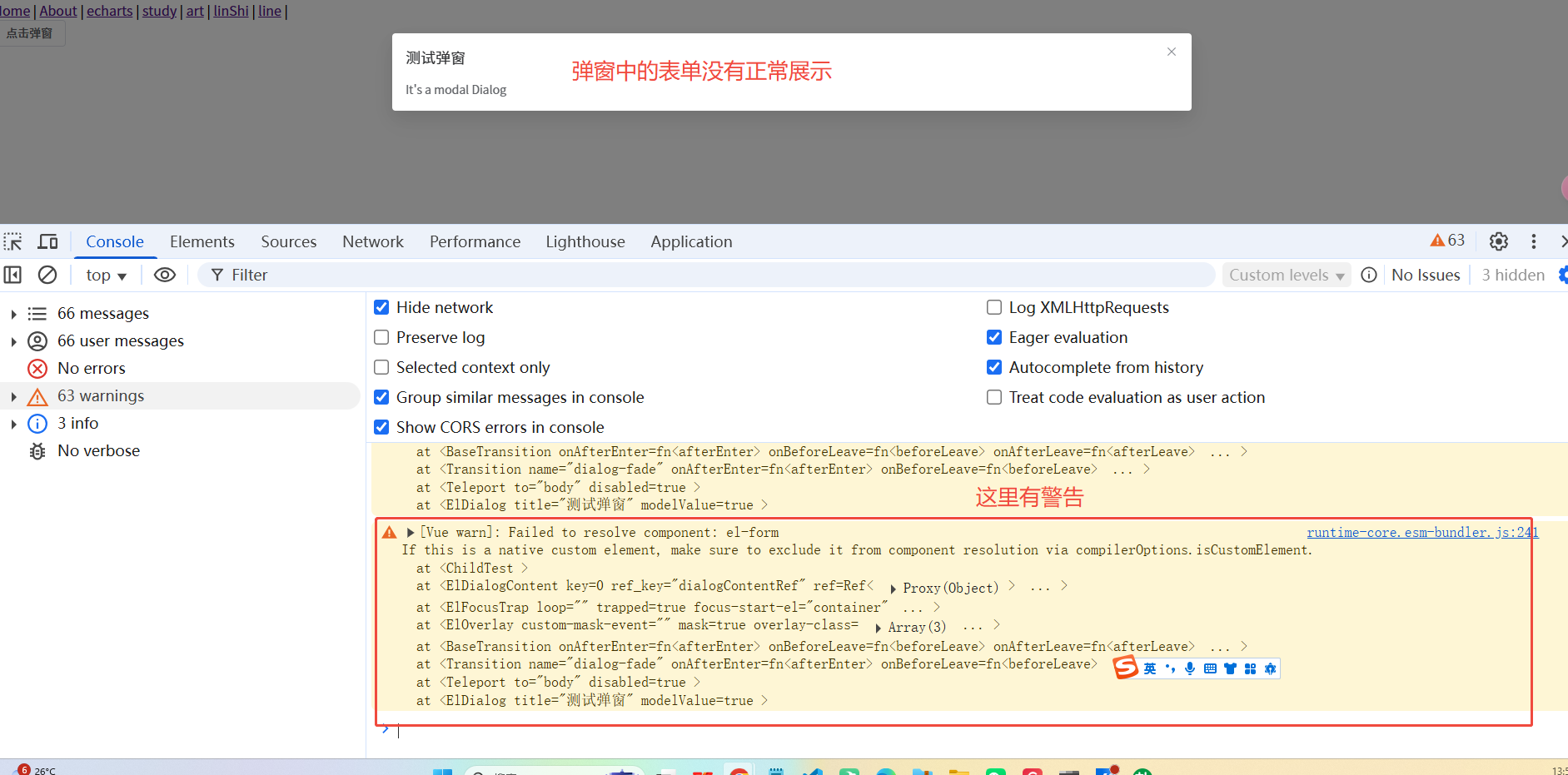
其实就是说:我重新创建了一个新的app,这个app中没有注册组件。
因此会警告,页面渲染不出来。
// 我重新创建了一个app,这个app中没有注册 element-plus 组件。
const app = createApp(dialog)
现在我们重新注册element-plus组件。
准确的说:我们要注册 childTest.vue 组件使用到的东西
给新创建的app应用注册childTest组件使用到的东西
我们将会在这个命令式弹窗中重新注册需要使用到的组件
// 封装的弹窗
import { createApp, h } from "vue";
import { ElDialog } from "element-plus";
// 引入组件和样式
import ElementPlus from "element-plus";
// import "element-plus/dist/index.css";
export function renderDialog(component:any,props:any, modalProps:any){
 const dialog  = h(
    ElDialog,   // 模态框组件
    {
      ...modalProps, // 模态框属性
      modelValue:true, // 模态框显示
    }, // 因为是模态框组件,肯定是模态框的属性
    {
      default:()=>h(component, props ) // 插槽,el-dialog下的内容
    }
  )
 console.log(dialog)
  // 创建一个新的 Vue 应用实例。这个应用实例是独立的,与主应用分离。
  const app = createApp(dialog)
  // 在新实例中注册 Element Plus, 这弹窗中的组件就可以正常显示了
  app.use(ElementPlus);
  const div = document.createElement('div')
  document.body.appendChild(div)
  app.mount(div)
}
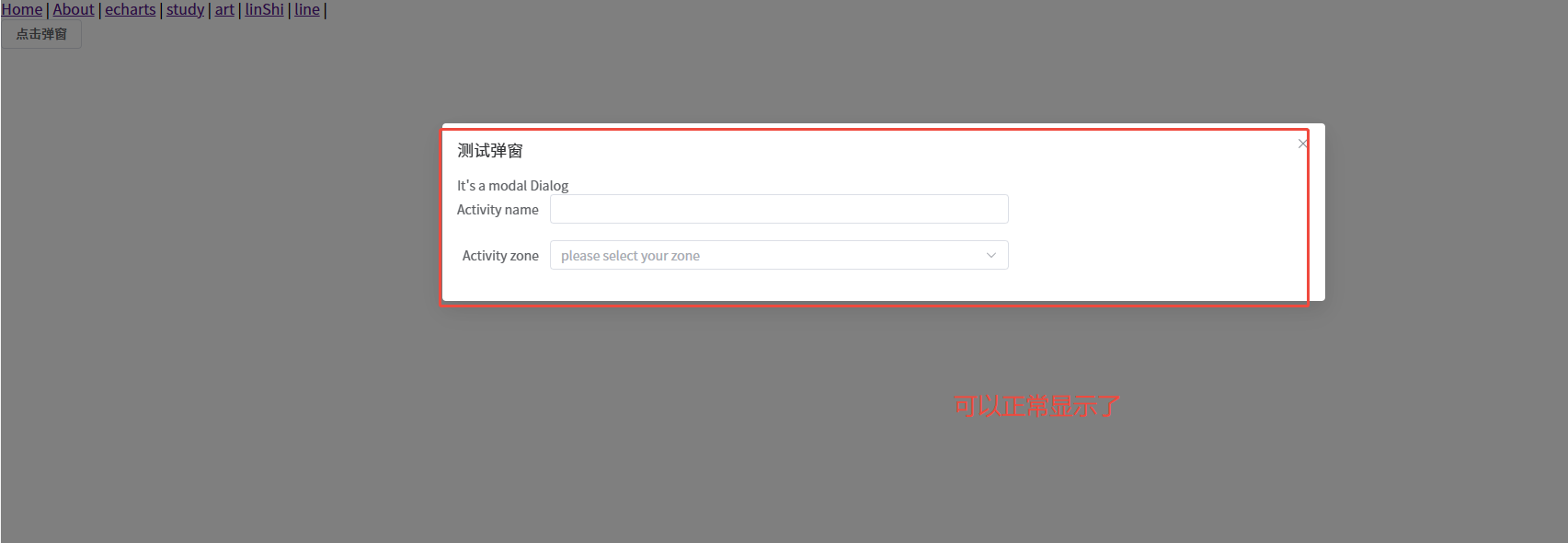
现在我们发现可以正常展示弹窗中的表单了。因为我们注册了element-plus组件。
但是我们发现又发现了另外一个问题。
弹窗底部没有取消和确认按钮。
需要我们再次通过h函数来创建
关于使用createApp创建新的应用实例
在Vue 3中,我们可以使用 createApp 来创建新的应用实例
但是这样会创建一个完全独立的应用
它不会共享主应用的组件、插件等。
因此我们需要重新注册
弹窗底部新增取消和确认按钮
我们将会使用h函数中的插槽来创建底部的取消按钮
// 封装的弹窗
import { createApp, h } from "vue";
import { ElDialog, ElButton, ElForm, ElFormItem, ElInput, ElSelect, ElOption } from "element-plus";
import ElementPlus from "element-plus";

export function renderDialog(component: any, props: any, modalProps: any) {
  // 创建弹窗实例
  const dialog = h(
    ElDialog,
    {
      ...modalProps,
      modelValue: true,
    },
    {
      // 主要内容插槽
      default: () => h(component, props),
      // 底部插槽
      footer:() =>h(
        'div',
        { class: 'dialog-footer' },
        [
          h(
            ElButton,
            {
              onClick: () => {
                console.log('取消')
              }
            },
            () => '取消'
          ),
          h(
            ElButton,
            {
              type: 'primary',
              onClick: () => {
                console.log('确定')
              }
            },
            () => '确定'
          )
        ]
      )
    }
  );
  // 创建一个新的 Vue 应用实例。这个应用实例是独立的,与主应用分离。
  const app = createApp(dialog)
  // 在新实例中注册 Element Plus, 这弹窗中的组件就可以正常显示了
  app.use(ElementPlus);
  const div = document.createElement('div')
  document.body.appendChild(div)
  app.mount(div)
}
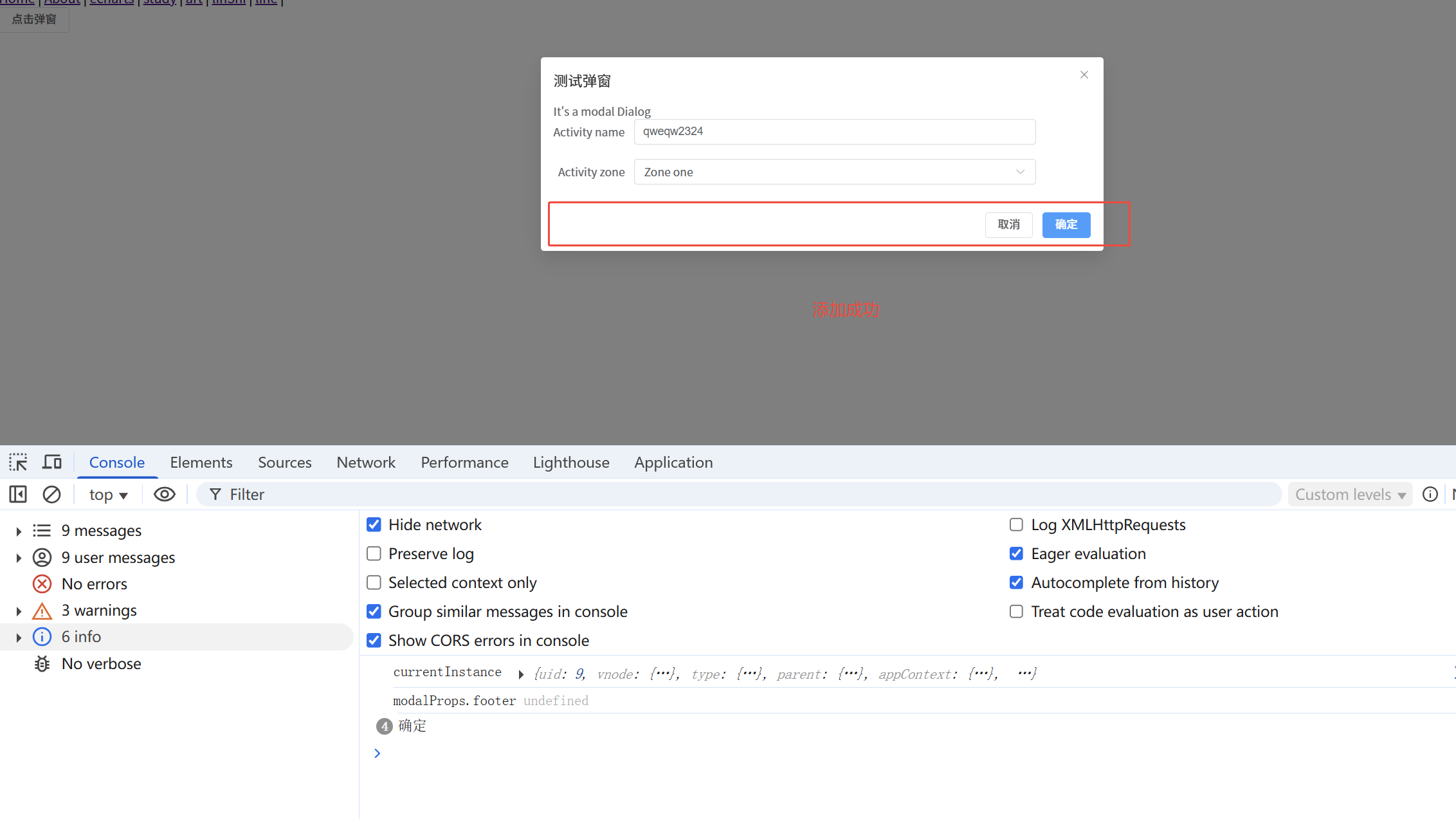
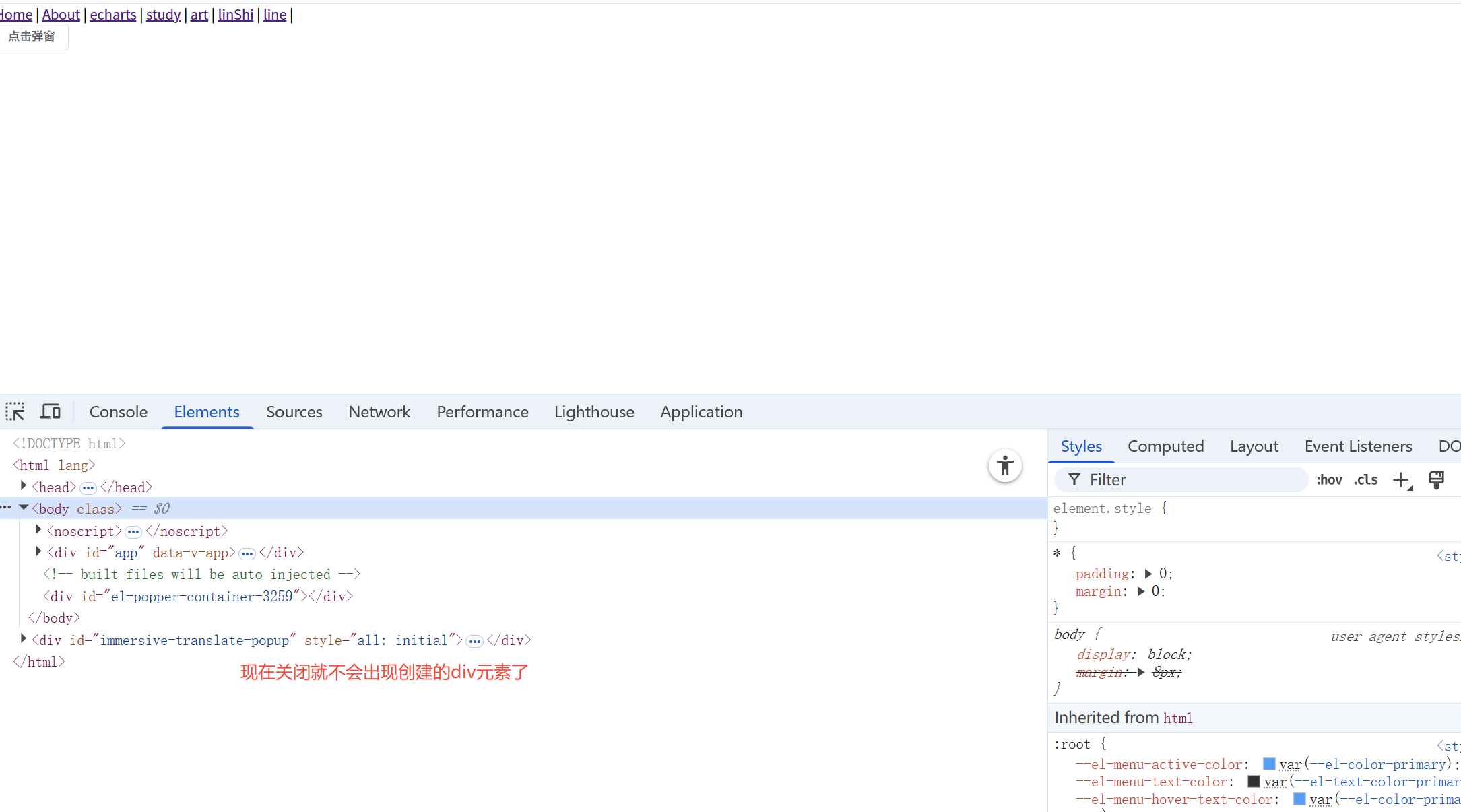
点击关闭弹窗时,需要移除之前创建的div
卸载的同时需要把我们创建的div元素移除,否则页面上会出现很多div。
2个地方需要移除:1,点击确认按钮。 2,点击其他地方的关闭
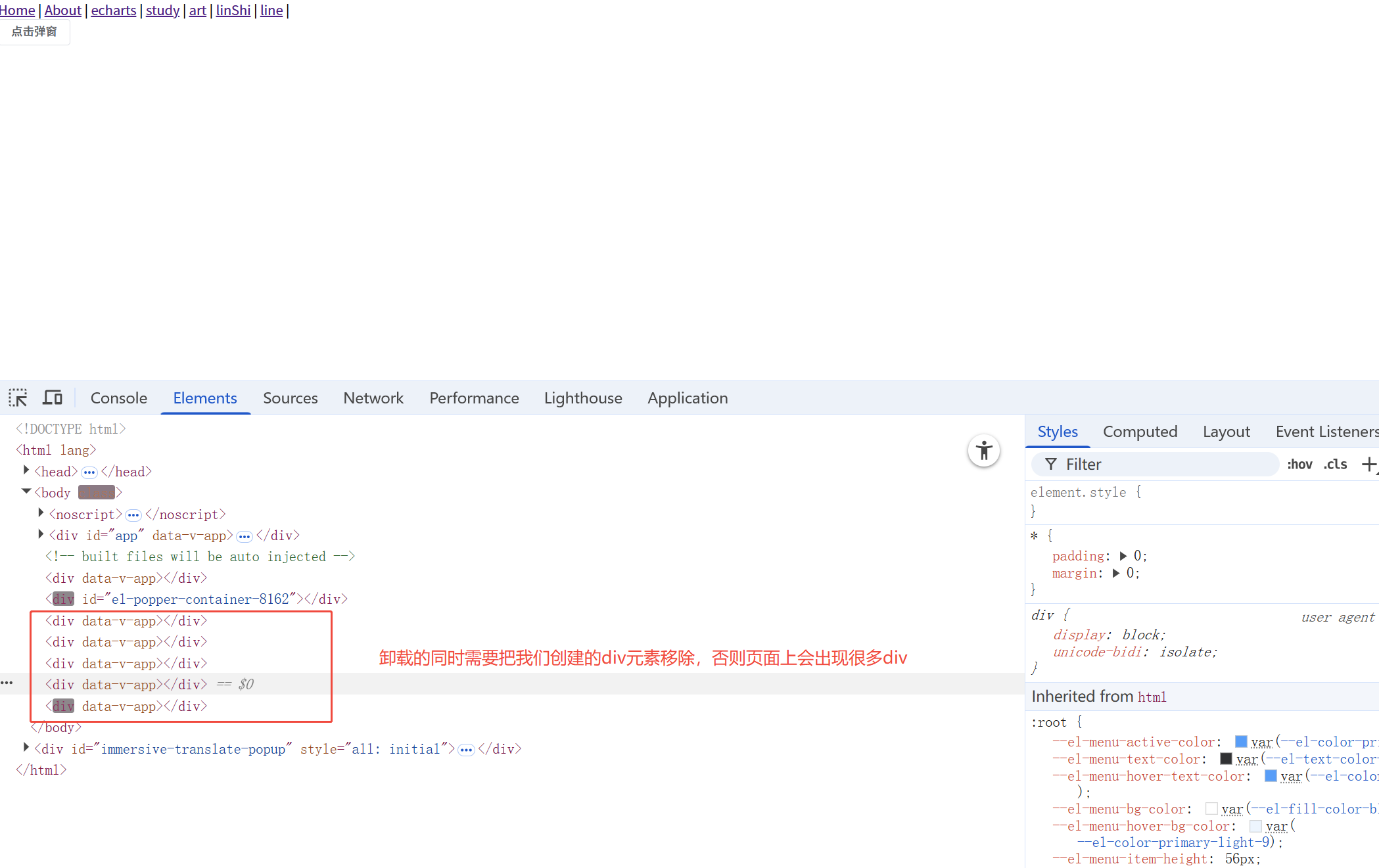
关闭弹窗正确销毁相关组件
// 封装的弹窗
import { createApp, h } from "vue";
import { ElDialog, ElButton, ElForm, ElFormItem, ElInput, ElSelect, ElOption } from "element-plus";
import ElementPlus from "element-plus";

export function renderDialog(component: any, props: any, modalProps: any) {
  console.log('111')
  // 创建弹窗实例
  const dialog = h(
    ElDialog,
    {
      ...modalProps,
      modelValue: true,
      onClose: ()=> {
        console.log('关闭的回调')
        app.unmount() // 这样卸载会让动画消失
        // 卸载的同时需要把我们创建的div元素移除,否则页面上会出现很多div
        document.body.removeChild(div)
      }
    },
    {
      // 主要内容插槽
      default: () => h(component, props),
      // 底部插槽
      footer:() =>h(
        'div',
        {
          class: 'dialog-footer',

        },
        [
          h(
            ElButton,
            {
              onClick: () => {
                console.log('点击取消按钮')
                // 卸载一个已挂载的应用实例。卸载一个应用会触发该应用组件树内所有组件的卸载生命周期钩子。
                app.unmount() // 这样卸载会让动画消失
                // 卸载的同时需要把我们创建的div元素移除,否则页面上会出现很多div
                document.body.removeChild(div)
              }
            },
            () => '取消'
          ),
          h(
            ElButton,
            {
              type: 'primary',
              onClick: () => {
                console.log('确定')
              }
            },
            () => '确定'
          )
        ]
      )
    }
  );
  // 创建一个新的 Vue 应用实例。这个应用实例是独立的,与主应用分离。
  const app = createApp(dialog)
  // 在新实例中注册 Element Plus, 这弹窗中的组件就可以正常显示了
  app.use(ElementPlus);
  // 这个div元素在在销毁应用时需要被移除哈
  const div = document.createElement('div')
  document.body.appendChild(div)
  app.mount(div)
}
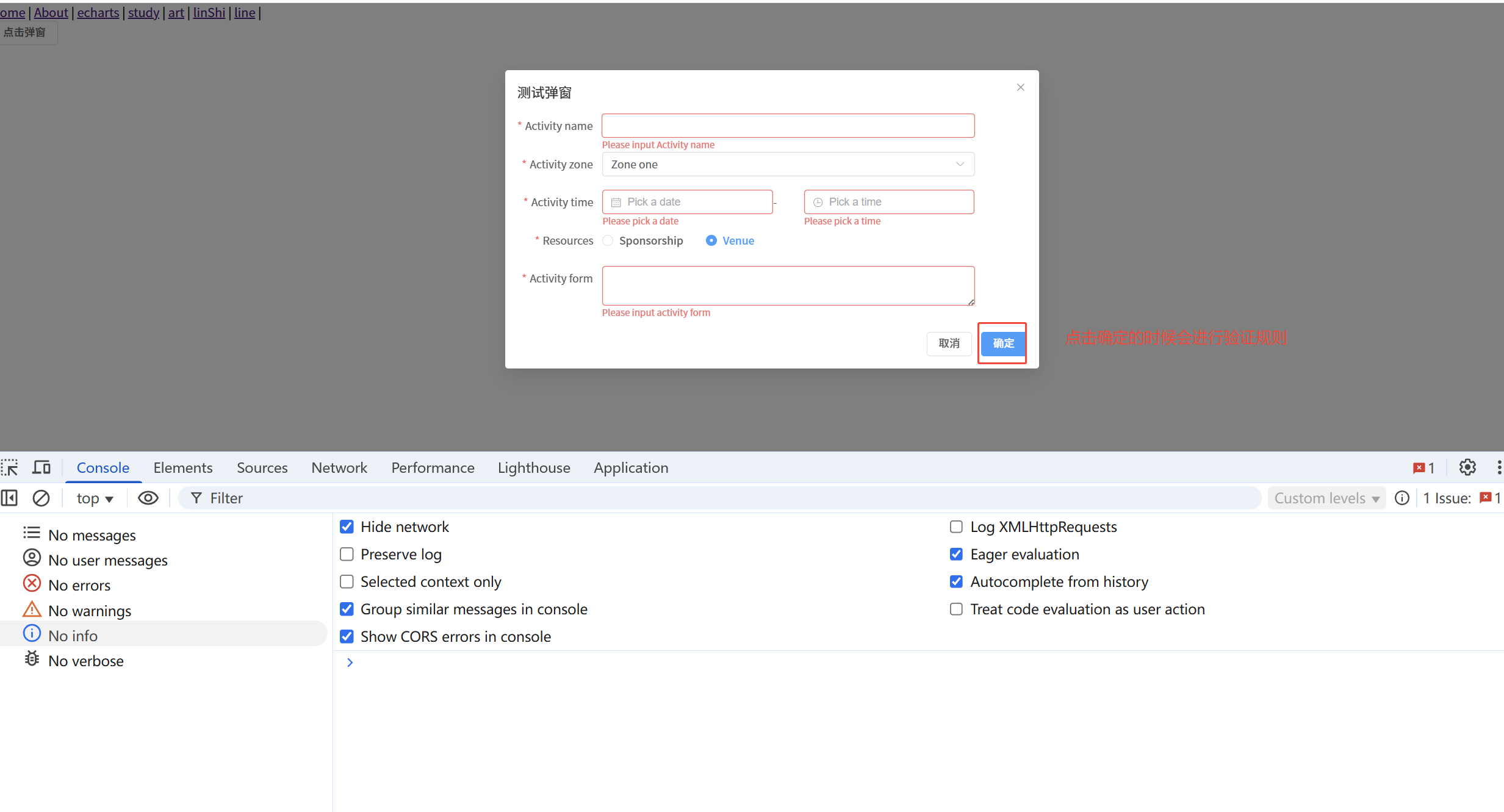
点击确认按钮时验证规则
有些时候,我们弹窗中的表单是需要进行规则校验的。
我们下面来实现这个功能点
传递的组件
<template>
  <el-form
    ref="ruleFormRef"
    style="max-width: 600px"
    :model="ruleForm"
    :rules="rules"
    label-width="auto"
  >
    <el-form-item label="Activity name" prop="name">
      <el-input v-model="ruleForm.name" />
    </el-form-item>
    <el-form-item label="Activity zone" prop="region">
      <el-select v-model="ruleForm.region" placeholder="Activity zone">
        <el-option label="Zone one" value="shanghai" />
        <el-option label="Zone two" value="beijing" />
      </el-select>
    </el-form-item>

    <el-form-item label="Activity time" required>
      <el-col :span="11">
        <el-form-item prop="date1">
          <el-date-picker
            v-model="ruleForm.date1"
            type="date"
            aria-label="Pick a date"
            placeholder="Pick a date"
            style="width: 100%"
          />
        </el-form-item>
      </el-col>
      <el-col class="text-center" :span="2">
        <span class="text-gray-500">-</span>
      </el-col>
      <el-col :span="11">
        <el-form-item prop="date2">
          <el-time-picker
            v-model="ruleForm.date2"
            aria-label="Pick a time"
            placeholder="Pick a time"
            style="width: 100%"
          />
        </el-form-item>
      </el-col>
    </el-form-item>

    <el-form-item label="Resources" prop="resource">
      <el-radio-group v-model="ruleForm.resource">
        <el-radio value="Sponsorship">Sponsorship</el-radio>
        <el-radio value="Venue">Venue</el-radio>
      </el-radio-group>
    </el-form-item>
    <el-form-item label="Activity form" prop="desc">
      <el-input v-model="ruleForm.desc" type="textarea" />
    </el-form-item>

  </el-form>
</template>

<script lang="ts" setup>
import { reactive, ref } from 'vue'

import type { FormInstance, FormRules } from 'element-plus'

interface RuleForm {
  name: string
  region: string
  date1: string
  date2: string
  resource: string
  desc: string
}
const ruleFormRef = ref<FormInstance>()
const ruleForm = reactive<RuleForm>({
  name: 'Hello',
  region: '',
  date1: '',
  date2: '',
  resource: '',
  desc: '',
})
const rules = reactive<FormRules<RuleForm>>({
  name: [
    { required: true, message: 'Please input Activity name', trigger: 'blur' },
    { min: 3, max: 5, message: 'Length should be 3 to 5', trigger: 'blur' },
  ],
  region: [
    {
      required: true,
      message: 'Please select Activity zone',
      trigger: 'change',
    },
  ],
  date1: [
    {
      type: 'date',
      required: true,
      message: 'Please pick a date',
      trigger: 'change',
    },
  ],
  date2: [
    {
      type: 'date',
      required: true,
      message: 'Please pick a time',
      trigger: 'change',
    },
  ],
  resource: [
    {
      required: true,
      message: 'Please select activity resource',
      trigger: 'change',
    },
  ],
  desc: [
    { required: true, message: 'Please input activity form', trigger: 'blur' },
  ],
})

const submitForm = async () => {
  if (!ruleFormRef.value) {
    console.error('ruleFormRef is not initialized')
    return false
  }
  try {
    const valid = await ruleFormRef.value.validate()
    if (valid) {
      console.log('表单校验通过', ruleForm)
      return Promise.resolve(ruleForm)
    }
  } catch (error) {
    // 为啥submitForm中,valid的值是false会执行catch ?
    // el-form 组件的 validate 方法的工作机制导致的。 validate 方法在表单验证失败时会抛出异常
    console.error('err', error)
    return false
    /**
     * 下面这样写为啥界面会报错呢?
     * return Promise.reject(error)
     * 当表单验证失败时,ruleFormRef.value.validate() 会抛出一个异常。
     * 虽然你用了 try...catch 捕获这个异常,并且在 catch 块中通过 return Promise.reject(error) 返回了一个被拒绝的 Promise
     * 但如果调用 submitForm 的地方没有正确地处理这个被拒绝的 Promise(即没有使用 .catch() 或者 await 来接收错误),
     * 那么浏览器控制台就会显示一个 "Uncaught (in promise)" 错误。
     * 在 catch 中再次 return Promise.reject(error) 是多余的, 直接return false
     * */
    /**
     * 如果你这样写
     * throw error 直接抛出错误即可
     * 那么就需要再调用submitForm的地方捕获异常
     * */
  }
}

defineExpose({
  submitForm:submitForm
})
</script>
// 封装的弹窗
import { createApp, h, ref } from "vue";
import { ElDialog, ElButton, ElForm, ElFormItem, ElInput, ElSelect, ElOption } from "element-plus";
import ElementPlus from "element-plus";

export function renderDialog(component: any, props: any, modalProps: any) {
  const instanceElement = ref()
  console.log('111', instanceElement)
  // 创建弹窗实例
  const dialog = h(
    ElDialog,
    {
      ...modalProps,
      modelValue: true,
      onClose: ()=> {
        console.log('关闭的回调')
        app.unmount() // 这样卸载会让动画消失
        // 卸载的同时需要把我们创建的div元素移除,否则页面上会出现很多div
        document.body.removeChild(div)
      }
    },
    {
      // 主要内容插槽,这里的ref必须接收一个ref
      default: () => h(component, {...props, ref: instanceElement}),
      // 底部插槽
      footer:() =>h(
        'div',
        {
          class: 'dialog-footer',

        },
        [
          h(
            ElButton,
            {
              onClick: () => {
                console.log('点击取消按钮')
                // 卸载一个已挂载的应用实例。卸载一个应用会触发该应用组件树内所有组件的卸载生命周期钩子。
                app.unmount() // 这样卸载会让动画消失
                // 卸载的同时需要把我们创建的div元素移除,否则页面上会出现很多div
                document.body.removeChild(div)
              }
            },
            () => '取消'
          ),
          h(
            ElButton,
            {
              type: 'primary',
              onClick: () => {
                instanceElement?.value?.submitForm().then((res:any) =>{
                  console.log('得到的值',res)
                })
                console.log('确定')
              }
            },
            () => '确定'
          )
        ]
      )
    }
  );
  // 创建一个新的 Vue 应用实例。这个应用实例是独立的,与主应用分离。
  const app = createApp(dialog)
  // 在新实例中注册 Element Plus, 这弹窗中的组件就可以正常显示了
  app.use(ElementPlus);
  // 这个div元素在在销毁应用时需要被移除哈
  const div = document.createElement('div')
  document.body.appendChild(div)
  app.mount(div)
}
关键的点:通过ref拿到childTest组件中的方法,childTest要暴露需要的方法
如何把表单中的数据暴露出去
可以通过回调函数的方式把数据暴露出去哈。
// 封装的弹窗
import { createApp, h, ref } from "vue";
import { ElDialog, ElButton, ElForm, ElFormItem, ElInput, ElSelect, ElOption } from "element-plus";
import ElementPlus from "element-plus";

export function renderDialog(component: any, props: any, modalProps: any, onConfirm: (data: any) => any ) {
  // 第4个参数是回调函数
  const instanceElement = ref()
  console.log('111', instanceElement)
  // 创建弹窗实例
  const dialog = h(
    ElDialog,
    {
      ...modalProps,
      modelValue: true,
      onClose: ()=> {
        console.log('关闭的回调')
        app.unmount() // 这样卸载会让动画消失
        // 卸载的同时需要把我们创建的div元素移除,否则页面上会出现很多div
        document.body.removeChild(div)
      }
    },
    {
      // 主要内容插槽,这里的ref必须接收一个ref
      default: () => h(component, {...props, ref: instanceElement}),
      // 底部插槽
      footer:() =>h(
        'div',
        {
          class: 'dialog-footer',

        },
        [
          h(
            ElButton,
            {
              onClick: () => {
                console.log('点击取消按钮')
                // 卸载一个已挂载的应用实例。卸载一个应用会触发该应用组件树内所有组件的卸载生命周期钩子。
                app.unmount() // 这样卸载会让动画消失
                // 卸载的同时需要把我们创建的div元素移除,否则页面上会出现很多div
                document.body.removeChild(div)
              }
            },
            () => '取消'
          ),
          h(
            ElButton,
            {
              type: 'primary',
              onClick: () => {
                // submitForm 调用表单组件中需要验证或者暴露出去的数据
                instanceElement?.value?.submitForm().then((res:any) =>{
                  console.log('得到的值',res)
                  // 验证通过后调用回调函数传递数据, 如验证失败,res 的值有可能是一个false。
                  onConfirm(res)
                  // 怎么把这个事件传递出去,让使用的时候知道点击了确认并且知道验证通过了
                }).catch((error: any) => {
                  // 验证失败时也可以传递错误信息
                  console.log('验证失败', error)
                })
                console.log('确定')
              }
            },
            () => '确定'
          )
        ]
      )
    }
  );
  // 创建一个新的 Vue 应用实例。这个应用实例是独立的,与主应用分离。
  const app = createApp(dialog)
  // 在新实例中注册 Element Plus, 这弹窗中的组件就可以正常显示了
  app.use(ElementPlus);
  // 这个div元素在在销毁应用时需要被移除哈
  const div = document.createElement('div')
  document.body.appendChild(div)
  app.mount(div)
}
<template>
  <div>
    <el-button @click="openMask">点击弹窗</el-button>
  </div>
</template>

<script setup lang="ts">
import childTest from '@/components/childTest.vue'
import { renderDialog } from '@/hooks/dialog'
import { getCurrentInstance } from 'vue';
const currentInstance = getCurrentInstance();
function openMask(){
  console.log('currentInstance',currentInstance)
  renderDialog(childTest,{},{title:'测试弹窗', width: '700'}, (res)=>{
    console.log('通过回调函数返回值', res)
  })
}
</script>
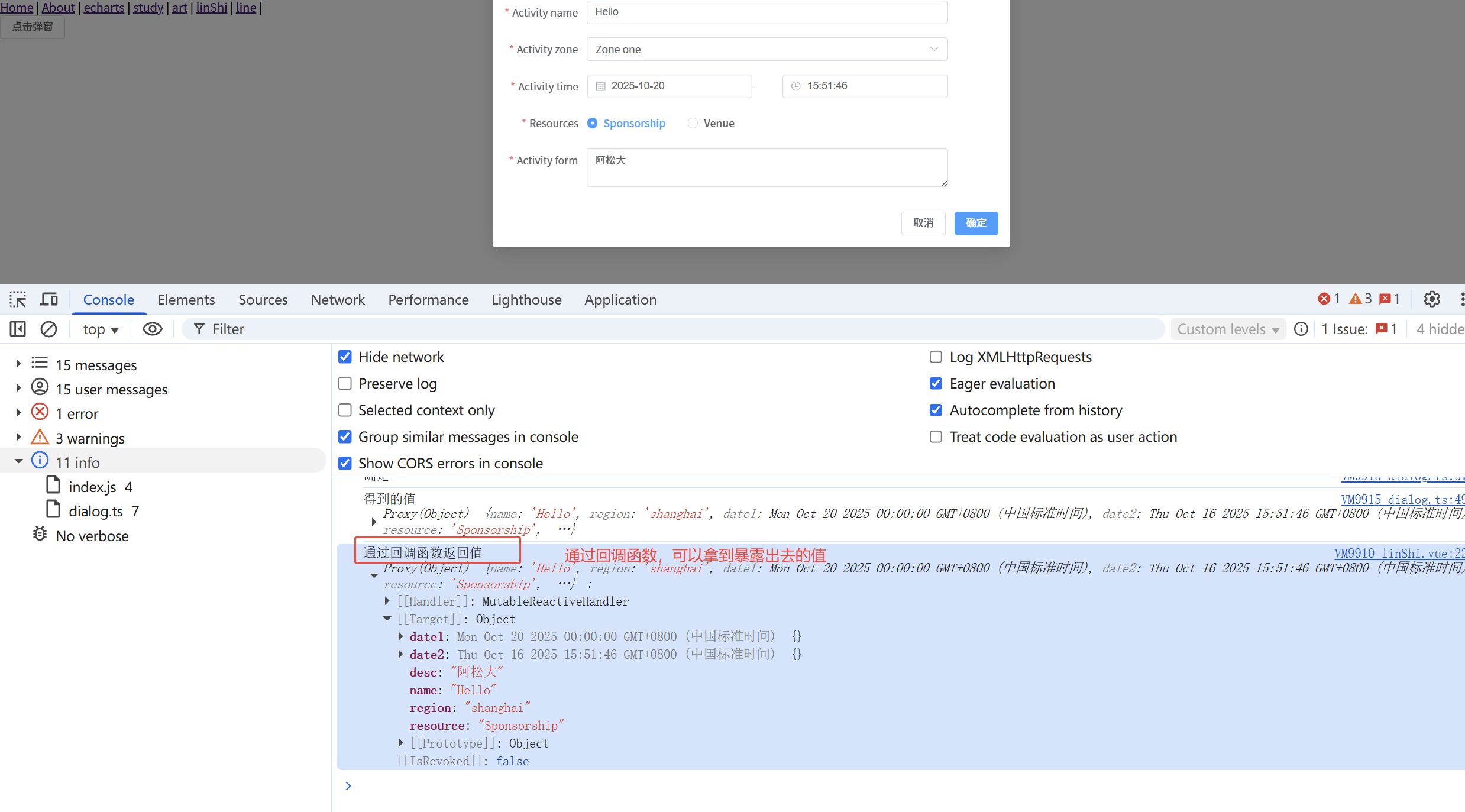
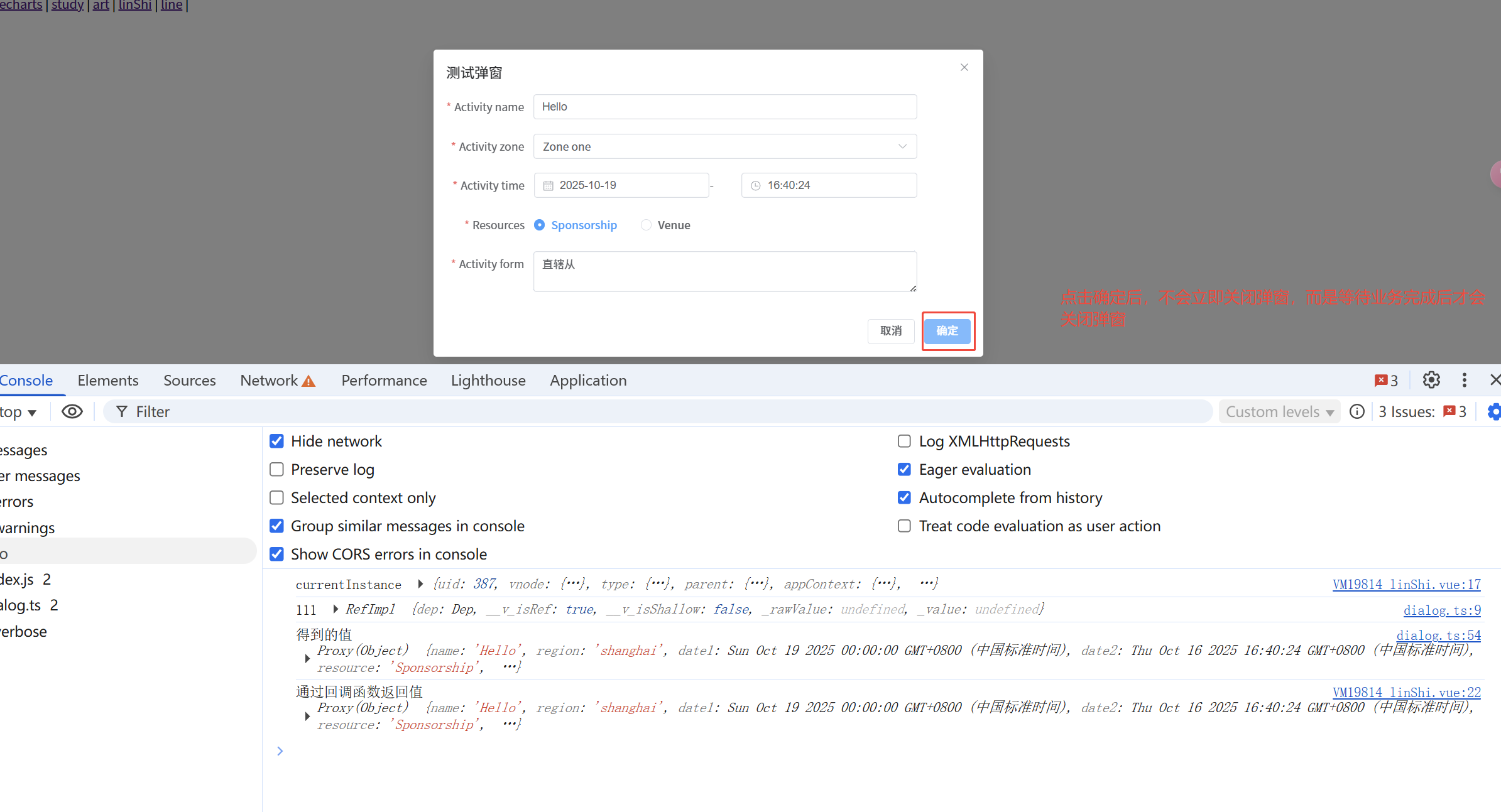
点击确定时,业务完成后关闭弹窗
现在想要点击确定,等业务处理完成之后,才关闭弹窗。
需要在使用完成业务的时候返回一个promise,让封装的弹窗调用这个promise
这样就可以知道什么时候关闭弹窗了
// 封装的弹窗
import { createApp, h, ref } from "vue";
import { ElDialog, ElButton, ElForm, ElFormItem, ElInput, ElSelect, ElOption } from "element-plus";
import ElementPlus from "element-plus";

export function renderDialog(component: any, props: any, modalProps: any, onConfirm: (data: any) => any ) {
  // 第4个参数是回调函数
  const instanceElement = ref()
  console.log('111', instanceElement)
  // 创建弹窗实例
  const dialog = h(
    ElDialog,
    {
      ...modalProps,
      modelValue: true,
      onClose: ()=> {
        console.log('关闭的回调')
        app.unmount() // 这样卸载会让动画消失
        // 卸载的同时需要把我们创建的div元素移除,否则页面上会出现很多div
        document.body.removeChild(div)
      }
    },
    {
      // 主要内容插槽,这里的ref必须接收一个ref
      default: () => h(component, {...props, ref: instanceElement}),
      // 底部插槽
      footer:() =>h(
        'div',
        {
          class: 'dialog-footer',

        },
        [
          h(
            ElButton,
            {
              onClick: () => {
                console.log('点击取消按钮')
                // 卸载一个已挂载的应用实例。卸载一个应用会触发该应用组件树内所有组件的卸载生命周期钩子。
                app.unmount() // 这样卸载会让动画消失
                // 卸载的同时需要把我们创建的div元素移除,否则页面上会出现很多div
                document.body.removeChild(div)
              }
            },
            () => '取消'
          ),
          h(
            ElButton,
            {
              type: 'primary',
              onClick: () => {
                // submitForm 调用表单组件中需要验证或者暴露出去的数据
                instanceElement?.value?.submitForm().then((res:any) =>{
                  console.log('得到的值',res)
                  // 验证通过后调用回调函数传递数据,如验证失败,res 的值有可能是一个false。
                  const callbackResult = onConfirm(res);
                  // 如果回调函数返回的是 Promise,则等待业务完成后再关闭弹窗
                  if (callbackResult instanceof Promise) {
                    // 注意这里的finally,这样写在服务出现异常的时候会有问题,这里是有问题的,需要优化
                    // 注意这里的finally,这样写在服务出现异常的时候会有问题,这里是有问题的,需要优化
                    callbackResult.finally(() => {
                      // 弹窗关闭逻辑
                      app.unmount()
                      document.body.removeChild(div)
                    });
                  } else {
                    // 如果不是 Promise,立即关闭弹窗
                    app.unmount()
                    document.body.removeChild(div)
                  }
                }).catch((error: any) => {
                  // 验证失败时也可以传递错误信息
                  console.log('验证失败', error)
                })
              }
            },
            () => '确定'
          )
        ]
      )
    }
  );
  // 创建一个新的 Vue 应用实例。这个应用实例是独立的,与主应用分离。
  const app = createApp(dialog)
  // 在新实例中注册 Element Plus, 这弹窗中的组件就可以正常显示了
  app.use(ElementPlus);
  // 这个div元素在在销毁应用时需要被移除哈
  const div = document.createElement('div')
  document.body.appendChild(div)
  app.mount(div)
}
<template>
  <div>
    <el-button @click="openMask">点击弹窗</el-button>
  </div>
</template>

<script setup lang="ts">
import childTest from '@/components/childTest.vue'
import { renderDialog } from '@/hooks/dialog'
import { getCurrentInstance } from 'vue';
const currentInstance = getCurrentInstance();
function openMask(){
  console.log('currentInstance',currentInstance)
  renderDialog(childTest,{},{title:'测试弹窗', width: '700'}, (res)=>{
    console.log('通过回调函数返回值', res)
    // 这里返回一个promise对象,这样就可以让业务完成后才关闭弹窗
    return fetch("https://dog.ceo/api/breed/pembroke/images/random")
     .then((res) => {
       return res.json();
     })
     .then((res) => {
        console.log('获取的图片地址为:', res.message);
     });
  })
}
</script>
优化业务组件
// 封装的弹窗
import { createApp, h, ref } from "vue";
import { ElDialog, ElButton, ElForm, ElFormItem, ElInput, ElSelect, ElOption } from "element-plus";
import ElementPlus from "element-plus";

export function renderDialog(component: any, props: any, modalProps: any, onConfirm: (data: any) => any ) {
  // 关闭弹窗,避免重复代码
  const closeDialog = () => {
    // 成功时关闭弹窗
    app.unmount();
    // 检查div是否仍然存在且为body的子元素,否者可能出现异常
    if (div && div.parentNode) {
      document.body.removeChild(div)
    }
  }
  // 第4个参数是回调函数
  const instanceElement = ref()
  console.log('111', instanceElement)
  // 创建弹窗实例
  const dialog = h(
    ElDialog,
    {
      ...modalProps,
      modelValue: true,
      onClose: ()=> {
        console.log('关闭的回调')
        app.unmount() // 这样卸载会让动画消失
        // 卸载的同时需要把我们创建的div元素移除,否则页面上会出现很多div
        document.body.removeChild(div)
      }
    },
    {
      // 主要内容插槽,这里的ref必须接收一个ref
      default: () => h(component, {...props, ref: instanceElement}),
      // 底部插槽
      footer:() =>h(
        'div',
        {
          class: 'dialog-footer',

        },
        [
          h(
            ElButton,
            {
              onClick: () => {
                console.log('点击取消按钮')
                // 卸载一个已挂载的应用实例。卸载一个应用会触发该应用组件树内所有组件的卸载生命周期钩子。
                app.unmount() // 这样卸载会让动画消失
                // 卸载的同时需要把我们创建的div元素移除,否则页面上会出现很多div
                document.body.removeChild(div)
              }
            },
            () => '取消'
          ),
          h(
            ElButton,
            {
              type: 'primary',
              onClick: () => {
                // submitForm 调用表单组件中需要验证或者暴露出去的数据
                instanceElement?.value?.submitForm().then((res:any) =>{
                  console.log('得到的值',res)
                  // 验证通过后调用回调函数传递数据,如验证失败,res 的值有可能是一个false。
                  const callbackResult = onConfirm(res);
                  // 如果回调函数返回的是 Promise,则等待业务完成后再关闭弹窗
                  if (callbackResult instanceof Promise) {

                     callbackResult.then(() => {
                      if(res){
                        console.log('111')
                        closeDialog()
                      }
                    }).catch(error=>{
                      console.log('222')
                      console.error('回调函数执行出错,如:网络错误', error);
                      // 错误情况下也关闭弹窗
                      closeDialog()
                    });
                  } else {
                    // 如果不是 Promise,并且验证时通过了的。立即关闭弹窗
                    console.log('333', res)
                    if(res){
                      closeDialog()
                    }
                  }
                }).catch((error: any) => {
                  console.log('44444')
                  // 验证失败时也可以传递错误信息
                  console.log('验证失败', error)
                })
              }
            },
            () => '确定'
          )
        ]
      )
    }
  );
  // 创建一个新的 Vue 应用实例。这个应用实例是独立的,与主应用分离。
  const app = createApp(dialog)
  // 在新实例中注册 Element Plus, 这弹窗中的组件就可以正常显示了
  app.use(ElementPlus);
  // 这个div元素在在销毁应用时需要被移除哈
  const div = document.createElement('div')
  document.body.appendChild(div)
  app.mount(div)
}
<template>
  <div>
    <el-button @click="openMask">点击弹窗</el-button>
  </div>
</template>
<script setup lang="ts">
import childTest from '@/components/childTest.vue'
import { renderDialog } from '@/hooks/dialog'
import { getCurrentInstance } from 'vue';
const currentInstance = getCurrentInstance();
function openMask(){
  console.log('currentInstance',currentInstance)
  renderDialog(childTest,{},{title:'测试弹窗', width: '700'}, (res)=>{
    console.log('通过回调函数返回值', res)
      // 这里返回一个promise对象,这样就可以让业务完成后才关闭弹窗
      return fetch("https://dog.ceo/api/breed/pembroke/images/random")
      .then((res) => {
        return res.json();
      })
      .then((res) => {
          console.log('获取的图片地址为:', res.message);
      });
  })
}
</script>
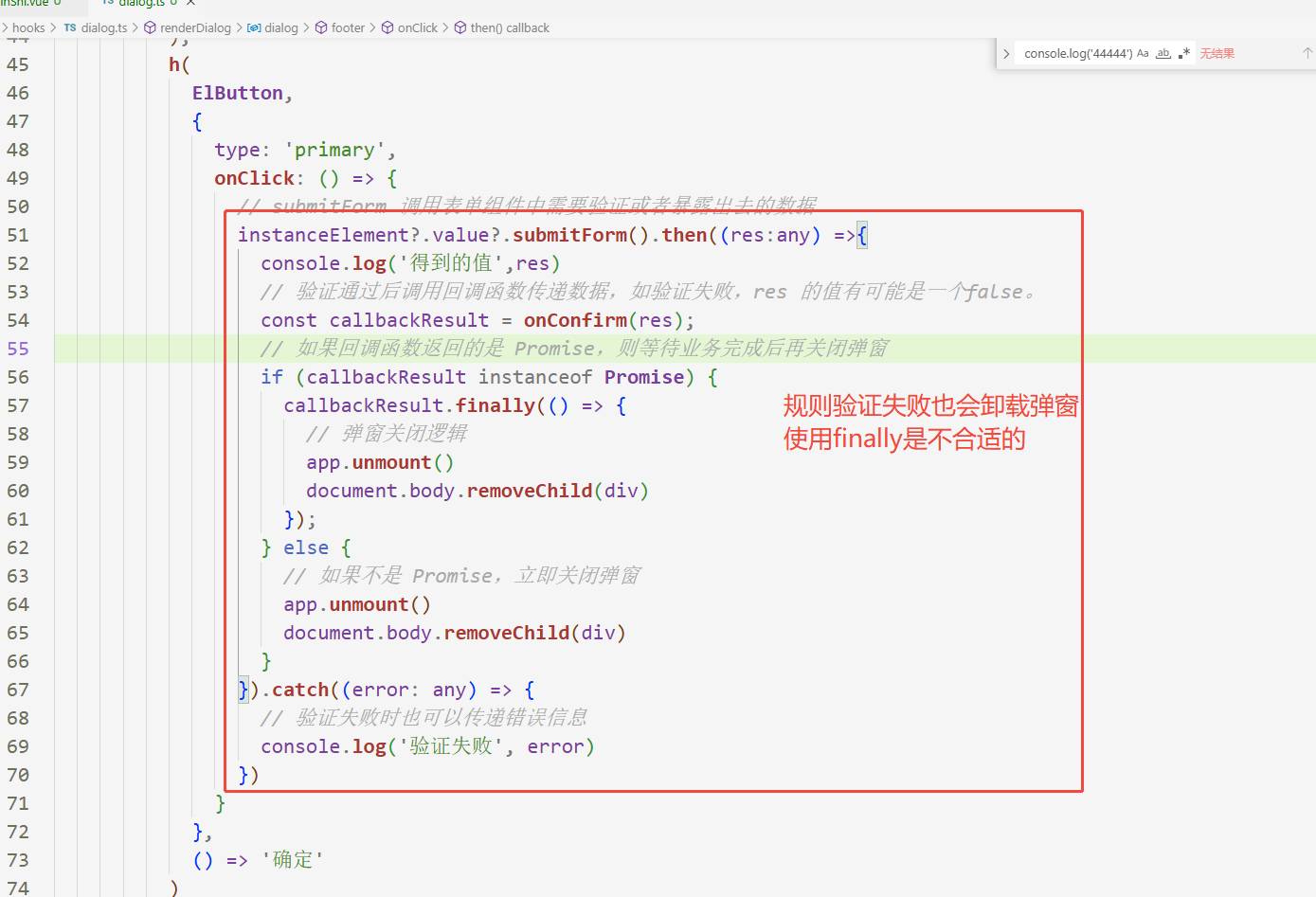
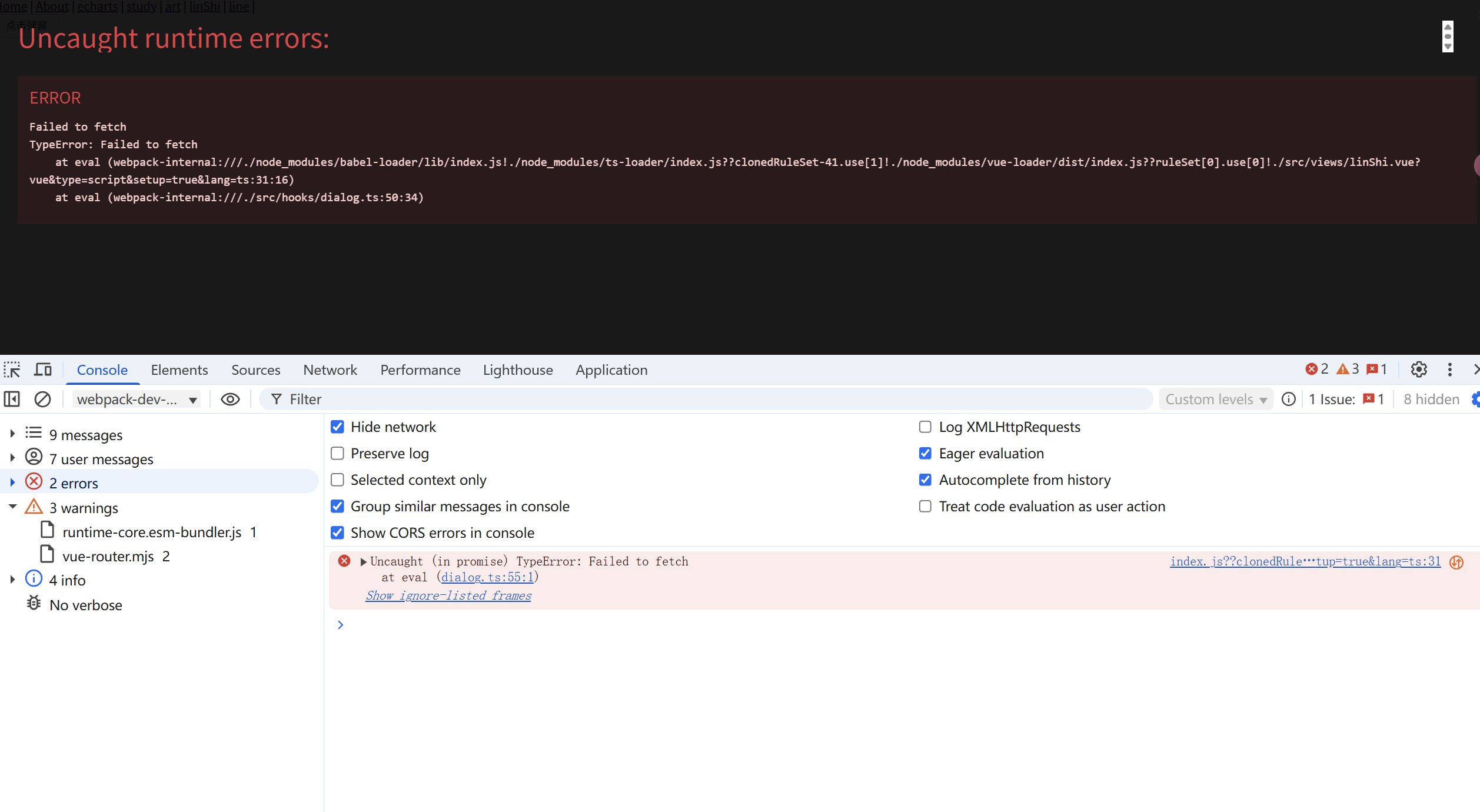
眼尖的小伙伴可能已经发现了这一段代码。
1,验证不通过会也会触发卸载弹窗
2,callbackResult.finally是不合适的
3.
最终的代码
// 封装的弹窗
import { createApp, h, ref } from "vue";
import { ElDialog, ElButton, ElForm, ElFormItem, ElInput, ElSelect, ElOption } from "element-plus";
import ElementPlus from "element-plus";

export function renderDialog(component: any, props: any, modalProps: any, onConfirm: (data: any) => any ) {
  // 关闭弹窗,避免重复代码
  const closeDialog = () => {
    // 成功时关闭弹窗
    app.unmount();
    // 检查div是否仍然存在且为body的子元素,否者可能出现异常
    if (div && div.parentNode) {
      document.body.removeChild(div)
    }
  }
  // 第4个参数是回调函数
  const instanceElement = ref()
  console.log('111', instanceElement)
  const isLoading = ref(false)
  // 创建弹窗实例
  const dialog = h(
    ElDialog,
    {
      ...modalProps,
      modelValue: true,
      onClose: ()=> {
        isLoading.value = false
        console.log('关闭的回调')
        app.unmount() // 这样卸载会让动画消失
        // 卸载的同时需要把我们创建的div元素移除,否则页面上会出现很多div
        document.body.removeChild(div)
      }
    },
    {
      // 主要内容插槽,这里的ref必须接收一个ref
      default: () => h(component, {...props, ref: instanceElement}),
      // 底部插槽,noShowFooterBool是true,不显示; false的显示底部
      footer: props.noShowFooterBool ? null : () =>h(
        'div',
        {
          class: 'dialog-footer',
        },
        [
          h(
            ElButton,
            {
              onClick: () => {
                console.log('点击取消按钮')
                // 卸载一个已挂载的应用实例。卸载一个应用会触发该应用组件树内所有组件的卸载生命周期钩子。
                app.unmount() // 这样卸载会让动画消失
                // 卸载的同时需要把我们创建的div元素移除,否则页面上会出现很多div
                document.body.removeChild(div)
              }
            },
            () => props.cancelText || '取消'
          ),
          h(
            ElButton,
            {
              type: 'primary',
              loading: isLoading.value,
              onClick: () => {
                isLoading.value = true
                // submitForm 调用表单组件中需要验证或者暴露出去的数据
                instanceElement?.value?.submitForm().then((res:any) =>{
                  if(!res){
                    isLoading.value = false
                  }
                  console.log('得到的值',res)
                  // 验证通过后调用回调函数传递数据,如验证失败,res 的值有可能是一个false。
                  const callbackResult = onConfirm(res);
                  // 如果回调函数返回的是 Promise,则等待业务完成后再关闭弹窗
                  if (callbackResult instanceof Promise) {
                     callbackResult.then(() => {
                      if(res){
                        console.log('111')
                        closeDialog()
                      }else{
                        isLoading.value = false
                      }
                    }).catch(error=>{
                      console.log('222')
                      console.error('回调函数执行出错,如:网络错误', error);
                      // 错误情况下也关闭弹窗
                      closeDialog()
                    });
                  } else {
                    // 如果不是 Promise,并且验证时通过了的。立即关闭弹窗
                    console.log('333', res)
                    if(res){
                      closeDialog()
                    }else{
                      isLoading.value = false
                    }
                  }
                }).catch((error: any) => {
                  console.log('44444')
                   isLoading.value = false
                  // 验证失败时也可以传递错误信息
                  console.log('验证失败', error)
                })
              }
            },
            () => props.confirmText ||  '确定'
          )
        ]
      )
    }
  );
  // 创建一个新的 Vue 应用实例。这个应用实例是独立的,与主应用分离。
  const app = createApp(dialog)
  // 在新实例中注册 Element Plus, 这弹窗中的组件就可以正常显示了
  app.use(ElementPlus);
  // 这个div元素在在销毁应用时需要被移除哈
  const div = document.createElement('div')
  document.body.appendChild(div)
  app.mount(div)
}
<template>
  <div>
    <el-button @click="openMask">点击弹窗</el-button>
  </div>
</template>

<script setup lang="ts">
import childTest from '@/components/childTest.vue'
import { renderDialog } from '@/hooks/dialog'
import { getCurrentInstance } from 'vue';
const currentInstance = getCurrentInstance();
function openMask(){
  console.log('currentInstance',currentInstance)
  const otherProps =  {cancelText:'取消哈', confirmText: '确认哈',showFooterBool:true }
  const dialogSetObject = {title:'测试弹窗哈', width: '700', draggable: true}
  renderDialog(childTest,otherProps,dialogSetObject, (res)=>{
    console.log('通过回调函数返回值', res)
    // 这里返回一个promise对象,这样就可以让业务完成后才关闭弹窗
    return fetch("https://dog.ceo/api/breed/pembroke/images/random")
    .then((res) => {
      return res.json();
    })
    .then((res) => {
        console.log('获取的图片地址为:', res.message);
    });
  })
}
</script>

<style lang="scss" scoped>

</style>
<template>
  <el-form
    ref="ruleFormRef"
    style="max-width: 600px"
    :model="ruleForm"
    :rules="rules"
    label-width="auto"
  >
    <el-form-item label="Activity name" prop="name">
      <el-input v-model="ruleForm.name" />
    </el-form-item>
    <el-form-item label="Activity zone" prop="region">
      <el-select v-model="ruleForm.region" placeholder="Activity zone">
        <el-option label="Zone one" value="shanghai" />
        <el-option label="Zone two" value="beijing" />
      </el-select>
    </el-form-item>

    <el-form-item label="Activity time" required>
      <el-col :span="11">
        <el-form-item prop="date1">
          <el-date-picker
            v-model="ruleForm.date1"
            type="date"
            aria-label="Pick a date"
            placeholder="Pick a date"
            style="width: 100%"
          />
        </el-form-item>
      </el-col>
      <el-col class="text-center" :span="2">
        <span class="text-gray-500">-</span>
      </el-col>
      <el-col :span="11">
        <el-form-item prop="date2">
          <el-time-picker
            v-model="ruleForm.date2"
            aria-label="Pick a time"
            placeholder="Pick a time"
            style="width: 100%"
          />
        </el-form-item>
      </el-col>
    </el-form-item>


    <el-form-item label="Resources" prop="resource">
      <el-radio-group v-model="ruleForm.resource">
        <el-radio value="Sponsorship">Sponsorship</el-radio>
        <el-radio value="Venue">Venue</el-radio>
      </el-radio-group>
    </el-form-item>
    <el-form-item label="Activity form" prop="desc">
      <el-input v-model="ruleForm.desc" type="textarea" />
    </el-form-item>

  </el-form>
</template>

<script lang="ts" setup>
import { reactive, ref } from 'vue'

import type { FormInstance, FormRules } from 'element-plus'

interface RuleForm {
  name: string
  region: string

  date1: string
  date2: string


  resource: string
  desc: string
}


const ruleFormRef = ref<FormInstance>()
const ruleForm = reactive<RuleForm>({
  name: 'Hello',
  region: '',
  date1: '',
  date2: '',
  resource: '',
  desc: '',
})


const rules = reactive<FormRules<RuleForm>>({
  name: [
    { required: true, message: 'Please input Activity name', trigger: 'blur' },
    { min: 3, max: 5, message: 'Length should be 3 to 5', trigger: 'blur' },
  ],
  region: [
    {
      required: true,
      message: 'Please select Activity zone',
      trigger: 'change',
    },
  ],
  date1: [
    {
      type: 'date',
      required: true,
      message: 'Please pick a date',
      trigger: 'change',
    },
  ],
  date2: [
    {
      type: 'date',
      required: true,
      message: 'Please pick a time',
      trigger: 'change',
    },
  ],
  resource: [
    {
      required: true,
      message: 'Please select activity resource',
      trigger: 'change',
    },
  ],
  desc: [
    { required: true, message: 'Please input activity form', trigger: 'blur' },
  ],
})

const submitForm = async () => {
  if (!ruleFormRef.value) {
    console.error('ruleFormRef is not initialized')
    return false
  }
  try {
    const valid = await ruleFormRef.value.validate()
    if (valid) {
      // 验证通过后,就会可以把你需要的数据暴露出去
      return Promise.resolve(ruleForm)
    }
  } catch (error) {
    // 为啥submitForm中,valid的值是false会执行catch ?
    // el-form 组件的 validate 方法的工作机制导致的。 validate 方法在表单验证失败时会抛出异常
    console.error('err', error)
    return false
    /**
     * 下面这样写为啥界面会报错呢?
     * return Promise.reject(error)
     * 当表单验证失败时,ruleFormRef.value.validate() 会抛出一个异常。
     * 虽然你用了 try...catch 捕获这个异常,并且在 catch 块中通过 return Promise.reject(error) 返回了一个被拒绝的 Promise
     * 但如果调用 submitForm 的地方没有正确地处理这个被拒绝的 Promise(即没有使用 .catch() 或者 await 来接收错误),
     * 那么浏览器控制台就会显示一个 "Uncaught (in promise)" 错误。
     * 在 catch 中再次 return Promise.reject(error) 是多余的, 直接return false
     * */
    /**
     * 如果你这样写
     * throw error 直接抛出错误即可
     * 那么就需要再调用submitForm的地方捕获异常
     * */
  }
}

defineExpose({
  submitForm:submitForm
})
</script>
遇见问题,这是你成长的机会,如果你能够解决,这就是收获。
出处:https://www.cnblogs.com/IwishIcould/
想问问题,打赏了卑微的博主,求求你备注一下的扣扣或者微信;这样我好联系你;(っ•̀ω•́)っ✎⁾⁾!
如果觉得这篇文章对你有小小的帮助的话,记得在右下角点个“推荐”哦,或者关注博主,在此感谢!
万水千山总是情,打赏5毛买辣条行不行,所以如果你心情还比较高兴,也是可以扫码打赏博主(っ•̀ω•́)っ✎⁾⁾!
想问问题,打赏了卑微的博主,求求你备注一下的扣扣或者微信;这样我好联系你;(っ•̀ω•́)っ✎⁾⁾!


如果文中有什么错误,欢迎指出。以免更多的人被误导。

 浙公网安备 33010602011771号