
firda搭建和使用
一,环境搭建
1.1 windows机器环境
安装python3,并且安装frida-tools
pip install frida-tools
安装后,查看版本
frida --version
我这里版本是15.2.2
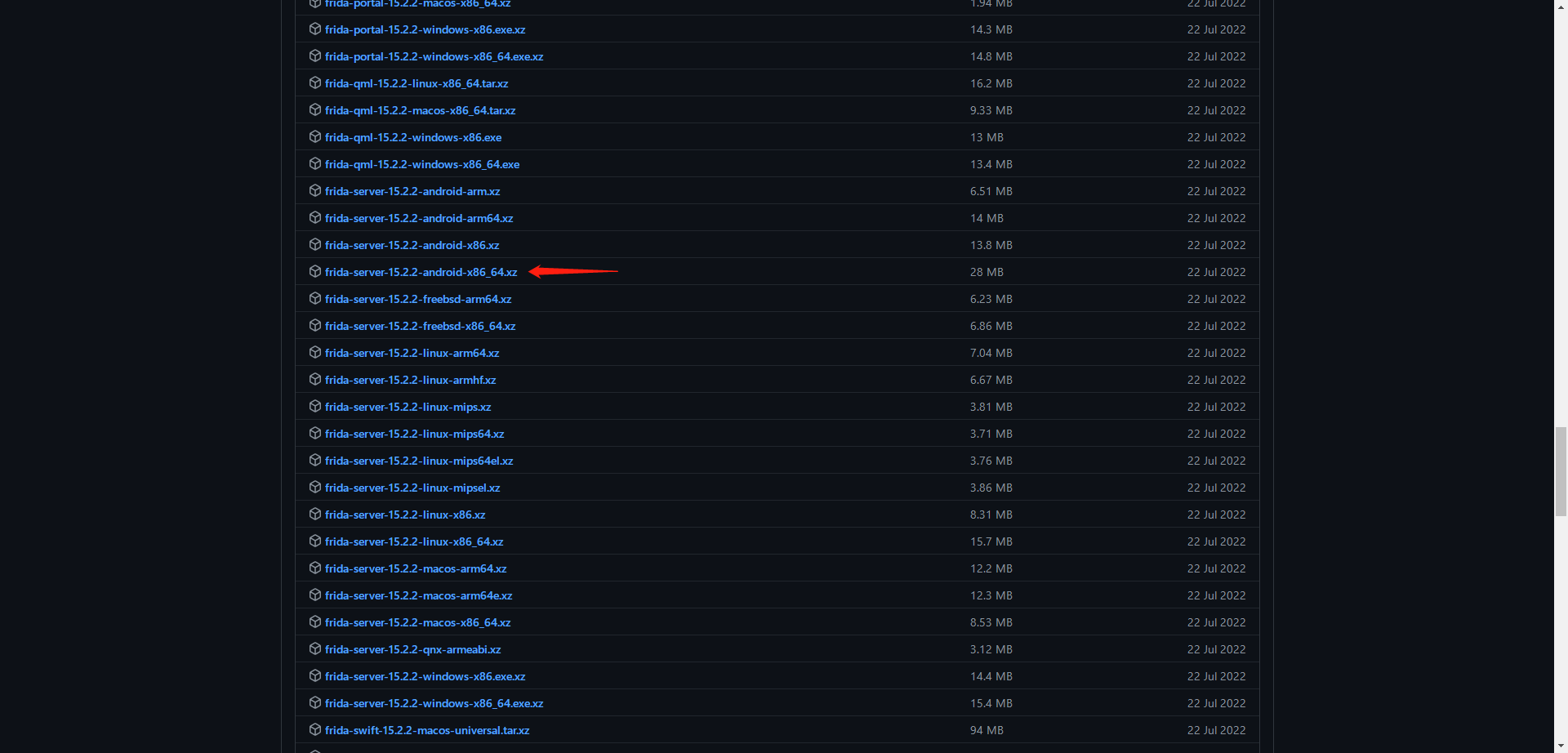
在github frida下载对应版本的frida-server
getprop ro.product.cpu.abi
查看模拟器系统架构

https://github.com/frida/frida
1.2 模拟器环境
使用mumu模拟器
安装后 链接adb
需要用mumu的adb 目录位置在:安装目录下\MuMu\emulator\nemu\vmonitor\bin
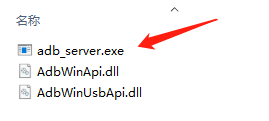
adb_server.exe connect 127.0.0.1:7555
然后
adb_server.exe shell
就可以链接到adb
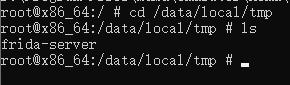
通过adb push将frida-server放到模拟器中
adb_server.exe push frida-server文件路径 /data/local/tmp/
二,frida脚本
attack.py
#frida.py
import frida  # 导入frida模块
import sys  # 导入sys模块

def on_message(message, data):  # js中执行send函数后要回调的函数
    print(message)

'''
spawn模式,Frida会自行启动并注入进目标App,Hook的时机非常早
'''


'''
attach模式,Frida会附加到当前的目标进程中,即需要App处于启动状态,这也意味着只能从当前时机往后Hook,
'''
session = frida.get_remote_device().attach('Appname')  #APPNAME

with open("./frida.js") as f:
    script = session.create_script(f.read())

script.on('message', on_message)  # 加载回调函数,也就是js中执行send函数规定要执行的python函数
script.load()  # 加载脚本


sys.stdin.read()
frida.js
2.1 函数重载
如果有源代码中有函数重载,firda将报错“Error:func():has more than one overload”,需要修改js代码
Java.use('包名.类名').方法名.overload('参数类型').implementation = function (arg1, arg2, arg3)
2.2 rpc 主动调用
导出名不可以有大写字母或者下划线
三,实战
3.1 请求加签
https://wwz.lanzouy.com/iuOBC0b2sspa
密码:e0pb
3.1.1 加密sign加密方法和salt
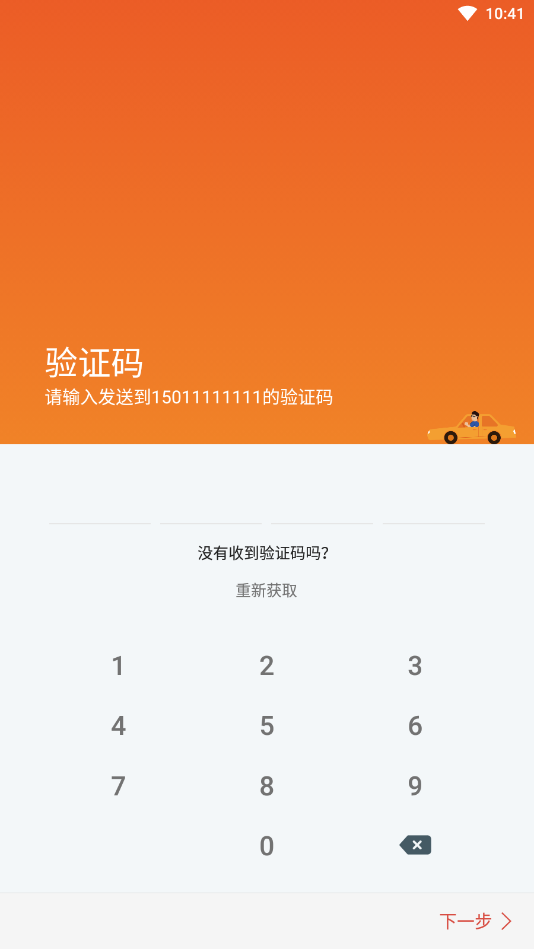
发送验证码抓包,可以看到数据包中添加了sign进行数据包签名认证
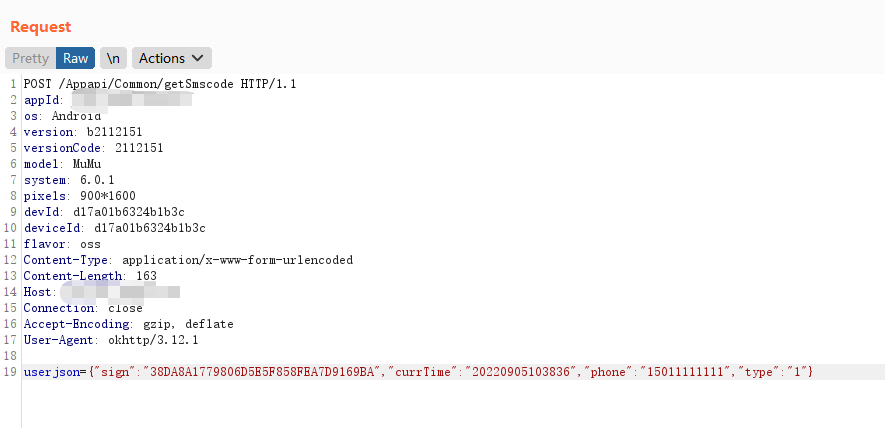
那目标就是要知道代码加签的方式和salt
启动frida
cmd中frida-ps -U 获取到app名
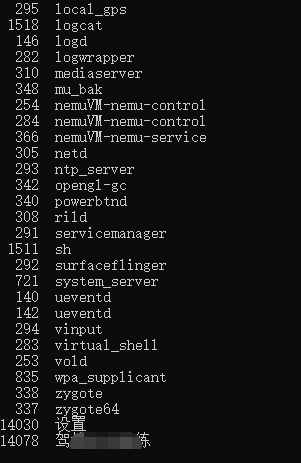
发现app没有加壳,将app放到jadx中进行反编译
搜索接口名getSmscode
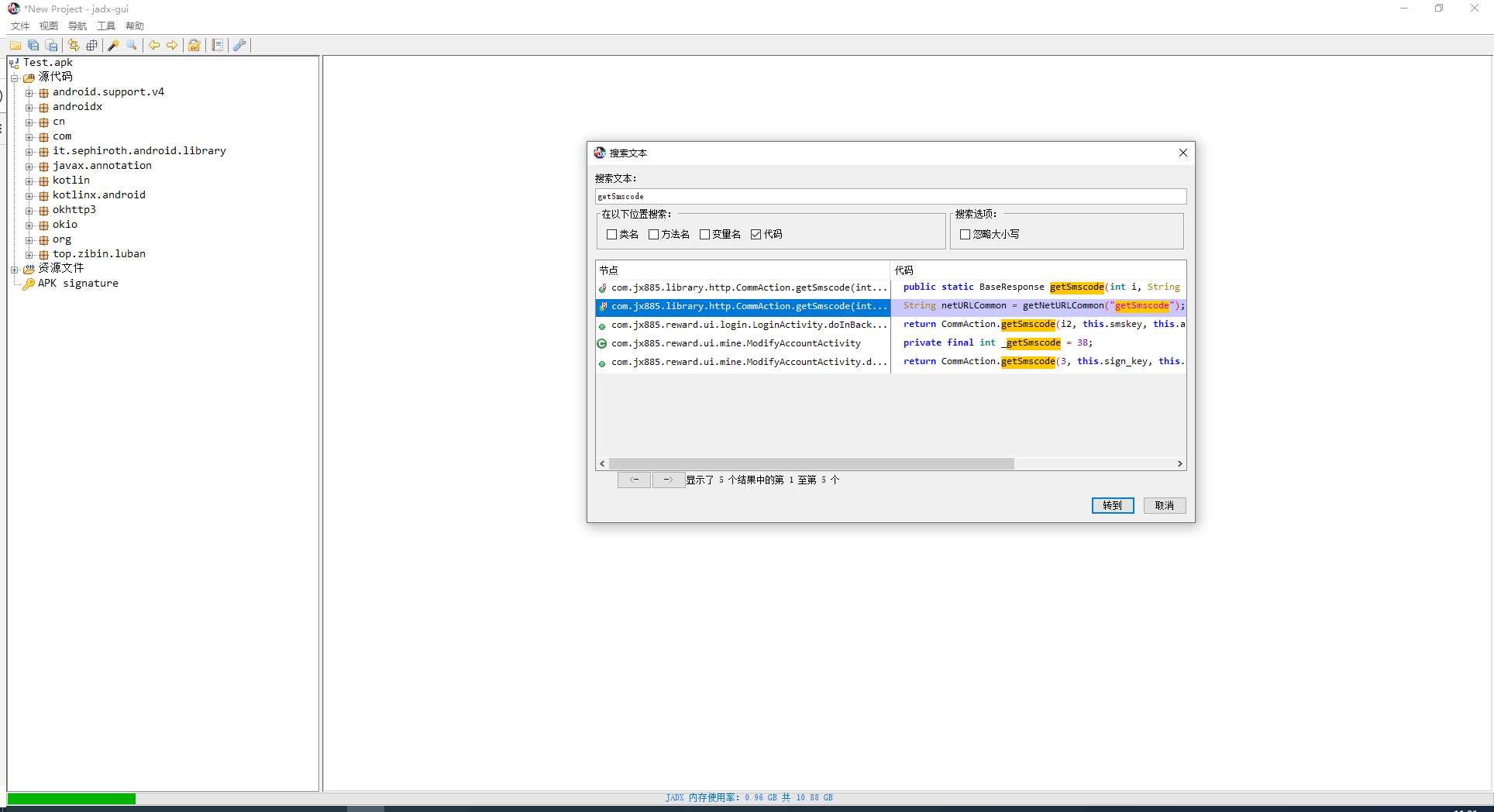
跟进到方法中
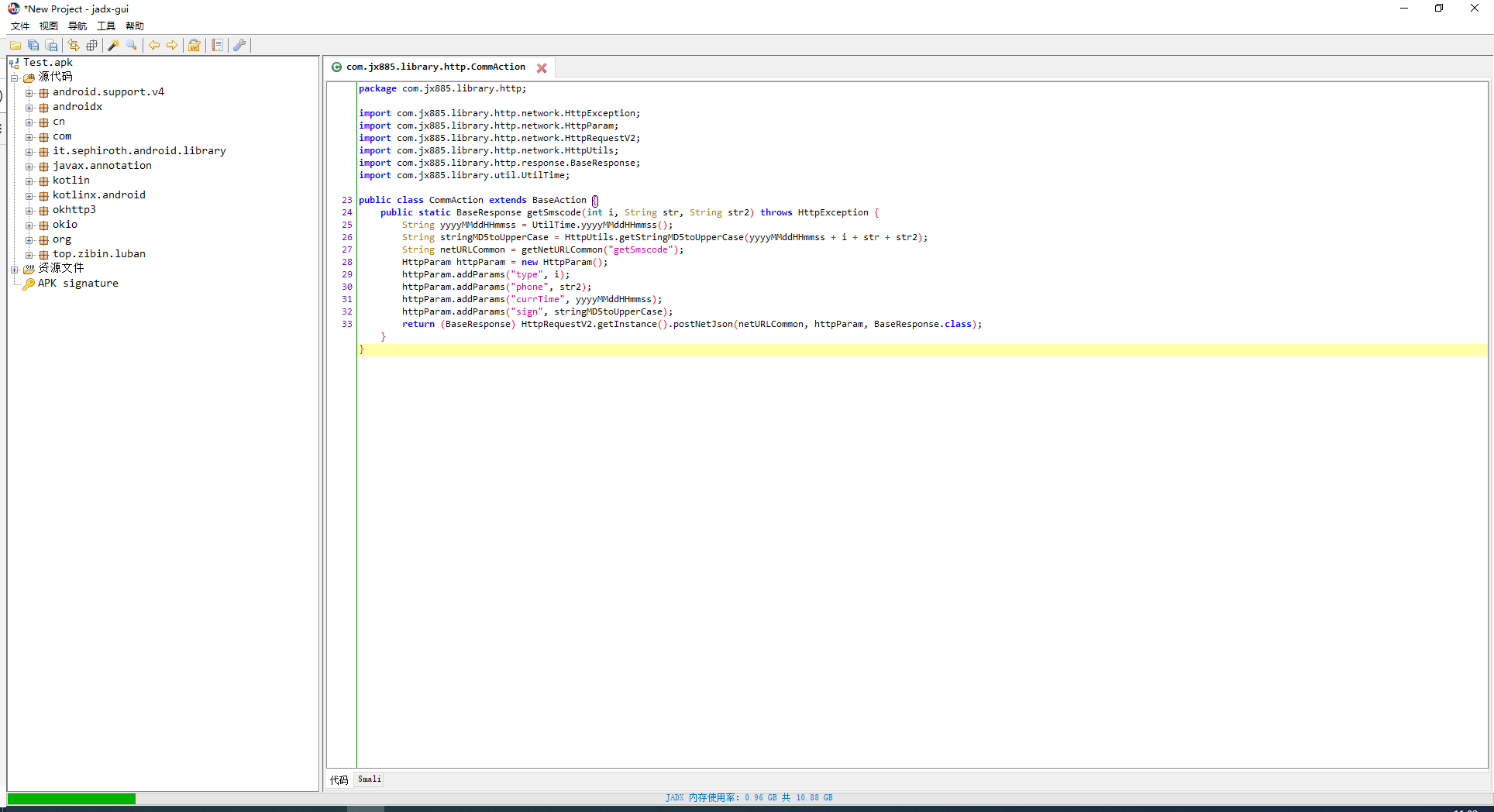
可以根据获取到的信息进行脚本编写
attack.py
#frida.py
import frida  # 导入frida模块
import sys  # 导入sys模块

def on_message(message, data):  # js中执行send函数后要回调的函数
    print(message)

'''
spawn模式,Frida会自行启动并注入进目标App,Hook的时机非常早
'''


'''
attach模式,Frida会附加到当前的目标进程中,即需要App处于启动状态,这也意味着只能从当前时机往后Hook,
'''
session = frida.get_remote_device().attach('驾培创业教练')  #APPNAME

with open("./frida.js") as f:
    script = session.create_script(f.read())

script.on('message', on_message)  # 加载回调函数,也就是js中执行send函数规定要执行的python函数
script.load()  # 加载脚本


sys.stdin.read()
frida.js
Java.perform(function () {
    Java.use('com.jx885.library.http.CommAction').getSmscode.implementation = function (mi, mstr, mstr2) {  //Java.use('包名.类名').方法名.implementation=function(arg1,arg2,...)
        console.log(mi, mstr, mstr2);
        return this.getSmscode(mi, mstr, mstr2);
    }
});
运行后attack.py 可以看到输出mi,mstr,mst2的内容
1 wocaonima 150xxxxxx6
3.1.2 rpc主动调用获取加密后的值
获取加密后的,就不能hook这里,这里是hook输入salt值
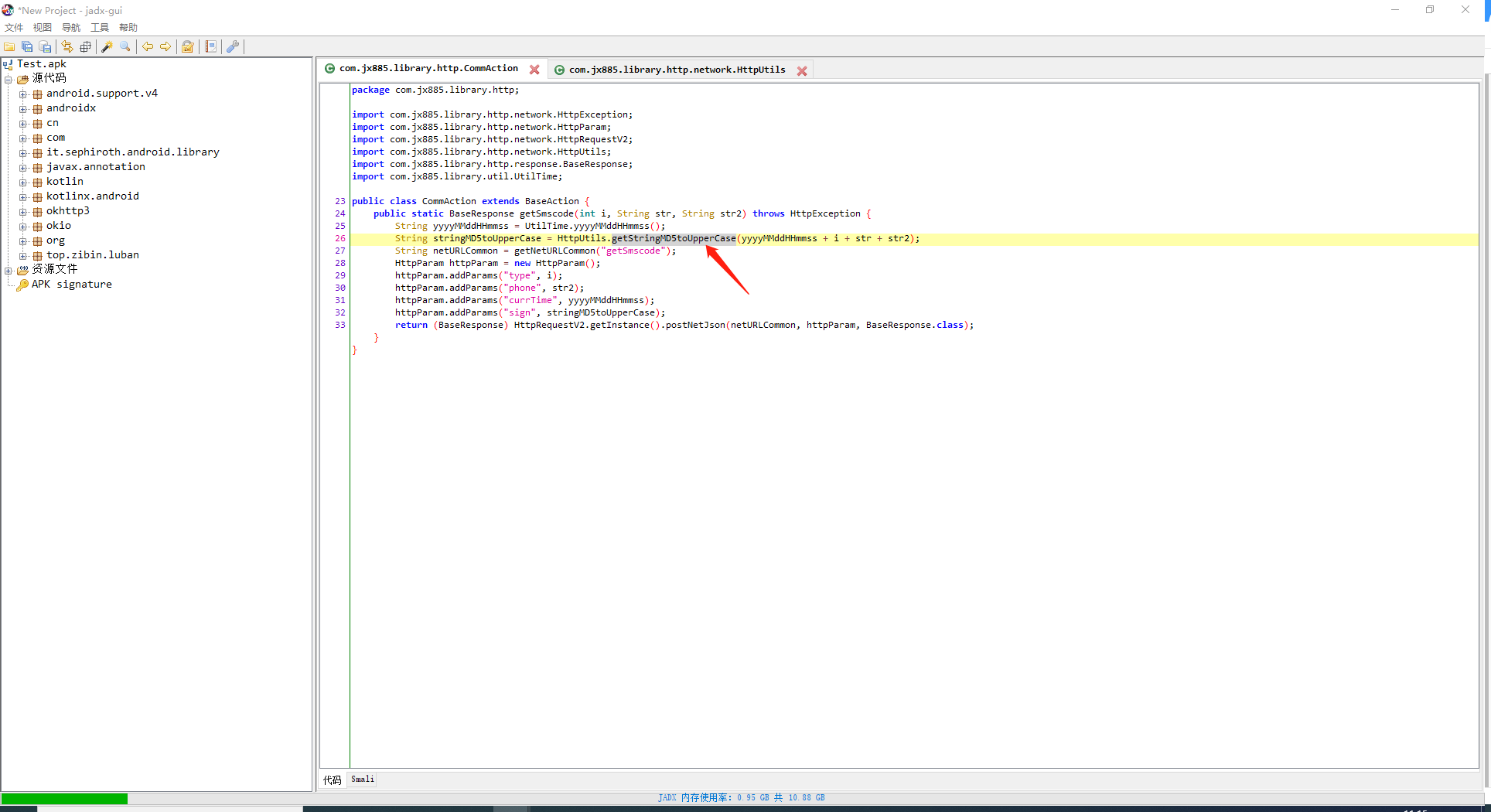
这里输入了参数,然后进行了加密,跟进
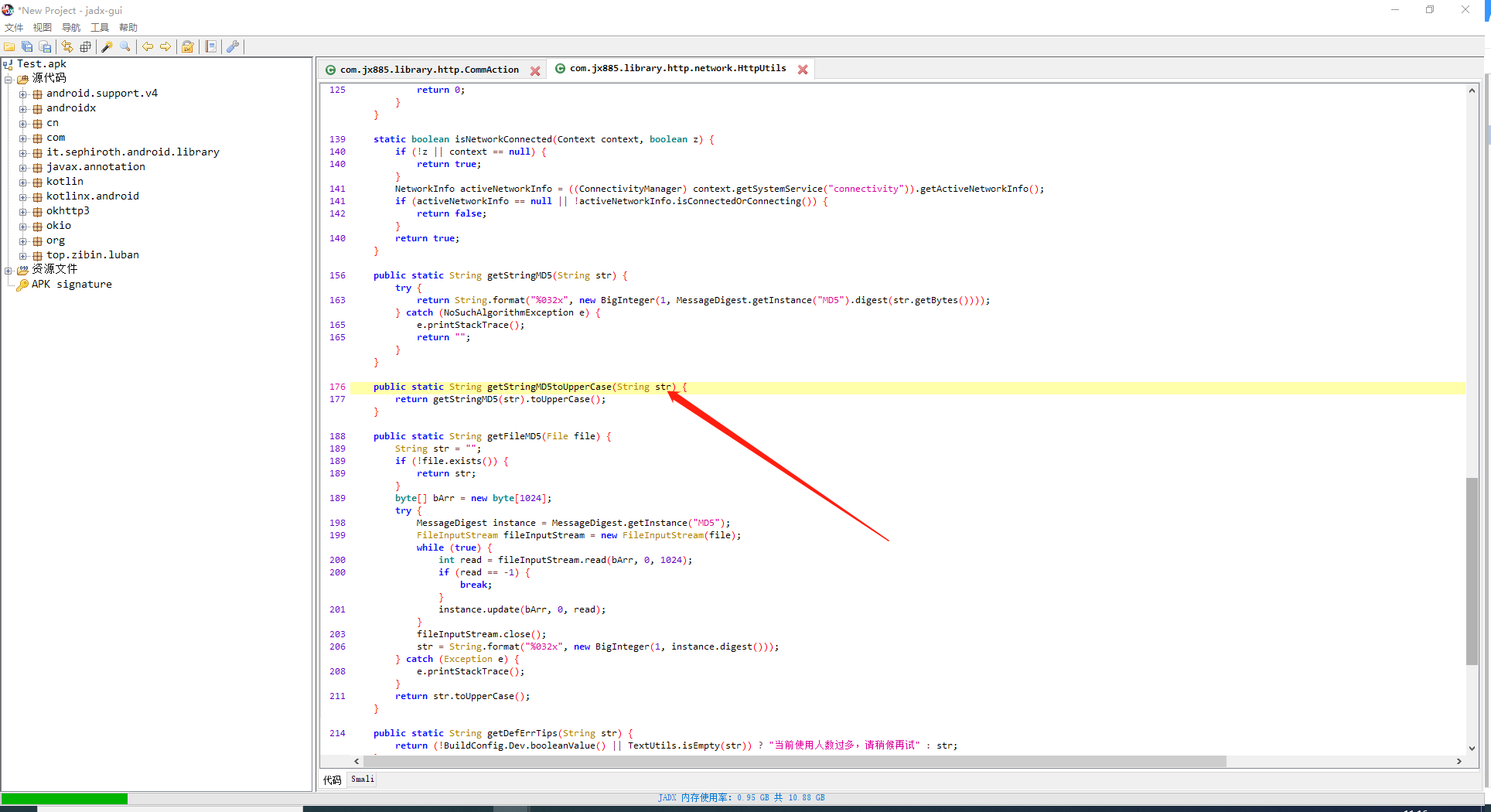
可以获取到加密后的内容
attack.py
#frida.py
import frida  # 导入frida模块
import sys  # 导入sys模块

def on_message(message, data):  # js中执行send函数后要回调的函数
    print(message)

'''
spawn模式,Frida会自行启动并注入进目标App,Hook的时机非常早
'''


'''
attach模式,Frida会附加到当前的目标进程中,即需要App处于启动状态,这也意味着只能从当前时机往后Hook,
'''
session = frida.get_remote_device().attach('驾培创业教练')  #APPNAME

with open("./frida.js") as f:
    script = session.create_script(f.read())

script.on('message', on_message)  # 加载回调函数,也就是js中执行send函数规定要执行的python函数
script.load()  # 加载脚本
currTime='20220902174219'
phone='152xxxxxx9'
type='1'
sign=script.exports.getsign(f'{currTime}{type}wocaonima{phone}')
print(sign)
#sys.stdin.read()
frida.js
function sign(s) {
    var result = '';
    Java.perform(function () {
        result = Java.use('com.jx885.library.http.network.HttpUtils').getStringMD5toUpperCase(s);
    })
    return result
}
rpc.exports = {
    getsign: sign
}
运行后可以获取到加密后的sign
3.2 frida加解密算法分析(加解密自吐)
https://wwz.lanzouy.com/iBoDm0b3gsed
密码:8ukg
var N_ENCRYPT_MODE = 1
var N_DECRYPT_MODE = 2

function showStacks() {
    var Exception = Java.use("java.lang.Exception");
    var ins = Exception.$new("Exception");
    var straces = ins.getStackTrace();

    if (undefined == straces || null == straces) {
        return;
    }

    console.log("============================= Stack strat=======================");
    console.log("");

    for (var i = 0; i < straces.length; i++) {
        var str = "   " + straces[i].toString();
        console.log(str);
    }

    console.log("");
    console.log("============================= Stack end=======================\r\n");
    Exception.$dispose();
}

//工具相关函数
var base64EncodeChars = 'ABCDEFGHIJKLMNOPQRSTUVWXYZabcdefghijklmnopqrstuvwxyz0123456789+/',
    base64DecodeChars = new Array((-1), (-1), (-1), (-1), (-1), (-1), (-1), (-1), (-1), (-1), (-1), (-1), (-1), (-1), (-1), (-1), (-1), (-1), (-1), (-1), (-1), (-1), (-1), (-1), (-1), (-1), (-1), (-1), (-1), (-1), (-1), (-1), (-1), (-1), (-1), (-1), (-1), (-1), (-1), (-1), (-1), (-1), (-1), 62, (-1), (-1), (-1), 63, 52, 53, 54, 55, 56, 57, 58, 59, 60, 61, (-1), (-1), (-1), (-1), (-1), (-1), (-1), 0, 1, 2, 3, 4, 5, 6, 7, 8, 9, 10, 11, 12, 13, 14, 15, 16, 17, 18, 19, 20, 21, 22, 23, 24, 25, (-1), (-1), (-1), (-1), (-1), (-1), 26, 27, 28, 29, 30, 31, 32, 33, 34, 35, 36, 37, 38, 39, 40, 41, 42, 43, 44, 45, 46, 47, 48, 49, 50, 51, (-1), (-1), (-1), (-1), (-1));

function stringToBase64(e) {
    var r, a, c, h, o, t;
    for (c = e.length, a = 0, r = ''; a < c;) {
        if (h = 255 & e.charCodeAt(a++), a == c) {
            r += base64EncodeChars.charAt(h >> 2),
                r += base64EncodeChars.charAt((3 & h) << 4),
                r += '==';
            break
        }
        if (o = e.charCodeAt(a++), a == c) {
            r += base64EncodeChars.charAt(h >> 2),
                r += base64EncodeChars.charAt((3 & h) << 4 | (240 & o) >> 4),
                r += base64EncodeChars.charAt((15 & o) << 2),
                r += '=';
            break
        }
        t = e.charCodeAt(a++),
            r += base64EncodeChars.charAt(h >> 2),
            r += base64EncodeChars.charAt((3 & h) << 4 | (240 & o) >> 4),
            r += base64EncodeChars.charAt((15 & o) << 2 | (192 & t) >> 6),
            r += base64EncodeChars.charAt(63 & t)
    }
    return r
}
function base64ToString(e) {
    var r, a, c, h, o, t, d;
    for (t = e.length, o = 0, d = ''; o < t;) {
        do
            r = base64DecodeChars[255 & e.charCodeAt(o++)];
        while (o < t && r == -1);
        if (r == -1)
            break;
        do
            a = base64DecodeChars[255 & e.charCodeAt(o++)];
        while (o < t && a == -1);
        if (a == -1)
            break;
        d += String.fromCharCode(r << 2 | (48 & a) >> 4);
        do {
            if (c = 255 & e.charCodeAt(o++), 61 == c)
                return d;
            c = base64DecodeChars[c]
        } while (o < t && c == -1);
        if (c == -1)
            break;
        d += String.fromCharCode((15 & a) << 4 | (60 & c) >> 2);
        do {
            if (h = 255 & e.charCodeAt(o++), 61 == h)
                return d;
            h = base64DecodeChars[h]
        } while (o < t && h == -1);
        if (h == -1)
            break;
        d += String.fromCharCode((3 & c) << 6 | h)
    }
    return d
}
function hexToBase64(str) {
    return base64Encode(String.fromCharCode.apply(null, str.replace(/\r|\n/g, "").replace(/([\da-fA-F]{2}) ?/g, "0x$1 ").replace(/ +$/, "").split(" ")));
}
function base64ToHex(str) {
    for (var i = 0, bin = base64Decode(str.replace(/[ \r\n]+$/, "")), hex = []; i < bin.length; ++i) {
        var tmp = bin.charCodeAt(i).toString(16);
        if (tmp.length === 1)
            tmp = "0" + tmp;
        hex[hex.length] = tmp;
    }
    return hex.join("");
}
function hexToBytes(str) {
    var pos = 0;
    var len = str.length;
    if (len % 2 != 0) {
        return null;
    }
    len /= 2;
    var hexA = new Array();
    for (var i = 0; i < len; i++) {
        var s = str.substr(pos, 2);
        var v = parseInt(s, 16);
        hexA.push(v);
        pos += 2;
    }
    return hexA;
}
function bytesToHex(arr) {
    var str = '';
    var k, j;
    for (var i = 0; i < arr.length; i++) {
        k = arr[i];
        j = k;
        if (k < 0) {
            j = k + 256;
        }
        if (j < 16) {
            str += "0";
        }
        str += j.toString(16);
    }
    return str;
}
function stringToHex(str) {
    var val = "";
    for (var i = 0; i < str.length; i++) {
        if (val == "")
            val = str.charCodeAt(i).toString(16);
        else
            val += str.charCodeAt(i).toString(16);
    }
    return val
}
function stringToBytes(str) {
    var ch, st, re = [];
    for (var i = 0; i < str.length; i++) {
        ch = str.charCodeAt(i);
        st = [];
        do {
            st.push(ch & 0xFF);
            ch = ch >> 8;
        }
        while (ch);
        re = re.concat(st.reverse());
    }
    return re;
}
//将byte[]转成String的方法
function bytesToString(arr) {
    var str = '';
    arr = new Uint8Array(arr);
    for (var i in arr) {
        str += String.fromCharCode(arr[i]);
    }
    return str;
}
function bytesToBase64(e) {
    var r, a, c, h, o, t;
    for (c = e.length, a = 0, r = ''; a < c;) {
        if (h = 255 & e[a++], a == c) {
            r += base64EncodeChars.charAt(h >> 2),
                r += base64EncodeChars.charAt((3 & h) << 4),
                r += '==';
            break
        }
        if (o = e[a++], a == c) {
            r += base64EncodeChars.charAt(h >> 2),
                r += base64EncodeChars.charAt((3 & h) << 4 | (240 & o) >> 4),
                r += base64EncodeChars.charAt((15 & o) << 2),
                r += '=';
            break
        }
        t = e[a++],
            r += base64EncodeChars.charAt(h >> 2),
            r += base64EncodeChars.charAt((3 & h) << 4 | (240 & o) >> 4),
            r += base64EncodeChars.charAt((15 & o) << 2 | (192 & t) >> 6),
            r += base64EncodeChars.charAt(63 & t)
    }
    return r
}
function base64ToBytes(e) {
    var r, a, c, h, o, t, d;
    for (t = e.length, o = 0, d = []; o < t;) {
        do
            r = base64DecodeChars[255 & e.charCodeAt(o++)];
        while (o < t && r == -1);
        if (r == -1)
            break;
        do
            a = base64DecodeChars[255 & e.charCodeAt(o++)];
        while (o < t && a == -1);
        if (a == -1)
            break;
        d.push(r << 2 | (48 & a) >> 4);
        do {
            if (c = 255 & e.charCodeAt(o++), 61 == c)
                return d;
            c = base64DecodeChars[c]
        } while (o < t && c == -1);
        if (c == -1)
            break;
        d.push((15 & a) << 4 | (60 & c) >> 2);
        do {
            if (h = 255 & e.charCodeAt(o++), 61 == h)
                return d;
            h = base64DecodeChars[h]
        } while (o < t && h == -1);
        if (h == -1)
            break;
        d.push((3 & c) << 6 | h)
    }
    return d
}
//stringToBase64 stringToHex stringToBytes
//base64ToString base64ToHex base64ToBytes
//               hexToBase64  hexToBytes
// bytesToBase64 bytesToHex bytesToString


Java.perform(function () {
    var secretKeySpec = Java.use('javax.crypto.spec.SecretKeySpec');
    secretKeySpec.$init.overload('[B', 'java.lang.String').implementation = function (a, b) {
        showStacks();
        var result = this.$init(a, b);
        console.log("======================================");
        console.log("算法名:" + b + "|str**:" + bytesToString(a));
        console.log("算法名:" + b + "|Hex**:" + bytesToHex(a));
        return result;
    }

    var DESKeySpec = Java.use('javax.crypto.spec.DESKeySpec');
    DESKeySpec.$init.overload('[B').implementation = function (a) {
        showStacks();
        var result = this.$init(a);
        console.log("======================================");
        var bytes_key_des = this.getKey();
        console.log("des**  |str " + bytesToString(bytes_key_des));
        console.log("des**  |hex " + bytesToHex(bytes_key_des));
        return result;
    }

    DESKeySpec.$init.overload('[B', 'int').implementation = function (a, b) {
        showStacks();
        var result = this.$init(a, b);
        console.log("======================================");
        var bytes_key_des = this.getKey();
        console.log("des**  |str " + bytesToString(bytes_key_des));
        console.log("des**  |hex " + bytesToHex(bytes_key_des));
        return result;
    }

    var mac = Java.use('javax.crypto.Mac');
    mac.getInstance.overload('java.lang.String').implementation = function (a) {
        showStacks();
        var result = this.getInstance(a);
        console.log("======================================");
        console.log("算法名:" + a);
        return result;
    }
    mac.update.overload('[B').implementation = function (a) {
        //showStacks();
        this.update(a);
        console.log("======================================");
        console.log("update:" + bytesToString(a))
    }
    mac.update.overload('[B', 'int', 'int').implementation = function (a, b, c) {
        //showStacks();
        this.update(a, b, c)
        console.log("======================================");
        console.log("update:" + bytesToString(a) + "|" + b + "|" + c);
    }
    mac.doFinal.overload().implementation = function () {
        //showStacks();
        var result = this.doFinal();
        console.log("======================================");
        console.log("doFinal结果: |str  :" + bytesToString(result));
        console.log("doFinal结果: |hex  :" + bytesToHex(result));
        console.log("doFinal结果: |base64  :" + bytesToBase64(result));
        return result;
    }
    mac.doFinal.overload('[B').implementation = function (a) {
        //showStacks();
        var result = this.doFinal(a);
        console.log("======================================");
        console.log("doFinal参数: |str  :" + bytesToString(a));
        console.log("doFinal结果: |str  :" + bytesToString(result));
        console.log("doFinal结果: |hex  :" + bytesToHex(result));
        console.log("doFinal结果: |base64  :" + bytesToBase64(result));
        return result;
    }

    var md = Java.use('java.security.MessageDigest');
    md.getInstance.overload('java.lang.String', 'java.lang.String').implementation = function (a, b) {
        //showStacks();
        console.log("======================================");
        console.log("算法名:" + a);
        return this.getInstance(a, b);
    }
    md.getInstance.overload('java.lang.String').implementation = function (a) {
        //showStacks();
        console.log("======================================");
        console.log("算法名:" + a);
        return this.getInstance(a);
    }
    md.update.overload('[B').implementation = function (a) {
        //showStacks();
        console.log("======================================");
        console.log("update:" + bytesToString(a))
        return this.update(a);
    }
    md.update.overload('[B', 'int', 'int').implementation = function (a, b, c) {
        //showStacks();
        console.log("======================================");
        console.log("update:" + bytesToString(a) + "|" + b + "|" + c);
        return this.update(a, b, c);
    }
    md.digest.overload().implementation = function () {
        //showStacks();
        console.log("======================================");
        var result = this.digest();
        console.log("digest结果:" + bytesToHex(result));
        console.log("digest结果:" + bytesToBase64(result));
        return result;
    }
    md.digest.overload('[B').implementation = function (a) {
        //showStacks();
        console.log("======================================");
        console.log("digest参数:" + bytesToString(a));
        var result = this.digest(a);
        console.log("digest结果:" + bytesToHex(result));
        console.log("digest结果:" + bytesToBase64(result));
        return result;
    }

    var ivParameterSpec = Java.use('javax.crypto.spec.IvParameterSpec');
    ivParameterSpec.$init.overload('[B').implementation = function (a) {
        //showStacks();
        var result = this.$init(a);
        console.log("======================================");
        console.log("iv向量: |str:" + bytesToString(a));
        console.log("iv向量: |hex:" + bytesToHex(a));
        return result;
    }

    var cipher = Java.use('javax.crypto.Cipher');
    cipher.getInstance.overload('java.lang.String').implementation = function (a) {
        //showStacks();
        var result = this.getInstance(a);
        console.log("======================================");
        console.log("模式填充:" + a);
        return result;
    }
    cipher.init.overload('int', 'java.security.Key').implementation = function (a, b) {
        //showStacks();
        var result = this.init(a, b);
        console.log("======================================");
        if (N_ENCRYPT_MODE == a) {
            console.log("init  | 加密模式");
        }
        else if (N_DECRYPT_MODE == a) {
            console.log("init  | 解密模式");
        }

        var bytes_key = b.getEncoded();
        console.log("init key:" + "|str**:" + bytesToString(bytes_key));
        console.log("init key:" + "|Hex**:" + bytesToHex(bytes_key));
        return result;
    }
    cipher.init.overload('int', 'java.security.cert.Certificate').implementation = function (a, b) {
        //showStacks();
        var result = this.init(a, b);
        console.log("======================================");

        if (N_ENCRYPT_MODE == a) {
            console.log("init  | 加密模式");
        }
        else if (N_DECRYPT_MODE == a) {
            console.log("init  | 解密模式");
        }

        return result;
    }
    cipher.init.overload('int', 'java.security.Key', 'java.security.spec.AlgorithmParameterSpec').implementation = function (a, b, c) {
        //showStacks();
        var result = this.init(a, b, c);
        console.log("======================================");

        if (N_ENCRYPT_MODE == a) {
            console.log("init  | 加密模式");
        }
        else if (N_DECRYPT_MODE == a) {
            console.log("init  | 解密模式");
        }

        var bytes_key = b.getEncoded();
        console.log("init key:" + "|str**:" + bytesToString(bytes_key));
        console.log("init key:" + "|Hex**:" + bytesToHex(bytes_key));

        return result;
    }
    cipher.init.overload('int', 'java.security.cert.Certificate', 'java.security.SecureRandom').implementation = function (a, b, c) {
        //showStacks();
        var result = this.init(a, b, c);
        if (N_ENCRYPT_MODE == a) {
            console.log("init  | 加密模式");
        }
        else if (N_DECRYPT_MODE == a) {
            console.log("init  | 解密模式");
        }
        return result;
    }
    cipher.init.overload('int', 'java.security.Key', 'java.security.SecureRandom').implementation = function (a, b, c) {
        //showStacks();
        var result = this.init(a, b, c);
        if (N_ENCRYPT_MODE == a) {
            console.log("init  | 加密模式");
        }
        else if (N_DECRYPT_MODE == a) {
            console.log("init  | 解密模式");
        }

        var bytes_key = b.getEncoded();
        console.log("init key:" + "|str**:" + bytesToString(bytes_key));
        console.log("init key:" + "|Hex**:" + bytesToHex(bytes_key));
        return result;
    }
    cipher.init.overload('int', 'java.security.Key', 'java.security.AlgorithmParameters').implementation = function (a, b, c) {
        //showStacks();
        var result = this.init(a, b, c);
        if (N_ENCRYPT_MODE == a) {
            console.log("init  | 加密模式");
        }
        else if (N_DECRYPT_MODE == a) {
            console.log("init  | 解密模式");
        }

        var bytes_key = b.getEncoded();
        console.log("init key:" + "|str**:" + bytesToString(bytes_key));
        console.log("init key:" + "|Hex**:" + bytesToHex(bytes_key));
        return result;
    }
    cipher.init.overload('int', 'java.security.Key', 'java.security.AlgorithmParameters', 'java.security.SecureRandom').implementation = function (a, b, c, d) {
        //showStacks();
        var result = this.init(a, b, c, d);
        if (N_ENCRYPT_MODE == a) {
            console.log("init  | 加密模式");
        }
        else if (N_DECRYPT_MODE == a) {
            console.log("init  | 解密模式");
        }

        var bytes_key = b.getEncoded();
        console.log("init key:" + "|str**:" + bytesToString(bytes_key));
        console.log("init key:" + "|Hex**:" + bytesToHex(bytes_key));
        return result;
    }
    cipher.init.overload('int', 'java.security.Key', 'java.security.spec.AlgorithmParameterSpec', 'java.security.SecureRandom').implementation = function (a, b, c, d) {
        //showStacks();
        var result = this.update(a, b, c, d);
        if (N_ENCRYPT_MODE == a) {
            console.log("init  | 加密模式");
        }
        else if (N_DECRYPT_MODE == a) {
            console.log("init  | 解密模式");
        }

        var bytes_key = b.getEncoded();
        console.log("init key:" + "|str**:" + bytesToString(bytes_key));
        console.log("init key:" + "|Hex**:" + bytesToHex(bytes_key));
        return result;
    }

    cipher.update.overload('[B').implementation = function (a) {
        //showStacks();
        var result = this.update(a);
        console.log("======================================");
        console.log("update:" + bytesToString(a));
        return result;
    }
    cipher.update.overload('[B', 'int', 'int').implementation = function (a, b, c) {
        //showStacks();
        var result = this.update(a, b, c);
        console.log("======================================");
        console.log("update:" + bytesToString(a) + "|" + b + "|" + c);
        return result;
    }
    cipher.doFinal.overload().implementation = function () {
        //showStacks();
        var result = this.doFinal();
        console.log("======================================");
        console.log("doFinal结果: |str  :" + bytesToString(result));
        console.log("doFinal结果: |hex  :" + bytesToHex(result));
        console.log("doFinal结果: |base64  :" + bytesToBase64(result));
        return result;
    }
    cipher.doFinal.overload('[B').implementation = function (a) {
        //showStacks();
        var result = this.doFinal(a);
        console.log("======================================");
        console.log("doFinal参数: |str  :" + bytesToString(a));
        console.log("doFinal结果: |str  :" + bytesToString(result));
        console.log("doFinal结果: |hex  :" + bytesToHex(result));
        console.log("doFinal结果: |base64  :" + bytesToBase64(result));
        return result;
    }

    var x509EncodedKeySpec = Java.use('java.security.spec.X509EncodedKeySpec');
    x509EncodedKeySpec.$init.overload('[B').implementation = function (a) {
        //showStacks();
        var result = this.$init(a);
        console.log("======================================");
        console.log("RSA**:" + bytesToBase64(a));
        return result;
    }

    var rSAPublicKeySpec = Java.use('java.security.spec.RSAPublicKeySpec');
    rSAPublicKeySpec.$init.overload('java.math.BigInteger', 'java.math.BigInteger').implementation = function (a, b) {
        //showStacks();
        var result = this.$init(a, b);
        console.log("======================================");
        //console.log("RSA**:" + bytesToBase64(a));
        console.log("RSA**N:" + a.toString(16));
        console.log("RSA**E:" + b.toString(16));
        return result;
    }

    var KeyPairGenerator = Java.use('java.security.KeyPairGenerator');
    KeyPairGenerator.generateKeyPair.implementation = function () {
        //showStacks();
        var result = this.generateKeyPair();
        console.log("======================================");

        var str_private = result.getPrivate().getEncoded();
        var str_public = result.getPublic().getEncoded();
        console.log("公钥  |hex" + bytesToHex(str_public));
        console.log("私钥  |hex" + bytesToHex(str_private));

        return result;
    }

    KeyPairGenerator.genKeyPair.implementation = function () {
        //showStacks();
        var result = this.genKeyPair();
        console.log("======================================");

        var str_private = result.getPrivate().getEncoded();
        var str_public = result.getPublic().getEncoded();
        console.log("公钥  |hex" + bytesToHex(str_public));
        console.log("私钥  |hex" + bytesToHex(str_private));

        return result;
    }
});
frida -UF -l frida.js --output log.txt
打开app,登录时抓包,发现有加密数据sign
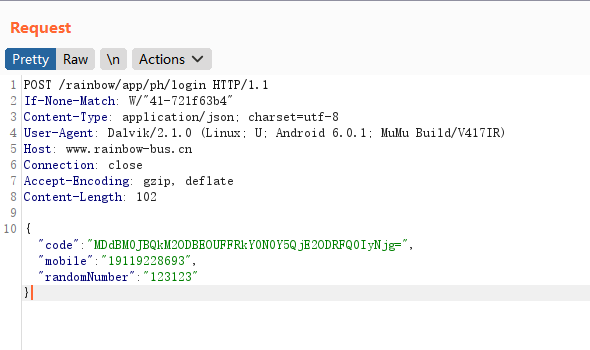
对code内容进行解密
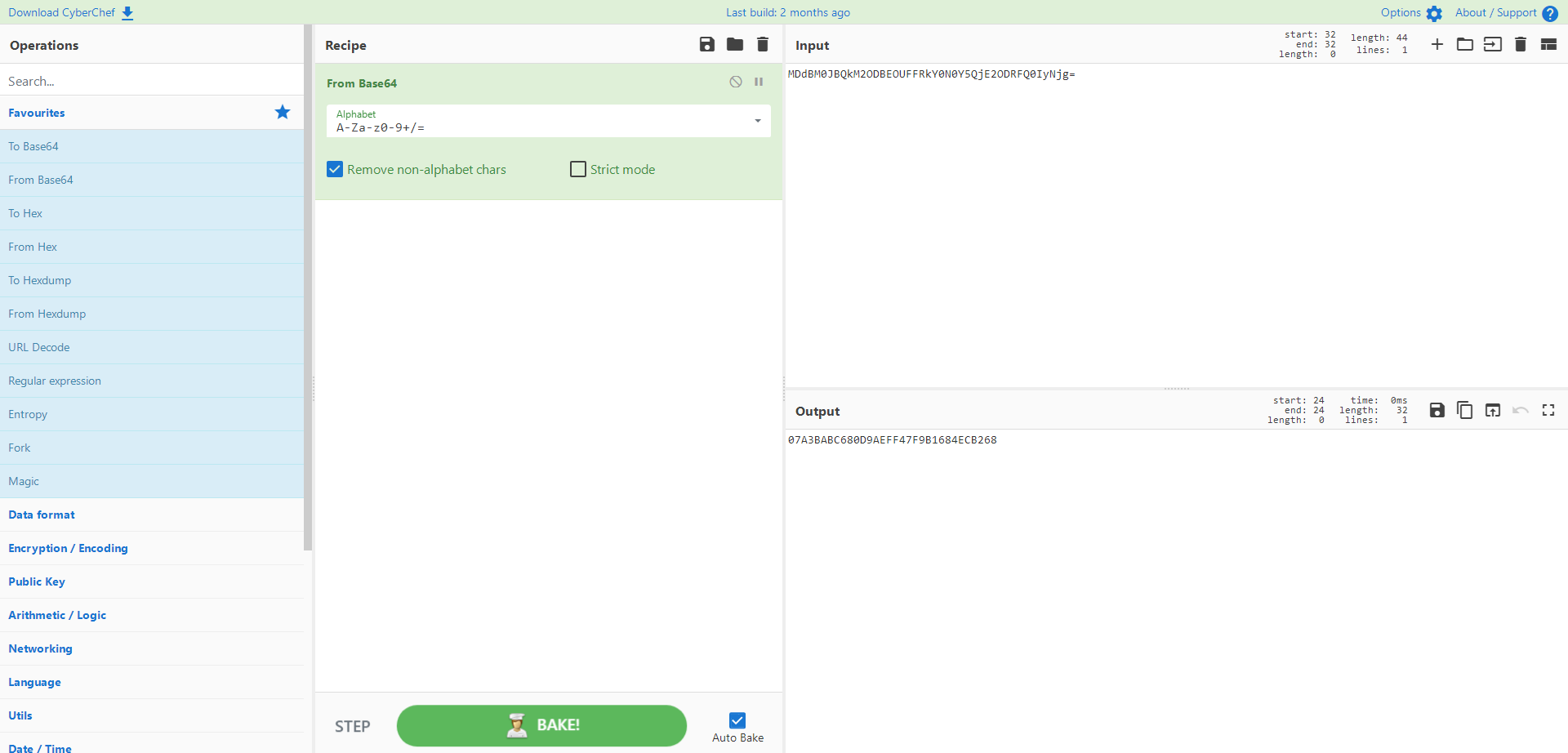
在log中搜索base64解密后的数据
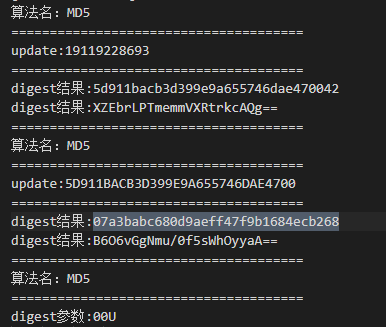
可以看到是对5D911BACB3D399E9A655746DAE4700进行md5的结果
5D911BACB3D399E9A655746DAE4700是手机号进行md5后,截取前三十位
三,frida-trace

 浙公网安备 33010602011771号