通过ifconfig命令显示ip地址
1.首先找到IP地址位置
ifconfig
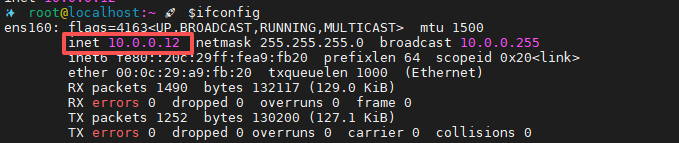
2.利用grep命令过滤inet信息
ifconfig | grep inet

3.利用head命令取所需IP的行
ifconfig | grep inet | head n1

4.利用awk命令分割取值,以空格为分隔符号输出需要的行
ifconfig | grep inet | head -n1 | awk -F' ' '{print $1" "$2}'


1.首先找到IP地址位置
ifconfig
2.利用grep命令过滤inet信息
ifconfig | grep inet
3.利用head命令取所需IP的行
ifconfig | grep inet | head n1
4.利用awk命令分割取值,以空格为分隔符号输出需要的行
ifconfig | grep inet | head -n1 | awk -F' ' '{print $1" "$2}'

 浙公网安备 33010602011771号