
区块链开发学习第七章:第一个Dapp-猜拳游戏
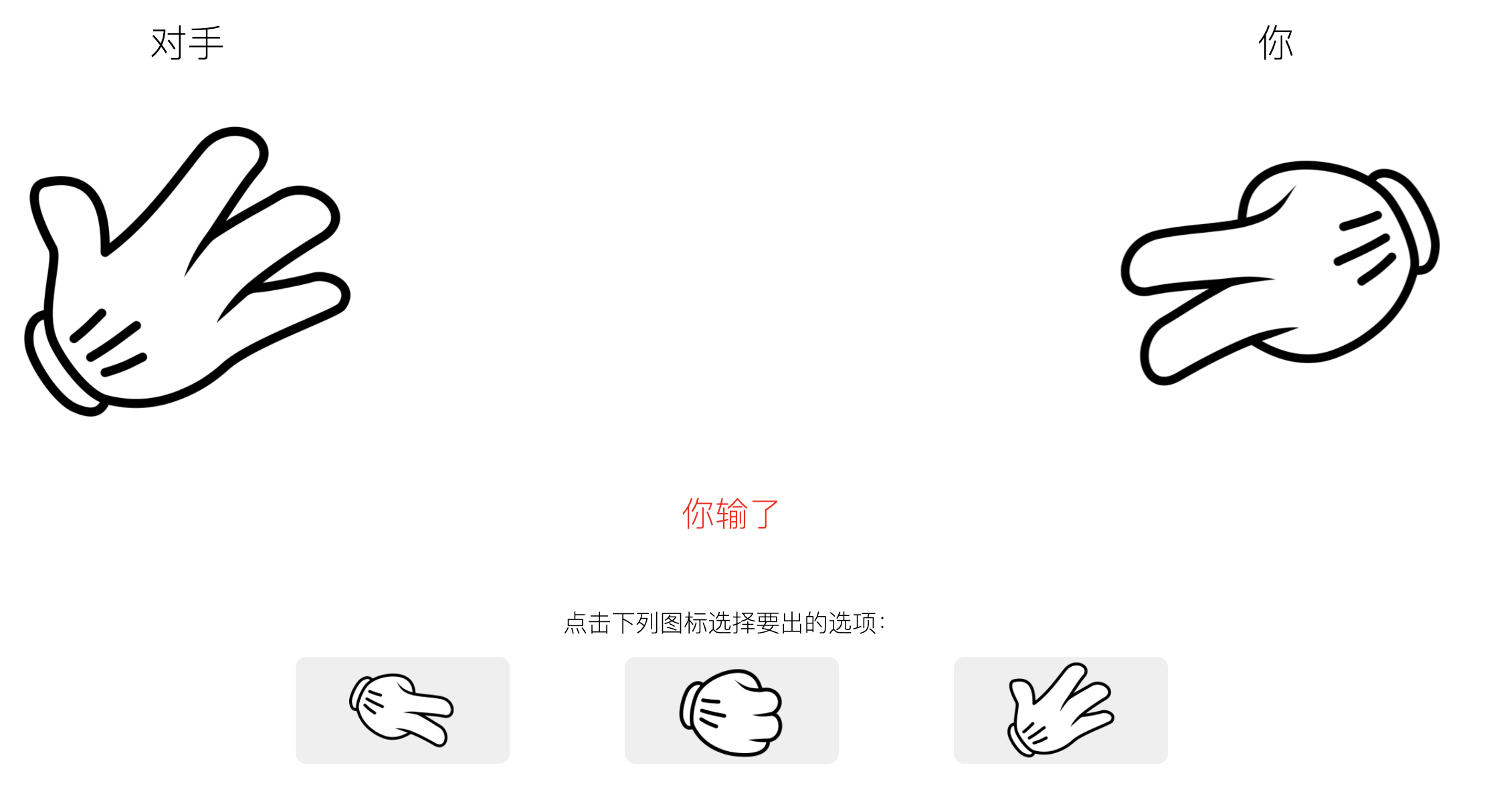
第一个简单的Dapp-猜拳游戏。本智能合约的功能很简单,就是用户与电脑猜拳,用户选择出手后,电脑随机一个选项,然后调用智能合约方法把两个选项值传过去,在智能合约上进行比较,并通过区块链合约事件广播结果,本地监听事件拿到结果后展示猜拳结果。
先大体声明下几个环境跟工具:
1、没有用truffle,直接MetaMask链接以太坊Ropsten测试链后,用Remix部署合约代码
2、前端用web3.js(1.6.1版本)
下面分成几步详细说明:
一、从Ropsten上获取eth
因为调用合约需要消耗eth,所以要先在Ropsten测试网上获取eth,可以复制自己的钱包地址后在这个网站上获取:https://faucet.ropsten.be/ 获取过程可能会有延时,多点几次就好。
二、编写猜拳智能合约
Remix上新建GuessGame.sol文件,并写入以下内容:
// SPDX-License-Identifier: MIT
pragma solidity >=0.4.22 <0.9.0;
contract GuessGame {
	event GuessResult(uint playerChoice,uint computerChoice,uint result);
	function play(uint playerChoice,uint computerChoice) public returns (bool){
		if(playerChoice > 0 && playerChoice <=3 && computerChoice > 0 && computerChoice <=3){
			if(playerChoice == computerChoice){
				//平手
				emit GuessResult(playerChoice,computerChoice,1);
			}else if(playerChoice == (computerChoice + 1) % 3){
				//电脑赢了
				emit GuessResult(playerChoice,computerChoice,2);
			}else{
				//其余都算玩家赢了
				emit GuessResult(playerChoice,computerChoice,3);
			}
			return true;
		}else{
			return false;
		}
	}
}
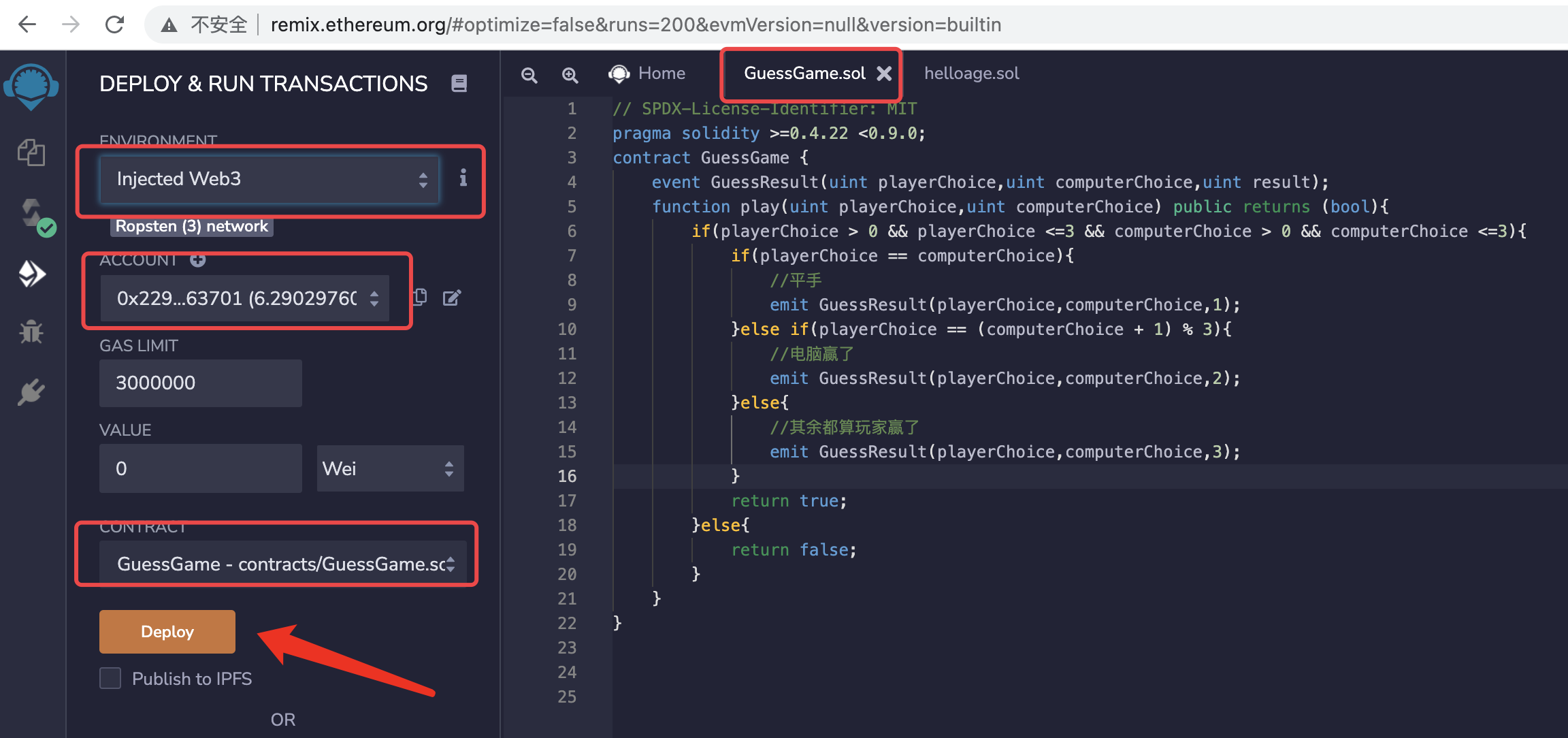
编译后部署到Ropsten上,当然首先到MetaMask连上Ropsten网络,并且账户上有足够的eth
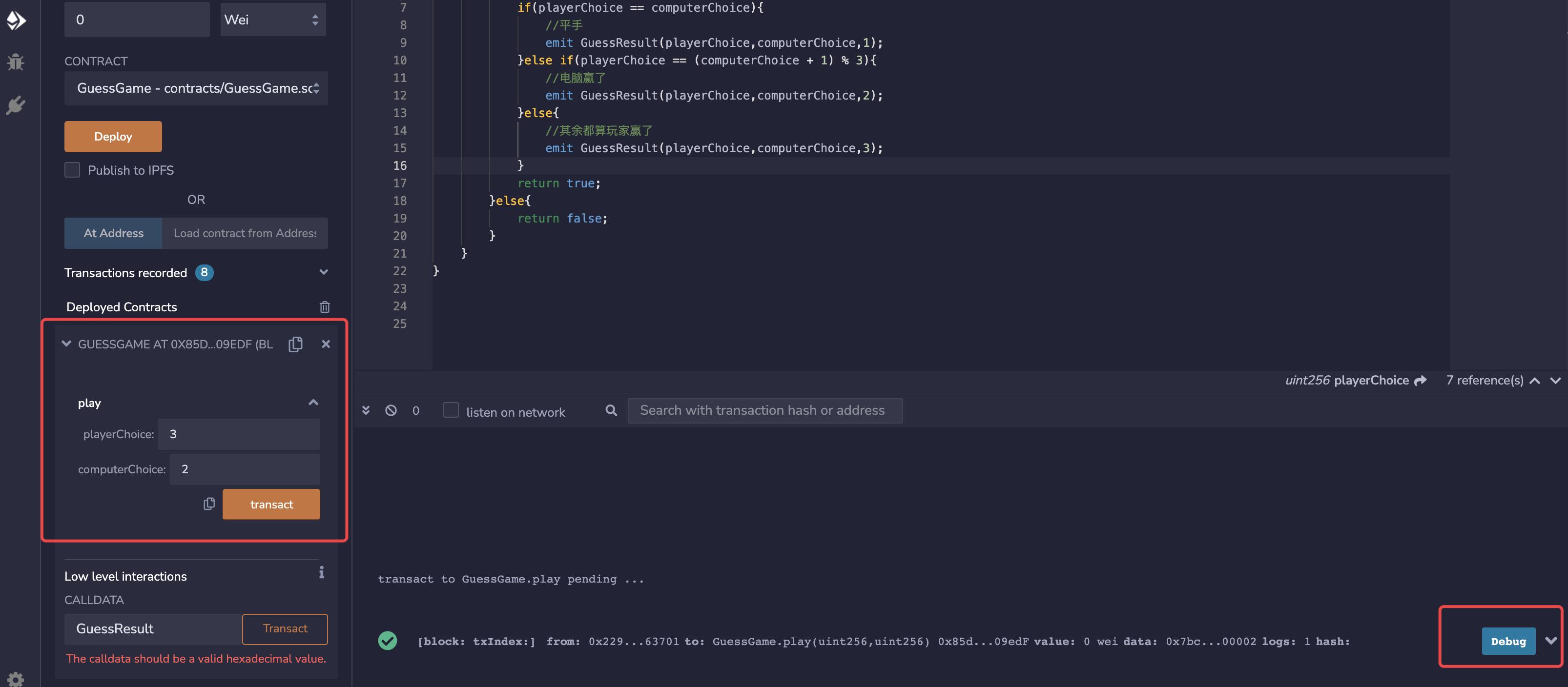
部署成功后,这里其实就显示了智能合约上的play方法了,可以直接在这里传值点击transact进行调用,调用成功后再控制台会输出结果,点击Debug可以查看详细信息
三、前端用web3.js调用智能合约
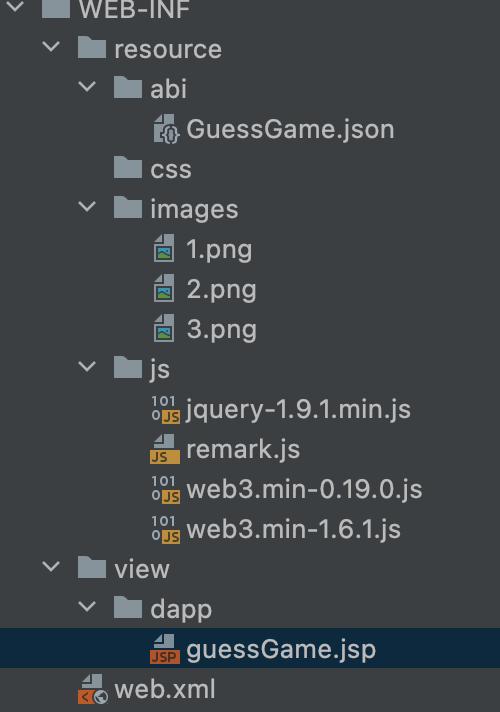
我后台因为集成了项目,所以是用jsp写的,大家简单点可以直接写Html,先贴下文件目录结构:
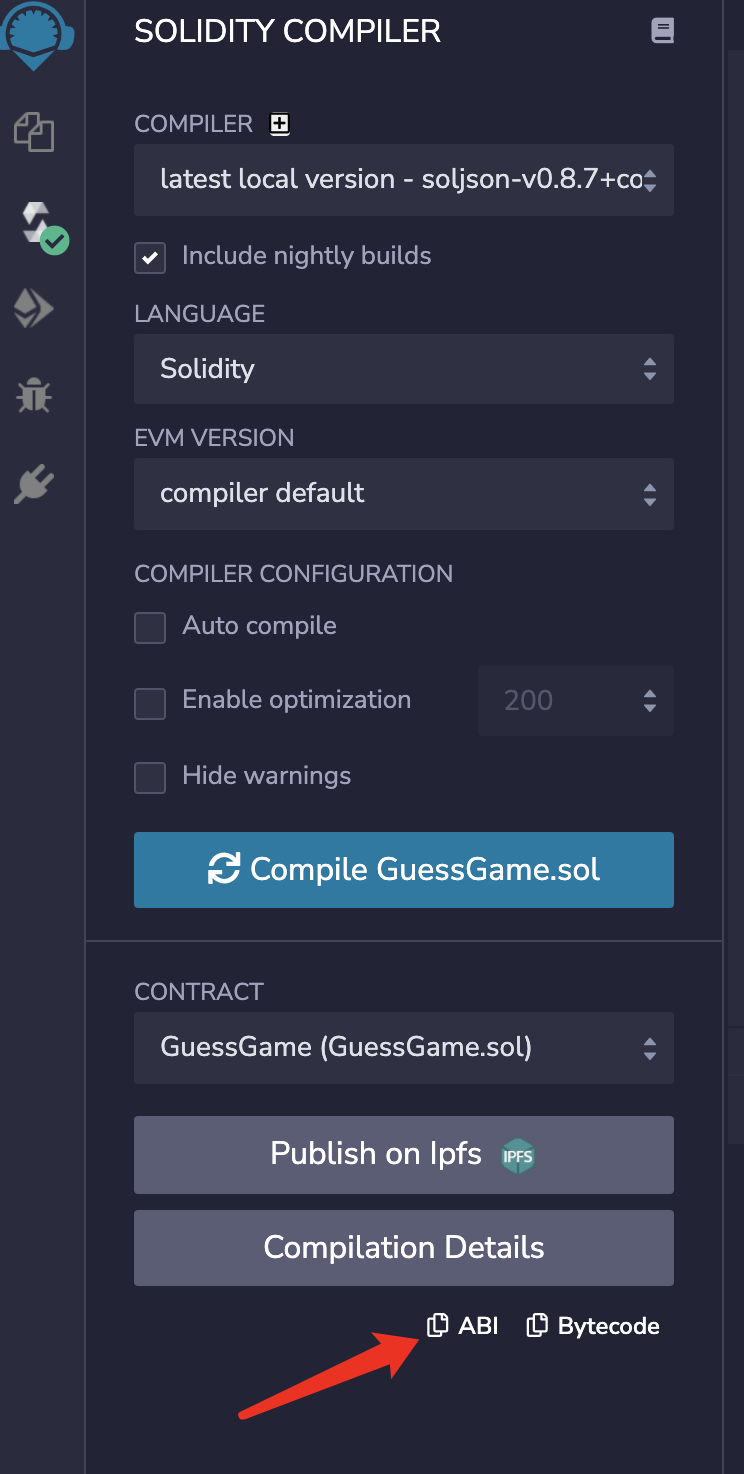
1、复制ABI文件:在Remix上点击复制ABI文件内容,并新建GuessGame.json文件,将复制的abi内容贴进去
2、引入web3.js等其它js
3、编写guessGame.jsp文件:
<%--
  Created by IntelliJ IDEA.
  User: ****
  Date: 2021/12/13
  Time: 21:35
  To change this template use File | Settings | File Templates.
--%>
<%@ page contentType="text/html;charset=UTF-8" language="java" pageEncoding="UTF-8" isELIgnored="false" %>
<%@ taglib prefix="c" uri="http://java.sun.com/jsp/jstl/core"%>
<html>
<head>
    <meta charset="utf-8">
    <meta http-equiv="Access-Control-Allow-Origin" content="*" >
    <c:set var="ctx" value="${pageContext.request.contextPath}" />
    <script type="text/javascript" src="${ctx}/resource/js/jquery-1.9.1.min.js" charset="utf-8"></script>
    <script type="text/javascript" src="${ctx}/resource/js/web3.min-1.6.1.js"></script>
    <title>猜拳游戏</title>
    <style>
        *{margin:0; padding: 0; font-weight: 200;}
        .player,.computer{
            width: 50%;
            float: left;
            padding-top: 30px;
            text-align: center
        }
        .player,.computer dt{
            font-size: 28px;
        }
        .player img,.computer img{
            margin-top: 30px;
            width: 30%;
        }
        .player img{
            transform:rotateY(180deg);
        }
        .select{
            text-align: center;
            font-size: 18px;
            max-width: 800px;
            margin: 0 auto;
            padding-top: 2%;
        }
        .select dt{
            width: 100%;
            overflow: hidden;
            line-height: 50px;
        }
        .select button{
            width: 20%;
            border:none;
            color: #fff;
            border-radius: 8px;
            line-height: 45px;
            margin: 0 5%;
            outline: none;
            font-size: 18px;
            cursor: pointer;
        }
        #info{
            width: 100%;
            text-align: center;
            overflow: hidden;
            font-size: 25px;
            line-height: 50px;
            color: red;
            padding-top: 2%;
            opacity: 0;
        }
    </style>
    <script type="text/javascript">
        var web3,guessGameABI,guessGameContract,refresh_timer;
        $(function(){
            web3Auth();
            jspFun();
            //var version = web3.version;
            //console.log(version);
            //web3.eth.net.getNetworkType().then(console.log);
            web3.eth.getAccounts(console.log);
            $.getJSON('/resource/abi/GuessGame.json',function(data){
                guessGameABI = data;
                //创建合约实例
                guessGameContract = new web3.eth.Contract(guessGameABI, '0x85daAd7dbB5Ba1B4020444Ab2f1D84c58d409edF', []);
                console.log(guessGameContract.defaultAccount);
                console.log(guessGameContract.defaultBlock);
                listenEvent();
            });

        })

        function listenEvent(){
            guessGameContract.events.GuessResult({
                //filter: {myIndexedParam: [20,23], myOtherIndexedParam: '0x123456789...'}, // 使用数组表示 或:如 20 或 23。
                //fromBlock: 0
            }, function(error, event){
                console.log(event);
            }).on("connected", function(subscriptionId){
                    console.log(subscriptionId);
            }).on('data', function(event){
                    console.log(event); // 与上述可选的回调结果相同
                    //uint playerChoice,uint computerChoice,uint result
                    resultDeal(event.returnValues.playerChoice,event.returnValues.computerChoice,event.returnValues.result);
            }).on('changed', function(event){
                    // 从本地数据库中删除事件
                    console.log("事件删除");
            }).on('error', function(error, receipt) {
                    // 如果交易被网络拒绝并带有交易收据,第二个参数将是交易收据。
                    console.log("事件被网络拒绝");
            });
        }

        function resultDeal(player_choice,computer_choice,r){
            //var r = result.args.result.toNumber();
            var info = "未知";
            if(r == 1){
                info = "平手";
            }else if(r == 2){
                info = "你输了";
            }else if(r == 3){
                info = "你赢了";
            }
            update_page(player_choice, computer_choice, info);
        }

        function update_page(player,computer,result){
            console.log(player+"----"+computer+"-----"+result);
            var info = document.getElementById('info');
            var playerImg = document.getElementById('player');
            var comImg = document.getElementById('computer');
            info.style.opacity = '0';
            clearInterval(refresh_timer);
            playerImg.src = '/resource/images/'+player+'.png';
            comImg.src = '/resource/images/'+computer+'.png';
            info.style.opacity = 1;
            info.innerText = result;
        }


        function guess(player_choice){
            //web3.eth.getCoinbase().then(console.log);
            //1:剪刀  2:石头   3:布
            var result;
            player_choice = parseInt(player_choice);
            computer_choice = parseInt(Math.random()*3)+1;
            document.getElementById('info').innerText = '';
            guessGameContract.methods.play(player_choice,computer_choice).send({
                from: '0x229Ea411D368C97b008c7bc19B01Fdd813163701'
            }).on('transactionHash', function(hash){
                console.log(hash);
                beginGame();
            }).on('confirmation', function(confirmationNumber, receipt){
                console.log(confirmationNumber);
                console.log(receipt);
            }).on('receipt', function(receipt) {
                // receipt 相关例子
                console.log(receipt);
            }).on('error', function(error, receipt) { // 如果交易被网络拒绝并带有交易收据,则第二个参数将是交易收据。
                console.log(error);
                console.log(receipt);
            });

        }

        function beginGame(){
            var playerImg = document.getElementById('player');
            var comImg = document.getElementById('computer');
            refresh_timer = setInterval(function(){
                this.n?this.n:this.n=1;this.n++
                this.n>3?this.n=1:this.n;
                playerImg.src = '/resource/images/'+this.n+'.png';
                comImg.src = '/resource/images/'+this.n+'.png';
            },100);
        }

        function jspFun(){
            choices = $('button');
            for(var i=0; i<choices.length; i++){
                choices[i].onclick = function(){
                    guess(this.value);
                }
            }
        }

        function web3Auth(){
            //初始化过程
            //var Web3 = require('web3');
            if (typeof web3 !== 'undefined') {
                console.info("init web3");
                web3 = new Web3(web3.currentProvider);
            } else {
                console.info("init new web3");
                // set the provider you want from Web3.providers
                web3 = new Web3(new Web3.providers.HttpProvider("http://localhost:8545"));
            }

        }
    </script>
</head>
<body>
    <div class="computer">
        <dl>
            <dt>对手</dt>
            <dd><img src="${ctx}/resource/images/2.png" id="computer" alt=""></dd>
        </dl>
    </div>
    <div class="player">
        <dl>
            <dt>你</dt>
            <dd><img src="${ctx}/resource/images/2.png" id="player" alt=""></dd>
        </dl>
    </div>
    <div id="info">平手</div>
    <div class="select">
        <dl>
            <dt>点击下列图标选择要出的选项:</dt>
            <dd>
                <button value="1"><img src='${ctx}/resource/images/1.png' style="width:80px"></button>
                <button value="2"><img src='${ctx}/resource/images/2.png' style="width:80px"></button>
                <button value="3"><img src='${ctx}/resource/images/3.png' style="width:80px"></button>
            </dd>
        </dl>
    </div>
</body>
</html>
详细内容参考web3文档看吧,我也是参考文档一点点写的,文档地址:https://learnblockchain.cn/docs/web3.js/
四、运行结果示例:

如果有学习计划的童鞋,可以加我QQ一起交流:


 浙公网安备 33010602011771号