
ASP.Net Core中间件
1、在解决方案资源管理器中,您将看到 Startup.cs 文件。你可以在其中编写代码,它是一个编写程序启动时立即执行的代码的文件。
a、在ASP.net Fromwork中可能也希望看到一个 web.config 文件,该文件包含您的应用程序执行所需的所有配置参数。
b、在 ASP.NET Core中,Web.config替换成了 Startup.cs文件.
c、Startup.cs里面是一个启动类文件,在这个类中可以配置应用程序和配置资源
如下面的代码
 public class Startup
    {
        // This method gets called by the runtime. Use this method to add services to the container.
        ////这个方法由运行时调用。使用此方法向容器添加服务。
        // For more information on how to configure your application, visit https://go.microsoft.com/fwlink/?LinkID=398940
        public void ConfigureServices(IServiceCollection services)
        {
        }

        // This method gets called by the runtime. Use this method to configure the HTTP request pipeline.
        ////这个方法由运行时调用。使用此方法配置HTTP请求管道。
        public void Configure(IApplicationBuilder app, IHostingEnvironment env)
        {
            if (env.IsDevelopment())
            {
                app.UseDeveloperExceptionPage();
            }

            app.Run(async (context) =>
            {
                await context.Response.WriteAsync("Hello World!my name ");

            });
        }
    }
在启动类中,也就是Startup.cs类中,大部分工作将设计有两种方法
1、configure方法是构建HTTP处理管道的地方
定义了应用程序如何响应请求,目前只能展示Hello Word
我们如果想提供一个index.html静态文件,就要在configure中添加一些代码
还可以如果用户非法操作,将要提供一个错误页面,或者asp.net controller的异常请求的路由
2、ConfigureServices()方法,这可帮助配置我的应用程序的组件
现在,我们有一个硬编码的字符串“Hello World !”来响应每个请求。我们不希望每个请求都是硬编码的字符串,我们想从一些组件加载响应字符串。
-
其他组件可能会从数据库加载文本,或从一个web服务或一个JSON文件,我们不管这它是从什么地方加载。
-
我们会设置一个场景,这样我们就没有这个硬编码字符串了。
在解决方案资源管理器中,右键单击您的项目节点并选择Add→New Item。

在左侧窗格中,选择Installed → Code,然后在中间窗格中,选择JSON文件。给这个文件取名为AppSetting.json,并单击Add按钮如上面的截图。
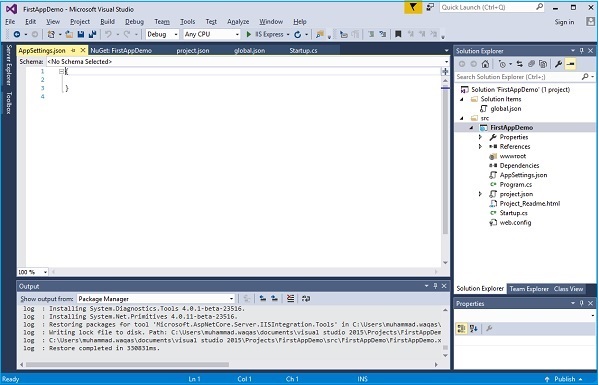
让我们在AppSettings中添加以下代码。
|
1
2
3
|
{ "message": "Hello, World! this message is from configuration file..." } |
然后将AppSettings.json的属性设置成输入“内容”,始终复制到输出目录
现在我们需要从 Startup.cs 文件访问此消息。这里是 Startup.cs 文件从 JSON 文件阅读上面的消息的实现代码。
|
1
2
3
4
5
6
7
8
9
10
11
12
13
14
15
16
17
18
19
20
21
22
23
24
25
26
27
28
29
30
31
32
33
34
35
|
using Microsoft.AspNet.Builder; using Microsoft.AspNet.Hosting; using Microsoft.AspNet.Http; using Microsoft.Extensions.DependencyInjection; using Microsoft.Extensions.Configuration; namespace FirstAppDemo { public class Startup { public Startup() { var builder = new ConfigurationBuilder() .AddJsonFile("AppSettings.json"); Configuration = builder.Build(); } public IConfiguration Configuration { get; set; } // This method gets called by the runtime. // Use this method to add services to the container. // For more information on how to configure your application, public void ConfigureServices(IServiceCollection services) { } // This method gets called by the runtime. // Use this method to configure the HTTP request pipeline. public void Configure(IApplicationBuilder app) { app.UseIISPlatformHandler(); app.Run(async (context) => { var msg = Configuration["message"]; await context.Response.WriteAsync(msg); }); } // Entry point for the application. public static void Main(string[] args) =7gt; WebApplication.Run<Startup>(args); } } |
让我们现在运行应用程序。一旦您运行该应用程序,它会产生下面的输出。


 浙公网安备 33010602011771号