


Java进阶之网络编程
一、InetAddress类的使用
1.实现网络通信需要解决的两个问题
1.如何准确地定位网络上一台或多台主机;定位主机上的特定的应用
2.找到主机后如何可靠高效地进行数据传输
2.网络通信的两个要素:
1.对应问题一:IP和端口号
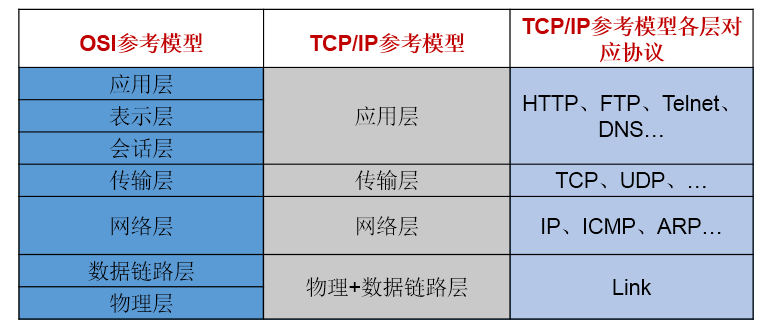
2.对应问题二:提供网络通信协议:TCP/IP参考模型(应用层、传输层、网络层、物理+数据链路层)
3.通信要素一:IP和端口号
3.1 IP的理解
- IP:唯一的标识 Internet 上的计算机(通信实体)
- 在Java中使用InetAddress类代表IP
- IP分类:IPv4 和 IPv6 ; 万维网 和 局域网
- 域名: www.baidu.com www.mi.com www.sina.com www.jd.com
域名解析:域名容易记忆,当在连接网络时输入一个主机的域名后,域名服务器(DNS)负责将域名转化成IP地址,这样才能和主机建立连接。 -------域名解析 - 本地回路地址:127.0.0.1 对应着:localhost
3.2 InetAddress类:此类的一个对象就代表着一个具体的IP地址
3.2.1实例化
getByName(String host) 、 getLocalHost()
3.2.2 常用方法
getHostName() / getHostAddress()
3.3 端口号:正在计算机上运行的进程。
要求:不同的进程不同的端口号
范围:被规定为一个 16 位的整数 0~65535。
端口号与IP地址的组合得出一个网络套接字:Socket
4.通信要素二:网络通信协议
分型模型
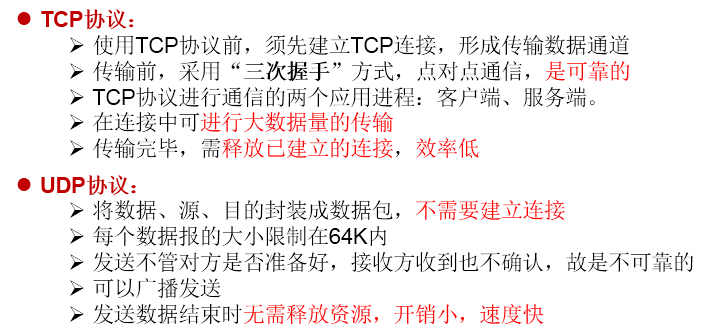
TCP和UDP的区别
TCP三次握手和四次挥手
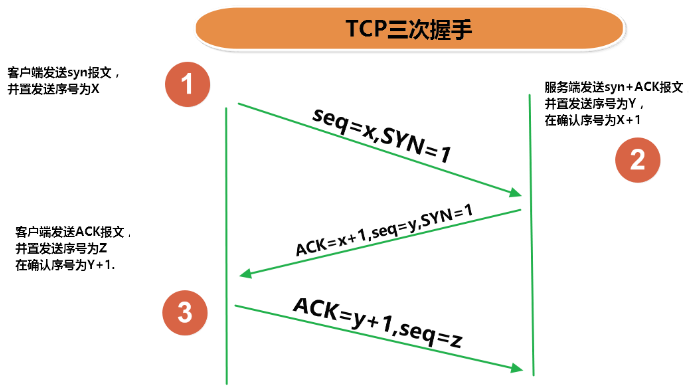
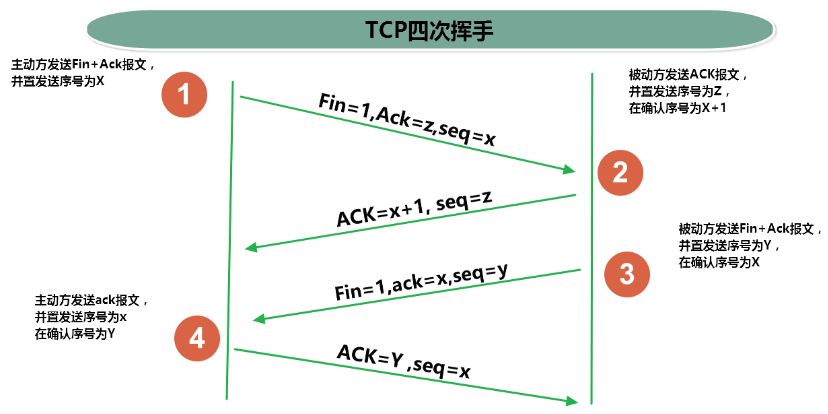
二、TCP网络编程
代码示例1:客户端发送信息给服务端,服务端将数据显示在控制台上
//客户端
@Test
public void client()  {
    Socket socket = null;
    OutputStream os = null;
    try {
        //1.创建Socket对象,指明服务器端的ip和端口号
        InetAddress inet = InetAddress.getByName("192.168.14.100");
        socket = new Socket(inet,8899);
        //2.获取一个输出流,用于输出数据
        os = socket.getOutputStream();
        //3.写出数据的操作
        os.write("你好,我是客户端mm".getBytes());
    } catch (IOException e) {
        e.printStackTrace();
    } finally {
        //4.资源的关闭
        if(os != null){
            try {
                os.close();
            } catch (IOException e) {
                e.printStackTrace();
            }

        }
        if(socket != null){
            try {
                socket.close();
            } catch (IOException e) {
                e.printStackTrace();
            }
        }
    }
}
//服务端
@Test
public void server()  {

    ServerSocket ss = null;
    Socket socket = null;
    InputStream is = null;
    ByteArrayOutputStream baos = null;
    try {
        //1.创建服务器端的ServerSocket,指明自己的端口号
        ss = new ServerSocket(8899);
        //2.调用accept()表示接收来自于客户端的socket
        socket = ss.accept();
        //3.获取输入流
        is = socket.getInputStream();

        //不建议这样写,可能会乱码
        //        byte[] buffer = new byte[1024];
        //        int len;
        //        while((len = is.read(buffer)) != -1){
        //            String str = new String(buffer,0,len);
        //            System.out.print(str);
        //        }
        //4.读取输入流中的数据
        baos = new ByteArrayOutputStream();
        byte[] buffer = new byte[5];
        int len;
        while((len = is.read(buffer)) != -1){
            baos.write(buffer,0,len);
        }

        System.out.println(baos.toString());

        System.out.println("收到了来自于:" + socket.getInetAddress().getHostAddress() + "的数据");

    } catch (IOException e) {
        e.printStackTrace();
    } finally {
        if(baos != null){
            //5.关闭资源
            try {
                baos.close();
            } catch (IOException e) {
                e.printStackTrace();
            }
        }
        if(is != null){
            try {
                is.close();
            } catch (IOException e) {
                e.printStackTrace();
            }
        }
        if(socket != null){
            try {
                socket.close();
            } catch (IOException e) {
                e.printStackTrace();
            }
        }
        if(ss != null){
            try {
                ss.close();
            } catch (IOException e) {
                e.printStackTrace();
            }
        }
    }
}
代码示例2:客户端发送文件给服务端,服务端将文件保存在本地。
/*
这里涉及到的异常,应该使用try-catch-finally处理
 */
@Test
public void client() throws IOException {
    //1.
    Socket socket = new Socket(InetAddress.getByName("127.0.0.1"),9090);
    //2.
    OutputStream os = socket.getOutputStream();
    //3.
    FileInputStream fis = new FileInputStream(new File("beauty.jpg"));
    //4.
    byte[] buffer = new byte[1024];
    int len;
    while((len = fis.read(buffer)) != -1){
        os.write(buffer,0,len);
    }
    //5.
    fis.close();
    os.close();
    socket.close();
}

/*
这里涉及到的异常,应该使用try-catch-finally处理
 */
@Test
public void server() throws IOException {
    //1.
    ServerSocket ss = new ServerSocket(9090);
    //2.
    Socket socket = ss.accept();
    //3.
    InputStream is = socket.getInputStream();
    //4.
    FileOutputStream fos = new FileOutputStream(new File("beauty1.jpg"));
    //5.
    byte[] buffer = new byte[1024];
    int len;
    while((len = is.read(buffer)) != -1){
        fos.write(buffer,0,len);
    }
    //6.
    fos.close();
    is.close();
    socket.close();
    ss.close();
}
代码示例3:从客户端发送文件给服务端,服务端保存到本地。并返回“发送成功”给客户端。并关闭相应的连接。
/*
    这里涉及到的异常,应该使用try-catch-finally处理
     */
@Test
public void client() throws IOException {
    //1.
    Socket socket = new Socket(InetAddress.getByName("127.0.0.1"),9090);
    //2.
    OutputStream os = socket.getOutputStream();
    //3.
    FileInputStream fis = new FileInputStream(new File("beauty.jpg"));
    //4.
    byte[] buffer = new byte[1024];
    int len;
    while((len = fis.read(buffer)) != -1){
        os.write(buffer,0,len);
    }
    //关闭数据的输出
    socket.shutdownOutput();

    //5.接收来自于服务器端的数据,并显示到控制台上
    InputStream is = socket.getInputStream();
    ByteArrayOutputStream baos = new ByteArrayOutputStream();
    byte[] bufferr = new byte[20];
    int len1;
    while((len1 = is.read(buffer)) != -1){
        baos.write(buffer,0,len1);
    }

    System.out.println(baos.toString());

    //6.
    fis.close();
    os.close();
    socket.close();
    baos.close();
}

/*
这里涉及到的异常,应该使用try-catch-finally处理
 */
@Test
public void server() throws IOException {
    //1.
    ServerSocket ss = new ServerSocket(9090);
    //2.
    Socket socket = ss.accept();
    //3.
    InputStream is = socket.getInputStream();
    //4.
    FileOutputStream fos = new FileOutputStream(new File("beauty2.jpg"));
    //5.
    byte[] buffer = new byte[1024];
    int len;
    while((len = is.read(buffer)) != -1){
        fos.write(buffer,0,len);
    }

    System.out.println("图片传输完成");

    //6.服务器端给予客户端反馈
    OutputStream os = socket.getOutputStream();
    os.write("你好,美女,照片我已收到,非常漂亮!".getBytes());

    //7.
    fos.close();
    is.close();
    socket.close();
    ss.close();
    os.close();

}
三、UDP网络编程
代码示例:
//发送端
@Test
public void sender() throws IOException {

    DatagramSocket socket = new DatagramSocket();


    String str = "我是UDP方式发送的导弹";
    byte[] data = str.getBytes();
    InetAddress inet = InetAddress.getLocalHost();
    DatagramPacket packet = new DatagramPacket(data,0,data.length,inet,9090);

    socket.send(packet);

    socket.close();

}
//接收端
@Test
public void receiver() throws IOException {

    DatagramSocket socket = new DatagramSocket(9090);

    byte[] buffer = new byte[100];
    DatagramPacket packet = new DatagramPacket(buffer,0,buffer.length);

    socket.receive(packet);

    System.out.println(new String(packet.getData(),0,packet.getLength()));

    socket.close();
}
四、URL编程
1.URL(Uniform Resource Locator)的理解:
统一资源定位符,对应着互联网的某一资源地址
2.URL的5个基本结构:
- http://localhost:8080/examples/beauty.jpg?username=Tom
- 协议 主机名 端口号 资源地址 参数列表
3.如何实例化:
URL url = new URL("http://localhost:8080/examples/beauty.jpg?username=Tom");
4.常用方法:
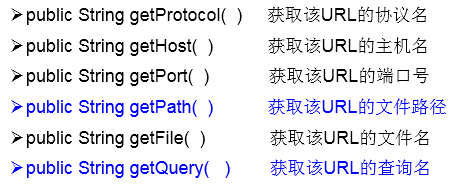
5.可以读取、下载对应的url资源:
public static void main(String[] args) {

    HttpURLConnection urlConnection = null;
    InputStream is = null;
    FileOutputStream fos = null;
    try {
        URL url = new URL("http://localhost:8080/examples/beauty.jpg");

        urlConnection = (HttpURLConnection) url.openConnection();

        urlConnection.connect();

        is = urlConnection.getInputStream();
        fos = new FileOutputStream("day10\\beauty3.jpg");

        byte[] buffer = new byte[1024];
        int len;
        while((len = is.read(buffer)) != -1){
            fos.write(buffer,0,len);
        }

        System.out.println("下载完成");
    } catch (IOException e) {
        e.printStackTrace();
    } finally {
        //关闭资源
        if(is != null){
            try {
                is.close();
            } catch (IOException e) {
                e.printStackTrace();
            }
        }
        if(fos != null){
            try {
                fos.close();
            } catch (IOException e) {
                e.printStackTrace();
            }
        }
        if(urlConnection != null){
            urlConnection.disconnect();
        }
    }
}

 浙公网安备 33010602011771号