

02_分页_01_简单设计
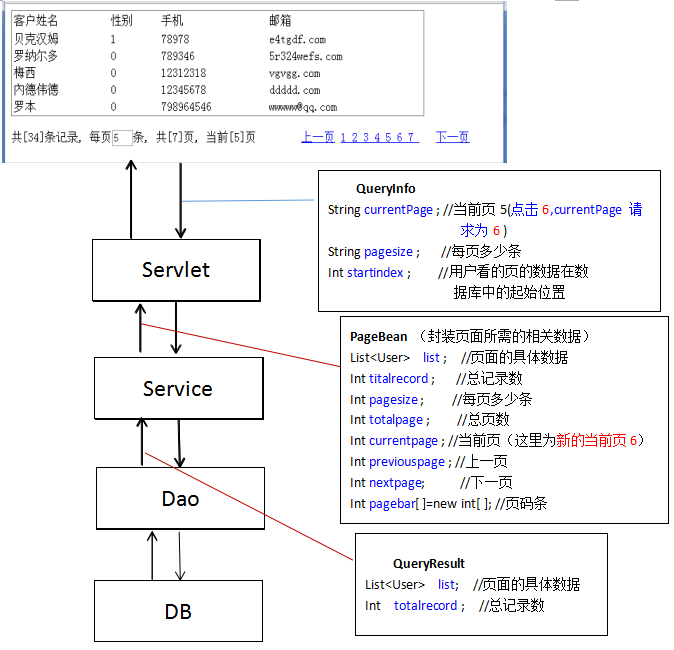
【分页流程图】
【数据库设计】
设计字段
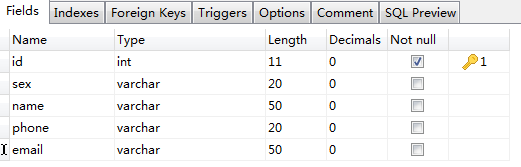
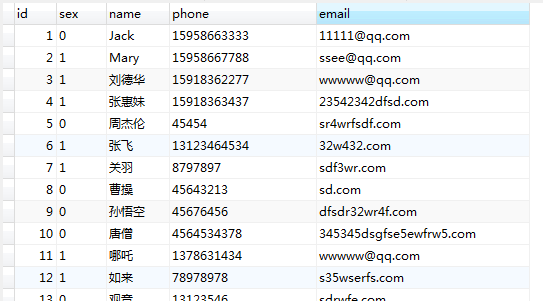
传入一些数据
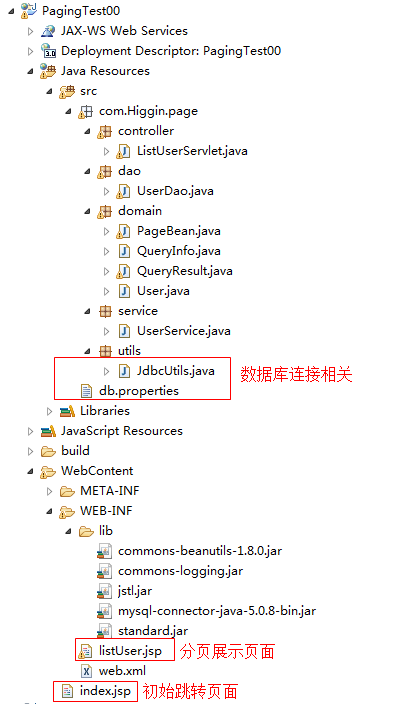
【工程截图】
一. domain层
【User.java】
public class User {
    private int id;
    private String name;
    private String sex;
    private String phone;
    private String email;
  .......忽略get和set方法
}
【QueryInfo.java】前端发送给Servlet的请求数据
package com.Higgin.page.domain;

/**
 * 分页界面传递过来的数据
 * @author YH
 *
 */
public class QueryInfo {
    private int currentpage=1; //用户当前看的页 ,默认为1
    private int pagesize=5;   //记住用户想看的页面大小,默认为5(1页5行)
    private int startindex;   //记住用户看的页的数据在数据库的起始位置

   ......//忽略currentpage和pagesize的get和set方法。

  public int getStartindex() {
        this.startindex=(this.currentpage-1)*this.pagesize;
        return startindex;
    }

}
【QueryResult.java】从数据库查询返回的结果,在UserDao体现!
package com.Higgin.page.domain;

import java.util.List;

/**
 * 从数据库中查询的数据
 * @author YH
 *
 */
public class QueryResult {
    private List list;        //记住用户看的页的数据
    private int totalrecord;//记住总记录数
  ........忽略两者的get和set方法
}
【PageBean.java】在UserService层体现!
package com.Higgin.page.domain;

import java.util.Arrays;
import java.util.List;

/**
 * 返回给分页前端界面的对象
 * @author YH
 *
 */
public class PageBean {
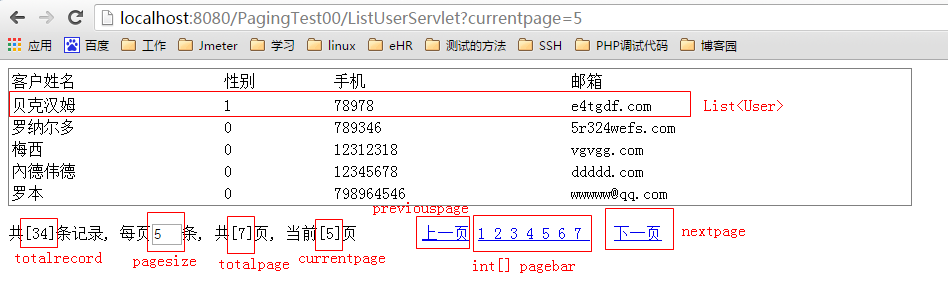
    private List list;
    private int totalrecord;  //总记录数
    private int pagesize;      //每页显示的记录数
    private int totalpage;    //总页数,可根据总记录数和每页记录数算出,无需set方法
    private int currentpage;  //当前页
    private int previouspage; //上一页  无需set方法
    private int nextpage;      //下一页 无需set方法
    private int[] pagebar;    //页码条

  public List getList() {
        return list;
    }
    public void setList(List list) {
        this.list = list;
    }

    public int getTotalrecord() {
        return totalrecord;
    }
    public void setTotalrecord(int totalrecord) {
        this.totalrecord = totalrecord;
    }

    public int getPagesize() {
        return pagesize;
    }
    public void setPagesize(int pagesize) {
        this.pagesize = pagesize;
    }
    //总页数
    public int getTotalpage() {
        //假如100条数据 每页显示5条  共显示20页
        //   101           5       21
        //      99           5       20
        if(this.totalrecord%this.pagesize==0){
            this.totalpage=this.totalrecord/this.pagesize;
        }else{
            this.totalpage=this.totalrecord/this.pagesize+1;
        }
        return totalpage;
    }

    public int getCurrentpage() {
        return currentpage;
    }
    public void setCurrentpage(int currentpage) {
        this.currentpage = currentpage;
    }

    //上一页
    public int getPreviouspage() {
        if(this.currentpage-1<1){
            this.previouspage=1;
        }else{
            this.previouspage=this.currentpage-1;
        }
        return previouspage;
    }
    //下一页
    public int getNextpage() {
        if(this.currentpage+1>=this.totalpage){
            this.nextpage=this.currentpage;
        }else{
            this.nextpage=this.currentpage+1;
        }
        return nextpage;
    }

    //页码条
    public int[] getPagebar() {
        int pagebar[] = new int[this.totalpage]; //数组的长度即为 总页数this.totalpage
        for(int i=1;i<=this.totalpage;i++){
            pagebar[i-1] = i;
        }
        this.pagebar = pagebar;
        return pagebar;
    }
}
前端页面需要的数据如下图所示(对应PageBean):
二.数据库连接相关
【db.properties】
driver=com.mysql.jdbc.Driver
url=jdbc:mysql://localhost:3306/paging
username=root
password=
【JdbcUtils.java】
package com.Higgin.page.utils;
import java.sql.Connection;
import java.sql.DriverManager;
import java.sql.ResultSet;
import java.sql.SQLException;
import java.sql.Statement;
import java.util.Properties;

public class JdbcUtils {

    private static Properties config = new Properties();
    static{
        try {
            config.load(JdbcUtils.class.getClassLoader().getResourceAsStream("db.properties"));
            Class.forName(config.getProperty("driver"));
        } catch (Exception e) {
            throw new ExceptionInInitializerError(e);
        }
    }

    public static Connection getConnection() throws SQLException{
        return DriverManager.getConnection(config.getProperty("url"), config.getProperty("username"), config.getProperty("password"));
    }

    public static void release(Connection conn,Statement st,ResultSet rs){
        if(rs!=null){
            try{
                rs.close();   //throw new
            }catch (Exception e) {
                e.printStackTrace();
            }
            rs = null;
        }
        if(st!=null){
            try{
                st.close();
            }catch (Exception e) {
                e.printStackTrace();
            }
            st = null;
        }
        if(conn!=null){
            try{
                conn.close();
            }catch (Exception e) {
                e.printStackTrace();
            }
        }
    }
}
三.Dao层
【UserDao.java】
package com.Higgin.page.dao;

import java.sql.Connection;
import java.sql.PreparedStatement;
import java.sql.ResultSet;
import java.util.ArrayList;
import java.util.List;

import org.junit.Test;

import com.Higgin.page.domain.QueryResult;
import com.Higgin.page.domain.User;
import com.Higgin.page.utils.JdbcUtils;

public class UserDao {

    //获取当前页数据和页面大小
    public QueryResult pageQuery(int startindex,int pagesize){
        Connection conn=null;
        PreparedStatement st=null;
        ResultSet rs=null;

        QueryResult qr=new QueryResult();
        try{
            conn=JdbcUtils.getConnection();
            String sql="select * from user limit ?,?";
            st=conn.prepareStatement(sql);
            st.setInt(1, startindex);  //从数据库user表的第startindex条数据开始查询
            st.setInt(2, pagesize);    //根据页面的展示条数pagesize来获取对应的user数据记录数量
            rs=st.executeQuery();
            List list=new ArrayList();
            while(rs.next()){
                User u =new User();
                u.setId(rs.getInt("id"));
                u.setName(rs.getString("name"));
                u.setSex(rs.getString("sex"));
                u.setPhone(rs.getString("phone"));
                u.setEmail(rs.getString("email"));  //一步步封装好User
                list.add(u);  //每次封装出一条User数据,存放在list中
            }
            qr.setList(list);  //然后将list数据传递到QueryResult中

            sql="select count(*) from user";
            rs=conn.prepareStatement(sql).executeQuery();
            if(rs.next()){
                qr.setTotalrecord(rs.getInt(1));  //将获取的user表的总记录数rs.getInt(1)传递到QueryResult中
            }
            return qr;    //执行成功,就返回一个QueryResult对象数据
        }catch(Exception e){
            throw new RuntimeException(e);
        }finally{
            JdbcUtils.release(conn, st, rs);
        }
    }

}
四.Service层
【UserService.java】
package com.Higgin.page.service;

import com.Higgin.page.dao.UserDao;
import com.Higgin.page.domain.PageBean;
import com.Higgin.page.domain.QueryInfo;
import com.Higgin.page.domain.QueryResult;

//得到页面的查询条件,查询数据库,返回页面所需的数据
public class UserService {
    private UserDao userDao =new UserDao();
    //传入参数为QueryInfo
    public PageBean pageQuery(QueryInfo queryInfo){
        //调用dao获取到返回页面的数据
        QueryResult qr=userDao.pageQuery(queryInfo.getStartindex(), queryInfo.getPagesize());

        //根据dao的查询的QueryResult结果和传入参数的QueryInfo,封装成页面显示所需的PageBean!!!!!!!!!!!!!!!!!!!
        PageBean bean=new PageBean();
        bean.setCurrentpage(queryInfo.getCurrentpage());
        bean.setList(qr.getList());
        bean.setPagesize(queryInfo.getPagesize());
        bean.setTotalrecord(qr.getTotalrecord());

        return bean;
    }
}
五.controller层
【ListUserServlet.java】(注解方式的Servlet)
package com.Higgin.page.controller;

import java.io.IOException;

import javax.servlet.ServletException;
import javax.servlet.annotation.WebServlet;
import javax.servlet.http.HttpServlet;
import javax.servlet.http.HttpServletRequest;
import javax.servlet.http.HttpServletResponse;

import com.Higgin.page.domain.PageBean;
import com.Higgin.page.domain.QueryInfo;
import com.Higgin.page.service.UserService;

//处理用户分页请求
@WebServlet("/ListUserServlet") //请求的路径为 http://localhost:8080/PagingTest00/ListUserServlet
public class ListUserServlet extends HttpServlet {
    private static final long serialVersionUID = 1L;
    private UserService userService=new UserService();
    public ListUserServlet() {
        super();
    }
    protected void doGet(HttpServletRequest request, HttpServletResponse response) throws ServletException, IOException {

      QueryInfo queryInfo=new QueryInfo();

         //获取前端发送过来的currentpage和pagesize请求数据,封装在queryInfo中
         String curentpage=request.getParameter("currentpage");
         if(curentpage!=null){
             queryInfo.setCurrentpage(Integer.parseInt(curentpage));
         }
         String pagesize=request.getParameter("pagesize");
         if(pagesize!=null){
             queryInfo.setPagesize(Integer.parseInt(pagesize));
         }

     //调用userService的pageQuery方法,参数为封装好的前端请求的queryInfo,返回值是封装好返回给前端页面的pageBean
        PageBean pageBean=userService.pageQuery(queryInfo);

        request.setAttribute("pageBean", pageBean);
        request.getRequestDispatcher("/WEB-INF/listUser.jsp").forward(request, response);
    }

    protected void doPost(HttpServletRequest request, HttpServletResponse response) throws ServletException, IOException {
        doGet(request,response);
    }

}
六.前端页面展示
【index.jsp】关键代码
<body>
    This is my JSP page. <br>
   <a href="${pageContext.request.contextPath }/ListUserServlet" target="main">查看客户</a>

</body>
【listUser.jsp】
<%@ page language="java" import="java.util.*" pageEncoding="UTF-8"%> <%@ taglib uri="http://java.sun.com/jsp/jstl/core" prefix="c"%> <% String path = request.getContextPath(); String basePath = request.getScheme()+"://"+request.getServerName()+":"+request.getServerPort()+path+"/"; %> <!DOCTYPE HTML PUBLIC "-//W3C//DTD HTML 4.01 Transitional//EN"> <html> <head> <title>listUser</title> </head> <body> <table frame="border" width="85%"> <tr> <td>客户姓名</td> <td>性别</td> <td>手机</td> <td>邮箱</td> <tr> <c:forEach var="c" items="${requestScope.pageBean.list}" varStatus="status"> <tr> <td>${c.name }</td> <td>${c.sex }</td> <td>${c.phone }</td> <td>${c.email }</td> </tr> </c:forEach> </table> <br> <script type="text/javascript"> function gotopage(currentpage){ window.location.href='${pageContext.request.contextPath}/ListUserServlet?currentpage='+currentpage; } </script> 共[${pageBean.totalrecord }]条记录, 每页<input type="text" id="pagesize" value="${pageBean.pagesize }" style="width: 30px" maxlength="2">条, 共[${pageBean.totalpage }]页, 当前[${pageBean.currentpage }]页 <a href="javascript:void(0)" onclick="gotopage(${pageBean.previouspage})">上一页</a> <c:forEach var="pagenum" items="${pageBean.pagebar}"> <a href="javascript:void(0)" onclick="gotopage(${pagenum})">${pagenum} </a> </c:forEach> <a href="javascript:void(0)" onclick="gotopage(${pageBean.nextpage})">下一页</a> </body> </html>
【运行结果】
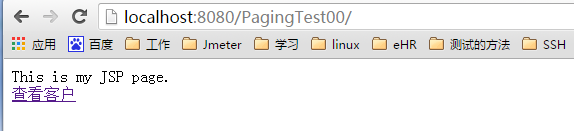
首先输入http://localhost:8080/PagingTest00,进入了index.jsp
点击“查看客户”,访问路径为http://localhost:8080/PagingTest00/ListUserServlet,访问ListUserServlet.java,然后跳转至listUser.jsp,如下
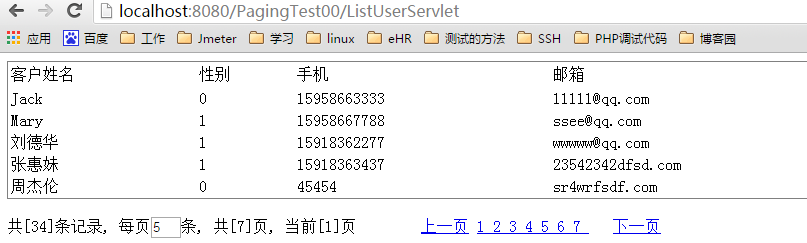
点击“上一页”、“下一页”、“1 2 3 4 5 6 7”等等都会有不同的变化,并且“当前[X]页”也会相应变化。

 浙公网安备 33010602011771号