FPGA學習筆記(肆)--- Star Test Bench Template Writer
上一篇testbench我自己也沒怎麽搞懂,再來一篇學習特權同學的方法。
課程:Lesson 7 BJ EPM240学习板实验1——分频计数实验
鏈接:https://www.youtube.com/edit?o=U&video_id=YbNEKMLUCyI (科學上網)
前奏:創建工程,蜂鳴器code,引脚配置,編譯,等等忽略
module fp_verilog(clk, rst_n, fm);

    input clk;//時鐘信號,50Mhz
    input rst_n;//復位信號,低電平有效
    output fm;//蜂鳴器

    //assign fm = 1'b0; //測試蜂鳴器是否正常

    reg[6:0] cnt;//位數越小越明顯,我因爲設置大了,simulation了半天

    always @(posedge clk or negedge rst_n)
        if(!rst_n) cnt <= 7'd0;
        else cnt <= cnt + 1'b1;

    assign fm = cnt[6];

endmodule

開始:Processing ---> Start ---> Star Test Bench Template Writer 注:可能messages框會説未生成 xxx.vt,導致無法完成下一步。 解決方法:Assignments ---> setting ---> Simulation ---> Tool name ---> ModelSim-Altera
然後:打開生成文檔,修改code 注:我所添加的code已經加粗,其餘請對比修改。
// Copyright (C) 2017  Intel Corporation. All rights reserved.
// Your use of Intel Corporation's design tools, logic functions
// and other software and tools, and its AMPP partner logic
// functions, and any output files from any of the foregoing
// (including device programming or simulation files), and any
// associated documentation or information are expressly subject
// to the terms and conditions of the Intel Program License
// Subscription Agreement, the Intel Quartus Prime License Agreement,
// the Intel MegaCore Function License Agreement, or other
// applicable license agreement, including, without limitation,
// that your use is for the sole purpose of programming logic
// devices manufactured by Intel and sold by Intel or its
// authorized distributors.  Please refer to the applicable
// agreement for further details.

// *****************************************************************************
// This file contains a Verilog test bench template that is freely editable to
// suit user's needs .Comments are provided in each section to help the user
// fill out necessary details.
// *****************************************************************************
// Generated on "08/07/2017 22:03:54"

// Verilog Test Bench template for design : fp_verilog
//
// Simulation tool : ModelSim (Verilog)
//

`timescale 100 us/ 10 us //
module fp_verilog_vlg_tst();
// constants
// general purpose registers
reg eachvec;
// test vector input registers
reg clk;
reg rst_n;
// wires
wire fm;

// assign statements (if any)
fp_verilog i1 (
// port map - connection between master ports and signals/registers
    .clk(clk),
    .fm(fm),
    .rst_n(rst_n)
);

initial
begin
// code that executes only once  只执行一次的代码
// insert code here --> begin   在这里插入代码 - >开始
    clk = 0;
    forever #50 clk = ~clk;
// --> end
$display("Running testbench");
end

initial
  begin
      rst_n = 0; #1000; rst_n = 1;
      #50000;
      $stop;
  end
//                            always
//                            // optional sensitivity list   可选灵敏度列表
//                            // @(event1 or event2 or .... eventn)
//                            begin
//                            // code executes for every event on sensitivity list   敏感性列表中的每个事件执行代码
//                            // insert code here --> begin 在这里插入代码 - >开始
//
//                            @eachvec;
//                            // --> end
//                            end
endmodule
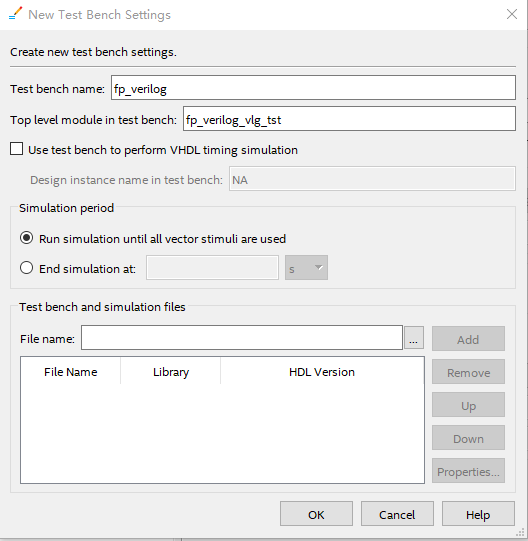
其次:Assignments ---> setting ---> Simulation ---> NativeLink settings ---> Compile test bench ---> Test Benchs ---> New ---> 如圖 且添加剛才的文件
最後:Tools ---> Run Simulation Tool ---> RTL Simulation
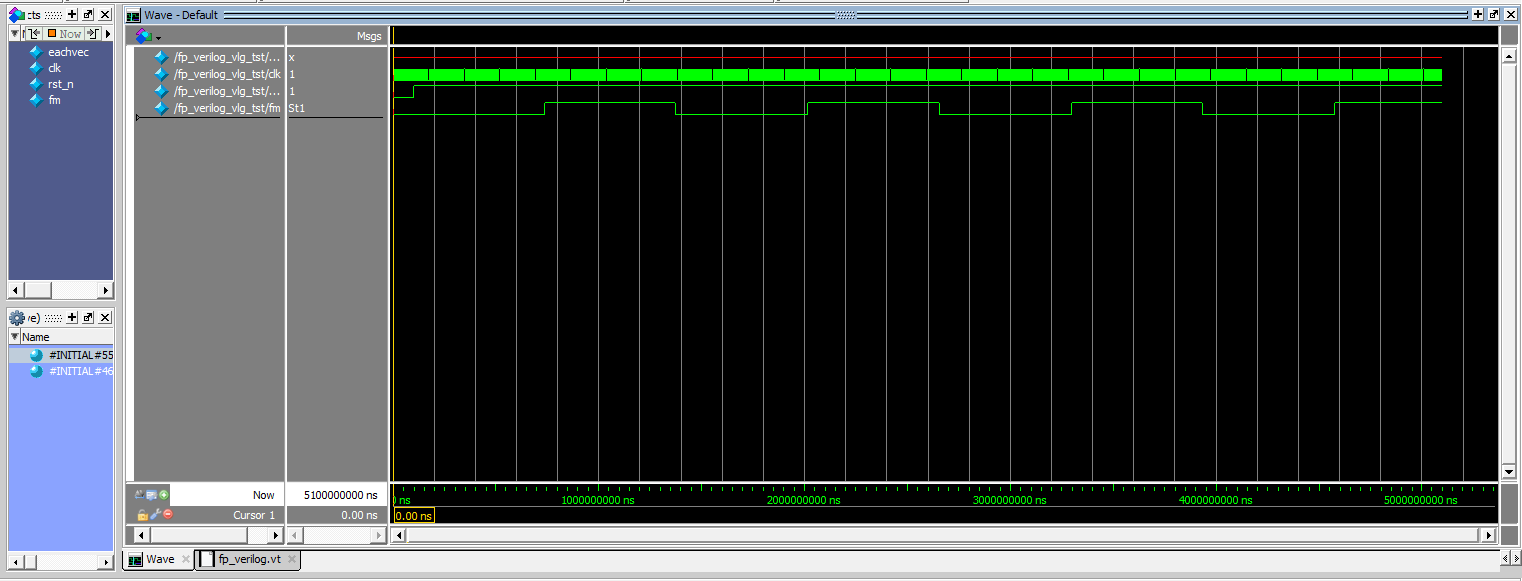
證明自己有多懶 (●'◡'●) :http://convert-units.info/time/microsecond/3000
posted on 2017-08-07 23:51 SuvanCheng 阅读(700) 评论(0) 收藏 举报


 浙公网安备 33010602011771号