

Java制作验证码
Java制作验证码
一、创建一个maven的web项目
在pom.xml文件中导入maven和tomcat的坐标
  <build>
      <plugins>
          <plugin>
              <groupId>org.apache.tomcat.maven</groupId>
              <artifactId>tomcat7-maven-plugin</artifactId>
              <version>2.2</version>
          </plugin>
          <plugin>
              <groupId>org.apache.maven.plugins</groupId>
              <artifactId>maven-compiler-plugin</artifactId>
              <configuration>
                  <source>8</source>
                  <target>8</target>
              </configuration>
          </plugin>
      </plugins>
  </build>
二、导入servlet坐标
		<dependency>
            <groupId>javax.servlet</groupId>
            <artifactId>javax.servlet-api</artifactId>
            <version>3.1.0</version>
            <scope>provided</scope>
        </dependency>
三、编写绘画验证码VerofyCode类
package com.lq.zhicheng;

import javax.imageio.ImageIO;
import java.awt.*;
import java.awt.image.BufferedImage;
import java.io.ByteArrayOutputStream;
import java.io.IOException;
import java.util.Base64;
import java.util.Random;

public class VerofyCode {
    private int width = 160;
    private int height = 40;
    private BufferedImage bufferedImage;
    private String code = "";
    private String str = "2345678wertyuiopasdfghjkzxcvnmQWERTYUIOPASDFGHJKLZXCVBNM";


    //用于判断得出的验证码是否和生成的一样
    public String getCode() {
        return code;
    }

    public VerofyCode() {
        //创建图片对象
        bufferedImage = new BufferedImage(width, height, BufferedImage.TYPE_3BYTE_BGR);
        //创建画笔对象
        Graphics2D grap = bufferedImage.createGraphics();
        Random random = new Random();
        //设置颜色
        grap.setColor(new Color(random.nextInt(256), random.nextInt(256), random.nextInt(256)));
        //填充背景色
        grap.fillRect(0, 0, width, height);
        Font font = new Font("", Font.ROMAN_BASELINE, 25);
        grap.setFont(font);
        grap.setColor(Color.black);
        //创建边框
        grap.drawRect(0, 0, width - 1, height - 1);
        //边框颜色
        grap.setColor(Color.black);

        //写字符,随机生成字符
        for (int i = 1; i <= 4; i++) {
            grap.setColor(new Color(random.nextInt(256), random.nextInt(256), random.nextInt(256)));
            int index = random.nextInt(str.length());
            char ch = str.charAt(index);
            grap.drawString(ch + "", width / 5 * i, height / 2);
            code += ch;
        }

        //绘制干扰线,两点确定一线
        for (int i = 0; i < 15; i++) {
            grap.setColor(new Color(random.nextInt(256), random.nextInt(256), random.nextInt(256)));
            int x1 = random.nextInt(width);
            int x2 = random.nextInt(height);
            int y1 = random.nextInt(width);
            int y2 = random.nextInt(height);
            grap.drawLine(x1, x2, y1, y2);
        }

    }

    public String getImg() {
        ByteArrayOutputStream stream = new ByteArrayOutputStream();
        try {
            ImageIO.write(bufferedImage, "png", stream);
        } catch (IOException e) {
            e.printStackTrace();
        }
        String base64 = Base64.getEncoder().encodeToString(stream.toByteArray());

        try {
            stream.flush();
            stream.close();
        } catch (IOException e) {
            e.printStackTrace();
        }
        return "data:image/png;base64," + base64;
    }

}
四、编写TestServlet类且继承HttpServlet类重新doGet、doPost方法。
package com.lq.zhicheng;

import javax.servlet.ServletException;
import javax.servlet.annotation.WebServlet;
import javax.servlet.http.HttpServlet;
import javax.servlet.http.HttpServletRequest;
import javax.servlet.http.HttpServletResponse;
import java.io.IOException;
@WebServlet(urlPatterns = "/test")
public class TestServlet extends HttpServlet {

    @Override
    protected void doGet(HttpServletRequest req, HttpServletResponse resp) throws ServletException, IOException {
        VerofyCode verofyCode = new VerofyCode();
        System.out.println(verofyCode.getCode());
        System.out.println(verofyCode.getImg());
        resp.setContentType("application/json;charset=utf-8");
        resp.getWriter().write(verofyCode.getImg());
    }

    @Override
    protected void doPost(HttpServletRequest req, HttpServletResponse resp) throws ServletException, IOException {
        doGet(req,resp);
    }
}
五、编写一个简单的前端页面来展示二维码,前端页面用到Vue的双向绑定,通过response反馈到的base64图像数据赋值给模型img中与img中的src进行双向绑定。
<!DOCTYPE html>
<html lang="en">
<head>
    <meta charset="UTF-8">
    <title>Title</title>
</head>
<body>
<div id="app">
    <p>验证码</p>
    <img :src="img" alt="" style="width:160px;height: 40px"/>
</div>
</body>
<script src="js/vue.js"></script>
<script src="js/index.js"></script>
<script src="js/axios-0.18.0.js"></script>
<script>
    new Vue({
        el: '#app',
        data: {
            img: ''
        },
        mounted() {
            //当加载完当前页面后,发送异步请求,获取数据
            this.selectAll()
        },
        methods: {
            selectAll() {
                axios({
                    method: "get",
                    url: "http://localhost:8080/15JavaWs6722/test",
                }).then(response => {
                    console.log(response);
                    this.img = response.data;
                    console.log(this.img);
                })
            }
        }
    })
</script>
</html>
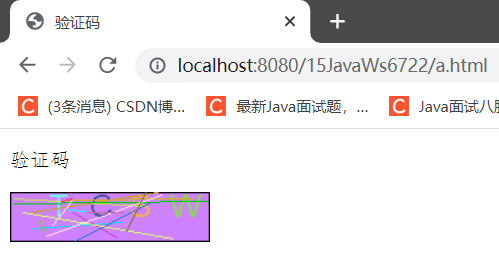
六、展示效果

 浙公网安备 33010602011771号